What Is Time Mapping? A Comprehensive Guide for Teams
Learn what time mapping is, why it matters, and how it helps teams visualize workloads, optimize resources, and improve project planning and productivity.
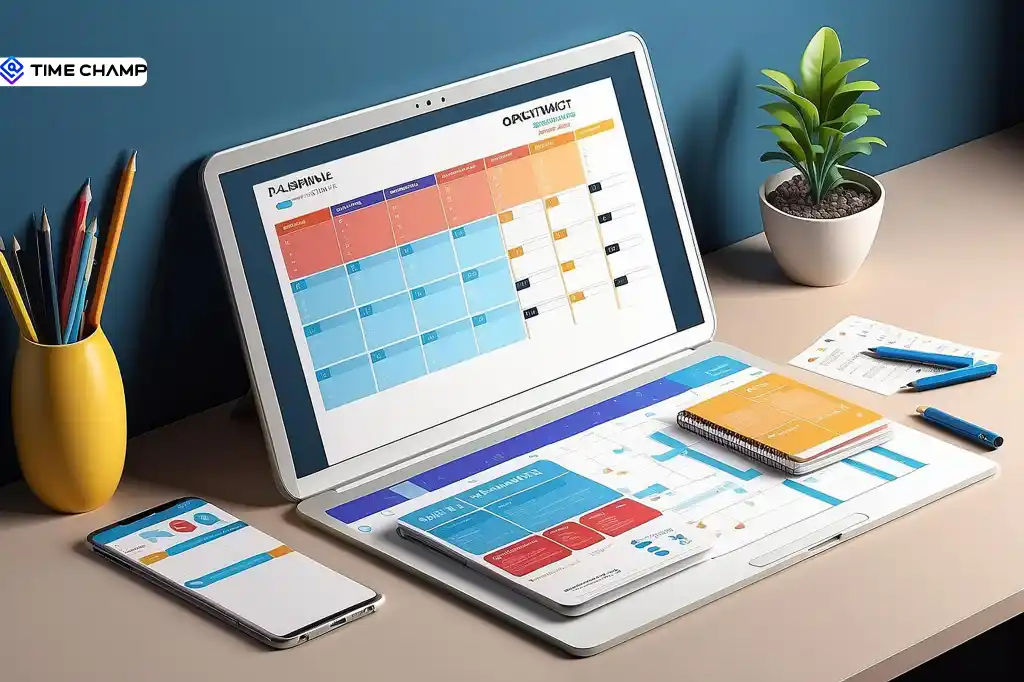
Your day probably doesn’t fall apart because you lack time, it falls apart because everything competes for it at once. Tasks overlap, priorities shift, and somehow “busy” never quite turns into “done.”
Time mapping is a simple planning method that helps fix that. Instead of just listing tasks, you place them into a visual timeline, turning your schedule into something you can actually see, structure, and follow.
In this blog, I’ll explain what time mapping is, how it works in real situations, and how you can use it to bring more clarity and structure to your everyday schedule.
What is Time Mapping?
Time mapping is a time management technique that visually organizes tasks, projects, and activities into structured time blocks across a day, week, or month. It helps individuals and teams clearly see how time is allocated, improve productivity, balance workloads, and plan work more effectively compared to traditional to-do lists.
The goal isn’t to schedule every minute of your day. It’s to create visibility. Once you can clearly see how your time is being spent, whether it’s hours lost to small interruptions or limited focus time in the day, you can move from guessing to making intentional changes.
A To-Do List vs. Time Map
A to-do list keeps expanding but doesn’t show whether you actually have enough time to complete everything. A time map, on the other hand, makes your capacity more visible by showing how your available hours are allocated. It helps you understand what realistically fits into your schedule, so you can avoid overcommitting and prioritize what matters most.
How Is Time Mapping Different from Other Time Management Methods?
I know it can feel a bit confusing since all these methods involve planning time on a calendar, but the key difference lies in intent: time mapping is about understanding your current reality, while others focus on shaping how your time should be used.
| Technique | What It Does | When To Use It |
|---|---|---|
| Time mapping | Shows how your time is actually distributed | Before planning, to understand your current time usage |
| Time blocking | Assigns specific tasks to calendar slots | After mapping, to structure your day |
| Timeboxing | Limits the time spent on a task | When tasks tend to expand beyond control |
| Time budgeting | Allocates hours to categories over time | For weekly or monthly workload balance |
The real advantage comes from using them in sequence. Start with time mapping to understand how your time is currently spent, then use time blocking, timeboxing, or time budgeting to adjust and improve how you want to spend it.
If you want to go deeper into execution methods, our guides on time blocking and timeboxing break each approach down in detail.
Why Time Mapping Works at a Deeper Level
Time mapping is effective because it improves how you think, plan, and execute work by removing common productivity blockers.

1. Reduces Decision Fatigue
When your day is already structured, you no longer waste energy deciding what to do next. This helps you to focus more on execution rather than constant decision-making.
2. Minimizes Context Switching
It encourages grouping similar tasks instead of jumping between unrelated work. According to the American Psychological Association, frequent task switching can reduce productivity by up to 40%, mainly due to the mental effort required to refocus.
3. Makes Overcommitment Visible
A clear time structure shows when your workload exceeds your actual available hours. This helps you avoid unrealistic planning and set more achievable expectations.
4. Aligns Work with Energy Levels
Time mapping helps you identify your most productive hours and protect them for high-focus work. Low-value tasks like emails can then be moved to lower-energy periods.
How to Create a Time Map in a Simple Way
You don’t need complex tools to build a time map, you just clarity about your time. With a few simple steps, you can turn your daily schedule into a structured visual plan.
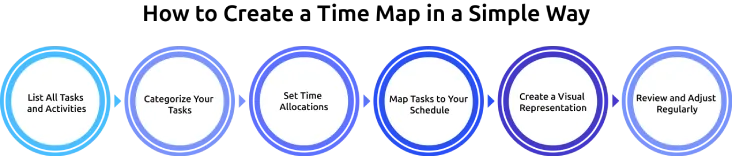
1. List All Tasks and Activities
Start by writing down everything you do in a typical week. Include work tasks like meetings, projects, emails, and admin work, along with personal activities such as exercise, hobbies, family time, and daily routines like commuting and meals. Be realistic when estimating how long each activity actually takes.
2. Categorize Your Tasks
Group similar activities into clear categories such as deep work, meetings, administrative tasks, personal development, exercise, and relaxation. This helps you understand how your time is distributed across different areas of your life.
3. Set Time Allocations
Decide how much time each category should ideally receive based on your priorities and goals. Stay realistic about your total available hours to avoid overloading your schedule.
4. Map Tasks to Your Schedule
Place your categorized tasks into your actual daily or weekly time structure. This helps you compare how your time is currently used and how you want it to be used.
5. Create a Visual Representation
Turn your time map into a visual format, such as a color-coded calendar, a spreadsheet, or a dedicated tool. You can also use calendar templates to organize activities consistently and make recurring patterns easier to track over time. Use different colors for different activity types so patterns and imbalances are easy to spot at a glance.
6. Review and Adjust Regularly
Time mapping is not a one-time exercise. Review your schedule weekly or monthly and adjust it based on what’s actually working. As your priorities change, make sure your time map evolves with them.
Common Mistakes That Make Time Maps Fail
If your time map didn’t last long, that’s normal. Most people run into the same issues:
1. Too Much Detail
Planning in 15-minute blocks may feel precise, but it quickly becomes exhausting to maintain. Time maps work better when tasks are grouped into larger, manageable blocks instead of overly detailed slots.
2. No Buffer Time
Real days are unpredictable. Without buffer space, even small interruptions can break your entire plan. Leaving room for flexibility (around 20% of your schedule) makes your time map more realistic and usable.
3. Ignoring Energy Levels
Not all hours of the day are equal. Scheduling high-focus work during low-energy periods often leads to frustration and poor output. Aligning tasks with your natural energy levels makes execution much smoother.
4. Building It from Memory
A time map based on assumptions rather than actual data often leads to inaccurate planning. This results in optimizing the wrong areas rather than fixing real-time usage patterns.
5. Not Reviewing Regularly
A time map is not a one-time exercise. Without regular review, it quickly becomes outdated. Small weekly adjustments help keep it aligned with your real workflow.
How Time Champ Helps You Build and Maintain a Time Map
A color-coded calendar or a basic spreadsheet is more than enough to test the idea and understand your time patterns, but the challenge comes with consistency. Manual tracking often becomes difficult to maintain, and most people stop updating it after a short period of time.
This is where an automated time tracking tool becomes useful. Time Champ is a time tracking and employee monitoring software that helps maintain accuracy by automatically recording how time is spent and mapping it to tasks and projects. This turns your time map into a continuously updated system instead of something you manage manually.
Key Features of Time Champ
Automatic Time Tracking
Time Champ automatically records active and idle time without requiring manual input. This ensures your time map is always based on real activity data.
App and Website Tracking
It tracks the applications and websites used during work hours, helping you understand exactly where your time is spent throughout the day.
Task and Project Mapping
Time Champ records the time spent on tasks and projects and provides detailed reports. This gives a clear view of how effort is distributed across different work areas.
Productivity Insights and Reports
It generates detailed productivity reports that help identify work patterns, peak focus periods, and areas where time may be lost. These insights support better planning and time allocation.
Work-Life Balance Visibility
The tool provides a breakdown of productive time, focus time, and breaks, making it easier to assess whether you are maintaining a healthy work-life balance or experiencing overwork.
Build Better Time Maps with Real Work Data
Track time automatically, find productivity patterns, and make every hour count
Conclusion
Time mapping is a simple but powerful way to understand how your time is actually spent and to bring more structure to your daily routine. Instead of relying on assumptions or incomplete to-do lists, it gives you a clear visual picture of your workload. When used consistently, it helps improve focus, balance priorities, and reduce overwhelm. With time tracking tools, maintaining and updating your time map becomes even easier through accurate, real-time tracking and insights.

Jahnavi Pulluri

Table of Content
 What is Time Mapping?
- How Is Time Mapping Different from Other Time Management Methods?
- Why Time Mapping Works at a Deeper Level
- How to Create a Time Map in a Simple Way
- Common Mistakes That Make Time Maps Fail
- How Time Champ Helps You Build and Maintain a Time Map
- Key Features of Time Champ
- Conclusion

Related Blogs

Discover essential features of time tracking software and how Time Champ enhances project management, productivity, and accuracy.
Tarun Kumar Reddy | Aug 23, 2024
Create a clear time tracking policy to boost productivity and ensure accurate work-hour reporting. Download a free customizable template.
Thasleem Shaik | Oct 04, 2024
Discover the pros and cons of time tracking software, its key features, and how it can improve productivity, accountability, and overall team performance.
Jahnavi Pulluri | Jun 05, 2026
Explore the latest time tracking statistics for 2026, including productivity trends, AI insights, remote work data, and workforce analytics.
Thasleem Shaik | May 22, 2026
Time tracking software vs manual timesheets: compare accuracy, cost, effort, and ROI to pick the right solution for improving your team's productivity.
Jahnavi Pulluri | May 15, 2026
Choose employee time tracking software with the right tracking features, reporting, integrations, security, scalability, and workforce visibility for your team.
Thasleem Shaik | May 26, 2026


 4.7/5 avg.
Ready to Manage Your Workforce Smarter?
Join our family of 1500+ companies using smart insights to redefine workforces!

Free Trial
No Credit Card Required