Time Champ > Blog > 5 Free Timesheet Templates (Excel, Word & Pdf) > Content
5 Free Timesheet Templates (Excel, Word & Pdf)
Always log accurate time with our easy and flexible timesheet templates. Download for free, customize to your needs, and use them according to your workflows.

Timesheet templates give you clarity on your team’s work and their time entries.
Managing these time entries comes in handy when you don’t want to miss those hectic project deadline days and when you want clarity on who’s present, who’s not, and most importantly, when you want to process payrolls for the employees who worked overtime.
And if you want to do all of this on paper, I call it a mayday, because there are too many ways for paper to get destroyed and lost. So, using a digital timesheet template is your best bet. If you still want it on paper, you can just print it late.
In this blog, I am going to give you 5 best timesheet templates completely for free, which you can use anytime based on your needs. Or, streamline your workflow with dedicated time tracking software from Time Champ. Let’s just get started.
What Are the 5 Types of Timesheet Templates?
There are 5 types of timesheet templates. Let me guide you through each one and how they help you.
1. Daily Timesheet Template
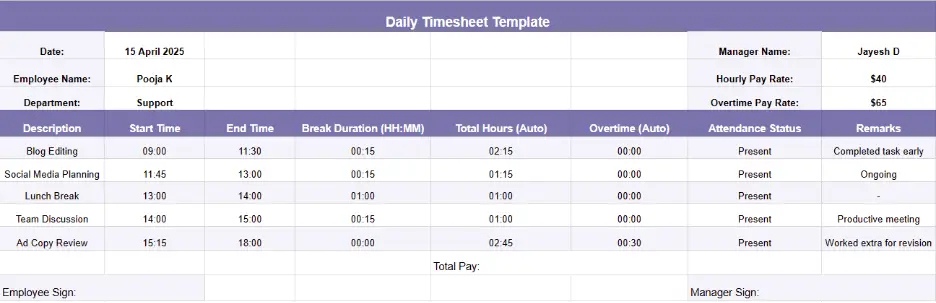
This is a daily timesheet, it helps you log every task that happens in a day and gives you clarity on how much time your employees are taking to complete each task. It’s also perfect for tracking short tasks, quick deliverables, and employees who work on multiple assignments in a single day. By maintaining a daily record, you can easily identify productivity patterns, manage workloads better, and address time-related inefficiencies early on.
Key Features:
- Task-Level Time Tracking:Aids you in logging every individual task along with start and end times, helping you understand how much time each activity is consuming in a day.
- Real-Time Attendance Records:Keeps an accurate record of when employees clock in and clock out, reducing manual effort and ensuring transparency in attendance tracking.
- Daily Summary Overview:Provides a clear view of total hours worked and total break time taken, allowing you to analyze productivity on the spot.
- Overtime and Hourly Calculation:Automatically calculates overtime hours, ensuring that extra efforts are recognized and compensated appropriately.
Things to Include in a Daily Timesheet Template:
- Employee information:Begin with simple information such as the employee’s name, identification number, and department. This assists in determining who is completing the timesheet.
- Date: Make sure that there is enough space for the date so that each entry is properly made for the particular day.
- Start and End Times:Provide fields for the time that an employee begins and the time he or she ends work. This will enable you to know the number of hours he or she has worked in a day.
- Break times:
Ensure that there is a field for recording breaks as this affects the overall working hours and
compliance with labor laws.
- Tasks or projects:Ensure that there is an area where the employee can write the particular activities or the projects that he or she accomplished in the course of the day. This assists in determining how time is being spent on various tasks.
- Total hours worked:Add a field that will calculate the total number of hours that the employee has worked and this field should be one that is easily understandable by both you and your employees.
- Approval signature:Last but not least, there should be a section where the employee and the manager or the supervisor should acknowledge the fact that they have gone through the timesheet and have approved it.
Use Cases of the Daily Timesheet Template:
- Employee Time Tracking
- Project Management
- Client Billing
- Compliance and Reporting
- Performance Evaluation
- Budgeting and Cost Management
Best For:
Freelancers, small teams, or departments with changing priorities who need to monitor daily activities closely and ensure every working hour counts.
2. Weekly Timesheet Template
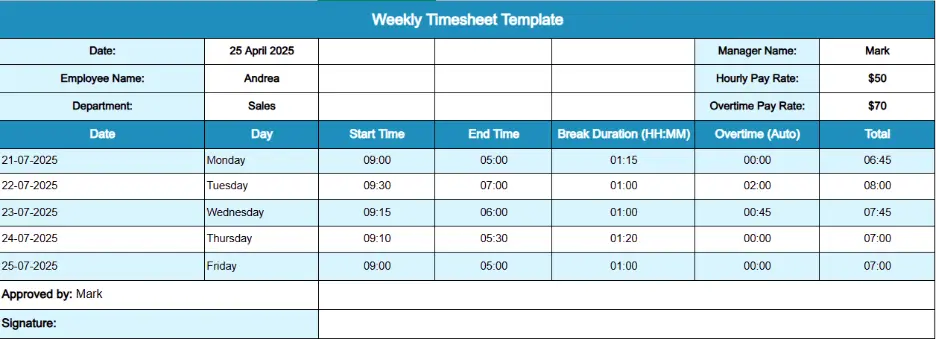
A weekly timesheet template gives you a wider picture of employee performance and workload across the entire week. If you are someone who plans projects weekly and wants to balance task distribution and resources efficiently, this is an ideal template for you.
Instead of logging every little task, this template helps you concentrate on the total productive hours per week.
Key Features:
- Weekly Work Hour Summary:Displays the total number of worked hours in the entire week, which in turn simplifies the process of monitoring consistency and identifying unusual work trends.
- Project or Department Segmentation:Divides work hours based on particular projects or departments, ultimately helping you in analyzing all the time investment on a larger scale.
- Weekly Productivity Graphs (Optional): Helps you add visual elements like charts or progress bars to represent the performance and progress in that entire week.
- Auto-Generated
Totals:Calculates work hours per day automatically to provide a clear weekly work schedule
without any manual calculation errors.
Things to Include in a Weekly Timesheet Template: Employee Details:
This will include simple data such as the employee’s name, department, and position. This helps to make sure that each timesheet is associated with the right individual.
- Dates covered:Every weekly timesheet template will contain the dates that are covered by the particular timesheet, which are usually from Monday to Friday (or including Saturday and Sunday). This assists you in ensuring that the precise period being documented is well understood.
- Daily start and end times:For each day of the week, the template will record the time an employee begins working and the time he or she leaves work. This enables you to track their working hours in a day effectively.
- Total hours worked:The template helps you calculate the total hours worked per day, both the normal working hours and the overtime hours. This provides you with a clear picture of the amount of time that your team is dedicating.
- Breaks taken:It is also necessary to document any breaks that are taken during the day. This assists in compliance with labor laws, supports adherence to break time policies time policies, and provides a comprehensive view of the working day.
- Task or project details:If your team is involved in different projects, the template can have fields where the employee can record the time spent on a particular task or project. This is useful for resource management and project tracking.
- Signatures:It is common to have a space for both the employee’s and the manager’s signatures at the end of the document. This provides an extra layer of assurance and ensures that the recorded hours are genuine.
- Notes or
comments:At times, there may be a need to include extra annotations or remarks. This section is
useful for the employee or the manager to give additional details, for instance, the cause of working
extra hours or any deviation from the normal working schedule.
Use Cases of the Weekly Timesheet Template:
- Weekly Payroll Processing
- Project Tracking and Management
- Employee Attendance Monitoring
- Time-off and Leave Management
- Budgeting and Cost Tracking
- Performance Analysis and Reporting
3. Biweekly Timesheet Template
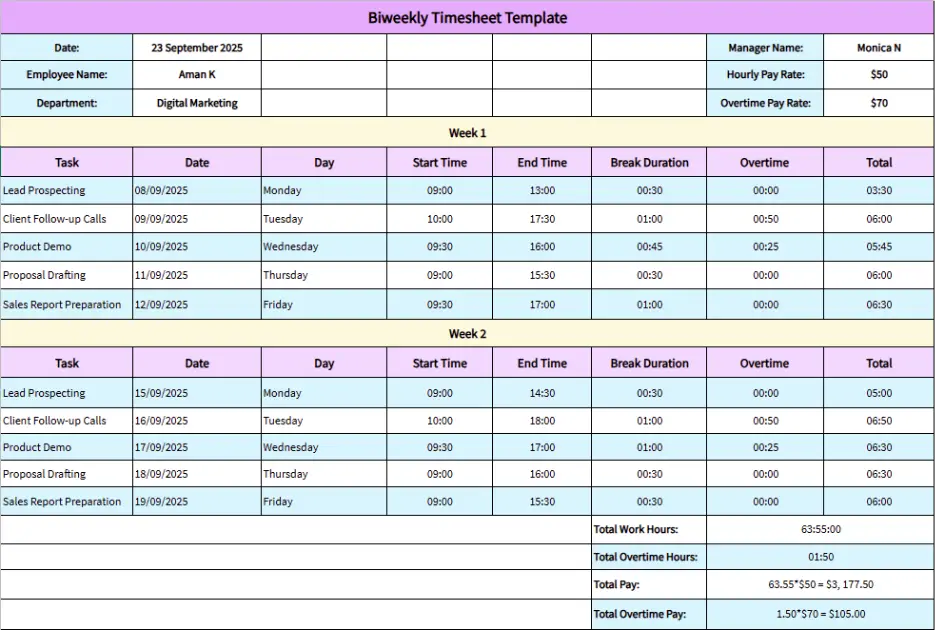
The biweekly timesheet template is an ideal choice if your company processes payroll every two weeks. It combines the benefits of daily and weekly tracking so that you can use it to record two weeks of work information in one place. This helps you simplify payment cycles and maintain proper attendance records.
Key Features:
- 14-Day Work Record: Monitors the work hours of each employee within two weeks in a row with the complete data to calculate payroll.
- Easy Payroll Integration:Fits perfectly well with biweekly pay schedules that finance teams can use to process salaries without missing any data.
- Leave and Holiday Tracking:Includes fields where you can record the number of leaves, holidays or sick days in the pay period, which makes salary processing transparent.
- Streamlined Approval Section:Provides a field for supervisor's approval, where your managers, team leads, or project supervisors can sign or just leave a digital signature, which helps a lot in maintaining the accountability of hours reported.
Things to Include in a Biweekly Timesheet Template:
- Employee information: Some of the information you will need to provide includes the employee’s name, department, and position. This assists in determining who the timesheet belongs to, which makes it easier for you to sort and analyze the information.
- Work hours: It is important to record the time when the workday begins and when it ends. This way, you can track the time your team members spend on the tasks and make sure that everyone works the necessary amount of time.
- Overtime:Make sure to add a section for any extra hours that were
put in. This is important for calculating overtime pay and other related payments so that all the extra
hours worked are well compensated.
- Time off:Include a section for any time off like vacation or sick leave. This assists you in tracking the number of employees who are away from work and guarantees that everyone’s time off is fairly handled.
- Approval section:You should also provide a section for approval. This makes it possible for you to approve the hours worked before the payroll is processed, thus reducing the chances of errors.
Use Cases of the Biweekly Timesheet Template:
- Biweekly Payroll Processing
- Tracking Employee Work Hours and Overtime
- Managing Project Budgets and Costs
- Reviewing Employee Productivity
- Monitoring Attendance and Leave
- Ensuring Compliance with Labor Regulations
4. Monthly Timesheet Template
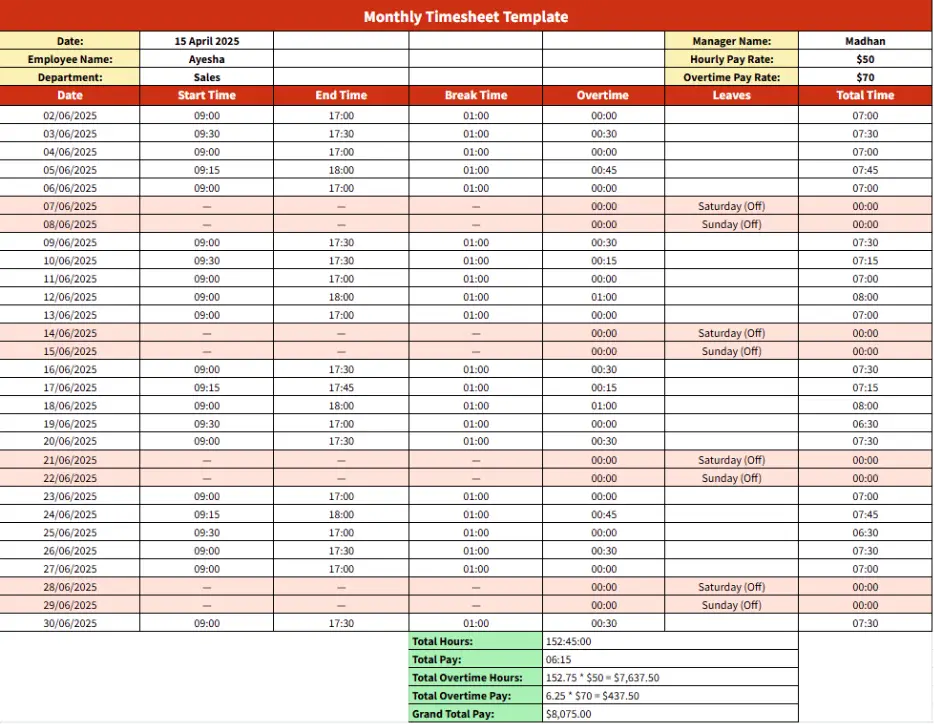
A monthly timesheet template helps you in recording the total working hours, attendance, and project participation for a month. It gives you a macro-level perspective, which you can use in performance reviews, reviews, payroll processing and long-term productivity analysis.
Key Features:
- Comprehensive Monthly Overview: Covers all 30 or 31 days of the month, giving you a detailed picture of attendance, work patterns, and total hours logged.
- Automated Totals and Averages:Summarizes total monthly hours worked and calculates averages for productivity evaluation.
- Integrated Leave and Overtime Tracking:Maintains records of paid leaves, absences, and overtime during the entire month for accurate billing
- Performance Insights Section:Gives you space to add monthly comments or supervisor remarks, which helps in identifying strengths and improvement areas.
Things to Include in a Monthly Timesheet Template:
- Columns for work descriptions:In your monthly timesheet template, you should add columns where you describe the work done in detail. This assists you in monitoring what tasks are being done by the employees and also aids in making sure that there is no confusion when it comes to reporting.
- Overtime tracking:It is also important to ensure that there is a section where overtime hours are recorded. This enables you to track any overtime worked and control the pay accordingly to ensure that it is fair.
- Project numbers:Include columns for project numbers or codes. This makes it easy to associate the hours worked with the project, which is useful in monitoring the project costs and progress.
- Total hours: Make a section for the total hours worked. This gives you a summary of hours for each employee, which makes it easier to calculate payroll and make the right payments.
- Employee information:Must contain fields for the employee information such as the name and the identification number. This helps in ensuring that the timesheets are properly associated with the right employees and thus minimizes the common mistakes that are likely to occur when preparing the payrolls.
- Approval signatures:Make room for approval signatures. This step ensures that the recorded hours have been checked and signed off, which is important in the validation of the timesheet before the payroll is processed.
Use Cases of the Monthly Timesheet Template:
- Monthly Payroll Calculations
- Tracking Long-Term Project Progress
- Analyzing Monthly Work Hours and Attendance
- Budgeting and Financial Planning
- Evaluating Employee Performance Trends
- Managing Employee Leave and Absences
Best For:
HR teams, finance departments, and business owners who prefer monthly payroll processing and long-term productivity insights.
5. Project-Based Timesheet Template
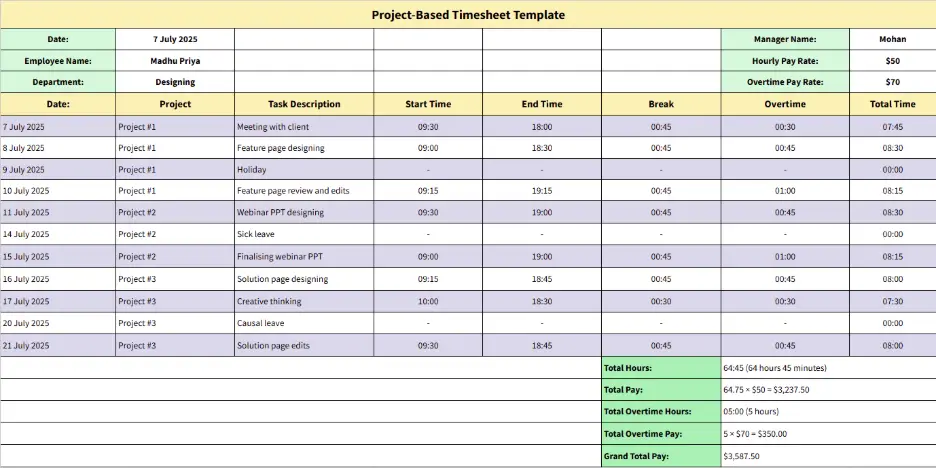
A project-based timesheet template focuses solely on tracking time by projects rather than fixed dates. It’s a flexible option if your teams work on multiple projects simultaneously or if your work depends on deliverables rather than daily attendance.
Key Features:
- Project-Specific Tracking:Records the amount of time spent by each employee on individual projects, assisting in measuring effort and efficiency on every project.
- Task and Milestone Segmentation:Breaks down projects into smaller tasks and milestones and offers a better view of progress and deadlines.
- Billable vs Non-Billable Hours:Differentiates between client-billable and internal hours that simplify the process of creating accurate invoices.
- Performance and Cost Reporting:Combines time logs and cost tracking, which enables your project managers to evaluate the ROI and time efficiency of every project.
Things to Include in a Project Timesheet Template:
- Project names:Make sure to add columns for project names in your Project Timesheet Template. This assists in tracking which projects the hours are being recorded against especially when working on different projects at the same time.
- Task descriptions:Include a section for task descriptions. This lets you track what work is being done on each project, which is helpful for understanding how time is being spent and whether tasks are moving forward as expected.
- Hours worked:Ensure that you have fields for hours worked. This is useful in tracking the amount of time each team member spends on different activities, which can be useful in tracking productivity and workloads.
- Project codes:Include project codes or numbers in your template. This relates the hours worked to certain budgets and time frames, which assists in managing costs and guaranteeing that projects do not exceed their financial and temporal limits.
- Total hours:Include a row for total hours worked. This provides you with an overview of the hours for each project, which makes it easier to calculate the cost of each project and review the progress of the project.
- Employee
Details:Add fields for the employee details such as the name and the identification number.
This makes it possible to match the timesheets to the right team members, thus avoiding confusion and
making it easier to process payroll.
- Approval
signatures:Allow space for approval signatures. This affirms that the recorded hours have been
checked and signed, making the timesheet authentic and valid before going to the next step.
Use Cases of the Project Timesheet Template:
- Project Tracking
- Project Budget Management
- Resource Allocation
- Client Billing
- Performance Analysise
Best For:
Agencies, consultants, freelancers, and project managers who need detailed insights into time spent per project and require accurate data for billing or project analysis.
What are the Pros and Cons of Timesheet Templates?
Timesheet templates really work for most people, but you also need to be aware of the cons that come with them.
Tally both the pros and cons, before completely stepping into timesheets and see if they really align with your company’s needs.
| Pros | Cons |
|---|---|
| 1. Easy to set up and requires no technical expertise | 1. Prone to manual entry errors and miscalculations |
| 2. Cost-effective option for small teams or startups | 2. Becomes difficult to manage for large teams |
| 3. Offers flexibility to customize according to project needs | 3. Lacks automation and real-time tracking features |
| 4. Simplifies payroll and client billing with clear hour logs | logs 4. Doesn’t integrate well with other tools or systems |
| 5. Helps monitor attendance and work distribution effectively | 5. Provides limited insights and no advanced analytics |
Automate your timesheets with Time Champ!
Get accurate timesheets and simplify your billing process
How Time Champ Simplifies Timesheet Management
Timesheets are for sure efficient, but doing them manually takes time and effort. But what if I tell you can just automate this whole process? Yep, Time Champ automates timesheets for you, it tracks employee login, logout, break time, overtime, and more.
Now your employees no longer need to fill out lengthy spreadsheets, yet you can get a clear view of each team member’s work hours at a glance. This automation not only saves time but also minimizes errors and creates a transparent record of daily productivity.
Beyond tracking hours, Time Champ brings smart timesheet creation, productivity insights, and integrated task management into one place. It automatically compiles activity data, categorizes productive and idle time, and links tasks directly to projects, helping you understand how work hours are distributed. Features like shift scheduling and workload management align schedules with actual working hours, making attendance, overtime, and utilization tracking more reliable. Managers can easily compare planned versus actual time spent to make better scheduling and resource decisions.
In short, Time Champ turns timesheet management into a smooth, smart, and reliable process that drives better productivity and accountability.
Conclusion
In the end, all you need is clarity, which comes with better organization, and timesheets give you that clarity. Actually, you can use more than one timesheet, or even combine two templates to create your own template, depending on your needs and operations.
Start using a timesheet template that fits your workflow, and you’ll see how a simple change can bring more clarity, balance, and efficiency to your workday.

Shabana Shaik


Table of Content
-
 What Are the 5 Types of Timesheet Templates?
-
1. Daily Timesheet Template
-
2. Weekly Timesheet Template
-
3. Biweekly Timesheet Template
-
What are the Pros and Cons of Timesheet Templates?
-
How Time Champ Simplifies Timesheet Management
-
Conclusion
Related Blogs

Get 8 free pay stub templates with built-in calculators in Excel, PDF, and Word formats instantly. Customize as needed, save time, and simplify payroll.
Sai Keerthi Uppala | November 25, 2025
Explore free downloadable sprint planning templates, including agile, scrum, weekly, and project templates in Excel, Word, and PDF for effective planning.
Guna Lakshmi | November 07, 2025
Explore 12 free project schedule templates in Excel, Word, and PDF, including simple, construction, tracking, timeline, and multi-project options.
Thasleem Shaik | November 03, 2025
Explore free project deliverables templates in Excel, Word, and PDF formats to track progress, manage tasks, and ensure on-time delivery.
Thasleem Shaik | November 03, 2025
Download free agile project management templates in Excel, Word, and PDF formats to plan, track, and manage agile projects with clarity and control.
Thasleem Shaik | Feb 19, 2026
Download 5 free Project Status Report Templates in Excel, Word, and PDF to track progress, spot risks early, and keep stakeholders aligned.
Tarun Kumar Reddy | Feb 11, 2026


 4.7/5 avg.
Ready to Manage Your Workforce Smarter?
Join our family of 1500+ companies using smart insights to redefine workforces!

Free Trial
No Credit Card Required