DLP False Positives: Why They Happen and How to Prevent Them
A DLP false positive occurs when legitimate activity is flagged as a security risk. See what causes it and practical ways to reduce unnecessary alerts.
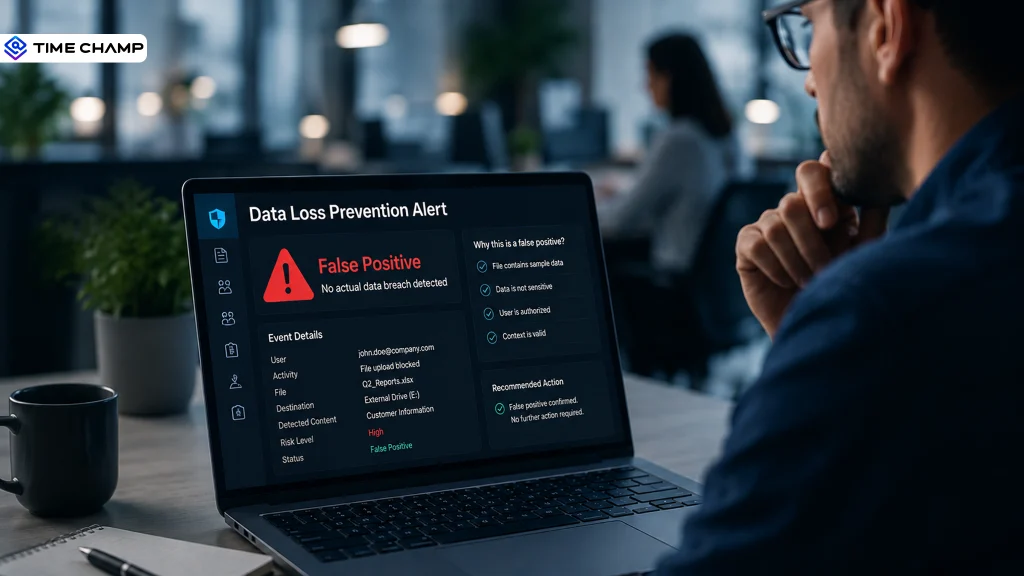
Imagine your smoke detector going off every time you make toast.
You would stop paying attention after a while. The same thing happens when DLP false positives keep appearing in your security dashboard. When every harmless action looks suspicious, it becomes harder to identify genuine threats, and valuable time goes into reviewing alerts that pose no real risk.
The goal is not to stop alerts. It is to make them more accurate, so you can focus on what truly needs your attention. In this blog, you'll see why DLP false positives happen, what causes them, and the practical steps you can take to improve detection accuracy while maintaining strong security.
What Is a DLP False Positive?
A DLP false positive is an alert that happens when a data loss prevention system mistakes a safe, approved action for a possible data leak. In simple terms, the system thinks sensitive data is at risk, even though the activity is legitimate.
For example, an employee may send a file to an approved client, but the DLP tool may still flag it because the file contains keywords, numbers, or patterns that look sensitive. The problem is not always the user’s action. Often, it is the rule that does not have enough context to understand the difference between real risk and normal work.
This is why false positives are more than just extra alerts. They can slow employees down, waste security teams’ time, and make it harder to spot genuine data loss attempts when they appear.
Common False Positive Examples in Real DLP Deployments
You'll run into the same patterns again and again once your DLP tool is live:
- A 9-digit product SKU gets read as a Social Security number.
- An internal ID format overlaps with a credit card number pattern.
- A test number like 555-0100 gets flagged as a real phone number.
- A file shared with an approved partner gets blocked as external sharing.
- A legitimate export to a client's cloud storage gets flagged as exfiltration.
For a broader look at how DLP works end-to-end, check out our guide on Data Loss Prevention.
How DLP Systems Generate False Positives
DLP systems rely on predefined policies, pattern matching, and content analysis to identify sensitive data. When these rules are too broad or lack context, they flag legitimate activities as policy violations. Below are some of the most common reasons DLP systems generate false positives.
- Broad or Overly Sensitive Policies: DLP policies that are too general can flag harmless files, emails, or messages simply because they contain keywords or patterns associated with sensitive data. Without precise conditions, these rules generate unnecessary alerts.
- Pattern Matching Without Context: Most DLP tools detect information using predefined patterns such as credit card numbers, passport numbers, or keywords. If similar patterns appear in test files, sample documents, or publicly available content, the system may trigger an alert even when no one is exposing sensitive data.
- Poor Data Classification: When data classification is not accurate, the DLP solution cannot distinguish between sensitive and non-sensitive information. As a result, it may treat routine business documents as confidential data.
- Outdated or Untested Policies: Business processes, applications, and data handling practices change over time. If DLP policies are not reviewed and updated regularly, they can continue flagging activities that are no longer considered risky.
Spending more time reviewing alerts than protecting your data?
Try Time Champ to reduce unnecessary investigations and keep sensitive data under better control.
Types of DLP False Positives
Not every DLP false positive occurs for the same reason. Some are triggered by file content, while others result from policies, user actions, or missing context. Recognizing the different types makes it easier to identify the root cause and fine-tune your DLP policies. Here are the most common types of DLP false positives.
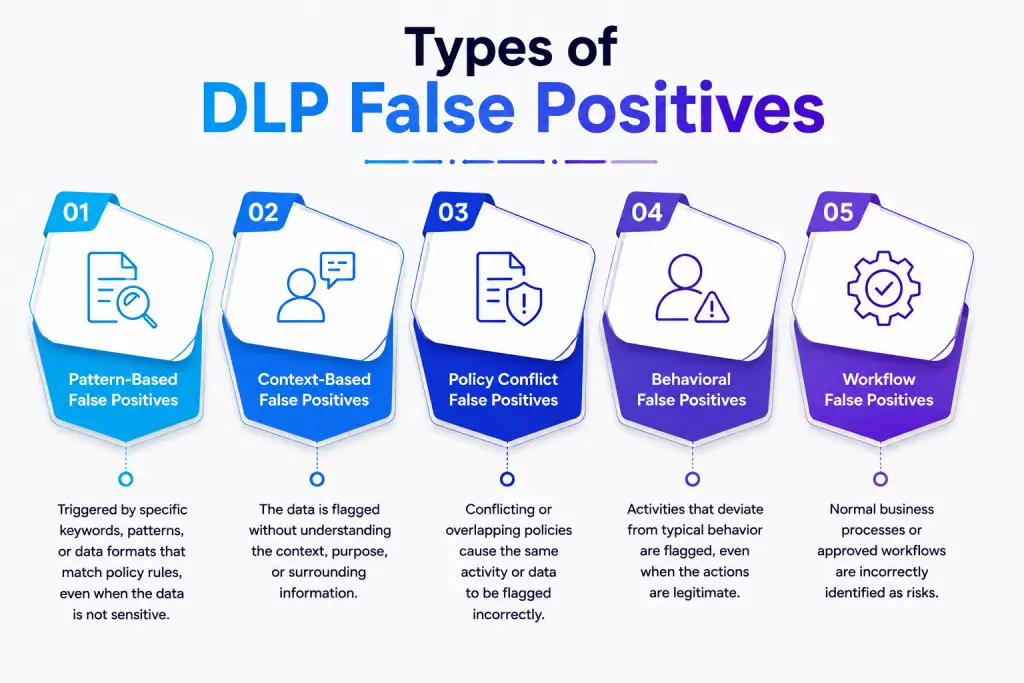
1. Pattern-Based False Positives
Many DLP tools use regular expressions to detect information such as credit card numbers, bank account details, or government IDs. Random number sequences or sample data that match these patterns can generate false alerts.
2. Context-Based False Positives
A file may contain sensitive-looking information, but context matters. For example, training materials, publicly available documents, or anonymized datasets can trigger DLP systems to flag them even though sharing them does not pose a security risk.
3. Policy Conflict False Positives
Multiple DLP rules can sometimes apply to the same activity. When overlapping or conflicting policies evaluate a single file, they may trigger duplicate or incorrect alerts, increasing alert volume without indicating a real threat.
4. Behavioral False Positives
DLP systems that rely on user behavior analytics often flag suspicious activity, like an employee logging in from a new location while traveling. The system treats it as risky because it compares actions to general user behavior instead of individual patterns.
5. Workflow False Positives
When a sensitive file moves through an approved or legitimate channel that the DLP policy does not recognize, the system still triggers an alert. For example, when a contract is sent to outside legal counsel through a managed file-sharing platform, DLP may still flag it even though the organization allows the sharing.

Did You Know
Surging alert volumes are overwhelming analysts, with an estimated 46% of alerts turning out to be false positives. This constant flood leaves 42% of alerts uninvestigated, stretching team capacity, driving fatigue, and increasing the risk that real cyber threats go undetected.
How to Reduce DLP False Positives?
Reducing DLP false positives is not about making your security policies less strict. It is about making them more accurate. By refining your policies, improving data visibility, and adding context to alerts, you can reduce unnecessary notifications without weakening data protection. Here are the practical ways to reduce DLP false positives.
1. Start in Audit Mode Before Enforcement
Turn on new policies in audit mode first, not blocking mode. Let the policy run silently for 30 to 60 days and see what it would have flagged. This helps you understand exactly which patterns cause issues before they affect any employee. Once you adjust the policy using real data, switch it to enforcement. If you skip this step, you will keep repeating a cycle of deploying, getting too many alerts, fixing under pressure, and deploying again.
2. Improve Your Data Classification
DLP cannot protect what it does not understand. Classify your data into sensitivity levels such as Public, Internal, Confidential, and Restricted before creating any policy. Then align your policy rules with each level. Your Restricted data should have the strictest controls, while normal internal files should not trigger the same alerts as sensitive information like a customer’s Social Security number. This reduces a large number of unnecessary alerts because the system clearly understands what is important.
3. Add Business Context to Detection Rules
Content alone never tells the full story. The same file shared with an approved partner and the same file uploaded to a personal cloud account may look the same to a rule that only checks content. Add role, department, time of day, and destination to your detection logic. A finance employee sending account numbers to a known vendor and a marketing employee sending the same numbers to an unknown address deserve different treatment, and your rules should reflect that.
4. Use Exclusion Rules and Allowlists
Some patterns will never be sensitive, no matter how often a rule detects them. Product SKUs, internal ID formats, and test values like 555-0100 fall into this category. Build dictionary exclusions for known safe values and add regex-based exceptions for predictable patterns.
On the other hand, maintain an allowlist of approved partners and SaaS tools so that legitimate transfers no longer trigger alerts. Google Cloud's guidance on exclusion rules confirms that this is one of the fastest ways to reduce recurring noise. Log every confirmed false positive to continuously expand and improve your exclusion library.
5. Adjust Instance Count Thresholds
Instance count controls how many matches a rule must find before it raises an alert. For example, a single credit card number in a support ticket may not be important on its own. But if a file contains many credit card numbers, it clearly signals higher risk. Microsoft’s own DLP deployment guidance recommends setting a higher threshold for low-risk data and only lowering it when the data is highly sensitive. Instead of using one fixed number for everything, adjust your thresholds based on the type of data you are protecting.
6. Backtest New Rules Against Historical Data
Before a new rule goes live, test it using your past incident data first. This helps you see how many alerts it would have created and how many of them would have been false positives. This way, you can find a poorly tuned rule in a test environment instead of your live alert system, where it can waste analyst time and reduce employee trust.
What Are the Common Mistakes When Tuning DLP False Positives?
Tuning DLP policies is an ongoing process, but small mistakes can quickly lead to excessive alerts and reduced policy effectiveness. Identifying these issues early helps you build a more reliable DLP strategy while keeping alert volumes under control.
The mistakes below show up again and again across DLP programs, and knowing them upfront saves you from repeating the same cycle.
- Weakening Rules to Reduce Noise: Turning off or loosening rules may reduce alerts, but it also reduces detection accuracy. Instead of weakening rules, improve them by adding better context so real threats are still caught.
- Tuning Without Measuring: Changing rules without tracking results leads to guesswork. Always check your DLP false-positive rate before and after changes to know if tuning actually improved performance.
- Ignoring Analyst Feedback: Security analysts see repeated false positives first. If their feedback is ignored, the same alert issues keep coming back. Their input should guide tuning decisions.
- One-Time Tuning with No Follow-up: You cannot treat DLP tuning as a one-time task. As your business changes, it quickly makes rules outdated, so you must regularly review them to keep false positives under control.
- Not Involving Business Teams: IT alone cannot understand all business workflows. Involving teams like finance, HR, and sales helps identify what normal activity is and reduces unnecessary alerts.
How Time Champ Approaches DLP False Positive Reduction
Time Champ provides a complete view of sensitive data activity so you can make informed security decisions. It helps you understand the full story behind risky-looking activity, such as who performed the action, what file was involved, where it moved, and whether the action matches normal work patterns.
This context helps reduce repeated false alerts and saves you from reviewing the same harmless activity again and again. With clearer visibility and configurable controls, Time Champ helps you protect sensitive data while keeping employees productive.
Finding it difficult to separate genuine threats from routine activity?
Try Time Champ to improve visibility into sensitive data and take faster action on real security concerns.
Conclusion
Reducing DLP false positives is an ongoing process that requires accurate policies, regular reviews, and a clear understanding of how data moves across your organization. When you focus on improving detection accuracy instead of simply reducing alerts, your security team can respond faster to real risks while avoiding unnecessary investigations.
Time Champ gives you greater visibility into file activity monitoring, website usage, USB devices, and other sensitive actions, helping you review incidents with more context and confidence. This allows your team to spend less time on unnecessary alerts and more time protecting your organization's sensitive data.

Thasleem Shaik

Table of Content
 What Is a DLP False Positive?
- How DLP Systems Generate False Positives
- Types of DLP False Positives
- How to Reduce DLP False Positives?
- What Are the Common Mistakes When Tuning DLP False Positives?
- How Time Champ Approaches DLP False Positive Reduction
- Conclusion
Instant Signup
Thank you for your request!
We have received your signup request and our team will get back to you soon. In the meantime, you can book a demo to see Time Champ in action.
Book a DemoFree trial. No credit card required. Prefer a walkthrough? Book a demo.
Related Blogs
Enhance your security with endpoint data loss prevention solutions that guard against data breaches and protect your most valuable assets.
Shabana Shaik | Jan 23, 2025
Stay ahead of data threats! Discover the best practices for data loss prevention and safeguard your organization’s sensitive information.
Shabana Shaik | Jan 18, 2025
Discover how network data loss prevention protects sensitive data and shields your business from costly breaches and regulatory risks
Thasleem Shaik | Jan 18, 2025
Discover how Email Data Loss Prevention (DLP) protects sensitive data from leaks and unauthorized access, strengthening your organization
Jahnavi Pulluri | Jan 20, 2025

Discover what a threat actor is and how they target your business. Learn simple and effective strategies to protect your company from cyber threats.
Sai Keerthi Uppala | Jan 22, 2025


 4.7/5 avg.
Ready to Manage Your Workforce Smarter?
Join our family of 1500+ companies using smart insights to redefine workforces!

Free Trial
No Credit Card Required