Customer Support Outsourcing: Models and How to Choose
A complete guide to customer support outsourcing, models, pros and cons, when to outsource, how to choose a provider, typical costs, and best practices.

When your support team can’t keep up with rising ticket volumes or customer demands, your service quality can quickly suffer. You may also end up spending more on hiring, training, and managing an in-house team. Customer support outsourcing can help you scale your support, control costs, and reduce the workload on your team. But choosing the wrong model can create more problems than it solves.
In this guide, you’ll learn about the main customer support outsourcing models and how to choose the right one for your business.
What Is Customer Support Outsourcing?
Customer support outsourcing is when you hire an external company to handle customer support tasks for your business. You can outsource specific tasks, such as answering customer questions and managing support tickets, or have the provider manage your entire customer support operation.
This approach allows you to access trained support professionals without building and managing a large in-house team. You can also scale your support more easily as customer demand changes, while your internal team can focus on other important business priorities.

Did You Know?
A survey by Deloitte found that 80% of executives plan to maintain or increase their investment in third-party outsourcing. This highlights how outsourcing can help businesses handle growing support needs more efficiently.
Types of Customer Support Outsourcing
Customer support outsourcing comes in different forms, depending on your business needs, budget, and the level of control you want to maintain. The right option can help you reduce costs, access skilled support professionals, and provide better customer service.
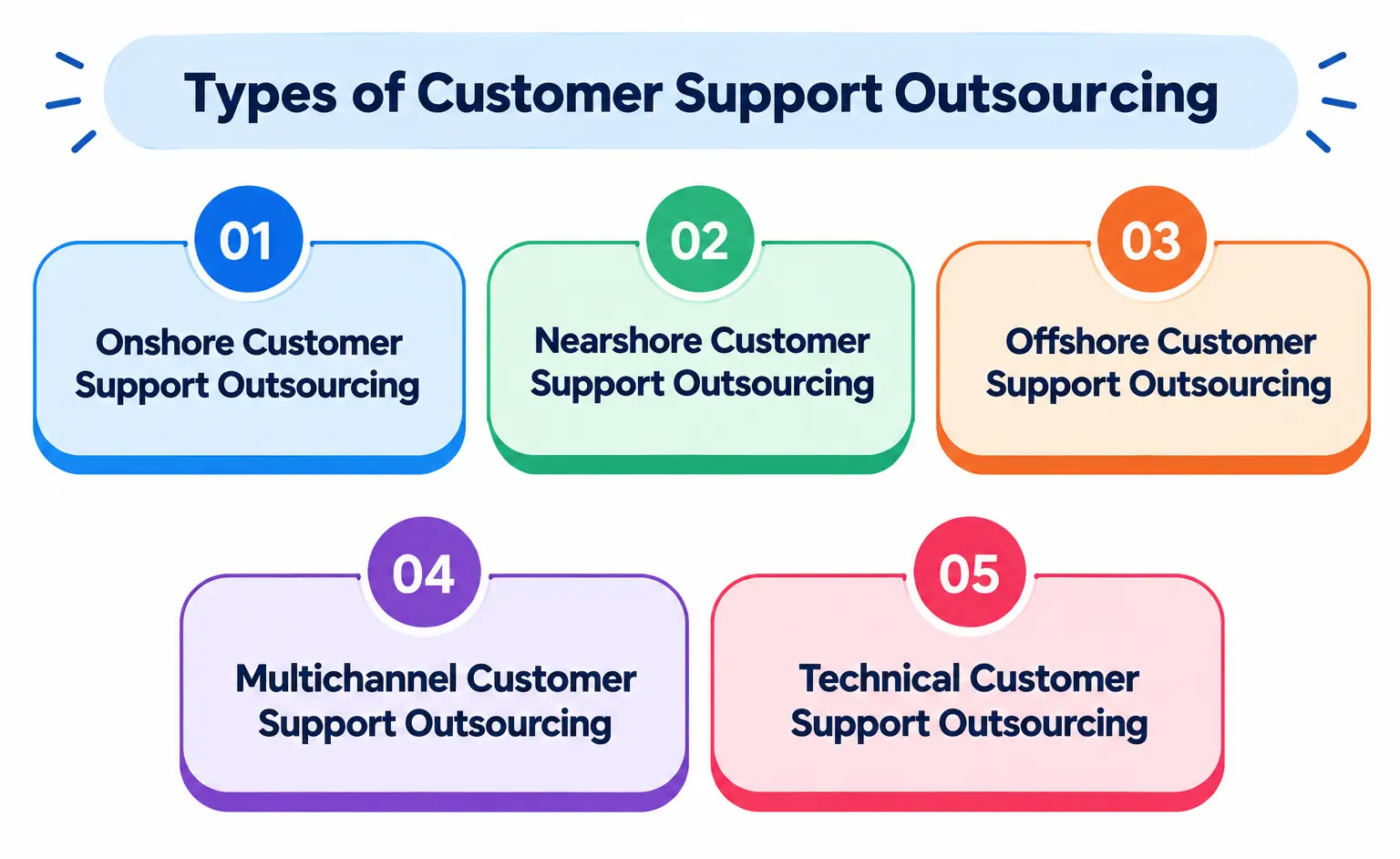
1. Onshore Customer Support Outsourcing
Onshore outsourcing means working with a customer support provider in your own country. This makes communication easier through shared language, time zones, and cultural understanding. It’s a good option when close collaboration and local knowledge are important to your business.
2. Nearshore Customer Support Outsourcing
Nearshore outsourcing involves working with a provider in a nearby country. This can help you lower support costs while maintaining similar time zones and easier communication. It’s a practical choice when you want a balance between cost savings and collaboration.
3. Offshore Customer Support Outsourcing
Offshore outsourcing means hiring a provider in a distant country, often to access lower labor costs and a larger talent pool. Different time zones can also help your business offer customer support beyond regular working hours or provide 24/7 coverage.
4. Multichannel Customer Support Outsourcing
This model covers customer support across multiple channels, such as phone, email, live chat, and social media. It gives your customers more ways to reach your business while reducing the workload on your internal support team.
5. Technical Customer Support Outsourcing
Technical support outsourcing involves hiring external specialists to handle product or technology-related customer issues. It can be useful when your customers need specialized assistance, and you want to avoid building a large technical support team in-house.
If you want to explore outsourcing beyond customer support, check out our guide to the different types of outsourcing, including models based on location, business function, and engagement.
Find the Right Outsourcing Partner for Your Business
See how Time Champ can help you manage support outsourcing operations more efficiently.
Pros and Cons of Customer Support Outsourcing
Customer support outsourcing can help you manage growing customer demands without expanding your in-house team. However, it also comes with potential challenges that you should consider before choosing an outsourcing provider.
| Pros | Cons |
|---|---|
| Reduces costs: Lower hiring, training, and operational costs can make support more affordable. | Less direct control: Managing an external team can make it harder to oversee daily support activities. |
| Provides access to skilled agents: You can work with trained professionals without building a large support team from scratch. | Communication challenges: Differences in time zones, language, or communication styles can affect service quality. |
| Scales easily: Support capacity can increase or decrease as your customer volume changes. | Data security risks: Sharing customer information with an external provider requires strong security measures. |
| Offers extended coverage: Different locations and shifts can help you provide support outside regular business hours. | Less brand familiarity: External agents may need time and training to understand your products, brand, and customers. |
| Allows your team to focus on core work: Outsourcing routine support tasks gives your internal employees more time for strategic priorities. | Quality can vary: Poor provider management or unclear service standards can lead to inconsistent customer experiences. |
When Should You Outsource Customer Support?
Outsourcing customer support makes sense when your current team struggles to keep up with customer demand, or you need to scale without increasing overhead. Consider outsourcing when:
- Support Volume Increases: A growing number of tickets, calls, or chats puts pressure on your support team.
- Response Times Get Longer: Customers wait too long for answers, which can affect their overall experience.
- Hiring Costs Rise: Recruiting and training enough support agents becomes expensive.
- Extended Coverage Is Needed: Customers need support outside your team’s regular working hours.
- Your Team Needs to Focus on Core Work: Outsourcing routine support tasks gives your employees more time for higher-priority responsibilities.
- Specialized Expertise Is Required: Customers need technical or industry-specific support that your internal team does not provide.
- Quick Scaling Is Necessary: Outsourcing makes it easier to increase or reduce support capacity as demand changes.
If several of these challenges apply to your business, outsourcing can help you improve support capacity while keeping your internal operations lean.
How to Choose a Customer Support Outsourcing Provider
Choosing the right customer support outsourcing provider can directly affect your service quality, costs, and customer experience. Consider these factors before making your decision.
Check Their Industry Experience
Look for a provider with experience in your industry and a clear understanding of your customer needs. Relevant experience also helps agents learn your products and processes faster.
Review Their Support Services
Check whether the provider offers the channels and services your customers need, such as phone, email, live chat, technical support, or 24/7 coverage.
Evaluate Agent Skills
Make sure the provider has trained agents who can communicate clearly, solve customer issues, and represent your brand professionally.
Check Security and Compliance
Review the provider’s data security practices and compliance standards, especially if agents handle sensitive customer or payment information.
Consider Scalability
Choose a provider that can increase or reduce support capacity as your customer volume changes. This gives you more flexibility during busy and slow periods.
Look at Performance Metrics
Ask how the provider measures support quality. Key metrics include response time, resolution time, customer satisfaction, and ticket volume.
Compare Pricing and Contracts
Review the pricing structure, contract terms, included services, and additional fees. Compare the total cost rather than choosing a provider based only on the lowest price.
Assess Communication and Control
Choose a provider that offers regular updates, clear reporting, and easy communication. Good visibility helps you monitor employee performance and address issues quickly.
Manage Customer Support Outsourcing More Effectively
Keep your outsourced support team productive and monitor their performance with Time Champ.
How Much Does Customer Support Outsourcing Cost?
Customer support outsourcing typically costs around $8-$60+ per agent hour, depending on your provider’s location, support complexity, coverage hours, and pricing model. Offshore support generally falls around $8-$18 per hour, while onshore support can range from $25-$60+ per hour.
Providers may also charge per ticket, per resolution, or through a monthly fee. For example, per-ticket pricing can range from about $1-$7 per interaction, while dedicated support agents may cost around $1,500-$8,000 per month.
Key Factors That Affect Cost:
- Location: Offshore providers generally cost less than onshore providers, while nearshore options often fall somewhere in between.
- Support Channels: Phone support can cost more than email or chat support because it requires dedicated agents and real-time handling.
- Coverage Hours: 24/7 support typically costs more than support limited to standard business hours.
- Service Complexity: Technical or specialized support usually costs more because it requires skilled agents and additional training.
- Support Volume: Higher ticket or call volumes can increase your overall outsourcing costs.
- Pricing Model: Per-agent, hourly, per-ticket, and monthly pricing models can produce different total costs.
Before choosing a provider, compare the total cost, services included, pricing structure, and contract terms. The cheapest option may not provide the quality or coverage your customers expect, so focus on the overall value you receive.
Best Practices for Outsourced Customer Support
Outsourcing customer support works best when you set clear expectations and maintain strong oversight. Follow these best practices to keep service quality consistent and get the most value from your outsourcing partnership.
Set Clear Service Expectations
Define your support goals, responsibilities, response times, and quality standards from the beginning. Clear expectations help the provider deliver the level of service your customers expect.
Provide Proper Training
Give agents the product knowledge, brand guidelines, and customer service training they need. Regular training also helps them stay updated as your products and processes change.
Set Clear KPIs
Track metrics such as response time, resolution time, customer satisfaction (CSAT), first-contact resolution, and ticket volume. Use these metrics to identify performance gaps and improve support quality.
Maintain Regular Communication
Schedule regular meetings and performance reviews with your provider. Open communication helps you address issues quickly and keep both teams aligned.
Protect Customer Data
Make sure your provider follows appropriate security practices and access controls. Limit access to sensitive customer information and regularly review security and compliance requirements.
Start Small and Scale Gradually
Begin with a manageable set of support tasks or channels before expanding the partnership. This lets you evaluate service quality and make adjustments before scaling up.
Collect Customer Feedback
Monitor customer feedback to understand how outsourced support affects the overall experience. Use these insights to identify recurring issues and improve your support process.
Review Performance Regularly
Don’t treat outsourcing as a set-and-forget arrangement. Review performance, costs, customer feedback, and KPIs regularly to ensure the provider continues to meet your business needs.
How Time Champ Helps You Manage Outsourced Customer Support
Outsourcing customer support can help you scale your operations, but managing an external team still requires visibility into productivity and performance. With Time Champ, you can monitor your outsourced support team, track productivity, and identify areas that need improvement.
- Track Team Productivity: Monitor productive hours, idle time, and productivity trends to spot gaps quickly.
- Monitor Apps and Websites: See which apps and websites your team uses and identify potential distractions.
- Review Screenshots and Activity: Use screenshots and activity tracking to get better visibility into work progress.
- Track Time and Attendance: Track work hours, breaks, idle time, and attendance automatically.
- Get Reports and Alerts: Use productivity reports and alerts to spot issues and take action quickly.
- Improve Accountability: Use time and productivity data to keep your outsourced team aligned with expectations.
Ready to Transform Your Customer Support Outsourcing?
See how Time Champ helps you track productivity and improve visibility across your support team. Start your free trial today!
Conclusion
Customer support outsourcing can help you reduce costs, handle growing demand, and scale support without expanding your in-house team. The key is choosing the right model and provider for your business.
Consider your support needs, budget, security requirements, and desired level of control before making a decision. With the right partner, outsourcing can improve support quality while giving your team more time to focus on business growth.

Guna Lakshmi

Table of Content
 What Is Customer Support Outsourcing?
- Types of Customer Support Outsourcing
- Pros and Cons of Customer Support Outsourcing
- When Should You Outsource Customer Support?
- How to Choose a Customer Support Outsourcing Provider
- How Much Does Customer Support Outsourcing Cost?
- Best Practices for Outsourced Customer Support
- How Time Champ Helps You Manage Outsourced Customer Support
- Conclusion

Related Blogs
Learn what the call center occupancy rate is, the formula, how to calculate it, what a good occupancy rate is, and how it differs from utilization.
Guna Lakshmi | Oct 23, 2026
Track the most important BPO KPIs to measure agent performance, productivity, customer satisfaction, and overall contact center success in 2026.
Guna Lakshmi | Oct 02, 2026
Learn what average handle time (AHT) is, the AHT formula, how to calculate it, and proven ways to reduce it without hurting service quality.
Guna Lakshmi | Oct 23, 2026
Contact center services help businesses manage customer support across multiple channels. Compare types, benefits, costs, technologies, and AI trends.
Thasleem Shaik | Aug 10, 2026
Discover the ultimate guide to call centre workforce management. Learn key functions, pros, cons, optimisation tips, and how real-time WFM boosts ROI.
Thasleem Shaik | Oct 01, 2025
Discover the 10 best call centre quality assurance software for 2025. Compare features, pricing, pros, and cons to boost service quality and performance.
Thasleem Shaik | Nov 07, 2025


 4.7/5 avg.
Ready to Manage Your Workforce Smarter?
Join our family of 1500+ companies using smart insights to redefine workforces!

Free Trial
No Credit Card Required