Time Tracking That Turns Work Hours into Decision-Grade Insights

Gain real insights into employee work hours, track productivity, and maintain consistent,measurable performance across every team.

employee feature head
Trusted by 1200+ Companies Worldwide
127+
Countries
1200+
Companies
100K+
Users
2.5M+
Insights Generated

An Easy, Effective Time Tracking App for Smoother, Stress-free Workdays

time tracking explain
projects icon

Effortless Time Logging

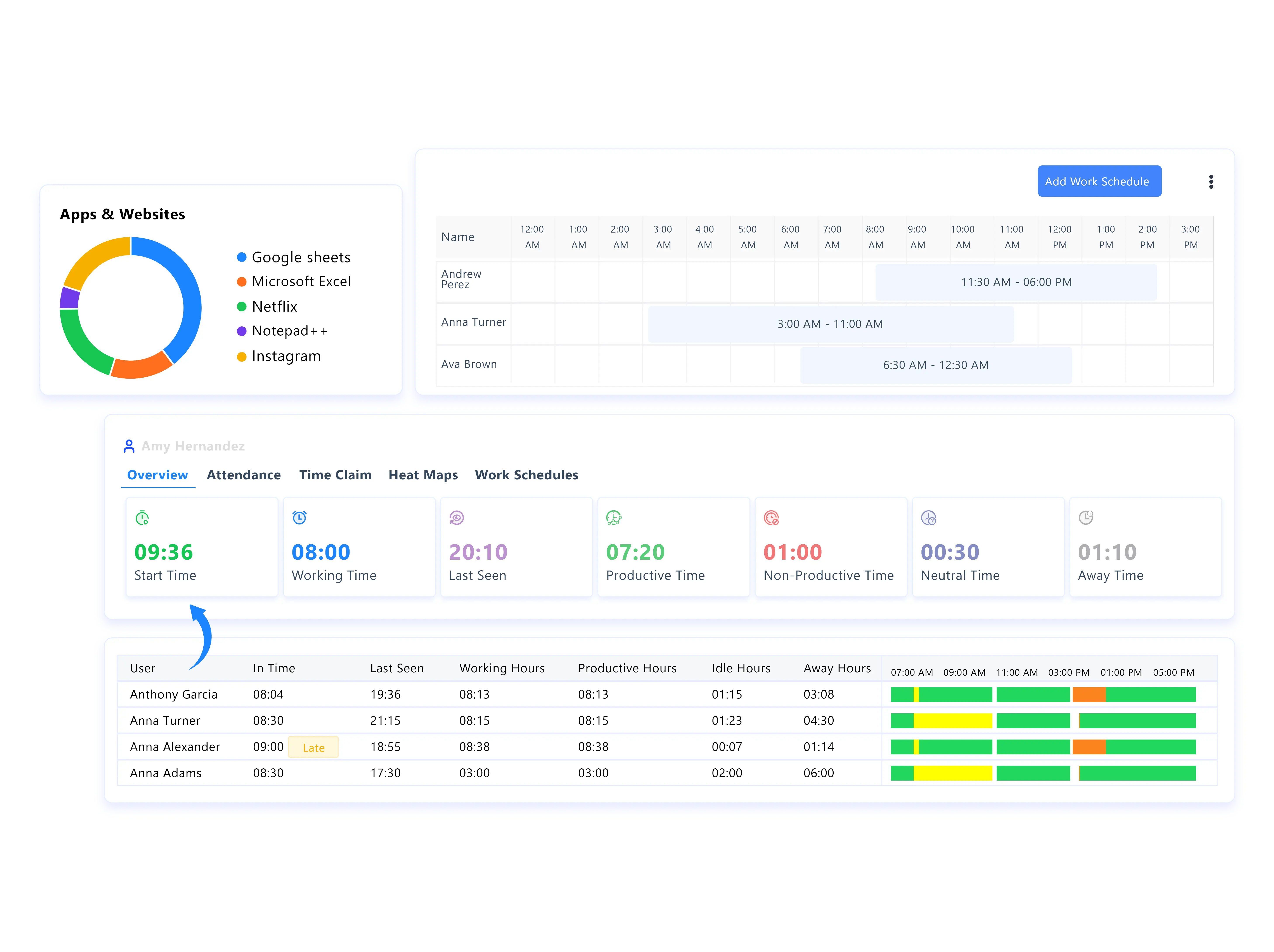
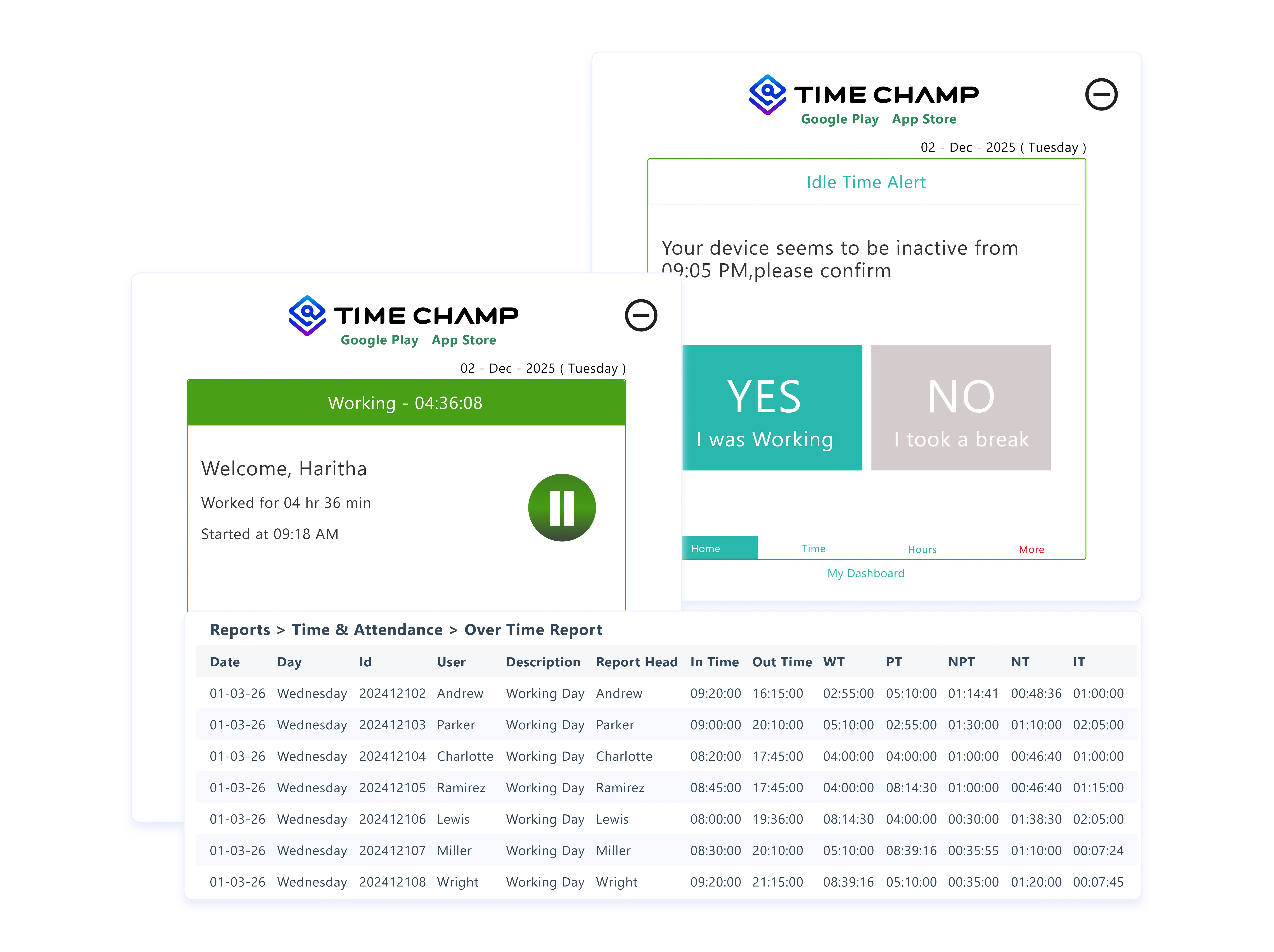
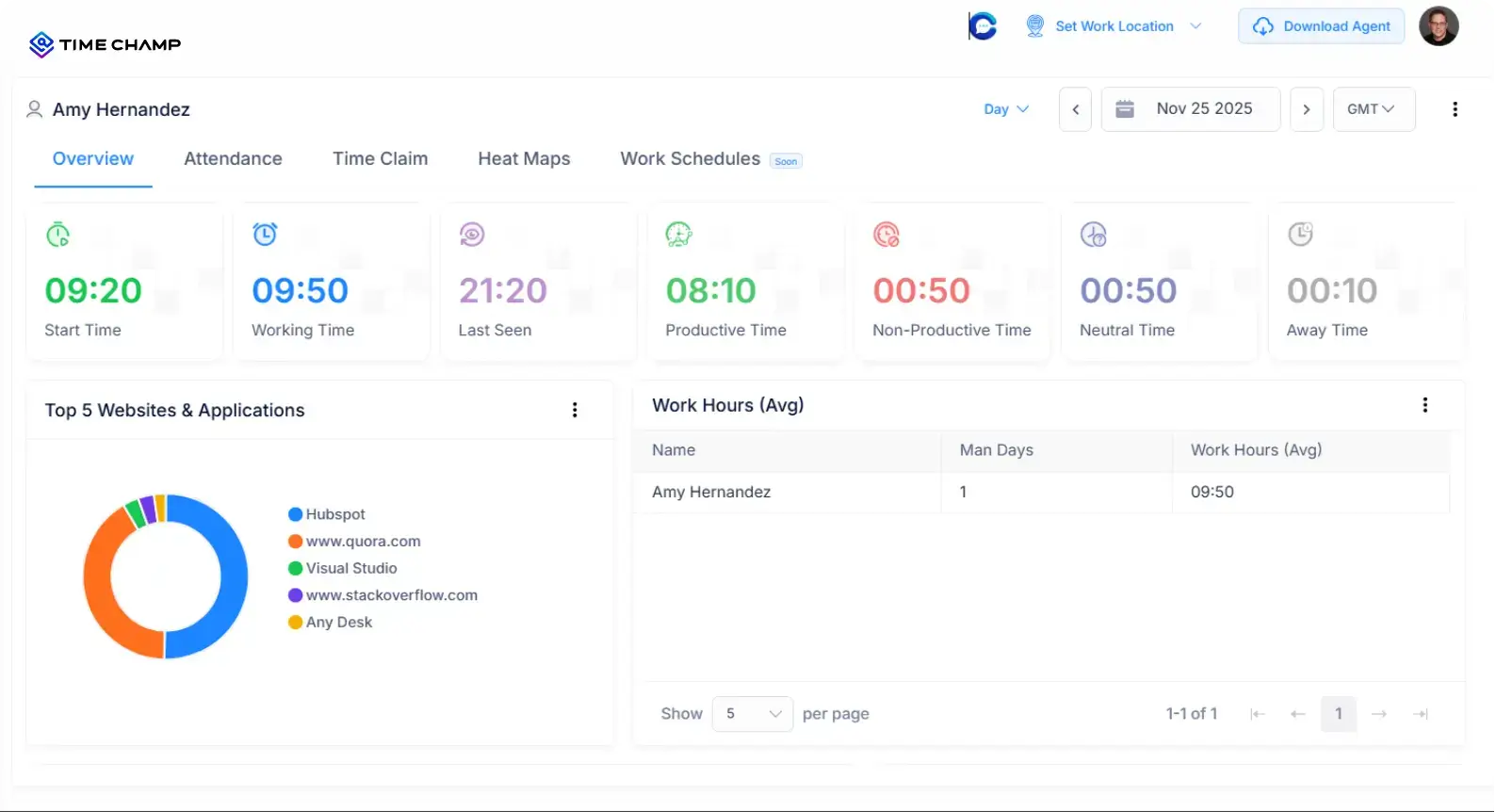
Track work hours automatically or manually with accurate clock-in/clock-out, break tracking, and idle time detection to keep every minute recorded.

projects icon

Smart Attendance Management

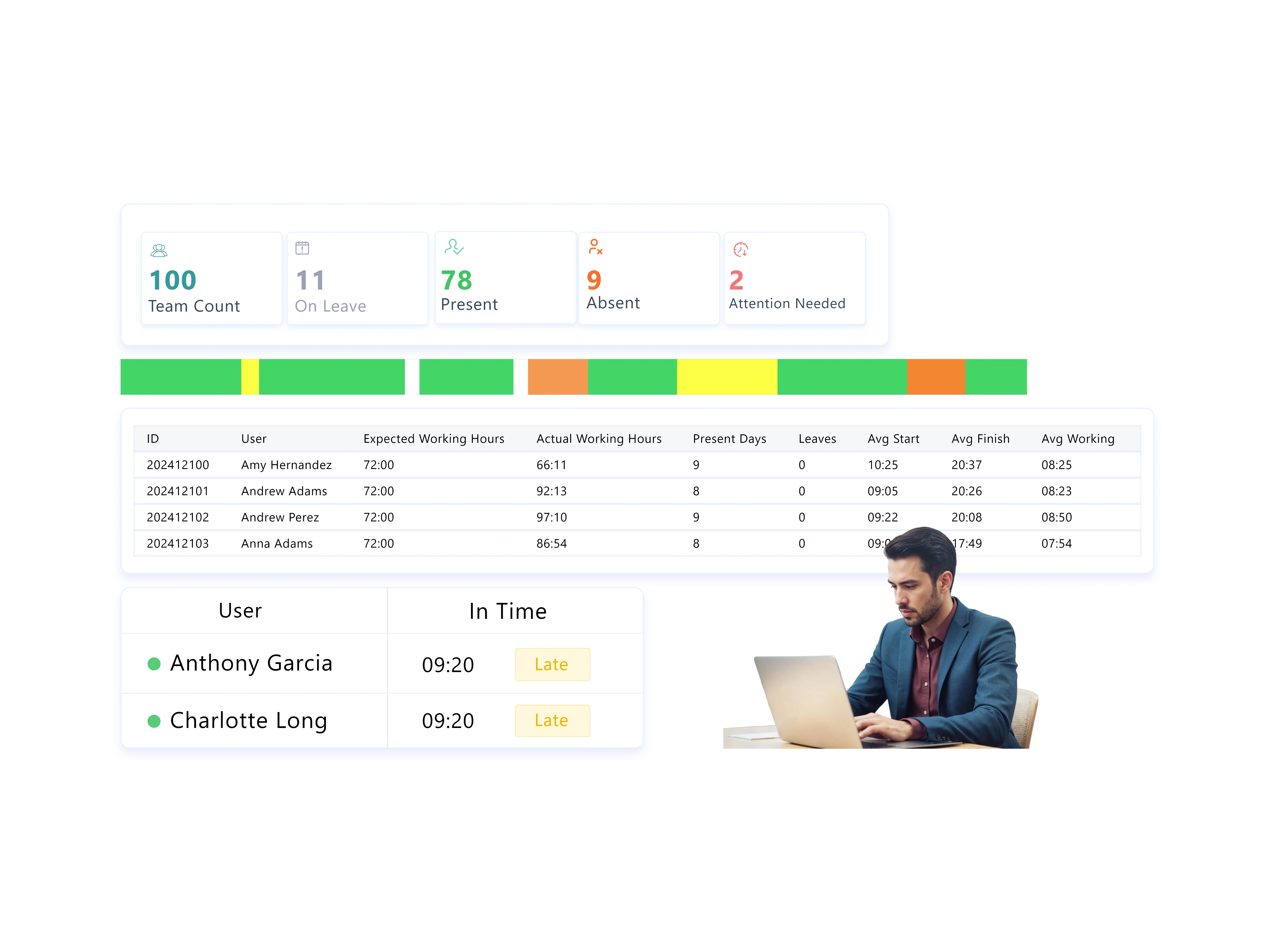
Know who’s present, on leave, late, or absent instantly. Get a real-time view of your team’s daily attendance without chasing updates.

projects icon

Flexible Time Claims

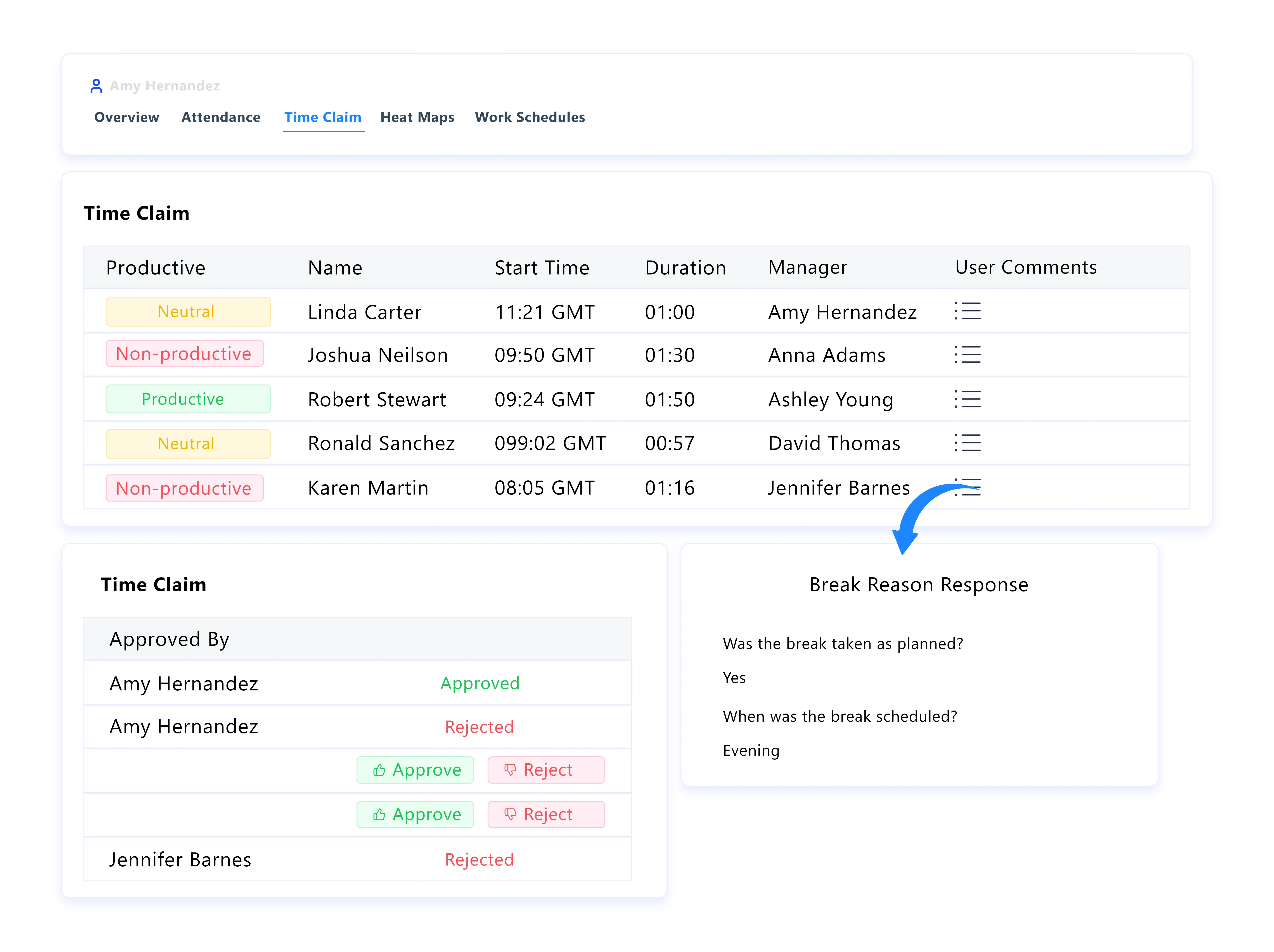
When work extends beyond the system, you can review time claims with full context, approve valid hours, or reject inaccuracies while maintaining payroll accuracy.

projects icon

Custom Work Schedules & Shift Planning

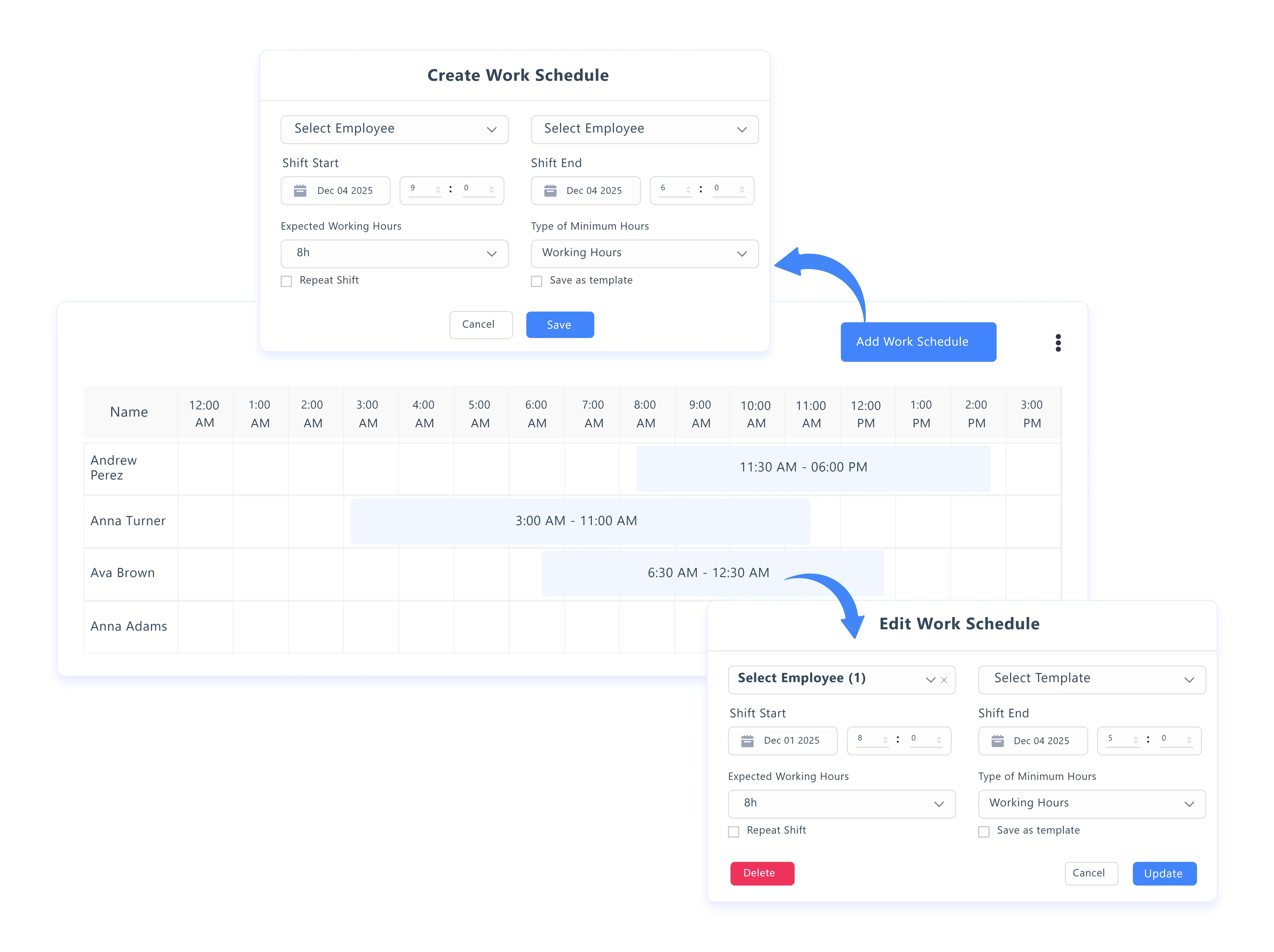
Set shifts, expected hours, and minimum work requirements daily, weekly, or monthly. Apply schedules to individuals, teams, or the entire organisation with ease.

time tracking explain
projects icon

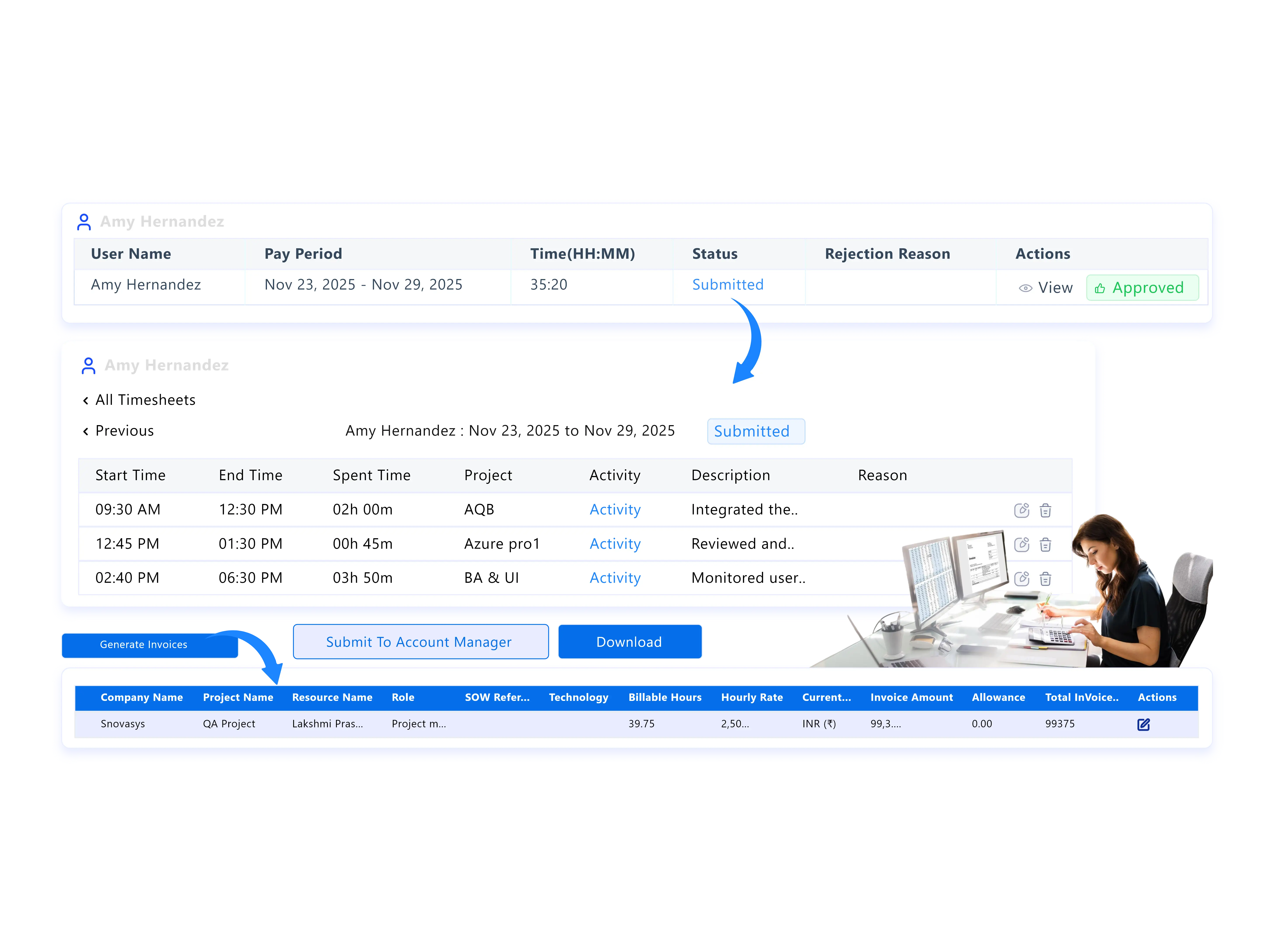
Automated & Project-Based Timesheets

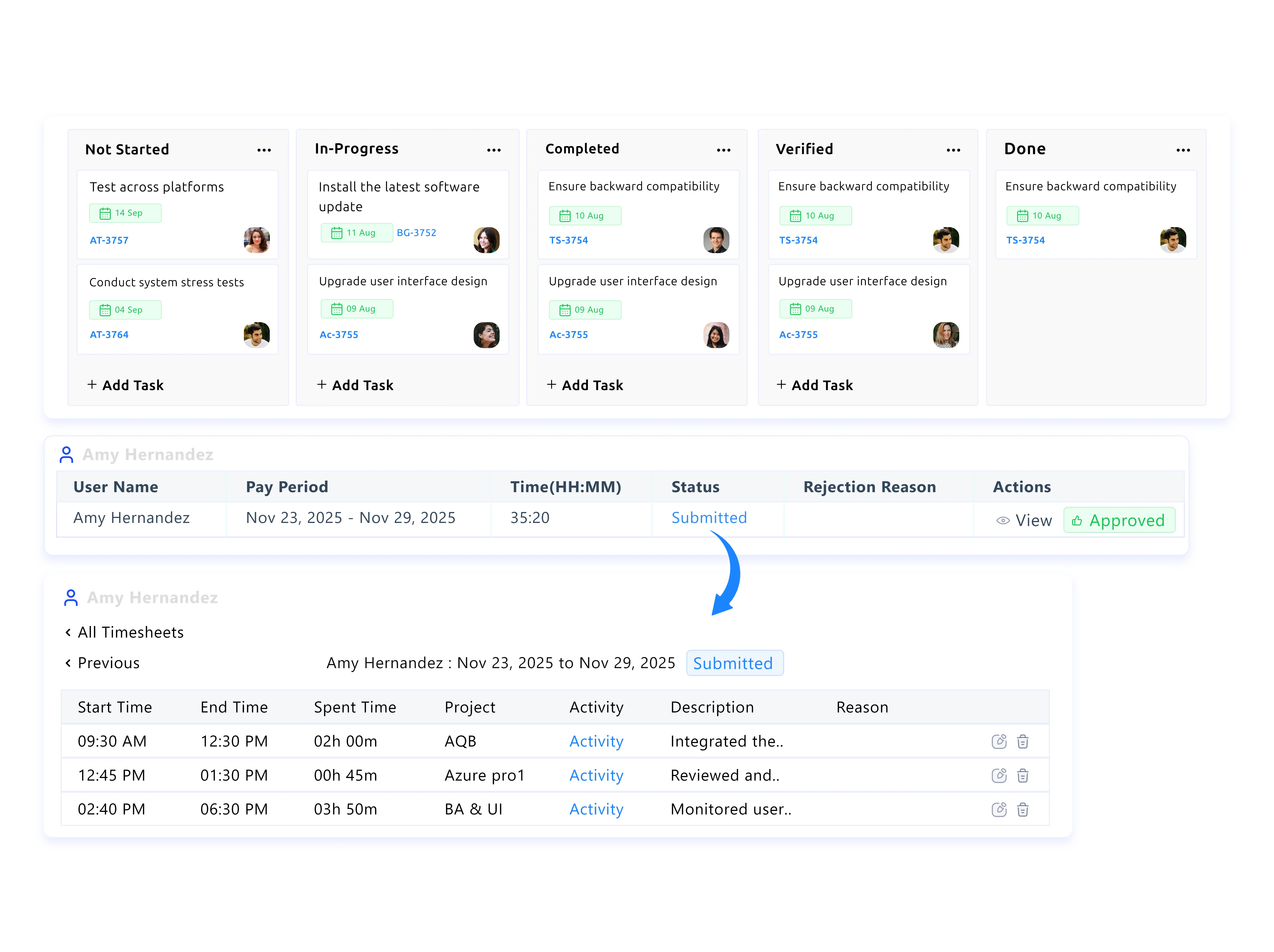
Timesheets are generated automatically from tracked hours. Add project-level details for accurate billing, with editable submissions and structured approval workflows.

projects icon

Intelligent Productivity Tracking

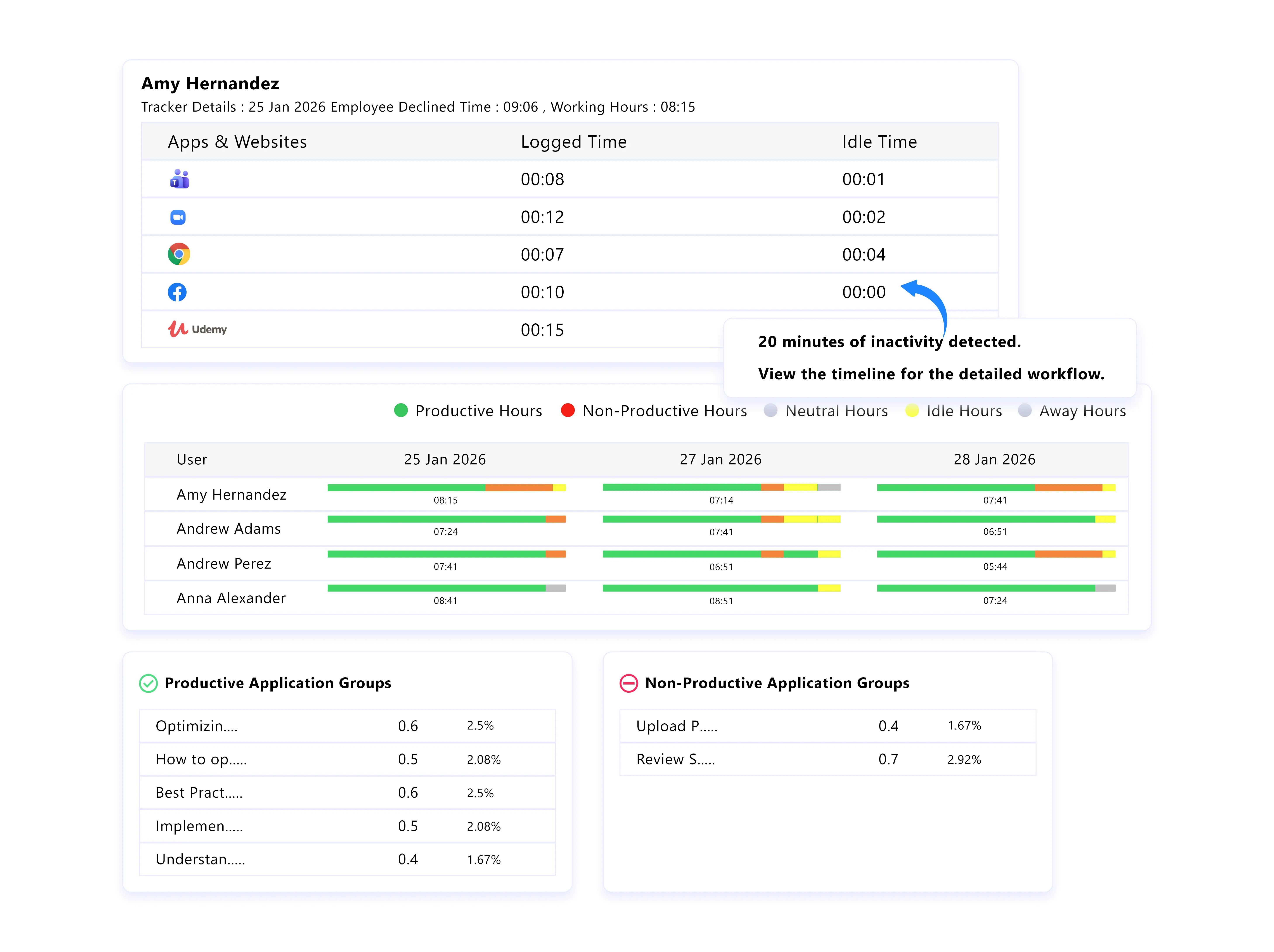
Get a clear picture of how time is spent across productive, neutral, and unproductive activities based on predefined app and website categories. Identify patterns and trends over time to encourage better work habits.

projects icon

Idle & Offline Time Intelligence

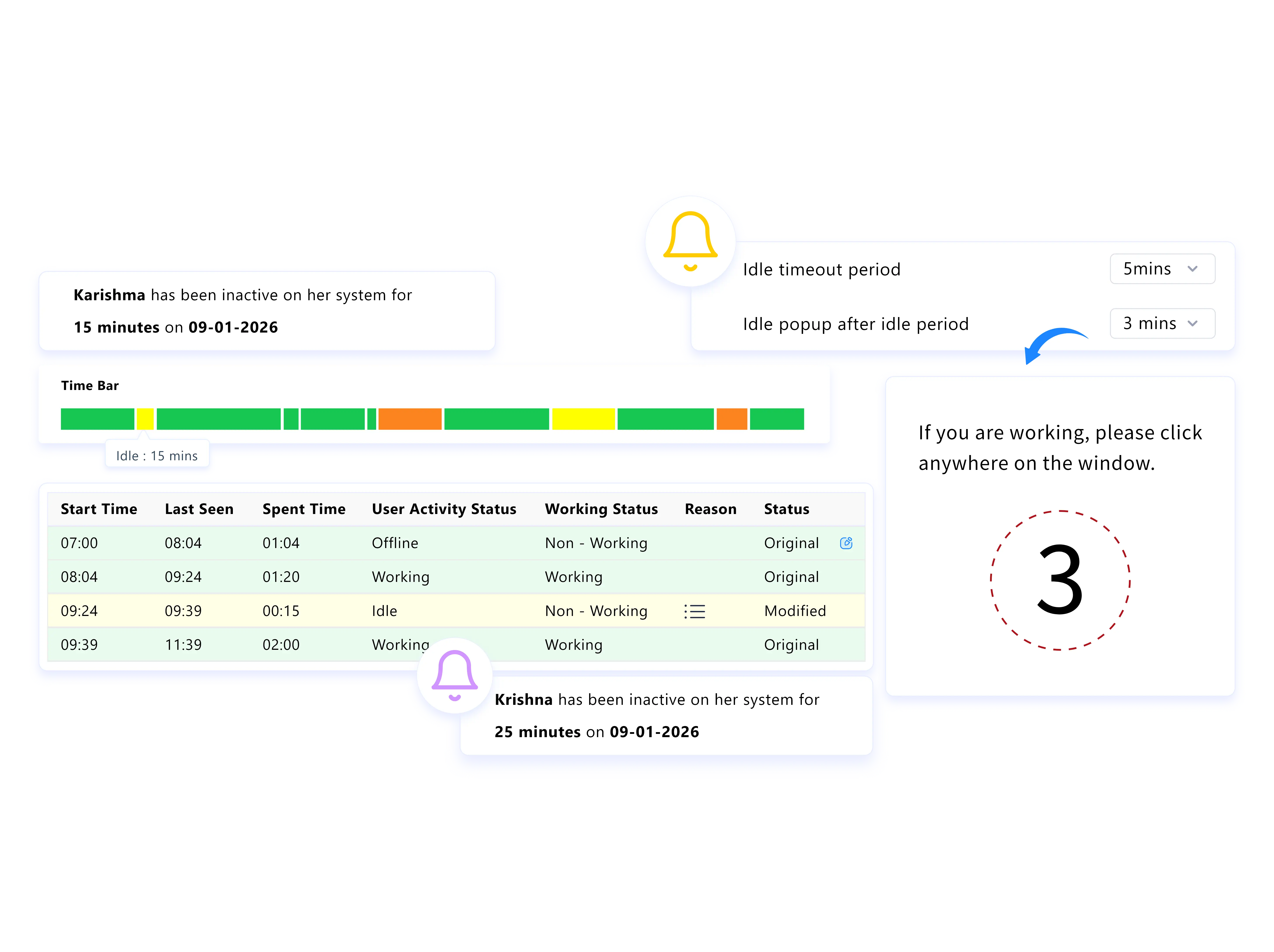
Get clear visibility into idle and offline time. Eliminate confusion around gaps while accurately capturing real work.

projects icon

Integrated Project & Task Management

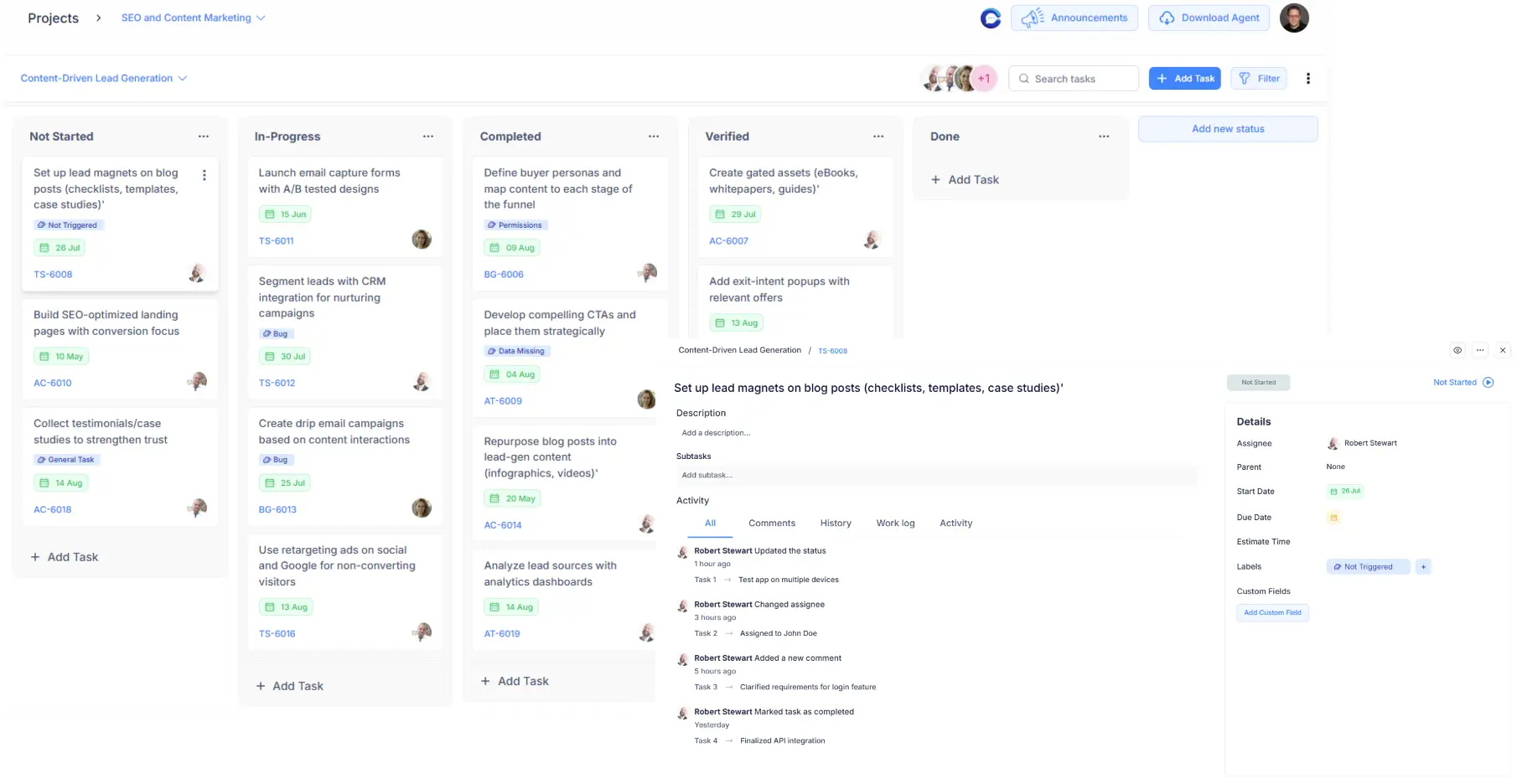
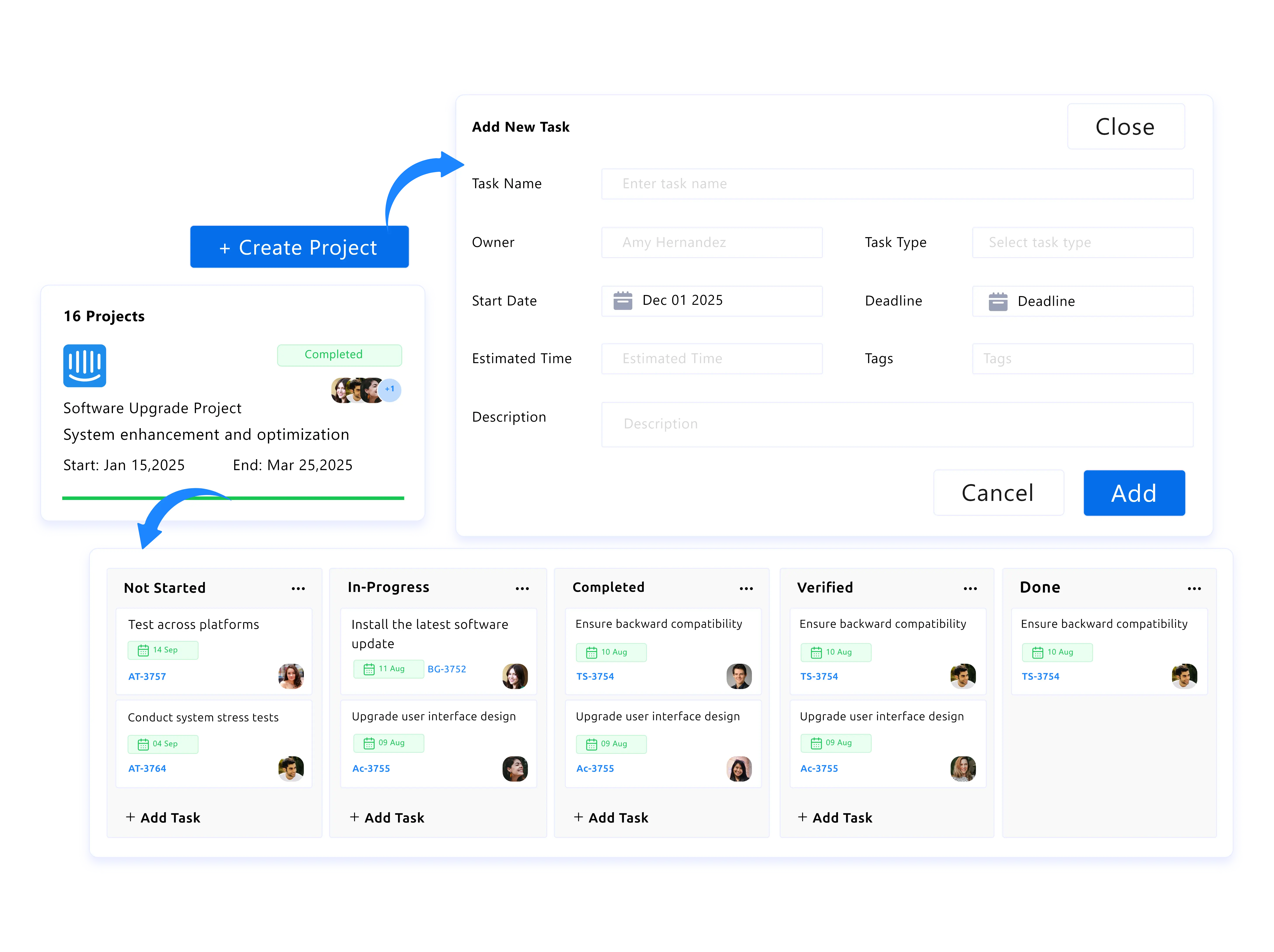
Create projects, assign tasks, track milestones, and monitor progress all in one place. Keep teams aligned, accountable, and on schedule.

time tracking explain
projects icon

Field & Location-Based Time Tracking

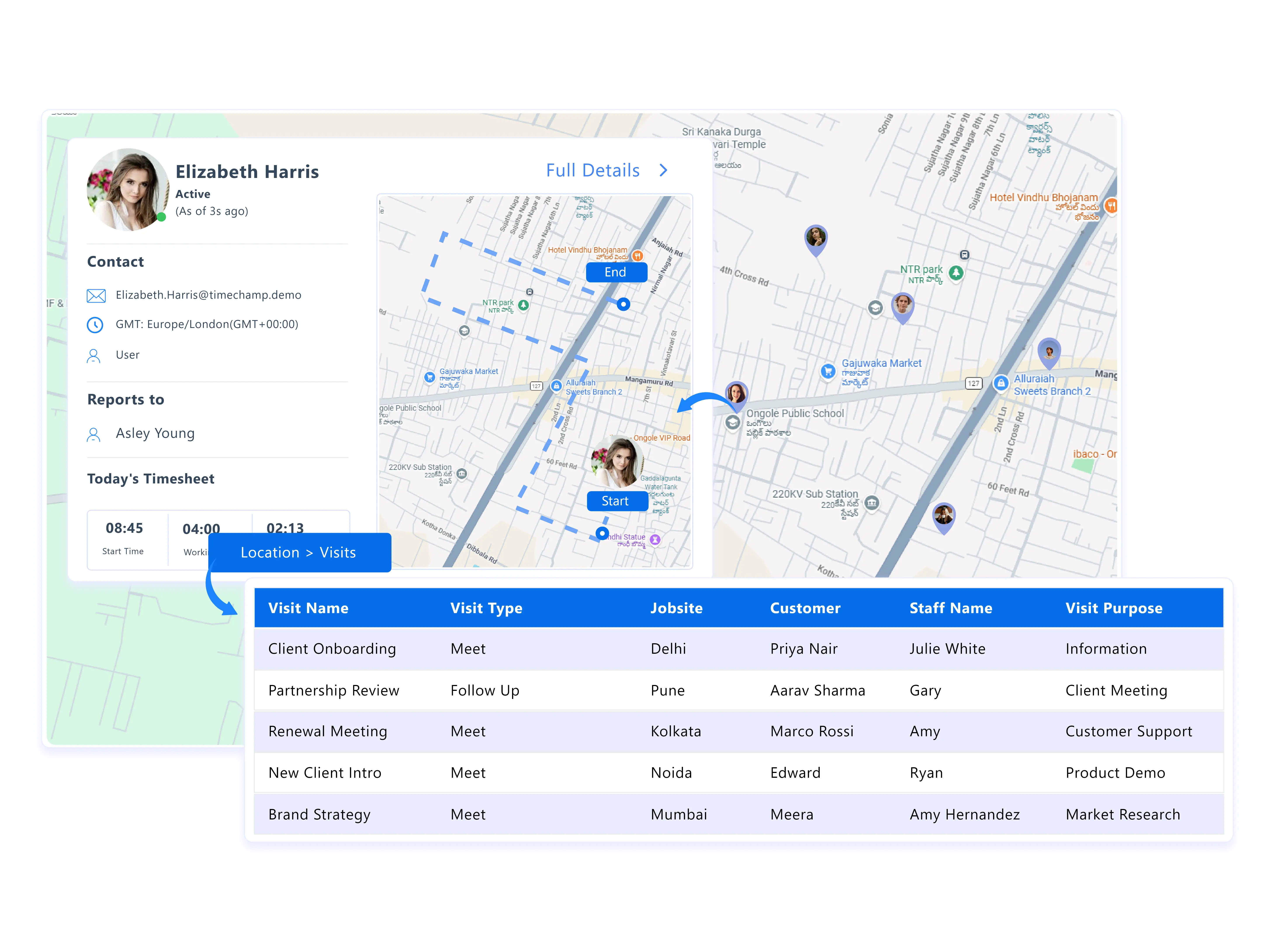
Track time accurately with GPS-enabled attendance and geofencing across field teams and remote operations.

projects icon

Proactive Workforce Alerts

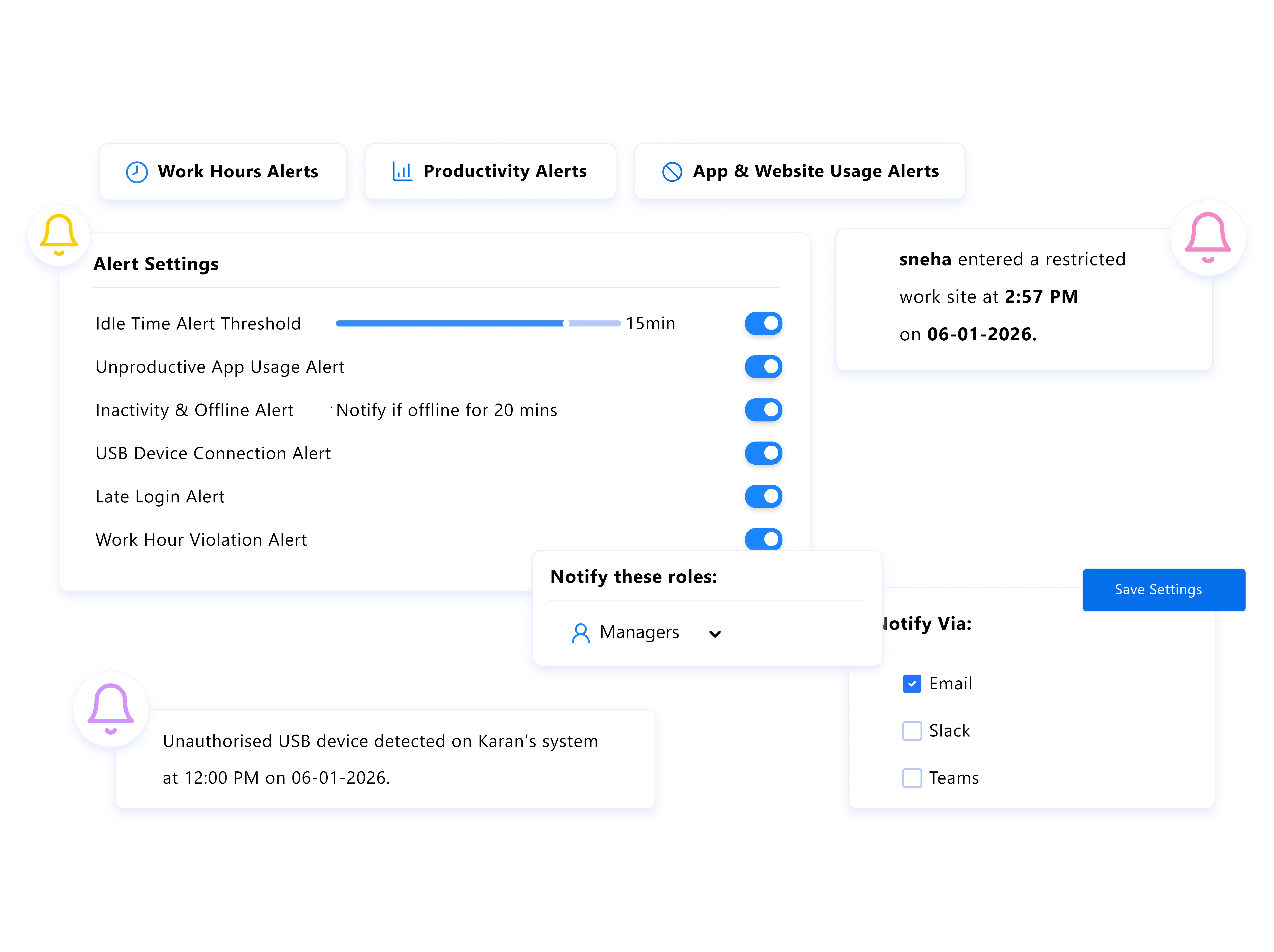
Receive timely alerts for late logins, extended idle time, productivity dips, or unusual activity, and take action early before issues escalate.

projects icon

Payroll & Invoicing Accuracy

Eliminate manual calculations with verified time data to streamline payroll processing and generate precise, client-ready invoices.

projects icon

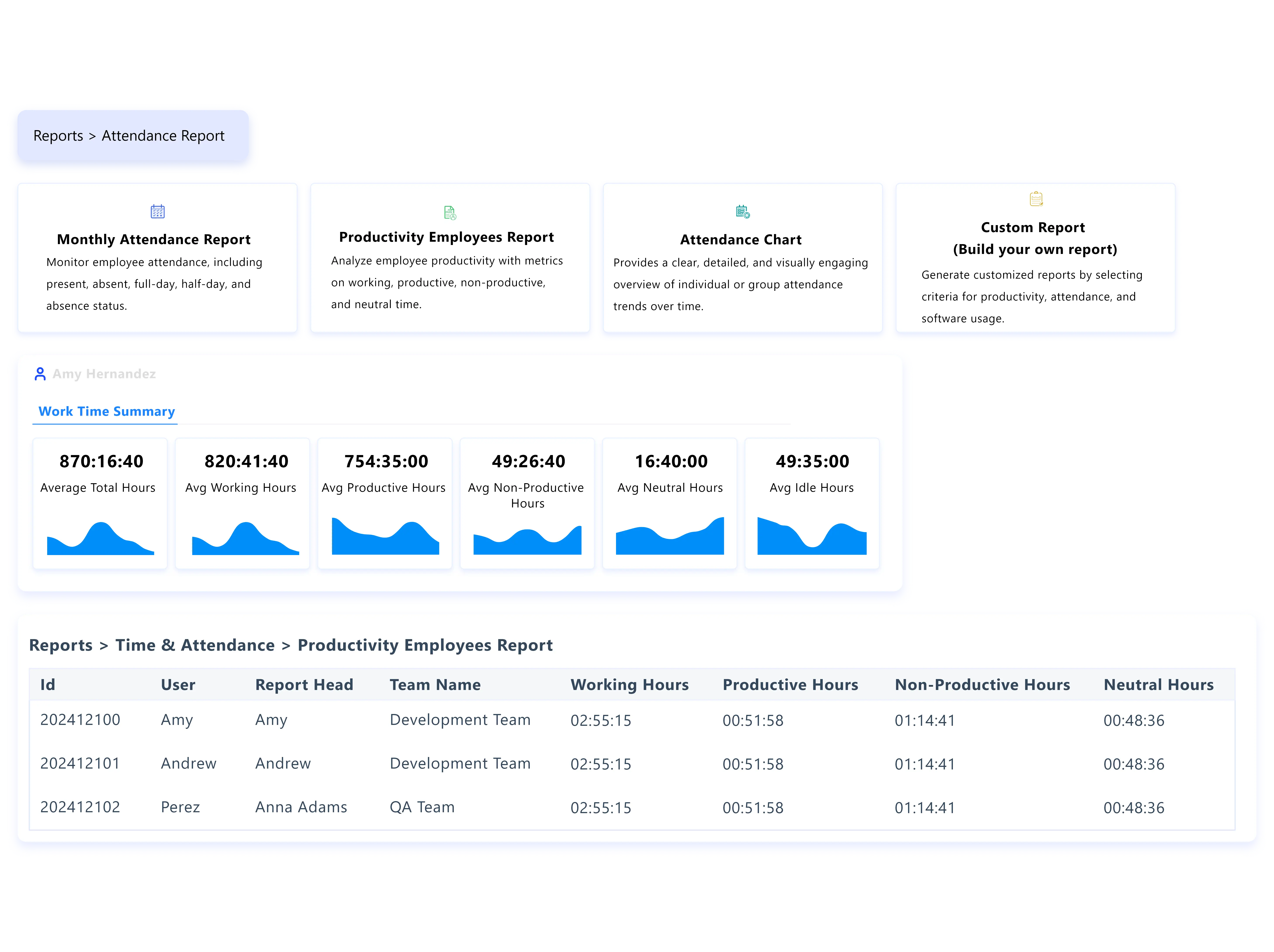
Customisable Workforce Reports

Generate attendance, overtime, productivity, and break-time reports in seconds. Customise them to fit your operational and compliance needs.

Traditional Time Tracking vs. Time Champ Time Tracking

A quick look at how Time Champ transforms the way teams track time, activity, and performance:

Traditional Time Tracking

  • icon
    Basic clock-in/clock-out with very limited visibility
  • icon
    No clarity on how work hours are spent
  • icon
    Minimal visibility into employee productivity
  • icon
    Timesheets prepared manually
  • icon
    No offline tracking support
  • icon
    No location verification

Modern Time Tracking Tool
( Time Champ )

  • icon
    Real-time view of work hours, attendance, live status, and activity
  • icon
    Clear breakdown of active time, idle time, apps used, and websites visited
  • icon
    Rich productivity insights with labels, timestamps, and behavioral patterns
  • icon
    Auto-generated timesheets with precise logs and quick approvals
  • icon
    Offline tracking that auto-syncs once connected
  • icon
    GPS-based location tracking for field or remote teams

Is Time Champ the Perfect Time Keeping Software for Your Team?thinking image

Absolutely! Teams using Time Champ gained complete visibility into work hours, improved accountability, and removed guesswork from productivity.

It helped organisations effortlessly track time, understand activity patterns, and run daily operations with clarity.

With Time Champ, teams:

consultant tracking
workign hours tracking

Tracked Work Hours with Total Accuracy

They logged time automatically with precision, ensuring every minute of work was captured and recorded correctly.

real time reports

Improved Accountability Across Teams

Employees received transparent insights into their own work patterns while managers monitored progress without micromanaging.

sameless invoicing

Tracked Time Even When Offline

Time Champ recorded working hours without internet access and synced everything automatically once the device reconnected.

Make your workday smoother with Time Champ - an easy, intuitive time-tracking solution that captures every hour & activity with ease.

Bring your workflow to our platform. We’ll bring the precision behind every second.

Get Started now!
How Time Champ’s Time Tracking Software Works
  • 1
    Create Your Account
  • 2
    Add Your Team Members
  • 3
    Set up Projects, Tasks & Workflows
  • 4
    Track Time Automatically or Manually
  • 5 Access Clear Reports & Insights
Create Your Account

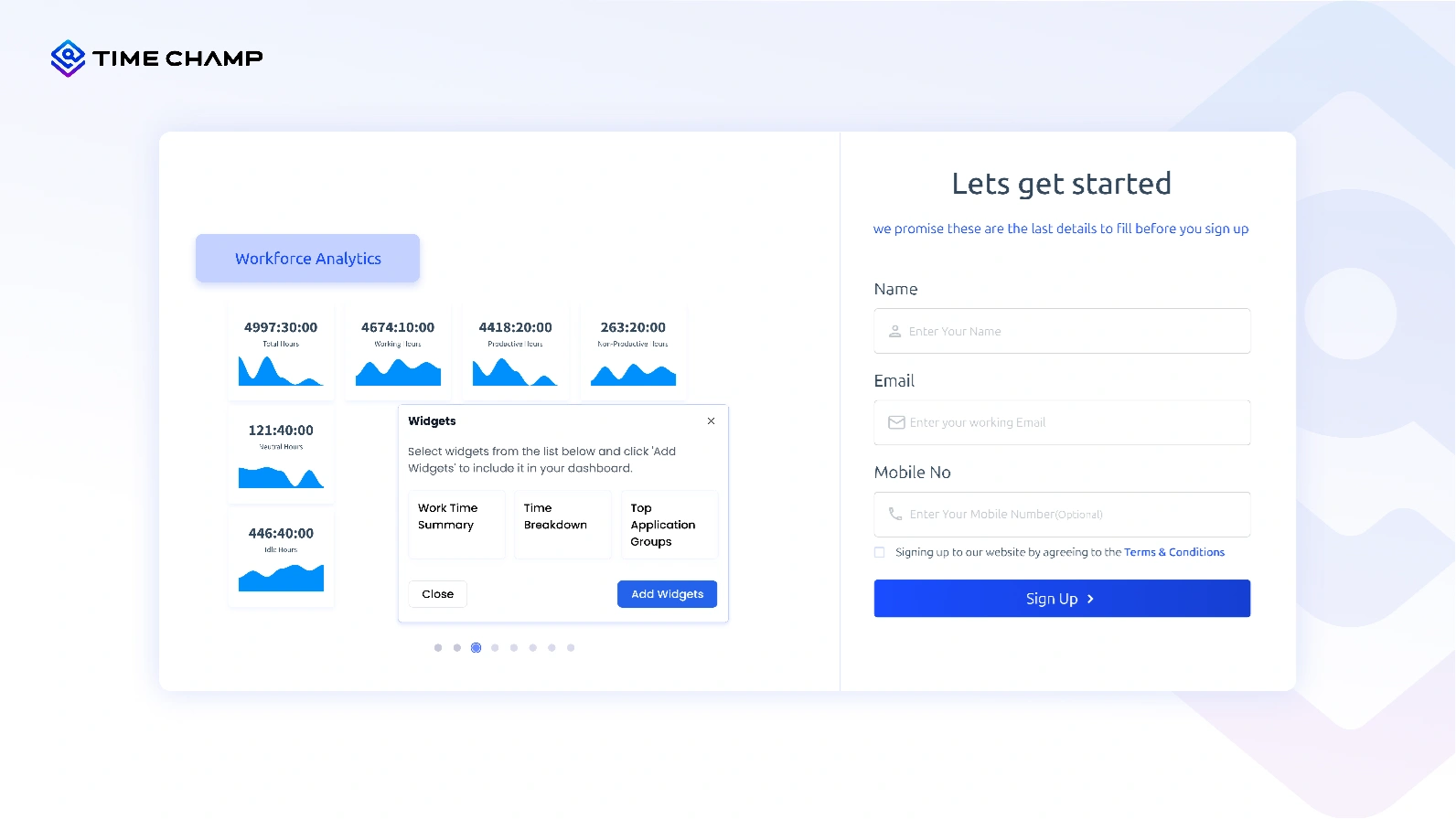
Start by signing up for free and setting up your account in just a few seconds.

Create an Account
Add Your Team Members

Invite your entire team to join so everyone’s time, activity, and work hours can be tracked from one place.
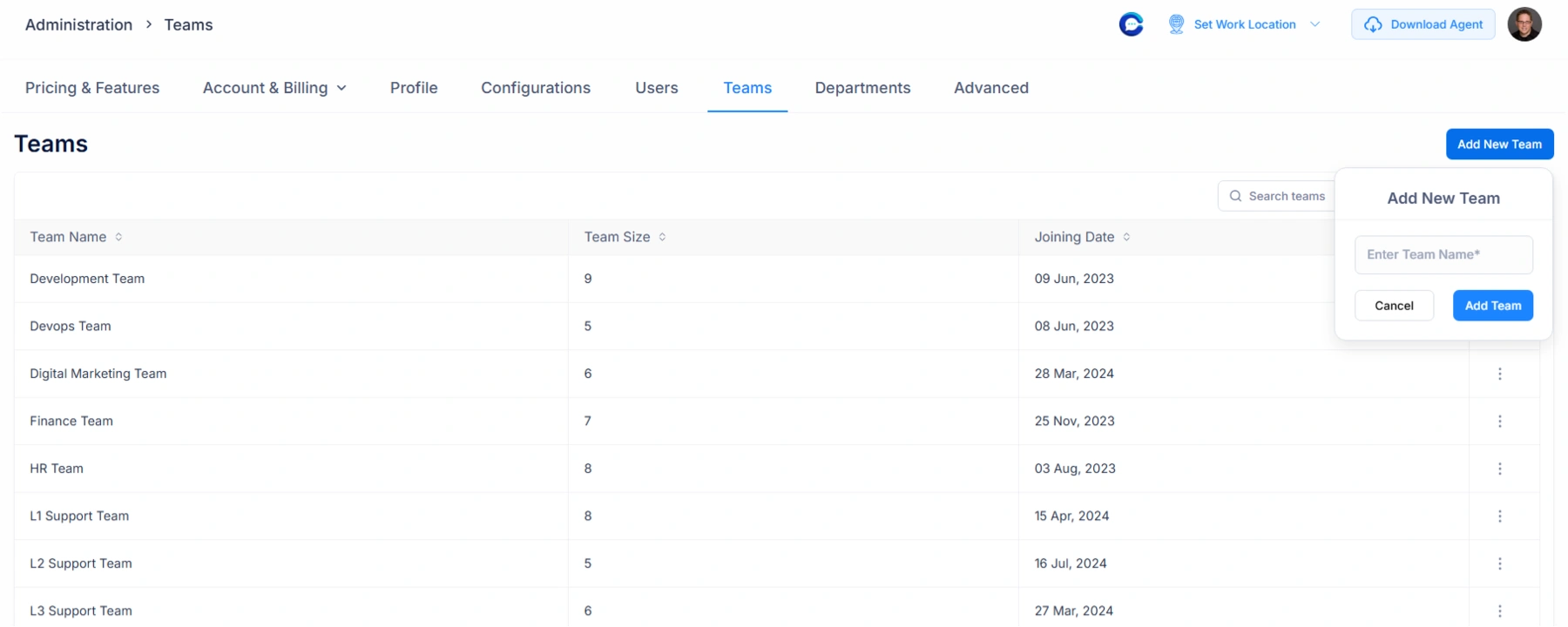
Invite Your Whole Team
Set up Projects, Tasks & Workflows

Create projects, assign tasks, and define work categories to structure how time will be tracked across your organisation.

Create & Manage Projects
Track Time Automatically or Manually

Let Time Champ track work hours, activity, and idle time in real time, or allow team members to log their hours manually if needed.
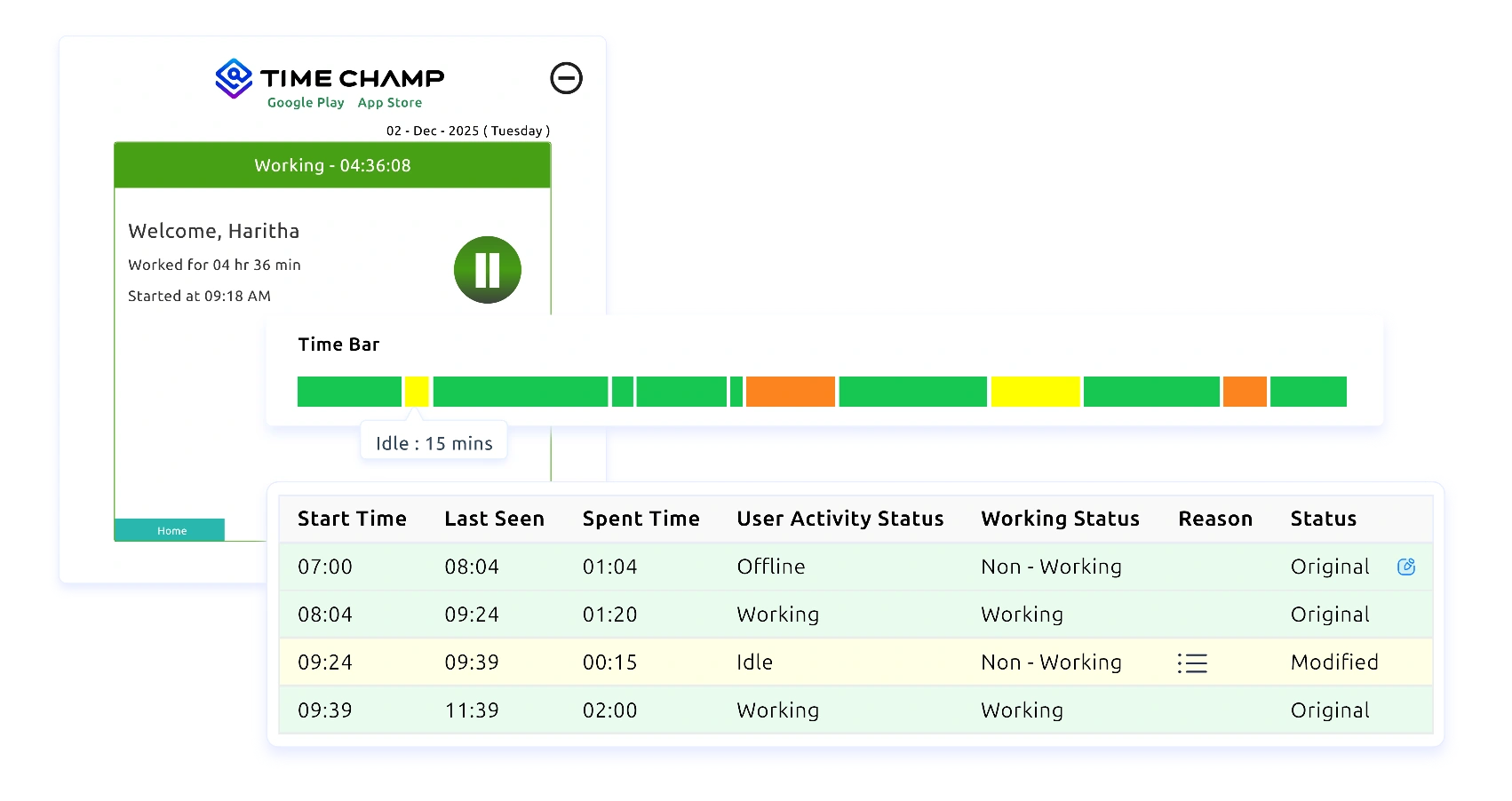
Start Tracking Time
Access Clear Reports & Insights

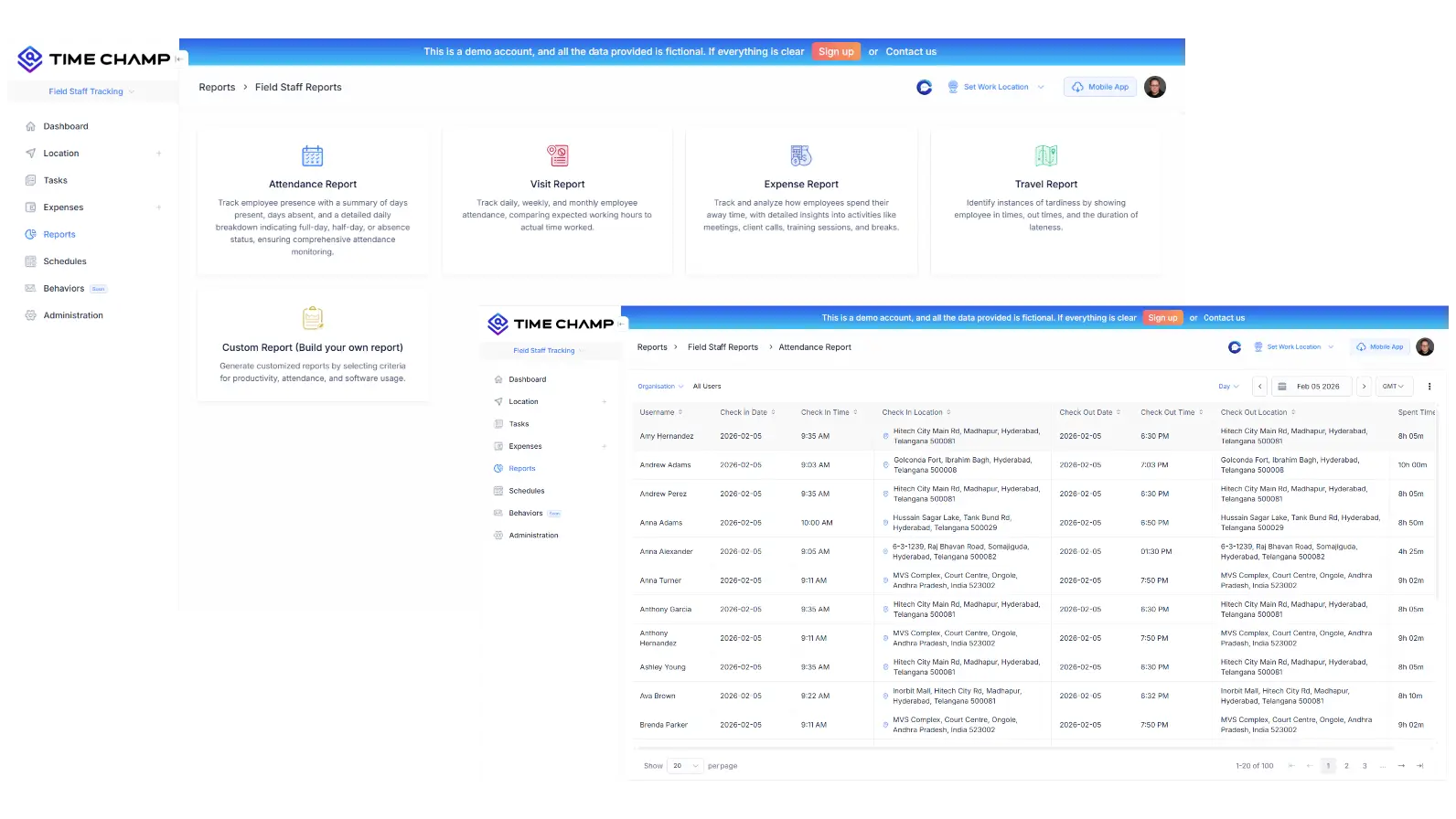
View automated timesheets, productivity trends, activity logs, and real-time dashboards to understand how your team spends every hour.
Export Reports

Time Tracking Software Use Cases

time management productivity

Real-Time Logging & Work Hour Tracking

time management productivity

Daily Activity Monitoring & Focus Insights

task proritizaioon

Project-Based Time Tracking & Cost Estimation

project task tracking

Billable vs Non-Billable Hour Management

evaluation and improvement

Productivity Trend Analysis & Reporting

task segmentation

Idle Time, Break Tracking & Work Patterns

compliance regulation

Workload Balancing & Resource Optimisation

work hour analysis

Location Time Tracking for Field & Remote Teams

A Smarter Time Tracking Tool for Better Team Performance

See What Our Happy Customers Say

Agilisium
Saw 70% Boost in Workforce Productivity
Automated, accurate attendance eliminated manual effort.
Smarter efficiency reduced operational delays
Agilisium companylogo

Simply awesome! If you have suggestions, Time Champ is always open to your ideas, share your thoughts, and help shape what comes next.

Agilisium
Vserve Ebusiness Solutions
52% Rise in Employee Accountability
Improved visibility into team operations
Saw a 56% increase in overall team productivity
Vserve Ebusiness Solutions

Time Champ redefined our daily operations. It has simplified how we track staff and manage daily operations. Weʼve seen real results in productivity and accountability. Iʼd recommend it to any business looking for an easy, all-in-one solution

Arun Raj
Envision
Saw 47% Improvement in Work Quality
Reduced effort and time in payroll processing
Achieved better task prioritisation across teams
Envision

We replaced a tool that fell short with Time Champ, and our operations improved instantly. Its flexible tracking, attendance, productivity, and screenshots made our workflow far more efficient.

Sharat Kumar,
Process Analyst at Envision Enterprise Solutions
Markets & Markets
Saw 25% Boost in Team Productivity
Improved focus with smarter idle time tracking
Achieved a 38% boost in operational efficiency
Markets & Markets

Time Champ has transformed how we manage our workforce. With real-time monitoring and deep insights, we’ve reduced inefficiencies, improved productivity, and supported healthier work-life balance, all without compromising employee privacy.

Markets and Markets
Milestone Technologies
Saved up to 1,270 Accuracy in Billing Hours
Achieved better accuracy and efficiency in client billing  
Improved scheduling that enhanced overall productivity 
Milestone Technologies

Time Champ is a trusted buddy for us. We have been using it for 3 years now, and it has greatly helped us streamline our operations.  

Premish Paul,
 Executive Leader at Milestone Technologies
 AAA Insolvency
Achieved 46%Enhancement in Workflow Efficiency
Improved monitoring through real-time insights
39% increase in employee productivity
 AAA Insolvency

Time Champ showed how time is spent, boosted team productivity, simplified billing, and improved performance with its easy-to-use, clear system.

Priyanka Mazoomdar
See What Makes Teams Choose Time Champ

Recognised for Excellence, Trusted by Teams Worldwide

Time Champ’s workforce intelligence software earns top ratings for helping teams work smarter with clarity, focus, and measurable growth.

gridleader award timechamp high perfomer timechamp spring momentum awards timechamp easier todo award asia high perfomer spring mid market high perfomer high perfoemr small high user adoption awards timechamp awards regional leader timechamp asia pasific leader easiestsetup timechamp high perfoemr small high perfomer timechamp midmarket leader mid market high perfomer high perfomer timechamp mid market high perfomer
stars image
g2 Logo stars image

4.8

capterra logo stars image

5.0

crozdesk logo stars image

5.0

softwaresuggest logo stars image

5.0

A Complete Guide on Time Tracking Software

Guide Topics

    What is Time Tracking Software?
    Time tracking software is a digital tool that records and monitors how employees spend their working hours. It automatically logs the time spent on tasks, projects, activities, and daily work, helping businesses maintain accurate timesheets, improve productivity, and ensure transparent reporting of work hours.
    Why is Time Tracking Software Important?
    Time tracking system matters as it helps teams work more clearly and efficiently. The points below highlight the key reasons why it plays such an important role in everyday business operations.
    Ensures Accurate Work Hours
    Time tracking tool removes the need for manual note-taking, reducing errors and inconsistencies. By automatically capturing active hours, breaks, and idle time, it creates precise timesheets that both you and your employees can rely on. This level of accuracy is essential for maintaining trust and ensuring every minute of work is accounted for correctly.
    Improves Team Productivity
    With detailed insights into daily activity, your teams can easily identify where time is spent and find areas where improvements can be made. This visibility helps highlight inefficiencies, repetitive tasks, and productivity gaps. As a result, teams can shift focus to high-value work, prioritise tasks better, and build stronger work habits over time.
    Supports Fair Payroll and Billing
    Accurate time logs make payroll smoother and more transparent by ensuring employees are paid exactly for the hours they’ve worked. For businesses that bill clients based on time, clear and detailed reports help avoid disputes and maintain professional trust. This improves financial accuracy and reduces conflicts between teams and clients.
    Better Management of Remote and Hybrid Teams
    For distributed teams, visibility is important. Time tracking software provides you with a clear look at work hours, activity levels, and progress without needing constant check-ins. It supports accountability while giving your teams flexibility, making it easier to manage hybrid and remote work environments.
    Clarifies How Time Is Allocated Across Projects
    Time sheet software makes it easy to see how much time each project or task requires. This helps teams understand workload distribution, track project budgets, and plan future work more accurately. With clear allocation data, you can assign resources more effectively and avoid overloading team members.
    Optimises Workflows and Operations
    Reliable time insights reveal how work is actually happening every day. You can identify slow processes, imbalances in workload, and areas that need improvement. With this information, you can redesign workflows, streamline operations, and make smarter decisions that improve overall efficiency across the organisation.
    How Time Champ Supports Time Tracking
    Time Champ is a workforce intelligence software that takes the stress out of tracking work hours by automating the entire process from start to finish. Whether your team works in-office, remotely, or in a hybrid setup, Time Champ ensures every minute is captured accurately and consistently. It keeps all the tracked time data synced across devices, making it easy for employees to manage their work from anywhere without losing track of their progress.
    The system automatically records active and idle time, giving teams a clear picture of how their day is spent. Users can map their hours to specific tasks & projects, ensuring every entry is organised and meaningful. Daily, weekly, and monthly logs provide complete visibility into work patterns, making it simple to review activity or prepare reports.c
    Alerts notify both you and users about long idle periods & missed entries, helping them maintain clean and accurate records. In addition, Time Champ’s detailed reports support smooth payroll processing, transparent client billing, and more informed performance reviews.
    By combining automation, clarity, budgeting, and flexibility, Time Champ makes time tracking effortless and reliable for teams of any size. It removes the burden of manual timesheets and gives organisations confidence that their time and data is always correct, complete, and easy to manage.
    Key Features of Time Tracking Software
    A strong time tracking solution offers tools that make monitoring work hours simple, accurate, and effortless. Time Champ brings all these features together to help teams stay organised and productive throughout the day. Below are the key features that make Time Champ a complete time tracking system:
    Automatic Time Capture
    Time Champ records work activity in the background without users having to start or stop timers manually. It captures active work, idle time, and application usage automatically, ensuring every minute is logged correctly. This helps eliminate manual errors and keeps timesheets clean and reliable.
    Manual Timesheet Entry
    Not all work happens at a desk or in front of a computer. Time Champ allows users to add or adjust their time entries manually whenever needed. This flexibility ensures that meetings, fieldwork, brainstorming sessions, and unexpected tasks are all captured accurately, creating a complete picture of the workday.
    Idle Time Detection
    Time Champ detects when a user becomes inactive and marks that period accordingly. This helps maintain accurate reporting by separating active working time from breaks or interruptions. Teams can set rules and view detailed logs to understand activity patterns and reduce unproductive time.
    Project & Task Tracking
    Users can map each hour they work to the correct task, project, or client. This gives the organisation a clear view of how time is distributed and which activities require the most effort. With this insight, project managers can plan workloads better, manage scope, and improve efficiency across teams.
    Productivity Analytics
    Time Champ provides insights into how effectively time is being used throughout the day. It highlights active hours, idle periods, app usage patterns, and overall productivity levels. These insights help both employees and managers identify distractions, optimise focus time, and improve work habits over time.
    Attendance & Work Hours Tracking
    Time Champ integrates time tracking with attendance management. It records login/logout times, working hours, break durations, overtime, and compliance with schedules. This gives you a complete, unified picture of employee availability and performance.
    Reporting & Export Options
    The platform generates detailed daily, weekly, and monthly reports that summarise all logged activities. These reports can be exported for payroll processing, billing, audits, or internal performance reviews. With clear, structured data, businesses can make informed decisions and maintain accurate records effortlessly.
    Location Tracking
    For teams that work in the field or move between job sites, Time Champ offers location tracking to log where work is performed. This ensures accurate time records for on-site work, travel, and client visits. Location history and geofencing also help verify attendance and improve accountability for mobile or distributed teams.
    Benefits of Using Time Tracking Software
    1. Accurate Work Hours and Reliable Timesheets

    Time tracking software ensures every minute of work is captured correctly, removing the need for guesswork or manual logging. Employees no longer have to remember what they did at the end of the day, and managers don’t need to chase missing entries. With automated tracking, timesheets become consistent and trustworthy, helping organisations maintain accuracy across attendance, payroll, and project reports. This reduces errors, prevents confusion, and creates a reliable system that both employees and management can depend on.

    2. Improves Productivity and Better Focus

    Understanding how time is spent can significantly boost productivity. Time tracking software highlights which tasks take the longest, where inefficiencies occur, and what activities might be causing delays or distractions. These insights help employees stay focused and prioritise their most important work, while giving managers a clearer view of team performance. Over time, this leads to healthier work habits, stronger task management, and more efficient workflows across the organisation.

    3. Smooth, Transparent, and Accurate Billing

    For teams that bill clients by the hour, accurate time logs are essential. Time tracking software provides clean, detailed records that break down exactly how much time was spent on each client, task, or project. This transparency strengthens client trust, reduces billing disputes, and helps ensure invoices match the actual work completed. Even internally, cost tracking becomes smoother because managers can see the true effort put into each project.

    4. Better Project Planning and Resource Allocation

    Time tracking shows how long tasks actually take, not just what was estimated. This data helps teams plan future projects more realistically, set accurate deadlines, and avoid overloading employees. Managers can also see which team members are overloaded, underutilised, or perfectly balanced, making resource allocation far more effective. With better planning and visibility, projects become easier to manage, budgeting becomes more predictable, and timelines stay on track.

    5. Reduces Administrative Workload

    Manual timesheets are time-consuming and lead to mistakes. Time tracking software automates the process, reducing the amount of administrative work required from HR, managers, and employees. Reports are generated instantly, approvals move through the system more quickly, and payroll or billing cycles take far less effort to complete. This frees your teams from unnecessary manual tasks and allows them to focus on more meaningful work instead.

    Challenges without Time Tracking Software
    Without a proper time tracking app, businesses often struggle to maintain clarity and efficiency in their daily operations. Below are the major challenges organisations face when time tracking is not in place:
    Difficulty Measuring Productivity
    Without a clear view of how time is spent, teams struggle to understand where efforts are going. Managers cannot identify drawbacks or inefficiencies, and employees lack insight into their own work patterns, making productivity hard to track or improve.
    Miscommunication About Workloads and Priorities
    Without time tracking, it’s difficult to see who is overloaded and who has the capacity. Teams may end up misaligned, working on the wrong priorities, or struggling with uneven workloads. This affects efficiency and can lead to burnout or overlooked responsibilities.
    Inefficient Payroll and Billing Processes
    When time entry is inaccurate or incomplete, payroll becomes a slow and error-prone process. For service-based businesses, incorrect time logs can also cause billing discrepancies, delays in invoicing, and strained client relationships.
    Higher Risk of Overwork or Underutilisationc
    When organisations can't see how much time employees spend on tasks, it's easy for some people to take on too much while others have too little to do. This imbalance affects productivity, morale, and overall team performance.
    Lack of Transparency in Attendance and Work Behavior
    Managers have limited visibility when employees are working, how long tasks take, or whether work hours align with expectations. This lack of transparency can create misunderstandings, inconsistent attendance records, and reduced accountability.
    Best Practices for Using Time Tracking Software
    Train Employees on How to Use the Tool
    Start by giving employees proper training before the software is rolled out. Show them how the system works, what it’s used for, and why it matters. Provide simple guides or short videos they can refer back to, and make sure they have time to ask questions. When people understand the purpose and feel comfortable with the tool, adoption becomes much smoother.
    Encourage Consistent Daily Tracking
    Set the expectation that your team should log their time every day. Remind them during standups or check-ins, especially in the early weeks. Enable gentle reminders within the system to help build the habit. Daily tracking keeps records accurate and avoids guesswork.
    Review Time Reports Regularly
    Make reviewing time reports part of your regular routine. Look for workload patterns, delays, or anything that may need attention. Discuss these insights with your team so plans can be adjusted and workflows improved. Regular reviews ensure the data leads to action, not just storage.
    Use Data to Support, Not Micromanage
    Use time tracking information to remove roadblocks, balance workloads, and make processes smoother. Focus on identifying improvements and offering support. When the team sees that the data is used to help them, trust and cooperation grow.
    Integrate With Existing Systems
    If your team works with payroll, billing, HR, or project tools, make sure the time tracking system is properly connected. Check that the data flows correctly and update your team on any changes to their workflow. Proper integration saves everyone time and avoids repeated manual steps.
    Set Clear Expectations
    Give your team clear guidelines on how and when time should be logged. Define what needs to be tracked, work hours, breaks, tasks, projects, overtime, etc. Share these expectations openly and keep them accessible. When everyone follows the same standards, the data stays accurate and easy to work with.
    By following these best practices, you can ensure time tracking becomes a smooth, supportive, and productive part of everyday work.
    capteraa small logo goolereview small logo g2crowd small logo crozdesk small logo companyreviewsmall logo
    star image 4.7/5 avg.

    Ready to Manage Your Workforce Smarter?

    Join our family of 1100+ companies using smart insights to redefine workforces!

    tick mark indicating free trial available

    Free Trial

    tick mark indicating no credit card required

    No Credit Card Required