Leave Encashment Calculator
Calculate your leave encashment amount instantly, supports earned leave, tax exemption under Section 10(10AA), government and private employees, totally free.
What is Leave Encashment Calculator
A leave encashment calculator is an online financial tool that helps employees estimate the amount they can receive for their unused paid leave. It determines the payout based on factors such as salary and the number of unused leave days. This allows employees to understand the value of their accumulated time off and the amount they may receive under their organization’s policy.
Instead of doing manual calculations, you can quickly enter details such as your monthly salary and the number of unused leave days. The calculator then applies the standard leave encashment rules used by most companies to give an instant estimate of the payable amount.
This is especially useful for employees planning to resign, retire, or take advantage of their company’s policy. It gives a clear idea of the financial value of accumulated leave, making it easier to plan finances and understand what to expect in the final settlement or payroll calculation.
Why Should You Use Leave Encashment Calculator?
Unused leave isn’t just extra time off, it can actually have real financial value. If you’ve accumulated leave days over time, you might be able to convert them into cash depending on your company’s policy. A leave encashment calculator helps you quickly estimate how much those unused days could be worth. Here are some key reasons why many employees use this tool.
1. Quick Estimation of Leave Value
A leave encashment calculator helps you quickly estimate how much money your unused leave days are worth. Enter your salary and remaining leave days to instantly estimate your payout amount.
2. Improves Calculation Accuracy
When you calculate leave encashment manually, there is always a chance of mistakes, especially if different salary components or company policies are involved. Using a calculator helps you apply the correct formula, giving you a more accurate estimate.
3. Better Financial Planning
Knowing the potential amount you may receive from leave encashment can help you plan your finances more effectively. This can be particularly useful if you are planning to resign, retire, or expect a final settlement from your employer.
4. Easy to Understand the Encashment Process
If you’re unsure how leave encashment is calculated, a calculator can make things much clearer. It shows you the estimated value of your unused leave based on the details you provide, making the process easier to understand.
5. Supports Informed Decision-Making
When you know the value of your unused leave, it becomes easier for you to decide whether to encash the leave or use it before leaving your job. This allows you to make better decisions and get the most out of your company’s leave policy.
6. Tax Planning and Compliance
A leave encashment calculator can also help you understand the taxable and exempt portions of your leave encashment amount under Section 10(10AA)(ii) of the Income Tax Act. This gives you a clearer idea of the tax implications, helping you plan your finances while staying compliant with tax rules.
7. Transparency and Trust
Using a leave encashment calculator allows you to independently estimate the amount you may be entitled to receive. This makes it easier for you to verify the figures provided by your employer, helping build transparency and trust.
How to Use the Leave Encashment Calculator?
Using the leave encashment calculator is simple. You only need to enter a few details about your employment and unused leave to estimate your leave encashment amount and its taxability.
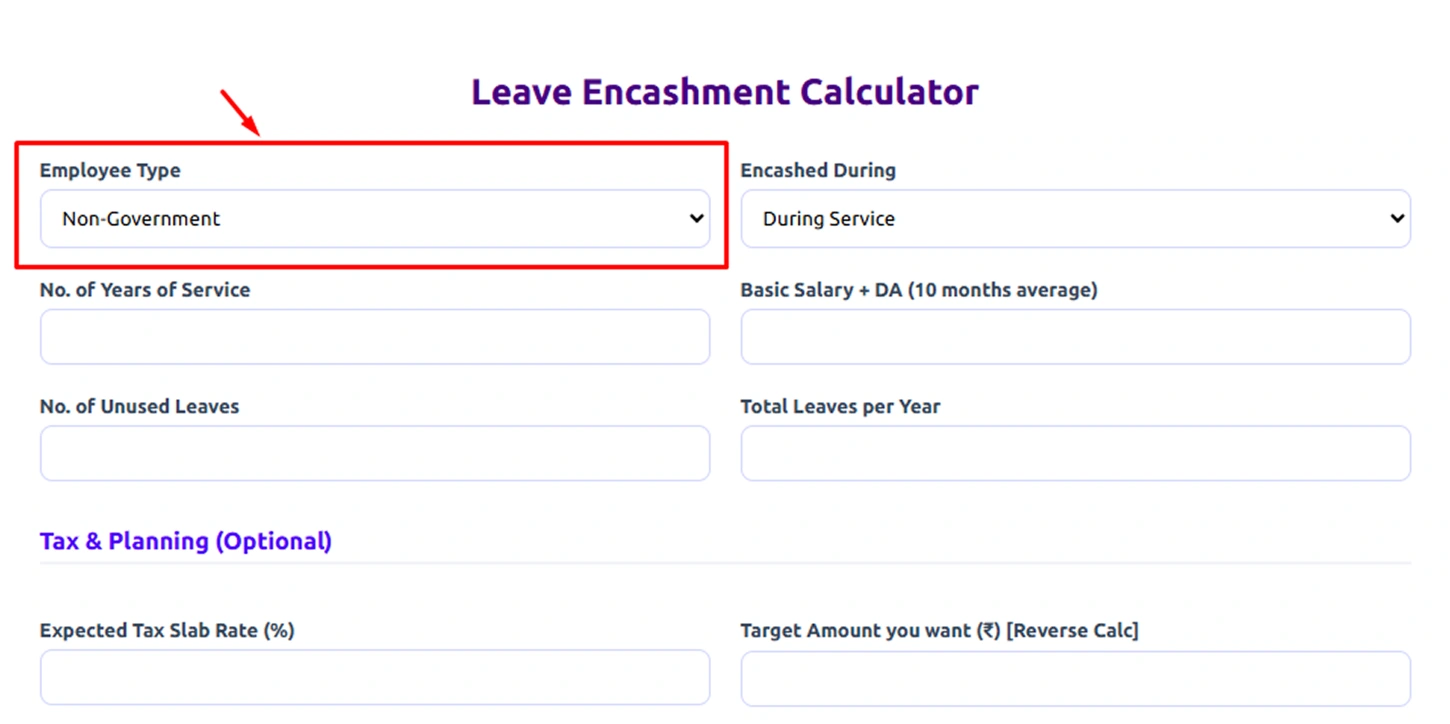
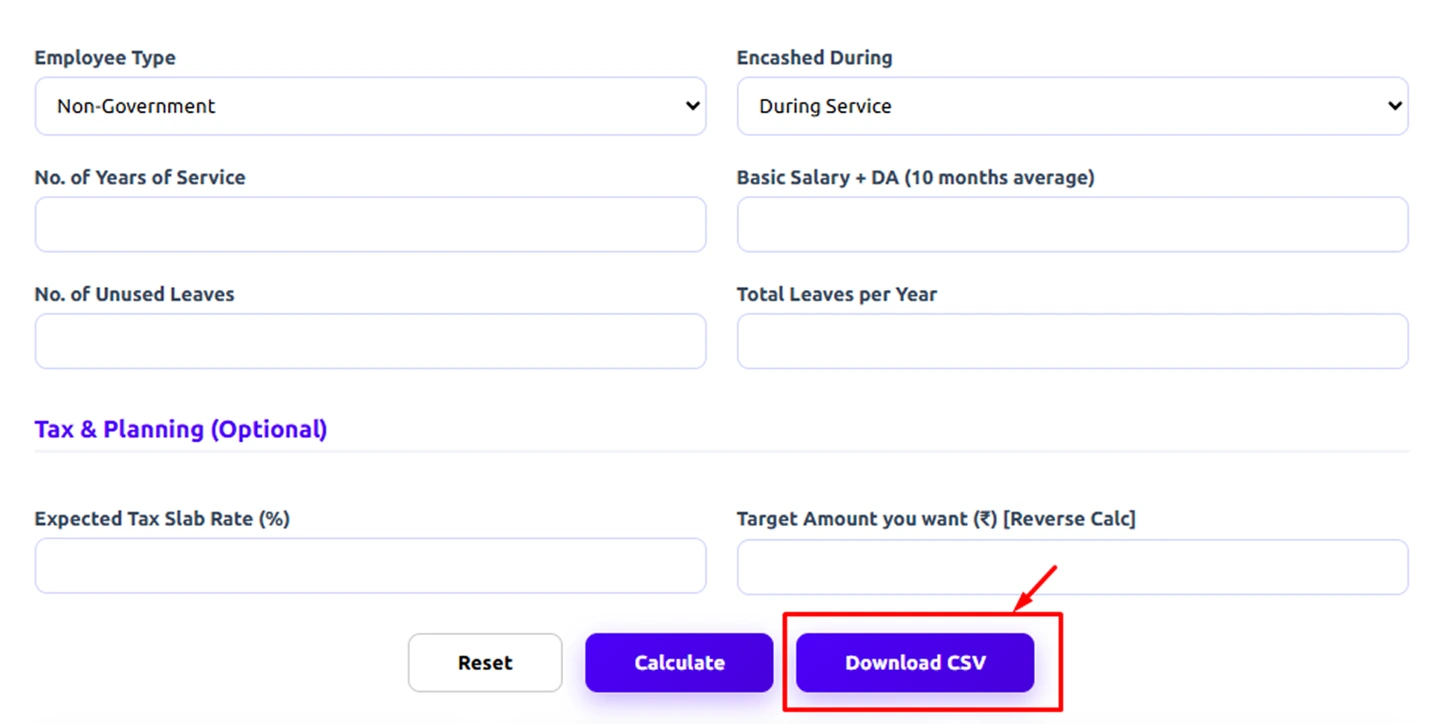
Step 1: Select Your Employee Type
Start by choosing whether you are a Government employee or a Non-Government employee.Different organizations follow different rules for leave encashment, so this selection helps the calculator apply the correct logic.
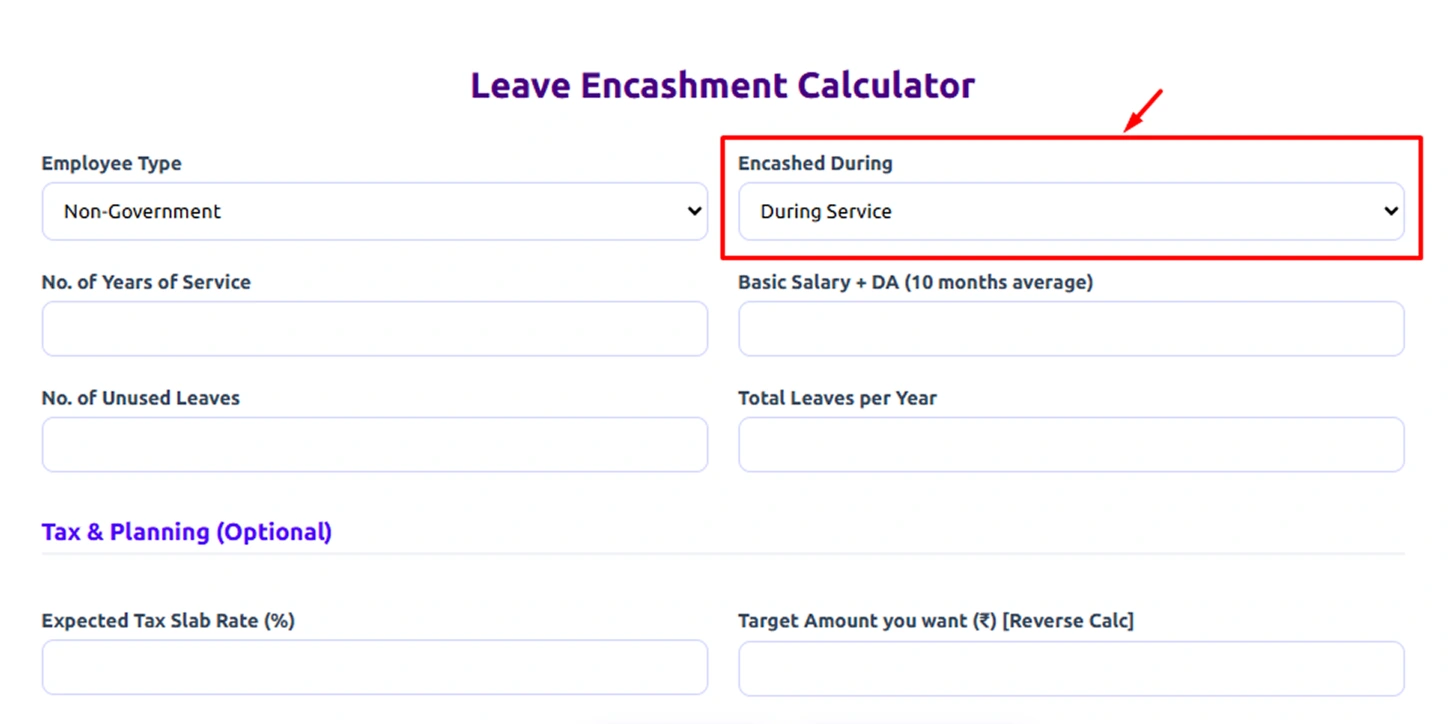
Step 2: Choose When You Are Encashing Leaves
Next, select when you want to encash your leave:
- During Service – when you are still working in the company.
- At Retirement – when you are leaving the organization after completing your service.
This affects how tax exemptions and final calculations are applied.
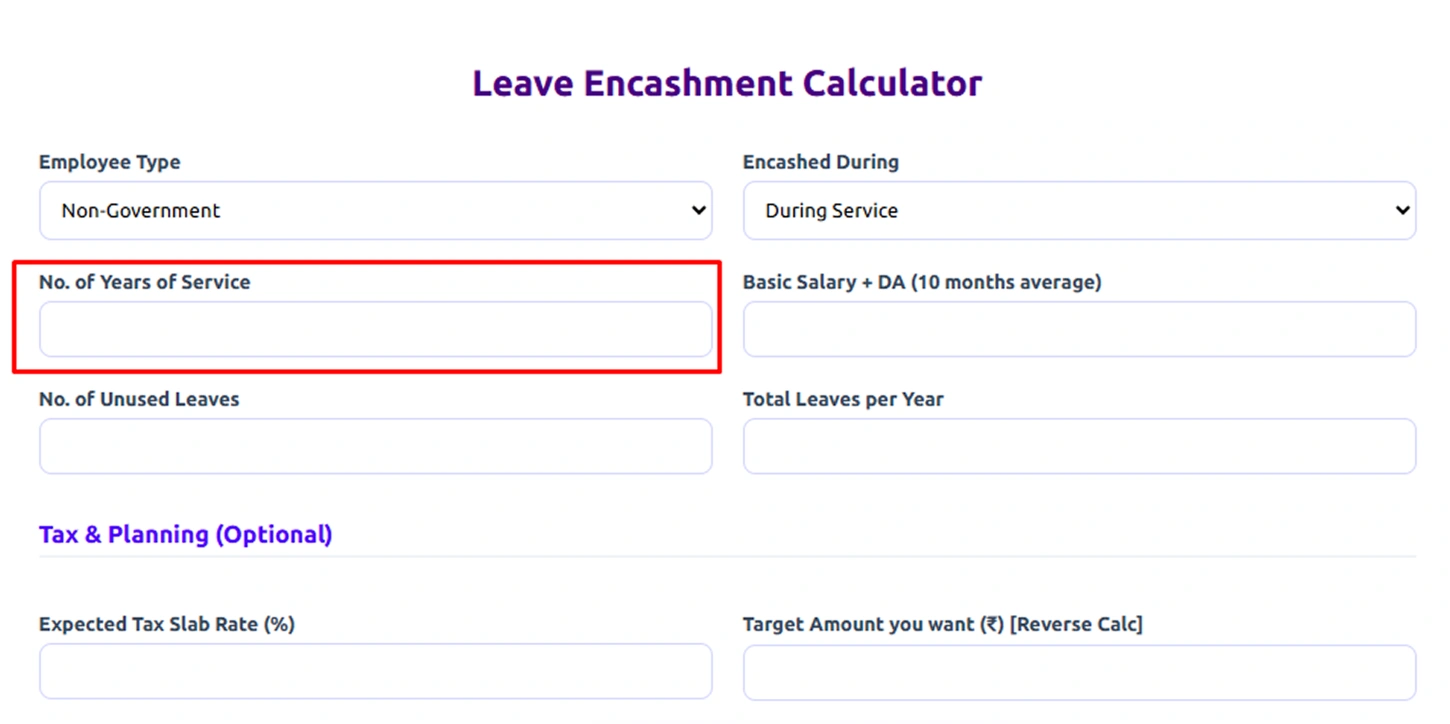
Step 3: Enter Your Years of Service
Add the total number of years you have worked in the organization.This helps determine eligibility and can influence how much leave you are allowed to accumulate.
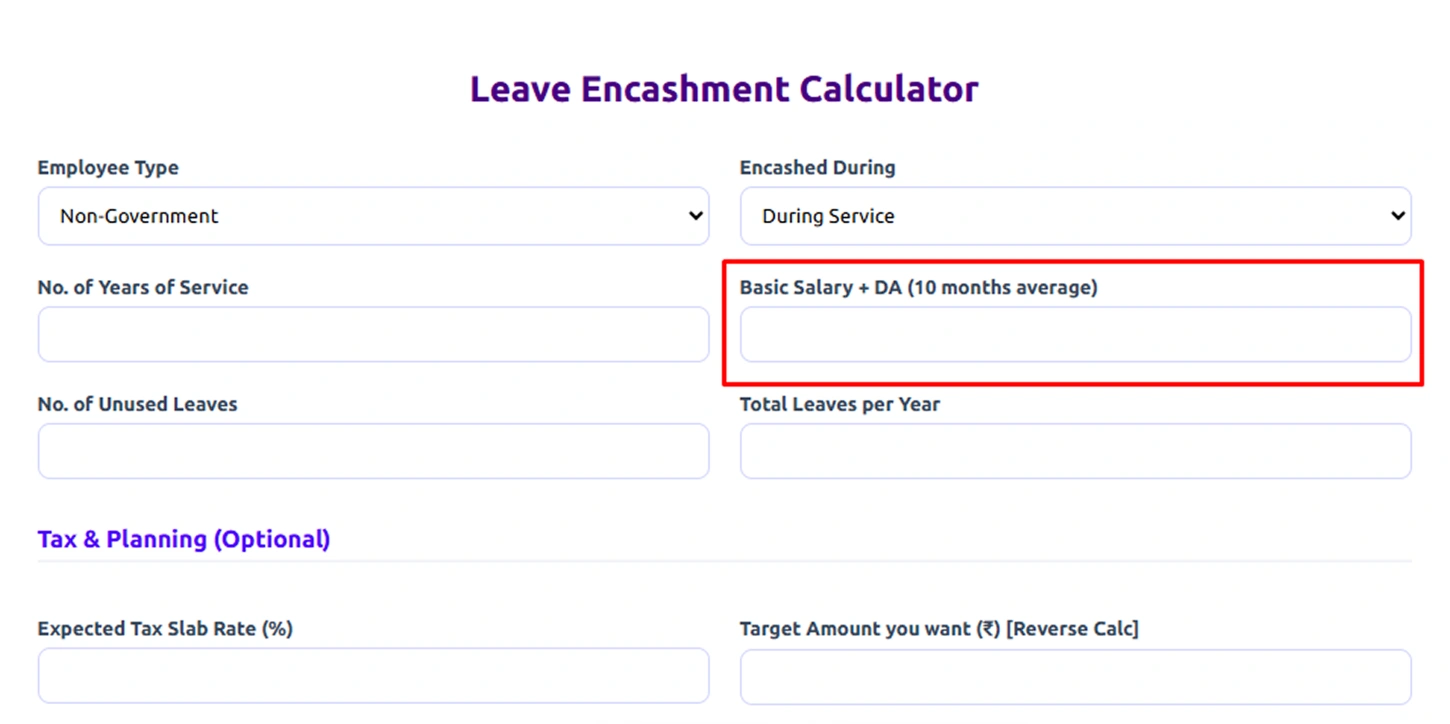
Step 4: Provide Your Salary Details
Enter your Basic Salary + Dearness Allowance (DA) based on the required average (for example, the average of the last 10 months if applicable).The calculator uses this amount to determine the value of each leave day.
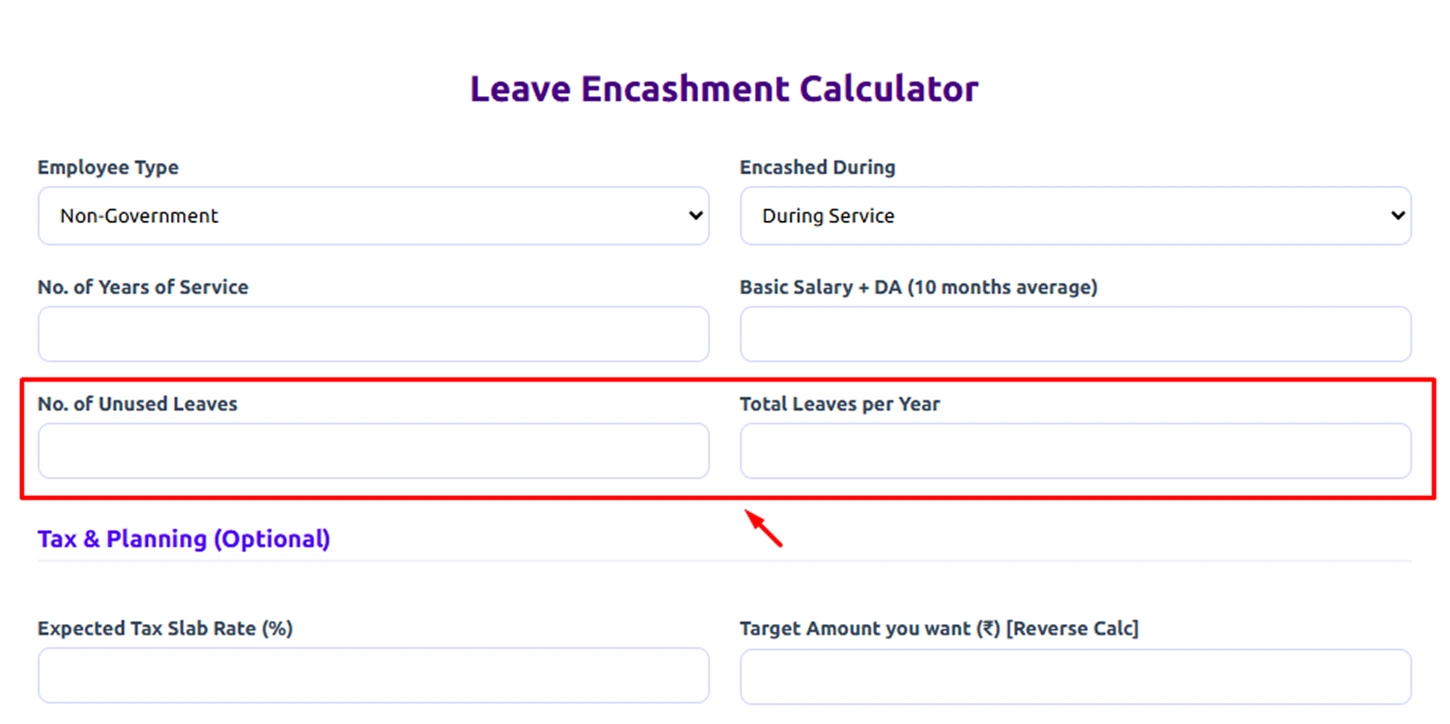
Step 5: Enter Your Leave Information
Now provide the following details:
- Number of Unused Leaves – the leave days you haven’t used yet.
- Total Leaves per Year – the number of leave days your company allows annually.
These inputs help calculate the total leave encashment amount you may receive.
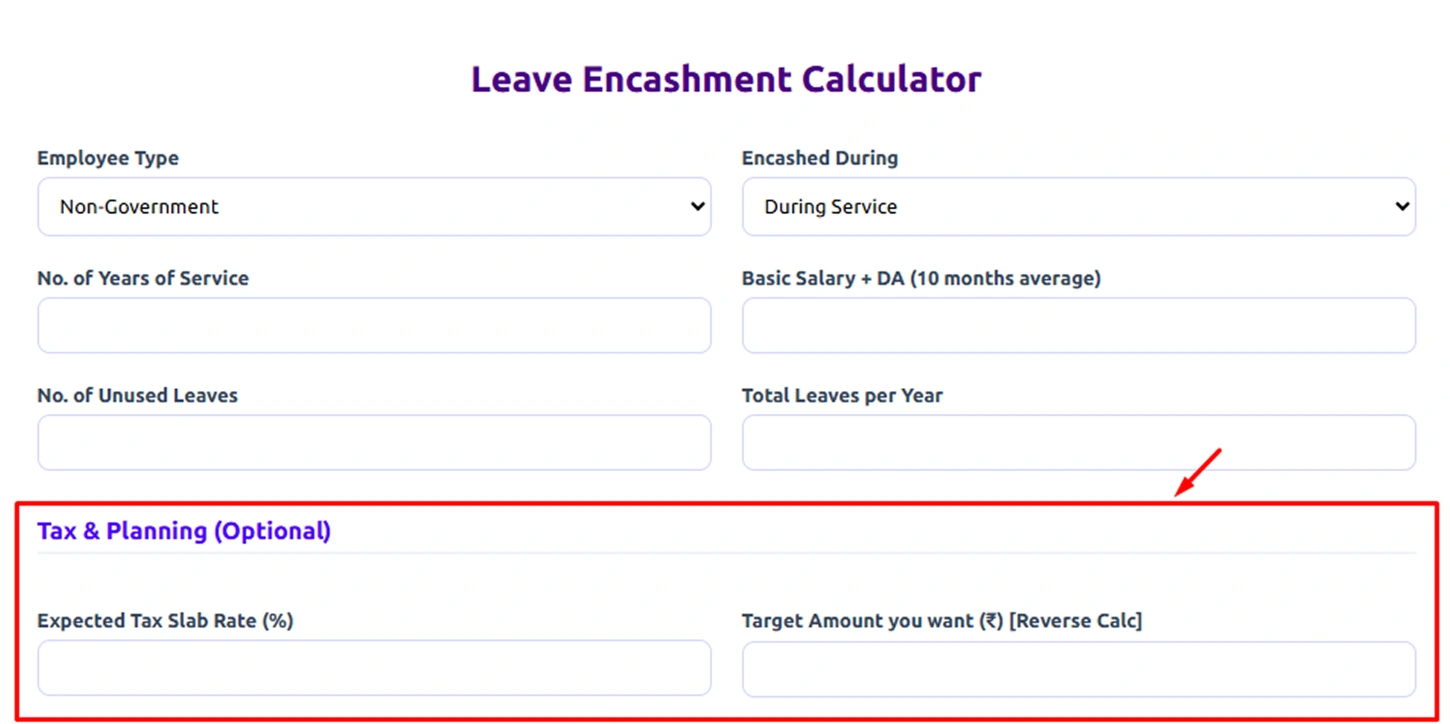
Step 6: Add Tax Information (Optional)
If you want to estimate how much tax may apply, you can enter:
- Expected Tax Slab Rate (%)
- Target Amount you want to receive (optional)
This helps the calculator estimate tax deductions and the final amount you will receive in hand.
Tax rules differ for government and non-government employees, and exemptions are calculated based on income tax laws.
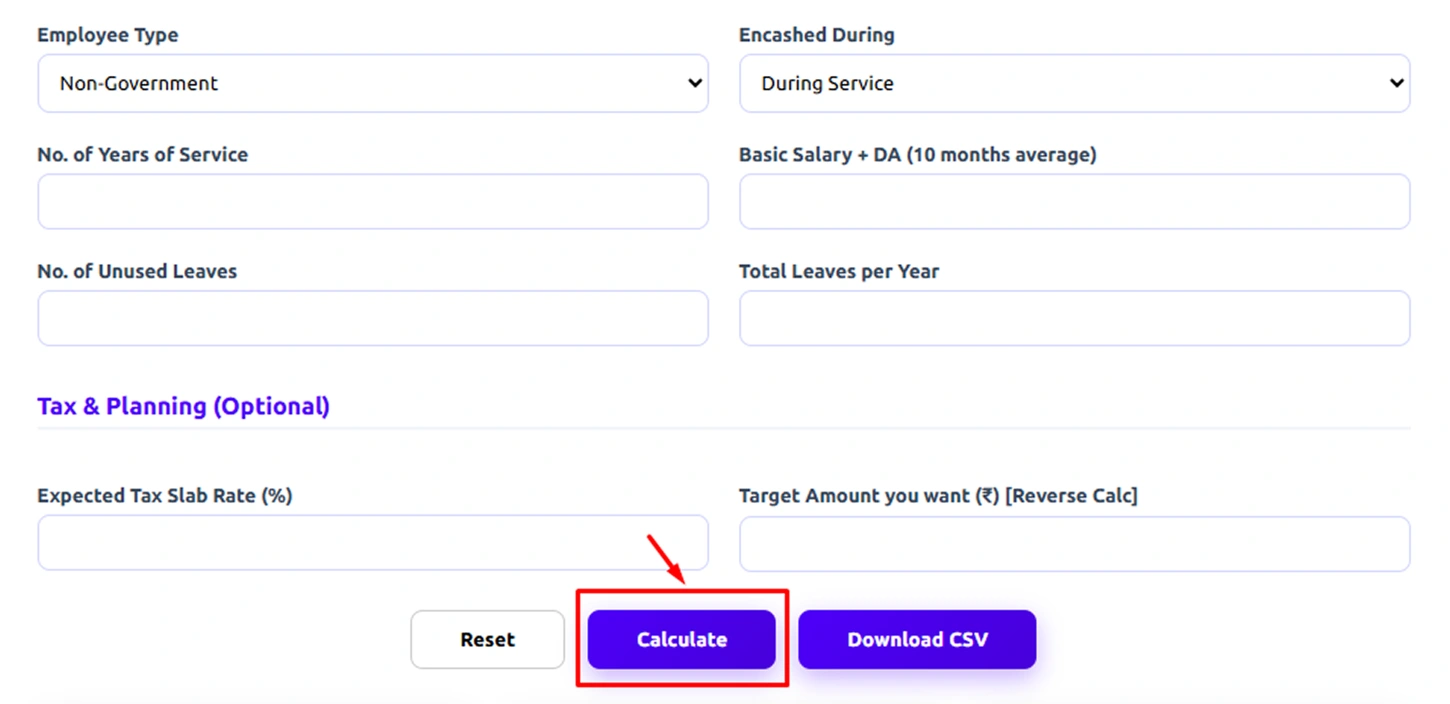
Step 7: Click “Calculate”
Once all the required fields are filled, click the Calculate button.The calculator will instantly process the information and apply the relevant formulas.
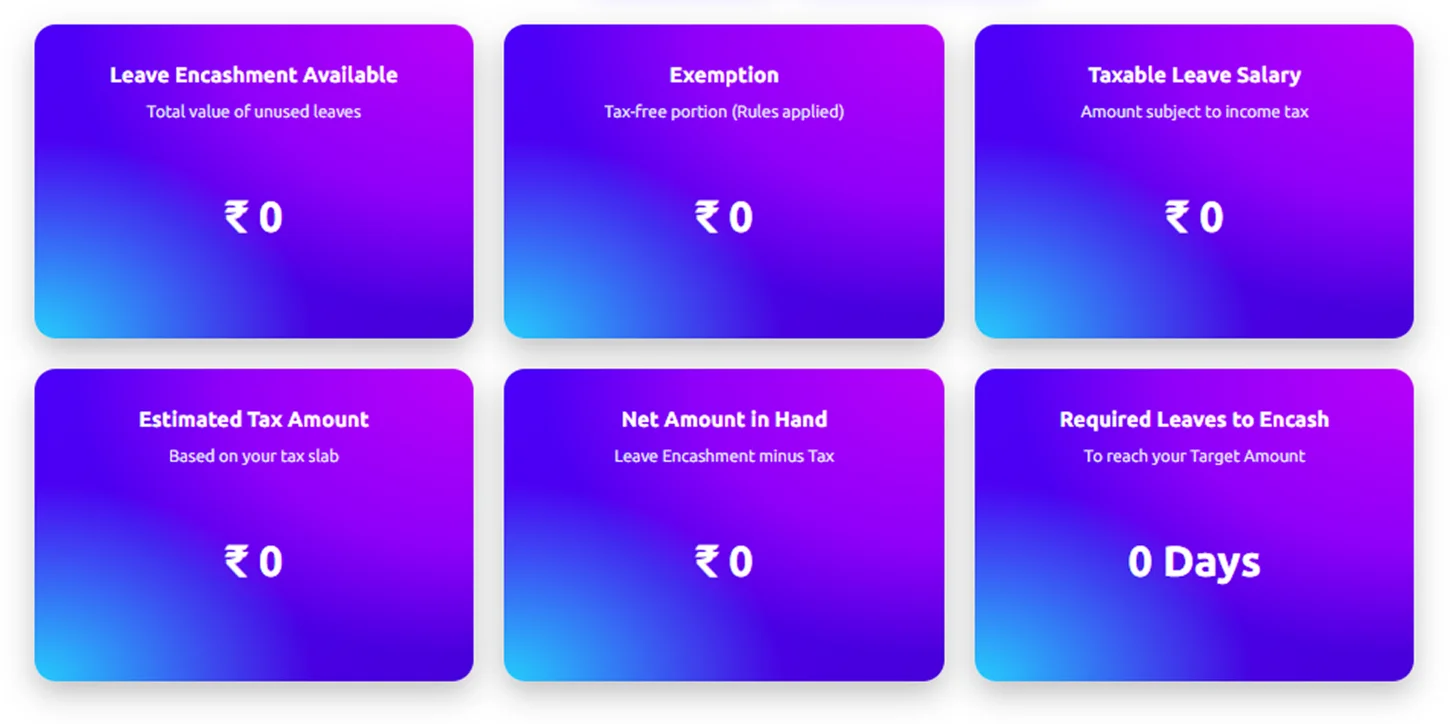
Step 8: Review Your Results
After calculation, the tool will show several results, including:
- Leave Encashment Available – Total value of your unused leave days
- Exemption – The portion that may be tax-free
- Taxable Leave Salary – Amount subject to income tax
- Estimated Tax Amount – Based on your tax slab
- Net Amount in Hand – Final amount you receive after tax
- Required Leaves to Encash – Leaves needed to reach a specific target amount
Step 9: Download Your Results
If needed, you can click Download CSV to save the results for future reference or financial planning.
How to Calculate the Leave Encashment?
Leave encashment calculation helps you understand the monetary value of your unused leave days. The calculation is generally based on the employee’s salary components and the number of earned but unused leave days. While the exact formula may vary depending on company policies and country regulations (India or the US), most organizations follow a similar basic calculation method.
Step 1: Identify Eligible Salary Components
The first step is determining which salary components are considered for leave encashment. In many organizations, the calculation is based on Basic Salary and Dearness Allowance (DA). Some companies may include additional salary components depending on their HR policies.
Step 2: Calculate the Daily Salary
Once the relevant salary components are identified, the next step is to calculate the per-day salary. This is usually done by dividing the monthly eligible salary by 30 days (or sometimes 26 working days, depending on the company policy).
Leave Encashment Formula
Daily Salary = (Basic Salary + Dearness Allowance) ÷ 30
Step 3: Determine the Number of Unused Leave Days
Next, identify the total number of earned leave days that remain unused and are eligible for encashment according to the company’s leave policy.
Step 4: Calculate the Leave Encashment Amount
Finally, multiply the daily salary by the number of unused leave days to determine the total encashment amount.
Formula
Leave Encashment Amount = Daily Salary × Number of Unused Leave Days
Example Calculation
To understand this better, consider the following example:
- Basic Salary = ₹40,000
- Dearness Allowance = ₹10,000
- Unused Leave Days = 15
Step 1: Daily Salary
(40,000 + 10,000) ÷ 30 = ₹1,666.67
Step 2: Leave Encashment
1,666.67 × 15 = ₹25,000
Total Leave Encashment = ₹25,000
What Are the Pros and Cons of the Leave Encashment Calculator?
| Pros | Cons |
|---|---|
| Provides a quick estimate of the monetary value of your unused leave days. | The calculated amount is only an estimate and may differ from the final payout. |
| Reduces manual calculation errors by automatically applying standard formulas. | Actual calculations may vary depending on company policies and HR rules. |
| Saves time by generating results instantly after entering basic details. | Some calculators may not include all salary components used in real payroll calculations. |
| Helps with financial planning when you are resigning, retiring, or expecting a final settlement. | Tax implications may vary based on individual situations and country regulations. |
| Allows employees to cross-check the encashment amount mentioned in payroll or settlement statements. | Incorrect inputs, such as salary or leave days, can lead to inaccurate results. |
What Your Leave Encashment Calculation Could Be Telling You
When you calculate your leave encashment, it helps you understand the financial value of your unused leave. It shows how your accumulated time off translates into money, giving you better clarity for financial planning and final settlements.

Estimate the Value of Unused Leave
Quickly see how much your accumulated leave days are worth.

Avoid Manual Calculation Errors
Automated calculations reduce mistakes in salary and leave-based estimates.

Plan Your Finances Better
Encashment insights help you prepare for resignation, retirement, or payouts.

Understand Tax Implications Clearly
Shows taxable and exempt portions to avoid surprises.

Verify Employer Calculations
Helps cross-check final settlement or payroll figures.

Improve Financial Decision-Making
Clear estimates help you make smarter financial choices.
How Time Champ Helps Improve Workforce Productivity
Managing employee attendance and leave manually can quickly become complex and time-consuming. Many organizations struggle to maintain accurate records, track leave balances, and handle requests, which can lead to errors and delays.
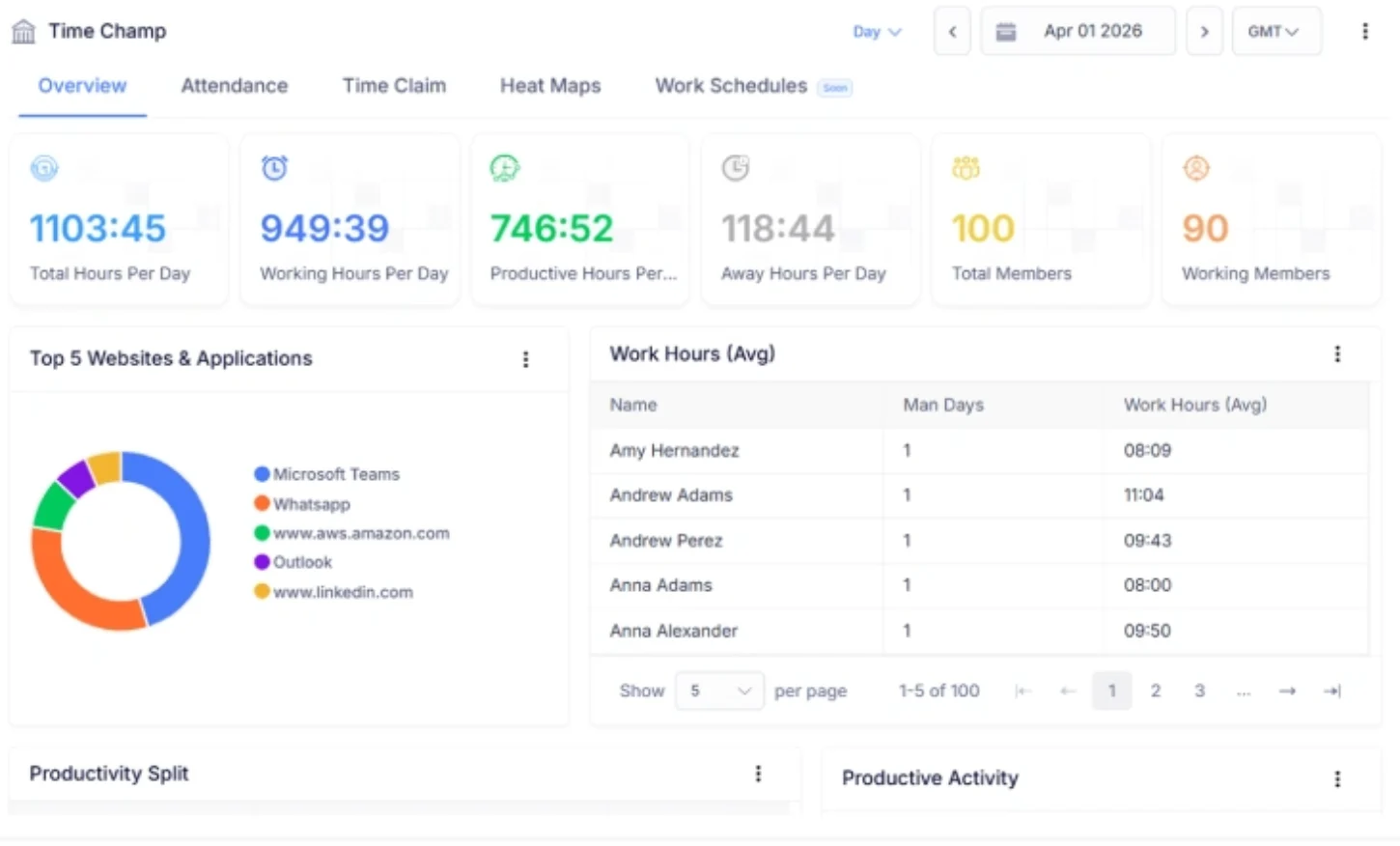
Time Champ simplifies this by automatically recording employee login and logout times, accurately tracking attendance without manual effort. It also generates detailed reports, giving managers clear visibility into work hours, attendance patterns, and overall records.
In addition to attendance, Time Champ makes leave management easy. You can easily apply for leave, check your available balances, and track request status, while managers can review and approve requests in just a few clicks.
By bringing attendance tracking and leave management into one platform, Time Champ reduces administrative work, improves accuracy, and ensures everything stays organized and transparent.
| Feature | Time Champ | Spreadsheets | Manual Calculators |
|---|---|---|---|
| Automatic Leave Balance Tracking | ✓ | ✕ | ✕ |
| Accurate Leave Encashment Calculation | ✓ | Partial | ✕ |
| Tax Deduction Handling | ✓ | ✕ | ✕ |
| Multi-Employee Support | ✓ | Partial | ✕ |
| Error Reduction / Accuracy | ✓ | ✕ | ✕ |
| Detailed Report Generation | ✓ | Partial | ✕ |
| Mobile App Support | ✓ | ✕ | ✕ |
Turn Leave Data into Smart Financial Decisions
Time Champ helps you track leave balances, calculate encashment instantly, and gain clear insights into employee leave and payroll data.
- Instant Leave Encashment Estimates
- Accurate Salary-Based Calculations
- Tax-Ready Insights for Better Planning
- Centralized Leave & Attendance Tracking
- Export-Ready Reports for Payroll
- Built for Teams of All Sizes
 Start 7-day free trial
A Workforce Intelligence Tool Built for Smarter Performance
See What Our Happy Customers Say

Our old tool didn’t align with our needs, but Time Champ changed everything. It helped us track work, stay organized, and manage our day more easily. With great support, it became the tool we trust the most.

We struggled with scattered attendance and task updates. Time Champ brought clarity to our reports and activity patterns, helping us focus on improving performance.

Time Champ gave us customizable, easy-to-use features like break reports, security, and attendance tracking. It’s an excellent solution for improving workforce productivity, highly recommended!

Time Champ gave us the clarity we needed. Its features helped us understand work patterns deeply, while remaining simple, affordable, and adaptable for teams of any size.

Time Champ is straightforward and incredibly effective. The insights are accurate, the experience is simple, and automated tracking removed all the guesswork.

Manual time tracking was slow and often inaccurate. With Time Champ, we gained clear insights into application and website usage while still maintaining employee privacy. Payroll accuracy improved, and overall team performance became stronger.
Connect with our product experts for a live demo and discuss your business requirements.
Explore Other Calculators

Full Time Equivalent (FTE) Calculator
Calculate full-time equivalents easily with our FTE Calculator - a precise tool for measuring employee workload, staffing, and resource planning.
Try Now →Billable Hours Calculator
Calculate billable hours instantly with our Billable Hours Calculator, an accurate tool for tracking work time, productivity, and client billing insights.
Try Now →Employee Utilization Rate Calculator
Calculate employee utilization rate instantly with our utilization rate calculator to analyze productivity, billable hours, and optimize workforce efficiency.
Try Now →


 4.7/5 avg.
Ready to Manage Your Workforce Smarter?
Join our family of 1500+ companies using smart insights to redefine workforces!

Free Trial
No Credit Card Required