Workflow Optimization: A Practical Guide to Better Workflows
Workflow optimization helps you reduce bottlenecks, remove wasted steps, and improve business processes. Learn the steps, techniques, and strategies.

How many times does a task change hands before it is complete? Where do requests sit waiting, details get lost, or the same update gets entered into multiple tools? These small gaps can turn a simple process into a slow and frustrating one.
Workflow optimization helps you see where work slows down, where unnecessary steps creep in, and where handoffs create problems. You can then remove what adds no value, simplify the steps that matter, and build a clearer path from the first request to the final result.
In this guide, we’ll look at practical ways to improve your workflows, spot bottlenecks, and make changes that keep work moving without adding more complexity.
What is Workflow Optimization?
Workflow optimization is the process of mapping a workflow as it really runs, finding where work stalls or repeats, and redesigning the sequence so the same outcome is reached with fewer steps, fewer handoffs, and less waiting. It applies to any repeatable business process, from onboarding a new hire to approving an invoice, and it is ongoing rather than a one-time project, because processes drift back toward complexity the moment nobody is watching.
Key Components of Workflow Optimization
A workflow can look simple on paper and still create delays, repeated work, and unnecessary handoffs. To improve your workflow, you need to look beyond individual tasks and examine how the entire process moves from one step to the next.
The main components of workflow optimization include the following.
- Process Analysis and Mapping: Map each step, decision, and handoff in your workflow to see how work actually moves. This helps you spot delays, duplicate tasks, gaps, and unnecessary steps.
- Automation of Repetitive Tasks: Automate repeated tasks such as data entry, notifications, approvals, and task routing. This reduces manual effort and helps work move faster with fewer errors.
- System Integration: Connect the tools involved in your workflow so information moves between systems without repeated manual entry. Integrating your CRM, ERP, and other business tools can reduce data gaps and disconnected work.
- Clear Ownership and Standardization: Assign clear ownership to each workflow step so everyone knows who handles the next action. Use consistent procedures, templates, and checklists for recurring work.
- Performance Monitoring and Analytics: Track relevant workflow data such as cycle time, throughput, errors, and resource usage. This helps you see whether your changes are working and where further improvements are needed.
- Continuous Improvement: Review your workflows regularly and use feedback and performance data to make adjustments. This keeps your workflow optimized and aligned with changing business needs.
How to Optimize a Workflow Step by Step
Optimizing workflow starts with understanding what slows work down and why. Follow these below steps to find the problem, fix the process, and keep improving it over time.
Step 1. Define the Goal and Scope
Decide what you want to improve before changing the workflow. You may want to improve speed, reduce costs, maintain quality, or make the process more predictable. Choose the goal that matters most for that workflow.
Then clearly define where the workflow starts and ends. Identify the exact event that starts the process and the result that marks its completion. This keeps the work focused and prevents the scope from growing unnecessarily.
Step 2. Map the Workflow as It Actually Runs
Map the real workflow, not just the process shown in your documentation. Talk to the people who handle the work and track every task, handoff, waiting point, and system involved.
If most of the workflow runs through software, use process mining or task mining to understand the actual sequence from system data. This gives you a clearer picture than relying only on memory, which can easily miss waiting time.
Step 3. Baseline Your Numbers Before You Change Anything
Before making any changes, record your current workflow performance. Track how long the workflow takes, how many items it completes, how often work returns for rework, and how many handoffs it has.
Keep this baseline for four to six weeks. This gives you enough data to compare the results and see whether your workflow optimization actually worked.
Step 4. Find the Real Bottleneck
Find the stage where work waits the longest. Improving other stages first can simply create a bigger queue before the bottleneck.
Focus on that stage, fix the problem, and then check the workflow again. Once you remove one bottleneck, another stage may become the new constraint.
Step 5. Eliminate and Simplify Before You Automate
Review every step and ask whether it affects the outcome, protects against a real risk, or meets a required regulation. If it does none of these, remove it instead of trying to make it faster.
Then simplify the steps that remain before you start optimizing workflow with automation.
Step 6. Redesign, Assign Owners, and Roll It Out
Create the new workflow and assign one clear owner to each stage. Make sure everyone understands the new process and knows when to start following it.
Provide the necessary training and set a clear rollout date. This prevents different teams from following different versions of the same workflow.

Did You Know
The workflow automation market reached a valuation of $23.77 billion in 2025, making it one of the fastest-growing segments in enterprise technology. Market analysts expect the market to grow at a 9.52% compound annual growth rate through 2030, showing that businesses increasingly see operational efficiency as a key factor in staying competitive. This growth shows that workflow optimization has moved from a specialized solution to a mainstream business requirement across industries and business sizes.
Workflow Optimization Techniques
A technique gives you a practical way to improve a workflow without changing the entire process. Here are a few simple techniques you can use based on the problem you want to fix.
- Limit the Work Each Stage Can Handle: Set a limit on how many items each stage can handle at once. When a stage reaches its limit, new work waits until an existing item moves forward. This keeps backlogs visible and prevents a busy stage from becoming overloaded.
- Group Similar Tasks Together: Handle similar tasks in batches instead of switching between different types of work throughout the day. This reduces unnecessary context switching and helps you complete similar tasks more efficiently.
- Set Time Limits for Each Stage: Set a reasonable time limit for each stage of the workflow. If an item stays longer than expected, flag it early instead of waiting for the delay to affect the entire process.
- Make Workflow Status Visible: Give everyone involved a clear view of where each item stands. A shared workflow board or workflow optimization software like Time Champ can show pending work, current stages, and items that have been waiting too long.
- Review the Workflow Regularly: Set a fixed time to review where work is building up or getting delayed. Regular reviews help you catch small issues early instead of waiting until they become larger workflow problems.
Workflow Optimization Strategies and Methodologies
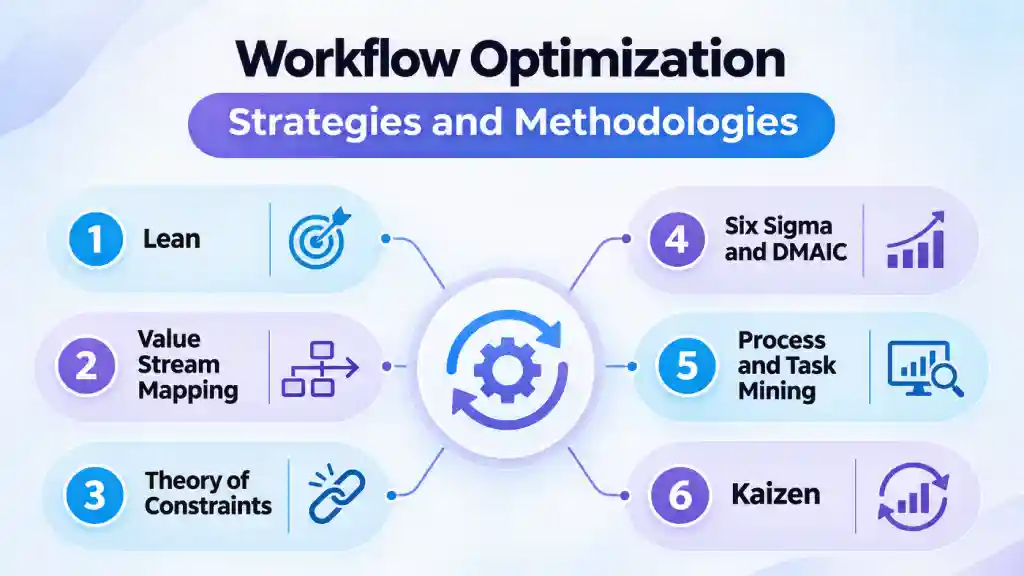
Different workflows have different problems, so you do not need to follow one methodology for every process. Choose an approach based on what is slowing the workflow down or creating inconsistent results.
1. Lean
Lean focuses on removing activities that do not add value to the workflow. It helps you reduce unnecessary steps, waiting, excess work, and other forms of waste.
2. Value Stream Mapping
Value Stream Mapping gives you a broader view of how work moves from start to finish. It helps you see where work adds value and where delays or unnecessary steps slow the flow.
3. Theory of Constraints
Theory of Constraints focuses on the one stage that limits the rest of the workflow. You improve that constraint first instead of spreading your effort across every stage.
4. Six Sigma and DMAIC
Six Sigma focuses on reducing errors and variation in a process. Its DMAIC approach gives you a structured way to define the problem, measure the current process, analyze its causes, improve it, and control the results.
5. Process and Task Mining
Process mining uses system data to reveal how a process actually runs. Task mining looks at activity within individual tasks to identify repeated actions, delays, and opportunities for improvement.
6. Kaizen
Kaizen focuses on making small, regular improvements instead of waiting for one major redesign. It works well when a workflow has several small problems rather than one obvious constraint.
Business Benefits of Optimizing Workflows
A better workflow helps work move with fewer delays and less repeated effort. Here are the key benefits of workflow optimization.
1. Faster Workflow Execution
Fewer handoffs and shorter queues help work move from one stage to the next faster. A task that took nine days because it waited in five different inboxes could take three or four days once those delays are removed.
2. Lower Operating Costs
Every unnecessary step takes time, and that time comes with a cost. Remove an approval that rarely changes anything or a form that nobody uses, and you free up hours spent on work that adds little value. That's how improving workflow efficiency can reduce costs without changing the output.
3. Better Workflow Visibility
Once you map a workflow properly, you can see where work gets delayed. You can identify the exact stage where a request is stuck and who owns the next action instead of chasing several people for an update. This visibility also helps you spot the next bottleneck before it becomes a repeated problem.
4. Clearer Task Ownership
A workflow with a clear owner at every stage leaves less room for work to get stuck between roles. This matters most during handoffs, where optimizing workflow can help prevent delays caused by unclear ownership. When one stage ends, the next owner knows what needs to happen.
5. Greater Work Capacity
A well-designed workflow can help your team handle more work before you need to add more staff. This makes business workflow optimization useful when your workload grows. When you fix a process early, it is less likely to become harder to manage as the volume increases.
Not sure where your workflow is losing time?
Use Time Champ to track work activity and spot where delays start.
Common Workflow Optimization Challenges
Improving a workflow can be difficult when you do not have a clear view of how work currently moves or what is causing the problems. Below are the common challenges that can slow down workflow optimization and make changes harder to implement.
1. Different Ways of Doing the Same Work
The same workflow may run differently across teams, locations, or even individual workgroups. These variations make it harder to understand the actual process and create a consistent starting point for improvement. Standardizing the core steps can reduce this variation before you make larger workflow changes.
2. Fragmented Tools and Data
When a workflow depends on several disconnected systems, information may need to move manually from one tool to another. This can create duplicate data entry, missing information, and delays between stages. Connecting systems or creating a clear handoff between them can reduce these gaps.
3. Resistance to Process Changes
Even a well-designed workflow can struggle if your team continues using the old process. Familiar workarounds can be difficult to replace, especially when the reason for the change is unclear. Involving the people who handle the workflow and explaining what will change can make adoption easier.
4. Limited Time and Resources
Workflow changes require time to map the current process, test new steps, train your team, and review the results. When you have limited time, budget, or staff, workflow improvement can compete with daily work. This can make it difficult to give the redesign enough attention to succeed.
5. Difficulty Sustaining the New Process
A workflow can work well after launch and still drift back to old habits over time. New workarounds, unclear changes, or outdated documentation can slowly create the same problems again. Regular reviews and clear ownership help keep the improved workflow in place.
How to Choose the Right Workflow Optimization Software
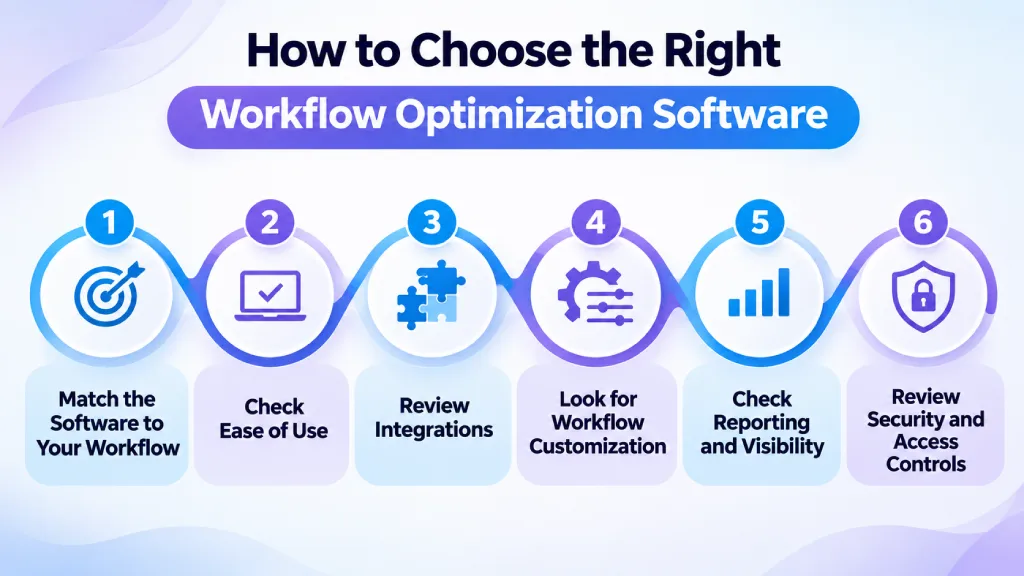
The right software should fit your workflow, existing tools, and actual business needs. Before you choose a platform, check the following factors to make sure it can support the way you work now and as your needs change.
1. Match the Software to Your Workflow
Start with the workflow you want to improve and list what the software needs to handle. Look for features that support your actual use cases instead of choosing a tool based on a long feature list.
2. Check Ease of Use
Make sure your team understands the software without relying on technical support for every small change. A clear interface, simple workflow design, and low-code or no-code options can make it easier to create and update workflows.
3. Review Integrations
Check whether the software connects with the tools you already use. Good integrations can move data between systems and reduce repeated data entry, especially when your workflow depends on CRM, HR, finance, project management, or communication tools.
4. Look for Workflow Customization
Your workflows may not follow the same path every time. Choose software that lets you create conditions, approvals, triggers, routing rules, and different paths when a process needs them. This gives you more control without forcing every workflow into the same structure.
5. Check Reporting and Visibility
The software shows you what is happening inside your workflows. Look for dashboards, activity logs, reports, and other views that help you see pending work, delays, and workflow activity. Reporting also gives you information to review whether your changes are working.
6. Review Security and Access Controls
Check how the software protects your workflow data and controls access. Look for features such as role-based permissions, audit logs, encryption, and compliance support when your workflows handle sensitive information.
How Time Champ Supports Workflow Optimization
When you need to understand why work takes longer than expected, Time Champ gives you a clearer view of where time goes across tasks and projects. You can track task time, review app and website activity, compare project-level time usage, and see how work is distributed across your available capacity. This helps you spot overloaded areas, unused capacity, and tasks that regularly take more time than planned.
You can also use real-time dashboards, utilization trends, and workload data to make better decisions while work is still in progress. Instead of waiting until a project ends to see where time went, you can identify workload gaps, adjust assignments, and plan resources based on actual work patterns.
Struggling to see where your workflow breaks down?
Try Time Champ to track tasks, time, and workload in one place.
Conclusion
Workflow optimization starts with understanding how work actually moves and fixing the steps that create delays, rework, or unnecessary effort. Focus on the process first, then use the right tools to support the changes. If you need clearer visibility into time, tasks, workload, and project activity, Time Champ can help you see where work is going and where your workflow needs attention.

Thasleem Shaik

Table of Content
 What is Workflow Optimization?
- Key Components of Workflow Optimization
- How to Optimize a Workflow Step by Step
- Workflow Optimization Techniques
- Workflow Optimization Strategies and Methodologies
- Business Benefits of Optimizing Workflows
- Common Workflow Optimization Challenges
- How to Choose the Right Workflow Optimization Software
- How Time Champ Supports Workflow Optimization
- Conclusion
Related Blogs
In the fast-paced modern workplace, Employee Activity Monitoring software ensures safety and productivity with location tracking and real-time analytics.
Hima Bindhu Nara | Jan 17, 2024
Learn what workflow automation is, why it’s important, its types, examples, benefits, challenges, and how it differs from business process automation.
Anjali | Apr 08, 2026
Find the 11 best workflow automation software for 2026. Compare features, pricing, pros & cons to automate tasks and improve team efficiency.
Guna Lakshmi | Apr 08, 2026
Business cost optimization helps reduce unnecessary spending, improve efficiency, and increase profits with practical strategies that deliver lasting results.
Thasleem Shaik | Aug 11, 2026
Learn what workforce optimisation (WFO) is, how it works, key components, top strategies, industry uses, software tips, and how WFO differs from WEM in detail.
Guna Lakshmi | Sep 15, 2025
Workforce Management (WFM) vs Workforce Optimisation (WFO). Learn the definitions, key functions, similarities, and best-fit use cases for businesses
Chethana Choudary | Sep 01, 2025


 4.7/5 avg.
Ready to Manage Your Workforce Smarter?
Join our family of 1500+ companies using smart insights to redefine workforces!

Free Trial
No Credit Card Required