What Is Data Leakage? Definition, Causes & Examples
Learn what data leakage is, how it differs from a data breach, common causes, workplace examples, and proven ways to prevent data leakage early and securely.
When people hear about exposed company data, they usually imagine cybercriminals breaking into systems. But that's not how many incidents begin. More often, they start with something surprisingly ordinary: a simple click, a rushed decision, or a small mistake that no one thought would matter.
That's exactly why understanding data leakage is so important. Let's look at what it is, why it happens, and how you can stop it before it becomes a costly mistake.
What is Data Leakage?
Data leakage is the unauthorized exposure of sensitive information from within an organization to places it shouldn't be, without a hacker breaking in. It often happens through everyday actions like sending an email to the wrong recipient, sharing a public cloud link, copying files to a USB drive, or misconfigured cloud storage.
Data leakage generally falls into two categories:
- Passive Data Leakage: Sensitive data is left exposed without anyone actively sharing it, for example, a public cloud folder, an exposed database, or credentials committed to a public repository.
- Active Data Leakage: Someone intentionally moves data through an approved channel, such as emailing files to a personal account, copying data to a USB drive, or uploading documents to an unauthorized cloud service.
Simply put, passive leakage is a configuration issue, while active leakage is a user behavior issue.
Data Leakage vs. Data Breach, Data Loss, and Data Exfiltration
Data leakage, data breaches, data loss, and data exfiltration are closely related but distinct cybersecurity concepts. Here's how they differ in terms of cause, intent, and impact.
| Term | What It Means | Intent | Example | Primary Impact |
|---|---|---|---|---|
| Data leakage | Sensitive data is unintentionally exposed through legitimate channels or misconfigurations. | Usually accidental | A cloud storage link is set to public. | Confidentiality |
| Data breach | An unauthorized party gains access by defeating security controls. | Malicious | An attacker logs in using stolen credentials. | Confidentiality & Integrity |
| Data loss | Data is deleted, corrupted, encrypted, or becomes unavailable. | Usually accidental | A failed backup or ransomware attack. | Availability |
| Data exfiltration | Sensitive data is intentionally copied or transferred out of an organization. | Intentional | An employee downloads a customer database before leaving. | Confidentiality |
Knowing the difference between these terms can help you respond to security incidents more effectively. A data leak can turn into a data breach if someone finds and misuses the exposed information. Data exfiltration is when someone intentionally takes data out of an organization, while data loss is about losing access to data, not exposing it. That's why backups can restore lost files but won't stop a data leak.
How Does Data Leakage Actually Happen?
Data leaks don't usually happen because someone ignored the rules. They happen because people are trying to get their work done.
Here's how it typically happens:
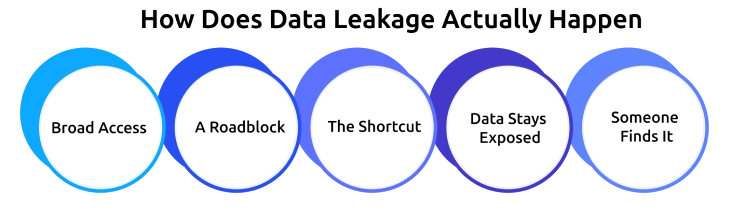
- Broad Access: Employees have access to more data than they need, often because permissions were never updated.
- A Roadblock: Slow systems, tight deadlines, or inconvenient tools push people to look for quicker alternatives.
- The Shortcut: Files are shared through personal email, messaging apps, USB drives, public AI tools, or personal cloud storage.
- Data Stays Exposed: The copied file remains in an unmanaged location, outside the organization's visibility and control.
- Someone Finds It: The exposed data is eventually discovered by a customer, researcher, competitor, attacker, or even an internal audit.
The important thing to remember is that most data leaks don't start with an attacker, they start with everyday work habits.
See Risk Before It Becomes a Problem
Identify unusual behavior and protect sensitive data before it's exposed
Real Examples of Data Leakage
Seeing how data leakage happens in the real world makes the risks easier to understand. Here are three well-known incidents that show how simple mistakes can expose sensitive information.
1. Samsung Employees Shared Confidential Data with ChatGPT (2023)
What Happened: Samsung engineers pasted confidential source code and meeting notes into ChatGPT while trying to debug code and speed up their work. As a result, proprietary business information was exposed to a public AI service.
2. Microsoft Accidentally Exposed 38 TB of Internal Data (2023)
What Happened: Microsoft AI researchers mistakenly shared an Azure Storage SAS token with excessive permissions in a public GitHub repository, exposing 38 TB of internal data.
3. Toyota Exposed Customer Data Through Cloud Misconfiguration (2023)
What Happened: Toyota discovered that a cloud service had been misconfigured, leaving customer information publicly accessible for several years.
These incidents may involve different organizations, but the pattern is the same. A simple mistake, an overlooked setting, or an everyday shortcut is often all it takes for sensitive data to be exposed.
What Are the Most Common Causes of Data Leakage?
Rather than treating every data leak the same, it's helpful to group the causes by where they originate. This makes it easier to understand who is responsible for preventing them and how they are typically discovered.
| Category | Who Owns the Fix? | How It Usually Surfaces | Typical Impact |
|---|---|---|---|
| Human & behavioral | Managers, HR, security awareness teams | Reported by employees, customers, or external parties | Most common cause of data leakage |
| Technical & configuration | IT, cloud, and security teams | Security scans, audits, or researcher findings | Less frequent but often impacts large volumes of data |
| Third-party & supply chain | Procurement, vendor management, and security teams | Vendor security notifications or incident reports | Growing risk as organizations depend on more third-party services |
What Types of Data Leak Most Often?
The information that leaks most often is usually the data employees access, edit, and share every day, making it far more likely to be exposed accidentally.
| Data Type | Why It Leaks | Common Exposure Routes |
|---|---|---|
| Customer personal data | Frequently accessed by sales, support, and customer service teams | CRM exports, shared reports, public cloud links |
| Employee & payroll records | Regularly handled by HR and finance teams | Email attachments, shared drives |
| Financial documents | Shared during budgeting, reporting, and business planning | Personal email, messaging apps |
| Credentials & API keys | Used across development and IT environments | Public repositories, tickets, configuration files |
| Intellectual property | Shared with vendors, partners, and contractors | AI tools, personal cloud storage, USB drives |
| Healthcare & claims data | Processed daily by healthcare and insurance teams | Screenshots, printed documents, unsecured file sharing |
What Are the Warning Signs of Data Leakage?
While a single unusual event isn't always a cause for concern, a pattern of unusual behavior or system activity can signal that sensitive data is at risk.
1. Behavioral Warning Signs
These are changes managers and colleagues may notice:
- Unusual access outside normal working hours.
- Repeated requests for access that isn't required for the person's role.
- Accessing projects, folders, or customer data unrelated to current work.
- Using personal email, messaging apps, or unauthorized tools for work.
- Reluctance to hand over files or accounts during role changes or resignation.
- A sudden increase in downloading or copying work files.
2. Technical Warning Signs
These indicators can often be detected by security tools:
- Unusually large downloads or data exports.
- Files uploaded to personal cloud storage or webmail accounts.
- New USB devices connected to company computers.
- Access to files or folders that haven't been opened before.
- Bulk access to sensitive records within a short period.
- Activity involving unapproved AI tools or file-sharing services.
- Attempts to bypass access restrictions.
- Activity on inactive or former employee accounts.
How To Prevent Data Leakage?
If data leakage can happen through everyday mistakes, can it really be prevented?
Absolutely, with the right mix of security controls, clear policies, and employee awareness, you can stop most leaks before they happen.
- Classify sensitive data so you know what needs the highest level of protection.
- Limit access by giving employees only the data they need and reviewing permissions regularly.
- Use secure file-sharing tools that are as convenient as unauthorized alternatives.
- Create a clear AI usage policy that explains which tools are approved and what data should never be shared.
- Control data movement with restrictions on USB devices, printing, downloads, and uploads where appropriate.
- Monitor user activity to detect unusual downloads, file sharing, or access patterns before they become incidents.
- Secure the offboarding process by revoking access immediately when employees or contractors leave.
- Prepare an incident response plan, so your team can act quickly if a data leak occurs.
- Train employees regularly using real-world examples and common workplace scenarios to build lasting security awareness.
The best way to prevent data leakage is to make doing the right thing easy. When employees have secure tools and simple processes, they're less likely to look for workarounds.
How Time Champ Helps You Catch Data Leakage Early
In many cases, employees leave behind small clues, unusual file transfers, unexpected USB activity, or sudden changes in how they access data. Time Champ is employee monitoring software with data loss prevention (DLP) capabilities that help you identify early warning signs, allowing you to address potential risks before they become security incidents.
Monitor Access to Unapproved Websites
Control which websites employees can access by marking trusted sites as safe and blocking unauthorized destinations. This helps reduce the risk of sensitive data being uploaded to personal cloud storage, public AI tools, or other unapproved platforms.
Prevent Unauthorized USB Transfers
Time Champ's USB device management lets you control access to external storage devices, helping prevent employees from copying sensitive files to USB drives without authorization.
Track Access to Sensitive Files
With file access monitoring, you can see who interacted with important files, when they were accessed, and detect unusual file activity that may indicate a potential data leak.
Restrict Large File Transfers
Limit uploads and downloads of sensitive documents to reduce the risk of bulk data transfers, whether intentional or accidental.
Detect Unusual User Behavior
Instead of only tracking activity, Time Champ highlights changes in user behavior, such as sudden spikes in file access, increased exports, or visits to unfamiliar websites, making it easier to identify potential risks early.
Maintain a Complete Activity Trail
When an incident occurs, detailed activity timelines and reports provide a clear record of user actions, helping security teams investigate faster and make informed decisions.
The biggest advantage is visibility. Rather than discovering a data leak after the damage is done, Time Champ helps you identify unusual activity early, giving your team the opportunity to investigate and respond before sensitive information leaves your organization.
Catch Data Leaks Before They Cost You
Monitor file activity, control USB and web access, and detect risky behavior
Conclusion
Data leakage can happen in any organization, and it often starts with simple mistakes or daily shortcuts. Knowing what causes it, finding the warning signs early, and putting the right controls in place can help you avoid costly incidents. With clear policies, secure tools, and regular monitoring, you can keep sensitive information protected and reduce the risk of data leaks.

Jahnavi Pulluri

Table of Content
 What is Data Leakage?
- Data Leakage vs. Data Breach, Data Loss, and Data Exfiltration
- How Does Data Leakage Actually Happen?
- Real Examples of Data Leakage
- What Are the Most Common Causes of Data Leakage?
- What Types of Data Leak Most Often?
- What Are the Warning Signs of Data Leakage?
- How To Prevent Data Leakage?
- How Time Champ Helps You Catch Data Leakage Early
- Conclusion
Instant Signup
Thank you for your request!
We have received your signup request and our team will get back to you soon. In the meantime, you can book a demo to see Time Champ in action.
Book a DemoFree trial. No credit card required. Prefer a walkthrough? Book a demo.
Related Blogs

Implement data loss prevention practices to protect sensitive data, reduce security risks, prevent breaches, and strengthen your organization's security.
Thasleem Shaik | Aug 24, 2026
Learn what endpoint data loss prevention is, how it works, its key features, and how to protect sensitive data from unauthorized access.
Guna Lakshmi | Aug 18, 2026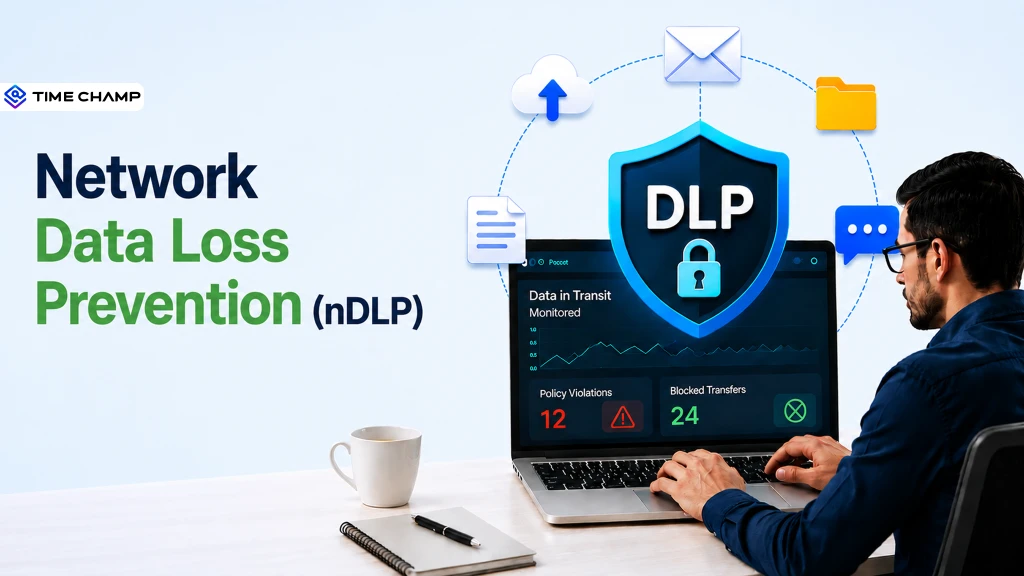
Concerned about sensitive data leaving your network? See how network data loss prevention helps to reduce risks with the right features and practices.
Anjali | Aug 26, 2026
Learn what Email Data Loss Prevention (DLP) is, how it works, key features, benefits, and best practices to protect email data from leaks.
Guna Lakshmi | Aug 19, 2026
Learn what data exfiltration is and how to prevent it from attackers. Protect your business from data theft with effective security strategies and best practices.
Sai Keerthi Uppala | Mar 12, 2025
Protect your business from data theft with proven prevention strategies. Learn key risks, security best practices, and how to safeguard sensitive data.
Jahnavi Pulluri | Aug 31, 2026


 4.7/5 avg.
Ready to Manage Your Workforce Smarter?
Join our family of 1500+ companies using smart insights to redefine workforces!

Free Trial
No Credit Card Required