Free Hybrid Work Schedule Templates + Examples (2026)
Get free hybrid work schedule templates, real-world examples, and expert tips. Learn how to create & manage hybrid teams in 2026 to boost productivity.

Hybrid work is great, until half the team comes into the office on Tuesday, the other half shows up on Thursday, and collaboration happens mostly through chat messages.
That's usually when scheduling starts becoming a challenge.
A clear hybrid work schedule can turn that chaos into coordination. Whether you prefer fixed office days, flexible schedules, or a remote-first approach, the right template helps everyone stay aligned and productive. In this blog, you'll find free hybrid work schedule templates, real-world examples, and practical tips to build a hybrid work model that actually works in 2026.
What is a Hybrid Work Schedule?
A hybrid work schedule is a work arrangement that defines when employees work remotely and when they work from the office. It provides a structured framework for balancing flexibility and in-person collaboration while ensuring teams remain aligned, productive, and accessible. Depending on the organization's needs, a hybrid work schedule may follow a fixed, flexible, remote-first, or rotational model.
For example, a company might require employees to work in the office on Tuesdays and Thursdays and work remotely on the remaining days. This approach gives employees greater flexibility while maintaining opportunities for face-to-face teamwork and communication.
Why a Hybrid Work Schedule Template Matters
A hybrid work schedule template gives you and your employees a clear way to plan office and remote work days. Instead of spending time coordinating schedules every week, everyone follows the same format, making it easier to know who will be in the office, who will be working remotely, and when teams can collaborate in person.
Here are a few reasons many companies use hybrid work schedule templates:
- Reduce Unproductive Office Days: Employees can see who will be in the office in advance, making collaboration easier.
- Help New Hires Settle in Faster: A documented schedule clarifies when employees are expected to work remotely or come into the office.
- Improve Visibility Across Teams: Everyone works from the same schedule format, reducing confusion and miscommunication.
- Make Attendance Easier to Track: Consistent scheduling provides a clearer picture of office usage and employee availability.
- Reduce Scheduling Headaches: With a schedule already in place, you only need to review exceptions instead of creating plans from scratch every week.
5 Hybrid Work Schedule Examples (by Model)
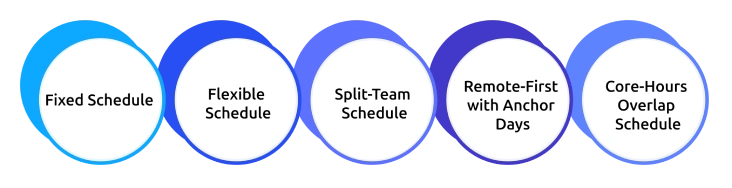
Hybrid work schedules usually fall into five common models: fixed, flexible, cohort-based, remote-first with anchor days, and core-hours overlap. Each one works best for different team structures and ways of working.
Below are practical examples you can adapt for your team.
1. Fixed Schedule (3/2, 2/3, 4/1)
In a fixed model, everyone follows the same in-office and remote days, making coordination simple and predictable. A common setup is 3 days in the office and 2 days remote (3/2), or the reverse (2/3). Some teams use a 4/1 model for more in-office collaboration.
Example (3/2 product team schedule):
In a fixed model, everyone follows the same in-office and remote days, making coordination simple and predictable. A common setup is 3 days in the office and 2 days remote (3/2), or the reverse (2/3). Some teams use a 4/1 model for more in-office collaboration.
Example (3/2 product team schedule):
| Day | Location | Focus |
|---|---|---|
| Monday | Office | Sprint planning, team sync |
| Tuesday | Office | Cross-team collaboration |
| Wednesday | Remote | Deep work, individual tasks |
| Thursday | Office | Reviews, demos, 1:1s |
| Friday | Remote | Documentation, focus time |
2. Flexible (Employee-Choice) Schedule
Employees choose their in-office days based on their workload and preferences, usually with a minimum number of office days per week. This model works best for experienced or independent teams.
The main challenge is coordination, without shared office days, overlap can be limited. Many companies solve this by setting at least one mandatory team day.
3. Cohort or Split-Team Schedule
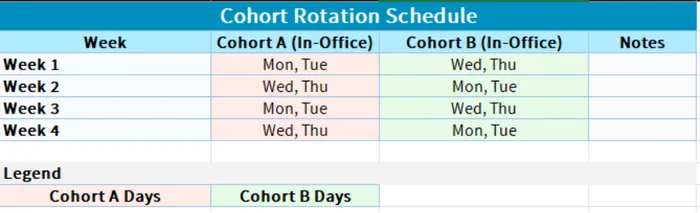
Teams are divided into groups (cohorts) that rotate office days. This helps manage office capacity while still ensuring in-person collaboration.
For example:
- Cohort A: Monday–Tuesday in office
- Cohort B: Wednesday–Thursday in office
This ensures balanced office usage without overcrowding.
4. Remote-First with Anchor Days
Remote work is the default, and teams come together on fixed “anchor days” for meetings, planning, workshops, or onboarding.
This model works well for distributed teams and ensures office time is intentional rather than routine.
5. Core-Hours Overlap Schedule
Instead of focusing on location, this model focuses on time. Everyone works during a shared overlap window (for example, 11 AM–3 PM), while the rest of the day is flexible.
It’s especially useful for teams spread across time zones where fixed office days are less practical.
The best hybrid model depends less on trends and more on how your team actually works day to day.
Hybrid Work Schedule Templates You Can Copy
Hybrid work models are becoming the new standard as companies balance in-office collaboration with remote flexibility.
These ready-to-use schedule templates help you design clear, fair, and efficient hybrid work routines for any team.
1. Weekly Team Schedule Template
The overlap row is what makes this template powerful, as it clearly highlights the strongest collaboration day and the fully remote day, helping you avoid scheduling unnecessary meetings on low-attendance days.
2. Individual Employee Schedule Template
Best for flexible hybrid models where employees choose their in-office days while maintaining structure and accountability.
3. Cohort Rotation Template
Best for organizations with limited office capacity. Teams are split into cohorts that rotate office days to balance space and collaboration.
Choosing the right hybrid schedule template depends on your team structure, office capacity, and level of flexibility required.
How to Create a Hybrid Work Schedule (Step by Step)
Creating a hybrid work schedule is not complicated, but it does need a clear structure. Without a proper plan, office days, remote work, and team coordination can quickly become inconsistent.
- Identify the Work Before the Schedule: Start by identifying the work, not the schedule. Separate tasks that require in-person collaboration from tasks that are better done remotely.
- Choose a Single Hybrid Model: Select one clear hybrid work model that best fits your team to avoid confusion and inconsistency.
- Set a Shared Anchor Day: Define a common in-office day to ensure regular overlap and improve team collaboration.
- Define Core Working Hours: Establish fixed working hours so teams know when everyone is available, especially across locations and time zones.
- Document and Share the Hybrid Schedule: Create a clear hybrid work schedule, share it with the team, and treat changes as exceptions rather than frequent adjustments.
- Review and Adjust After 30 Days: Evaluate the schedule after one month using attendance, collaboration, and output data, then refine it based on real results.
Not Sure Your Anchor Day Is Working?
Track attendance by day to ensure your hybrid schedule is on track.
Best Practices for a Hybrid Work Schedule
A hybrid work schedule works only when it’s planned well, otherwise, teams end up out of sync and unsure about office days.
These best practices will help you keep schedules clear, coordinated, and flexible for everyone.
- Start with an Anchor Day: Set at least one fixed day when the whole team works together before adding flexibility for the rest of the week.
- Protect Focus Time on Remote Days: Avoid filling remote days with meetings so employees can actually do deep work.
- Measure Output, Not Presence: Evaluate results based on completed work, not time spent in the office.
- Keep Tracking Transparent: Clearly explain what is being measured and why to maintain trust across the team.
- Align Schedule with Policy: The schedule defines when people work, but the policy defines how they work.
- Review Regularly: Revisit the schedule every quarter to ensure it still matches how the team operates.
How Time Champ Supports Your Hybrid Work Schedule
Time Champ is an employee monitoring software that provides a hybrid work scheduling feature designed to simplify workforce planning for organizations that operate in both work-from-home (WFH) and work-from-office (WFO) models. It helps you create structured schedules, track attendance, and maintain visibility across distributed teams without manual effort.
Key features of the hybrid work functionality:
Easy Schedule Creation
Allows you to define hybrid schedules by assigning WFH and WFO days for employees. You can also apply schedules for specific date ranges and selected team members, making planning flexible and scalable.
Automated Summary Reports
Generates clear and structured reports on hybrid work schedules, helping teams quickly understand who is working from where and when.
Live Location Tracking with Map View
Provides real-time visibility of employee locations, displayed through a map interface for better workforce coordination.
Hybrid Attendance Tracking
Records attendance for both remote and in-office workdays, offering detailed reports that improve accuracy and transparency in attendance management.
Centralized Dashboard Overview
Offers a unified dashboard showing WFH/WFO distribution, policy compliance, and non-compliance insights, helping you monitor hybrid work adherence effectively.
Ready To Make Hybrid Work Efficiently Work?
Start creating schedules, reviewing reports, and tracking attendance to keep your hybrid model on track.
Conclusion
A well-structured hybrid work schedule brings clarity, consistency, and better collaboration to distributed teams. When teams follow a clear template and regularly review how it’s working, coordination becomes much smoother. The goal is not rigid control, but a balanced system that supports both flexibility and productivity. With the right approach, hybrid work will stay efficient and predictable.

Jahnavi Pulluri

Table of Content
 What is a Hybrid Work Schedule?
- Why a Hybrid Work Schedule Template Matters
- 5 Hybrid Work Schedule Examples (by Model)
- Hybrid Work Schedule Templates You Can Copy
- How to Create a Hybrid Work Schedule (Step by Step)
- Best Practices for a Hybrid Work Schedule
- How Time Champ Supports Your Hybrid Work Schedule
- Conclusion

Related Blogs

Explore the challenges and benefits of hybrid work and discover strategies for effective team management to enhance flexibility, productivity, and smooth communication.
Thasleem Shaik | Oct 25, 2024
Compare hybrid and remote work models to determine which improves your team's productivity, collaboration, flexibility, and long-term business performance.
Anjali | Jun 16, 2026
Hybrid work statistics highlighting employee preferences, productivity, workplace flexibility, and business performance across modern organizations.
Thasleem Shaik | Jun 15, 2026
Struggling with remote work productivity challenges? Learn what’s slowing your team down and how to improve focus, communication, and performance.
Guna Lakshmi | Apr 15, 2026
Struggling to improve your remote workplace? Uncover six powerful strategies to boost productivity, enhance collaboration, and keep your team engaged!
Tarun Kumar Reddy | Mar 14, 2025
Avoid common remote work mistakes that hurt productivity and teamwork. Learn how to overcome challenges and create a more efficient remote work setup.
Thasleem Shaik | Mar 13, 2025


 4.7/5 avg.
Ready to Manage Your Workforce Smarter?
Join our family of 1500+ companies using smart insights to redefine workforces!

Free Trial
No Credit Card Required