Headcount Planning: How to Build a Plan That Works
Simple Headcount planning: the 7-step process, a free template, sizing methods, and the capacity audit that gets your roles approved in budget season.

Having a solid headcount plan is the core strength of an organization, when you have people to do every task effectively without bleeding into other tasks, they get done effectively.
It helps organizations forecast staffing needs, identify required roles, plan hiring timelines, and manage workforce costs.
So, let me tell you how to plan this perfectly enough to run your business uninterrupted and cleanly.
First, obviously, the definition, here it is:
What Is Headcount Planning?
Headcount planning is the process of deciding how many people your organization needs, in which roles, by when, and at what cost. It connects business goals to a staffing budget. When you do it properly, it answers two questions: what capacity do we need, and what capacity do we already have?
A headcount plan is not a hiring wish list. It is a capacity model with a price tag attached. The output looks like a spreadsheet, but the thinking underneath it should look like this:
- Demand: How much work is coming, based on real drivers rather than optimism.
- Supply: How much capacity you genuinely have today, after meetings, rework, admin, and attrition.
- The Gap: The difference between the two, expressed in roles, start dates, and cost.
Most plans get built on demand alone. Supply gets estimated as "team size times contracted hours", which is never true and is usually wrong by 20 to 30 percent. That single assumption is why so many plans fail their first serious question.
Why Do Most Headcount Plans Fall Apart in the Budget Meeting?
This is a tug of war between your proposal and the finance team’s cost concerns. Your perspective is about the lack of people to do stuff, and finance argues about the cost it causes to the company. I know these two are completely different conversations, your evidence will be mostly the workload, and their evidence is the fully loaded cost of a person against the revenue line.
Finance is not rejecting your plan because they think your team is fine. They are rejecting it because "we are stretched" is not an actual number, and they have twelve other leaders saying the exact same sentence in that exact week.
Once you see it from their side, the fix becomes obvious. You need to arrive with the cost conversation already answered.
SHRM's 2025 benchmarking data puts the average cost per hire at $5,475 for a nonexecutive role and $35,879 for an executive one, which makes an executive hire nearly seven times more expensive. Recruiting alone eats an average of 26 percent of the total HR budget. When you request six roles, that is what the person opposite you is calculating while you talk.
The other half of the problem is that most plans are built on a feeling. And there is now data on how rare it is to plan with anything better.
Gartner research published in 2026 found that only 31 percent of recruiting teams use labor market data to inform their talent strategy at all. Roughly two-thirds are planning on instinct. If you bring evidence, you are already in a small minority, and finance notices that immediately.
What Data Do You Need Before You Ask for a Single Hire?
You only need these 6 things before you ask for a single hire:
| Input | Where it Lives | Why Finance Cares |
|---|---|---|
| Current headcount by team | HRIS or your org chart | It is the baseline every other number is compared against |
| Real productive capacity | Activity and time data, not contracted hours | It tells them whether the gap is real or assumed |
| Workload volume and drivers | CRM, ticketing, project or delivery systems | It converts "we are busy" into a number that scales |
| Attrition rate by team | HR records, last 24 months | It sets how many hires simply hold the line |
| Fully loaded cost per role | Finance, including benefits, tools, and overhead | It is the number they are actually approving |
| Time to fill by role | Your ATS or recruiting team | It decides whether a Q2 approval lands as Q3 capacity |
The Capacity Audit Nobody Runs First
Row two is the one that matters, so let me spend a brief moment on it.
Almost every headcount plan calculates supply as headcount multiplied by contracted hours.
Ten people*40 hours = 400 hours of capacity
Then, compare your current team capacity with the workload to identify any gaps and determine if you need to hire.
But this calculation is not always accurate.
Before requesting a new role, first assess your team’s current capacity. Ask yourself these four questions:
- How many hours actually go to core work? Not the logged-in hours, nor the present, but working on the thing the role exists to do. If it is under 60 percent, you have a capacity problem that hiring will not solve, because the new person inherits the same 60 percent.
- How much of the work is rework? Work that was already done once and came back. This is invisible in every system that counts completions, and it is often the single largest recoverable block.
- Where is the queue actually stuck? If work sits waiting for approval more than it sits being worked on, your roadblock is a decision, not a person.
- How evenly is the load spread? One person at 130 percent and another at 70 percent looks like a staffing shortage from the outside. It is a distribution problem, and a new hire will not at all fix it.
I want to be honest about where this leads: sometimes the audit confirms the gap, and you walk into the budget meeting with the strongest case you have ever had. Sometimes it tells you the team does not need six people, it needs one person and a fixed approval step.
Both outcomes are wins, one saves you a bad quarter, and the other saves you five additional salaries.
Do You Need a Hire, or a Fix?
Some symptoms mean you are genuinely short of people. Others mean the work is badly shaped and adding people will make it even worse. The two look identical from a manager's chair, which is why this diagnostic matters more than any part of the planning process.
Read the middle column against your own team before you write a single requisition.
| What You are Seeing | Usually Means a Hire | Usually Means a Fix |
|---|---|---|
| Backlog growing steadily for two or more quarters | Yes, if volume rose and productive hours are already high | No, if productive hours are under 60 percent |
| People working late most weeks | Yes, if it is spread evenly across the team | No, if it is the same two people every time |
| Deadlines slipping | Yes, if the work started on time and ran long | No, if the work started late waiting on someone else |
| Quality dropping | Yes, if volume per person climbed sharply | No, if rework is already high, since more people means more rework |
| Everyone says they are at capacity | Yes, if the data agrees | No, if utilization varies by 30 points across the team |
| A seasonal spike every year | Rarely, permanent headcount for temporary demand is expensive | Cross-training, temporary cover or shifted deadlines |
| A person left and nothing got done | Sometimes, check whether the work is still needed first | Often. A departure is the cheapest time to question a role |
How to Build a Headcount Plan? The 7-Step Process
Now you know everything about a headcount plan, let me also tell you the most important part of the blog: How to actually build a plan that works.
- Audit What You Already Have: Real productive hours, workload distribution, rework, and queue delays for every team in scope. This takes a week, and it is the difference between a plan you can defend and a plan you can only assert.
- Model Demand From a Driver, Not a Feeling: Pick the thing that actually moves your workload, like tickets per customer, deals per rep, claims per day, projects per quarter. Then link headcount to that driver so your plan scales when the business does.
- Calculate the Gap in Hours Before You Convert It to People: Gaps shown in hours are easier to justify. Gaps shown as headcount raise questions like, “Why five people and not four?” You can only answer that if you first calculate the hours.
- Run Each Gap Through the Hire-or-Fix Check: Do this before working out the hiring cost. If the gap can be solved by fixing a process, it should not become a new role in the budget.
- Price and Set the Hiring Timeline: Look at the full cost of the hire, not just the salary. Then work backwards from when you need the extra capacity based on your actual hiring time. A role approved in January that takes 90 days to fill adds capacity in Q2, not Q1.
- Build the Approval Case in Their Language: Compare the cost of hiring with the cost of not hiring. Consider revenue at risk, SLA penalties, attrition, and overtime pay. Bring a number you would approve if you were in their position.
- Review Quarterly and Adjust Openly: A plan reviewed once a year is just a document. A plan reviewed every quarter becomes a useful tool. Explain what changed and why, because the credibility of your next plan depends on how honestly you handled this one.
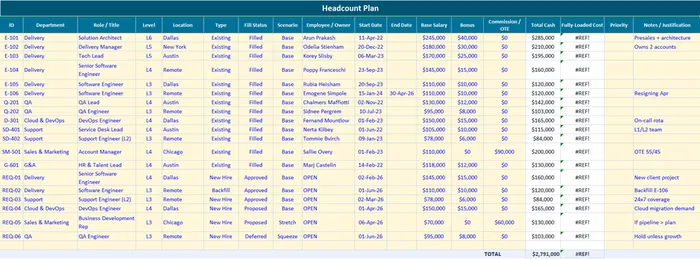
Sample Headcount Planning Template
Here’s a sample template for you to work on:
| Method | How it Works | Best When | The Catch |
|---|---|---|---|
| Ratio-based | Fixed ratios, such as one support agent per 150 accounts | You need a quick estimate or a sanity check | It bakes in last year's inefficiency permanently |
| Driver-based | Headcount linked to a business metric that moves | Most companies, most of the time | Only as good as the driver you pick |
| Bottom-up | Every task estimated in hours, then summed | High-cost teams and new functions | Slow, and it drifts as soon as the work changes |
| Zero-based | Rebuild from zero, justify every existing role | Restructures, mergers, cost programmes | Politically expensive. Not an annual habit |
My honest recommendation: Use a driver-based approach across the organization, then use a bottom-up approach for your one or two most expensive teams. This gives you a solid basis for planning everywhere and more accurate numbers where the highest costs are. If you’re choosing a driver, our list of critical productivity metrics and KPIs can help you find a metric your business already uses instead of creating a new one.
How to Do Headcount Planning and Forecasting Without a Crystal Ball?
Stop trying to predict one exact number, plan for three instead: a base case for the growth you expect, a stretch case for faster growth, and a squeeze case for a downturn. Then decide in advance what needs to happen for you to move from one scenario to another.
Single-number forecasts fail because businesses keep changing, and when the original number no longer fits, the plan gets abandoned instead of adjusted. These three scenarios avoid that because you have already planned for different outcomes.
| Scenario | What it Assumes | What You Commit to Now | The Trigger to Switch |
|---|---|---|---|
| Base | Growth roughly in line with your current trajectory | All must-have roles, sequenced across the year | This is your default |
| Stretch | Faster growth, a new market or a big client landing | Pre-written job specs and a shortlist, no offers | Two consecutive quarters above plan |
| Squeeze | Flat or declining revenue, or a funding delay | A named list of roles that pause, agreed in advance | One quarter more than 10 percent below plan |
The squeeze column is the uncomfortable one, also it is also the one that earns you the most credibility.
Having your own pause list ready before the planning meeting shows finance that you are planning for the business, not just for headcount. In my experience, that single move gets more roles approved.
Here are the three practical rules for the forecast itself:
- Forecast in Quarters, Not Months: Monthly precision is false precision when time to fill is 60 days.
- Include Attrition as Reduced Hours, Not as a Separate Line: Use your own rate by team. Company averages hide the teams that actually churn.
- Assume Ramp Time: A new hire is not full capacity on day one. Four to twelve weeks, depending on the role, and leaving it out is the most common reason a plan lands short.
Don’t let headcount gaps become delivery problems!
Time Champ gives you the workforce insights to spot capacity gaps and plan ahead.
How Time Champ Fits Into Headcount Planning
Time Champ is employee monitoring and workforce management software, and it sits at exactly one point in this process. Step one, the capacity audit.
It does not build your plan, price your roles, or run your approval workflow. Planning platforms do that well already. Time Champ gives you the number those platforms assume you already have, which is what your teams are actually doing with their time.
| What You Need to Know | What Time Champ Gives You |
|---|---|
| How many hours actually go to core work | Automatic app and website categorization into productive and non-productive time, by person, team and location |
| Whether the load is spread evenly | Workload and utilization views across teams, shifts and sites |
| Where the time is going instead | Time tracking against projects and tasks, with idle and away time surfaced automatically |
| Whether attendance matches the plan | Automated attendance and shift adherence without manual timesheets |
| How this quarter compares to last | Historical trends and reports you can export for the planning pack |
| Which teams changed after you hired | Before and after comparison on the same metrics, so you can prove the hire worked |
Plan a more effective workforce!
Get the insights you need to make smarter workforce decisions with Time Champ.
A Few Final Words
Proper headcount planning gives your organization an idea, a clear picture of what and where people are actually needed, so you don’t go overboard or too short on hiring.
An organization works at its best when people, policies, and responsibilities are clearly defined. Use our template to map out your needs and start working on it today for cleaner operations.

Shabana Shaik

Table of Content
 What Is Headcount Planning?
- Why Do Most Headcount Plans Fall Apart in the Budget Meeting?
- What Data Do You Need Before You Ask for a Single Hire?
- Do You Need a Hire, or a Fix?
- How to Build a Headcount Plan? The 7-Step Process
- Sample Headcount Planning Template
- How to Do Headcount Planning and Forecasting Without a Crystal Ball?
- How Time Champ Fits Into Headcount Planning
- A Few Final Words

Related Blogs
Download 5 free workforce planning templates for 2025 in Excel. Simplify headcount planning, skills gap analysis, succession & project capacity planning.
Thasleem Shaik | October 01, 2025![What is Workforce Intelligence? A Complete Guide [2026]](https://www.timechamp.io/images/workforce-intelligence-feature-image.webp)
Discover what workforce intelligence is, why it's critical, real examples, implementation steps, key benefits, challenges & how AI transforms the future.
Guna Lakshmi | Feb 11, 2026
Explore top workforce analytics tools for 2026 to monitor productivity, attendance, and team performance in real-time.
Guna Lakshmi | Apr 21, 2026
Understand what employee performance tracking is, along with proven methods, metrics that matter, and the best tools to track performance fairly in 2026.
Shabana Shaik | Jul 15, 2026
Learn about productivity tracking policy with a downloadable template and 30-day rollout plan to implement tracking clearly and build team acceptance.
Jahnavi Pulluri | May 11, 2026
Discover 10 workforce planning models every HR professional should know to align talent with business goals, improve efficiency, and plan for the future.
Thasleem Shaik | September 30, 2025


 4.7/5 avg.
Ready to Manage Your Workforce Smarter?
Join our family of 1500+ companies using smart insights to redefine workforces!

Free Trial
No Credit Card Required