Geofencing vs Traditional Location Tracking: Key Differences
Learn what a geofence is and how geofencing differs from GPS tracking. Compare accuracy, privacy, battery usage, and best use cases for smarter teams.
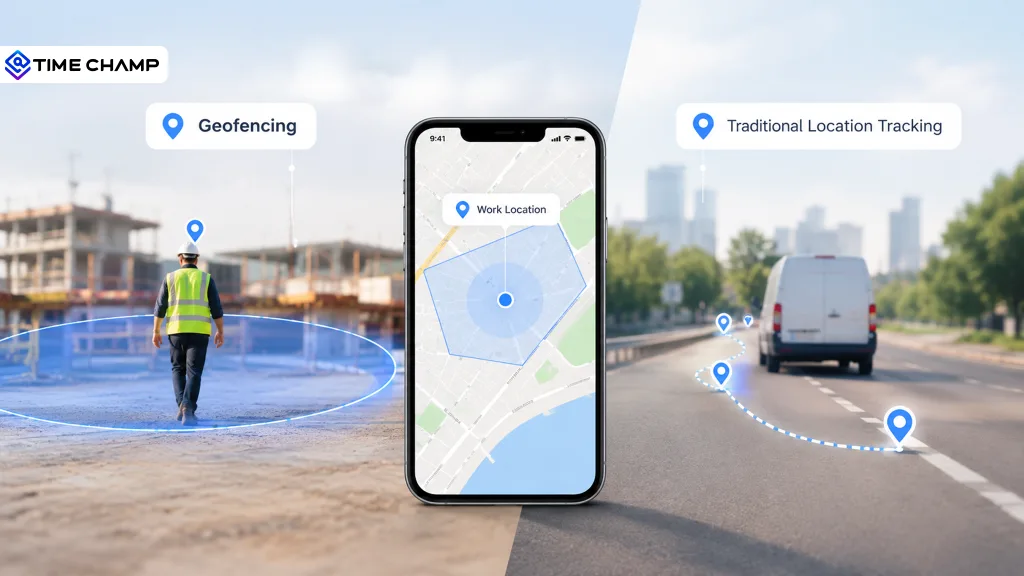
If someone asked you to explain the difference between geofencing and traditional location tracking, would you know where to start?
It's a common question, and for good reason. Because both technologies use location data, people often confuse them. But in reality, they work in completely different ways. Geofencing focuses on creating virtual boundaries that trigger actions, while traditional location tracking provides continuous updates on a person's, vehicle's, or asset's location. In this guide, we'll simplify the differences, compare their features, and help you decide which technology makes the most sense for your business.
What is a Geofence?
A geofence is a virtual boundary created around a real-world location using GPS, Wi-Fi, RFID, or cellular data. When a smartphone, tablet, or GPS-enabled device enters, exits, or remains within this predefined area, the geofencing system automatically detects the movement and triggers a specific action.
What Is Traditional Location Tracking?
Traditional location tracking is the process of continuously monitoring the real-time location of a person, vehicle, or asset using technologies such as GPS, cellular networks, or Wi-Fi. Unlike geofencing, which only triggers actions when a device crosses a virtual boundary, traditional location tracking provides ongoing location updates and records movement over time.
Geofencing vs Traditional Location Tracking: Key Differences
Both geofencing and traditional location tracking help you use location data, but they do different jobs. Take a look at the table below to see how they compare.
| Factor | Geofencing | Traditional Location Tracking |
|---|---|---|
| What it captures | Entry, exit, and time spent within a predefined virtual boundary | Continuous location updates, travel routes, stops, and movement history |
| Main question it answers | Was the employee or asset at the right location at the right time? | Where was the employee or asset throughout the day, and what route did they follow? |
| Data collected | Event-based location data only | Complete location history with timestamps and travel details |
| Automation | Automatically triggers actions like clock-ins, notifications, and alerts | Primarily provides tracking data for reporting and analysis |
| Battery usage | Lower, since it checks for boundary crossings instead of constant tracking | Higher, as GPS updates are recorded continuously or at regular intervals |
| Setup requirements | Requires virtual boundaries (geofences) to be created in advance | No predefined locations required; tracking starts wherever the device moves |
| Privacy impact | More privacy-friendly, as it focuses only on designated work locations | Collects more detailed movement data, making clear policies and employee consent important |
| Best suited for | Employee attendance, job site verification, access control, and restricted areas | Fleet management, delivery tracking, field service, route optimization, and asset monitoring |
Know Where Your Field Teams Are!
Track attendance, monitor job site visits, and optimize field operations with Time Champ
Why Most Field Teams Use Both
For many businesses, it's not about choosing geofencing or traditional location tracking; it's about using both together.
Geofencing confirms when employees arrive at or leave a job site, making it ideal for attendance and site verification. Traditional location tracking fills in the gaps by showing travel routes, stops, and time spent on the road.
When this location data is combined with attendance, timesheets, and expense records, you can discover valuable insights. For example, they can identify routes that take longer than expected, spot delays between job sites, and find opportunities to improve productivity.
Privacy and Trust: Using Location Data the Right Way
Location tracking can improve business operations, but it should always respect employee privacy. Being transparent about how location data is collected and used helps build trust and supports compliance with privacy regulations.
Here are a few best practices to follow:
- Track Only During Work Hours: Stop collecting location data when an employee's shift ends or they clock out.
- Collect Only the Data You Need: If geofencing is enough to verify attendance, there's no need for continuous GPS tracking.
- Be Transparent: Explain what data is collected, why it's needed, and who has access to it.
- Get Consent When Required: Privacy laws vary by country and region, so make sure your tracking practices comply with local regulations.
- Use Location Data to Support Employees: Accurate timesheets, fair mileage reimbursement, safer travel routes, and better scheduling help build trust far more than constant monitoring.
How Time Champ Brings Geofencing and GPS Tracking Together
Managing a field workforce is easier when you don't have to switch between multiple tools. Time Champ combines geofencing, GPS location tracking, attendance, timesheets, and field reporting into one platform, giving you a complete view of field operations in real time.
If you need to verify employee attendance at job sites, track travel between locations, or generate accurate timesheets, Time Champ helps you manage it all from a single dashboard.
Geofencing Features
- Smart geofencing lets you create virtual boundaries around job sites and allows employees to clock in or out only from approved locations.
- Geo-verified attendance automatically records clock-ins and clock-outs with location verification, reducing time fraud and improving attendance accuracy.
- Instant alerts notify you when employees enter or leave designated work zones.
GPS Location Tracking Features
- Real-time GPS tracking shows the live location of field employees during working hours.
- Route history records travel routes, stops, and time spent between job sites.
- Visit management logs client visits with GPS-verified check-in times, visit details, and territory coverage.
Workforce Intelligence for Smarter Field Operations
Time Champ goes beyond location tracking by turning location data into useful business insights.
- Automatic timesheets generate accurate work hours based on GPS and attendance data, eliminating manual time entries.
- Location-based expense tracking lets employees record travel expenses with GPS verification and image proof.
- Automated reports provide insights into attendance, travel time, client visits, routes, and field expenses.
- Real-time dashboards and alerts help you quickly identify missed check-ins, late arrivals, and coverage gaps, allowing you to take action before they affect operations.
Your Field Team Moves Fast, Your Software Should Too!
Create smart geofences, verify every check-in, and keep attendance accurate with Time Champ
Conclusion
Geofencing and traditional location tracking each serve a different purpose, and the right choice depends on your business needs. While geofencing is ideal for verifying attendance and job site visits, traditional location tracking provides complete visibility into employee movement and travel. For many field teams, using both together delivers the best results by improving accountability, streamlining operations, and helping you make smarter decisions.

Jahnavi Pulluri

Table of Content
 What is a Geofence?
- What Is Traditional Location Tracking?
- Geofencing vs Traditional Location Tracking: Key Differences
- Why Most Field Teams Use Both
- How Time Champ Brings Geofencing and GPS Tracking Together
- Conclusion

Related Blogs
Find the best GPS location tracking apps for employees to track routes, manage time across sites, and keep work organized with real-time insights.
Thasleem Shaik | Apr 13, 2026
Unlock how location intelligence transforms employee tracking, hybrid work management, and field team visibility with smart data-driven tools like Time Champ.
Chetana Choudary | Jul 24, 2025
Learn what location analytics is, why it matters, common use cases, key benefits, implementation challenges & how it differs from location intelligence.
Anjali | Feb 11, 2026
Choose employee time tracking software with the right tracking features, reporting, integrations, security, scalability, and workforce visibility for your team.
Thasleem Shaik | May 26, 2026
Discover the pros and cons of time tracking software, its key features, and how it can improve productivity, accountability, and overall team performance.
Jahnavi Pulluri | Jun 05, 2026
Time tracking software vs manual timesheets: compare accuracy, cost, effort, and ROI to pick the right solution for improving your team's productivity.
Jahnavi Pulluri | May 15, 2026


 4.7/5 avg.
Ready to Manage Your Workforce Smarter?
Join our family of 1500+ companies using smart insights to redefine workforces!

Free Trial
No Credit Card Required