Fleet Tracking: How It Works and How to Choose the Right System
Learn what fleet tracking is, how GPS fleet tracking systems work, key software features to compare, and how to add workforce visibility to vehicle data.
Managing a fleet isn’t just about knowing where your vehicles are. You also need to know how they’re being used, whether drivers are following planned routes, and where delays or inefficiencies are occurring.
A fleet tracking system helps you get this visibility by providing information about vehicle locations, routes, driver activity, and overall fleet performance. But how does fleet tracking actually work, and what should you look for when choosing a system?
This guide explains how fleet tracking works, its key features, and how to choose the right system for your business.
What Is Fleet Tracking?
Fleet tracking is a system that uses GPS and other technologies to monitor the location, movement, and status of vehicles in real time. It helps you see where your vehicles are, understand their routes, and manage fleet operations more efficiently.
A fleet tracking system can also provide information on vehicle speed, driver activity, route history, fuel usage, and vehicle performance, giving you better visibility into your fleet. In fact, four out of five fleet professionals now rely on GPS fleet tracking, according to the 2026 Verizon Connect Fleet Technology Trends Report.
Why Does Fleet Tracking Matter for Indian Businesses in 2026?
Fleet tracking matters for Indian businesses in 2026 because fuel is a major operating cost, customers expect live delivery updates, and many transport vehicles must carry approved tracking devices by law. A fleet tracking system helps companies control costs, prove service delivery, stay compliant, and keep vehicles and drivers safer on busy roads.
The market reflects this shift, as the India vehicle tracking market was valued at USD 1,026.2 million in 2025 and is projected to reach USD 3,063.1 million by 2034, growing at a CAGR of 12.53%, according to IMARC Group. Here are some key reasons why it matters:
1. Manages Increasing Fuel Costs
Fleet tracking identifies unnecessary idling, detours, and inefficient routes that increase fuel consumption. This helps businesses reduce fuel waste and control operating costs.

Did You Know?
According to Verizon Connect's 2026 report, fleets using GPS fleet tracking reported an average 12% decrease in fuel costs.
2. Improves Route Efficiency
Fleet tracking identifies inefficient routes and highlights delays during trips. This helps businesses plan better routes and improve vehicle utilization.
3. Improves Delivery Visibility
Real-time location data shows where vehicles are and provides visibility into trip progress. This helps businesses provide accurate delivery updates and respond quickly to delays.
4. Supports Driver Safety
Fleet tracking identifies driving behaviors such as speeding, harsh braking, and rapid acceleration. These insights help businesses provide targeted feedback and encourage safer driving practices.
5. Reduces Unauthorized Vehicle Use
Geofencing and movement alerts identify vehicles operating outside approved areas or working hours. This helps businesses detect unusual activity and respond quickly.
6. Simplifies Fleet Maintenance
Fleet tracking helps manage maintenance schedules, service records, and vehicle-related issues. This reduces the chances of missed servicing and helps minimize unexpected downtime.
7. Supports Regulatory Compliance
Fleet tracking helps businesses manage vehicle location requirements that apply to specific vehicle categories in India. Using an appropriate tracking system also helps maintain the required tracking information.
8. Supports Better Fleet Planning
Fleet data identifies vehicle utilization patterns, trip frequency, and operational gaps. These insights help businesses plan capacity, allocate vehicles efficiently, and make informed decisions about fleet expansion.
Looking for a smarter way to manage your fleet and workforce?
Use Time Champ to combine GPS, geofencing, attendance, and productivity insights for better visibility and more efficient field operations.
How Does a GPS Fleet Tracking System Work?
A GPS fleet tracking system follows a series of steps to collect vehicle information, transmit it, and present it through tracking software. Here’s how the process works:
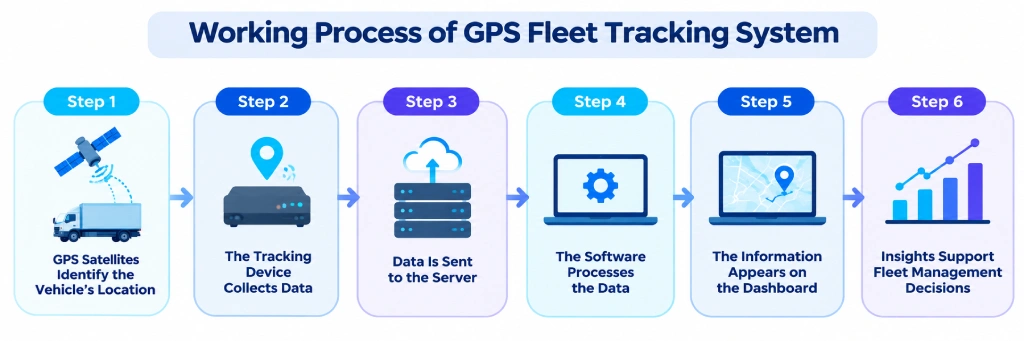
Step 1: GPS Satellites Identify the Vehicle’s Location
The GPS device installed in the vehicle receives signals from multiple GPS satellites to determine its location. These signals help calculate the vehicle’s position, speed, and direction.
The device uses signals from different satellites to improve location accuracy. This information is updated at regular intervals as the vehicle moves.
Step 2: The Tracking Device Collects Data
The tracking device collects important information about the vehicle while it is operating. This can include location, speed, stops, route history, and movement patterns.
Depending on the device and system, additional information such as ignition status, engine data, or fuel usage may also be collected. The data provides a detailed view of how each vehicle is being used.
Step 3: Data Is Sent to the Server
Once the tracking device collects the information, it sends the data to a central server through a cellular or wireless network. The frequency of these updates can vary depending on the tracking system and network connection.
The server stores the incoming information so it can be processed and accessed later. If the network connection is temporarily unavailable, some devices can store data and transmit it once the connection is restored.
Step 4: The Software Processes the Data
Fleet tracking software receives the vehicle data and converts it into useful information. It organizes details such as vehicle locations, routes, stops, and travel history.
The processed data is displayed in an easy-to-understand format through maps, dashboards, reports, and alerts. This makes large amounts of vehicle data easier to analyze.
Step 5: The Information Appears on the Dashboard
The processed information is displayed on a web or mobile dashboard. Fleet managers can view vehicle locations, review routes, and check historical movement from a centralized interface.
Dashboards can also provide alerts for events such as speeding, unauthorized movement, or route deviations. This creates greater visibility into day-to-day fleet operations.
Step 6: Insights Support Fleet Management Decisions
The collected data can help identify delays, inefficient routes, excessive vehicle use, and unusual driving activity. These insights can then be used to improve fleet operations.
Over time, historical tracking data can also reveal patterns in vehicle usage and driver behavior. This supports better planning, resource allocation, and overall fleet efficiency.
Did You Know?
Deloitte reported that a transportation provider using route optimization technology achieved up to a 50% reduction in dispatcher workload for managing daily pickups.
Types of Fleet Tracking Devices
Fleet tracking devices come in different types based on how they connect to the vehicle and how much information they collect. Choosing the right device depends on factors such as fleet size, vehicle type, tracking needs, and the level of data required.
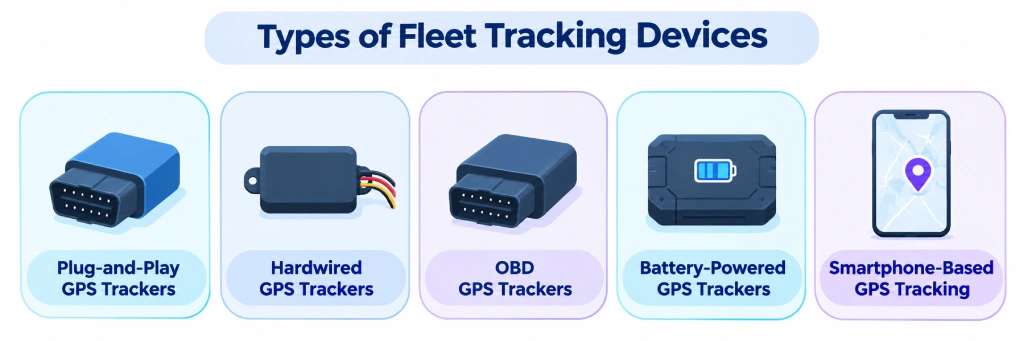
1. Plug-and-Play GPS Trackers
Plug-and-play GPS trackers connect directly to a vehicle’s OBD-II port, making them simple to install without professional assistance. They can provide information such as vehicle location, speed, travel routes, and driving activity.
These devices are suitable for businesses that need a quick tracking solution across a small or medium-sized fleet. They can also be moved between vehicles when needed.
2. Hardwired GPS Trackers
Hardwired GPS trackers are connected directly to the vehicle’s electrical system. Because they are installed inside the vehicle, they generally provide a more permanent tracking solution.
These devices are commonly used for commercial fleets that require continuous vehicle tracking. They can also support additional data collection depending on the device and vehicle.
3. OBD GPS Trackers
OBD GPS trackers use the vehicle’s onboard diagnostic port to collect location and vehicle-related information. Installation is usually straightforward because the device simply plugs into the available port.
Some OBD trackers can also access diagnostic information from the vehicle. This makes them useful when businesses need both location visibility and basic vehicle data.
4. Battery-Powered GPS Trackers
Battery-powered GPS trackers operate using an internal battery rather than drawing power directly from the vehicle. Their wireless design makes them flexible and easy to install.
They can be useful for vehicles where hardwired installation is difficult or when temporary tracking is required. Battery life varies depending on factors such as update frequency and device usage.
5. Smartphone-Based GPS Tracking
Smartphone-based tracking uses a mobile app to collect GPS location data from a driver's or field worker's smartphone. It eliminates the need to install a dedicated tracking device in every vehicle.
This approach can be practical for businesses with smaller fleets or mobile teams. However, tracking accuracy and availability can depend on the phone's battery, GPS settings, and network connection.
Want clearer insights from your fleet data?
Use Time Champ to turn vehicle and workforce data into actionable insights for better planning and operational decisions.
The Limitations of Fleet Tracking for Workforce Management
Fleet tracking gives you clear visibility into vehicles, routes, and trips, but it does not provide the complete picture of workforce activity. A vehicle can reach a location on time, but that alone does not show how employees spent their working hours or how efficiently the work was completed.
1. Limited Visibility Into Employee Work
Fleet tracking mainly focuses on vehicles and their movements. It does not show how employees spend their time when they are working at a customer site, office, warehouse, or other location.
2. Doesn’t Measure Productivity
Knowing that a vehicle reached its destination does not tell you how much work was completed there. Workforce management requires insights into working hours, activity, tasks, and productivity.
3. Limited Attendance Insights
Vehicle movement does not always reflect employee attendance. Multiple employees may travel in one vehicle, while others may use their own transportation or work from different locations.
4. No Clear View of Work Hours
Fleet tracking can show when a vehicle starts or ends a trip, but it may not accurately represent an employee’s actual working hours. This makes it difficult to manage overtime, breaks, and timesheets using fleet data alone.
5. Workforce and Fleet Data Remain Separate
When fleet and workforce information sit in separate systems, managers may need to compare data manually. Combining both types of information can provide a more complete view of field operations, employee time, and resource utilization.
Which Features Should You Look For in Fleet Tracking Software?
The right fleet tracking software should do more than show vehicle locations on a map. Look for features that help manage routes, drivers, vehicles, and day-to-day fleet operations from one platform.
- Real-Time GPS Tracking: Shows vehicle locations, movement, routes, and trip progress in real time.
- Geofencing: Creates virtual boundaries around specific locations and sends alerts when vehicles enter or leave them.
- Route Management: Helps plan routes and identify unnecessary detours, delays, and inefficient travel patterns.
- Driver Behavior Insights: Provides data on speeding, harsh braking, rapid acceleration, and other driving behaviors.
- Alerts and Notifications: Sends alerts for speeding, route deviations, unauthorized movement, and geofence violations.
- Fleet Reports and Analytics: Provides insights into vehicle utilization, mileage, trips, driving activity, and overall fleet performance.
- Mobile Access: Allows fleet managers to access vehicle and trip information from their mobile devices.
- Integrations: Connects fleet data with other business tools to reduce manual work and simplify operations.
- User Access Controls: Controls which users can access specific fleet information and features.
- Scalability: Supports additional vehicles, users, locations, and features as the business grows.
Need better control over your fleet operations?
Use Time Champ to simplify workforce management and gain clear insights into locations, attendance, working hours, and productivity.
Fleet Tracking Software vs Field Workforce Tracking: Which Do You Need?
Fleet tracking software and field workforce tracking solve different operational needs. Fleet tracking focuses on vehicles, while field workforce tracking focuses on employees working outside the office.
If your main concern is vehicle location, routes, fuel usage, and driving behavior, fleet tracking software may provide the visibility you need. If you also need to understand employee attendance, working hours, field activity, and productivity, field workforce tracking provides a broader view.
| Aspect | Fleet Tracking Software | Field Workforce Tracking |
|---|---|---|
| What it tracks | Vehicles, trailers, and equipment | Employees working in the field |
| Data source | Hardwired, OBD, or battery-powered GPS devices | A mobile app on the employee's phone |
| Key outputs | Location, trips, idling, fuel, and engine health | Geo-verified attendance, visits, time at client sites, routes, and field expenses |
| Main users | Fleet and transport managers | Operations, HR, and field sales or service managers |
| Best suited for | Logistics, transport, distribution, and bus operators | Field sales, service technicians, site crews, and riders on personal two-wheelers |
Which One Fits Your Business?
- Choose fleet tracking software if your primary requirement is managing vehicles, routes, drivers, fuel, and fleet operations.
- Choose field workforce tracking if your priority is managing employees, attendance, working hours, field activity, tasks, and productivity.
- Consider both if your business needs visibility into where vehicles are and how employees are using their working time.
For businesses with delivery, logistics, construction, field service, or other mobile teams, combining fleet and workforce data can provide a more complete view of daily operations.
Turn Fleet Data into Workforce Insights with Time Champ
Fleet tracking tells you where your vehicles are, but it doesn’t show the complete picture of how your field workforce spends its working hours. Time Champ bridges this gap by combining workforce visibility with GPS and geofence-based tracking, helping you understand both employee activity and location-based operations.
With Time Champ, you can:
- Manage employee working hours with automatic time tracking and timesheets.
- Use GPS-based tracking to see where field employees are and how they move during working hours.
- Set up geofences around offices, customer sites, project locations, or other work areas and get location-based visibility when employees enter or leave defined zones.
- Manage attendance across field, remote, and distributed teams using location-based insights.
- Understand productivity through detailed reports and analytics.
- Manage employee activity across applications and websites.
- View workforce data through centralized dashboards and reports.
- Improve workforce planning using insights into how time, locations, and resources are being utilized.
When fleet data and workforce insights work together, you get a clearer view of where your vehicles and field employees are, how they spend their working time, and how efficiently work is being completed.
Ready to bring fleet and workforce visibility together?
Use Time Champ to gain real-time insights into employee time, locations, attendance, and productivity, all in one place.
Conclusion
Fleet tracking helps you manage vehicles, routes, drivers, and daily operations more efficiently. But vehicle data alone doesn’t show how your field workforce spends its time or how work is being completed.
Time Champ brings fleet and workforce visibility together with GPS, geofencing, attendance, working hours, and productivity insights. Try Time Champ today to gain better visibility, improve workforce efficiency, and manage your field operations with confidence.

Guna Lakshmi

Table of Content
 What Is Fleet Tracking?
- Why Does Fleet Tracking Matter for Indian Businesses in 2026?
- How Does a GPS Fleet Tracking System Work?
- Types of Fleet Tracking Devices
- The Limitations of Fleet Tracking for Workforce Management
- Which Features Should You Look For in Fleet Tracking Software?
- Fleet Tracking Software vs Field Workforce Tracking: Which Do You Need?
- Turn Fleet Data into Workforce Insights with Time Champ
- Conclusion
Related Blogs

From accurate time tracking to payroll errors, the benefits of geofence attendance software help you streamline workforce management and boost accountability.
Guna Lakshmi | Jul 24, 2025
Simplify team management with smart employee geofencing. Track real-time attendance, boost accountability, and reduce time theft effortlessly.
Guna Lakshmi | Jul 24, 2025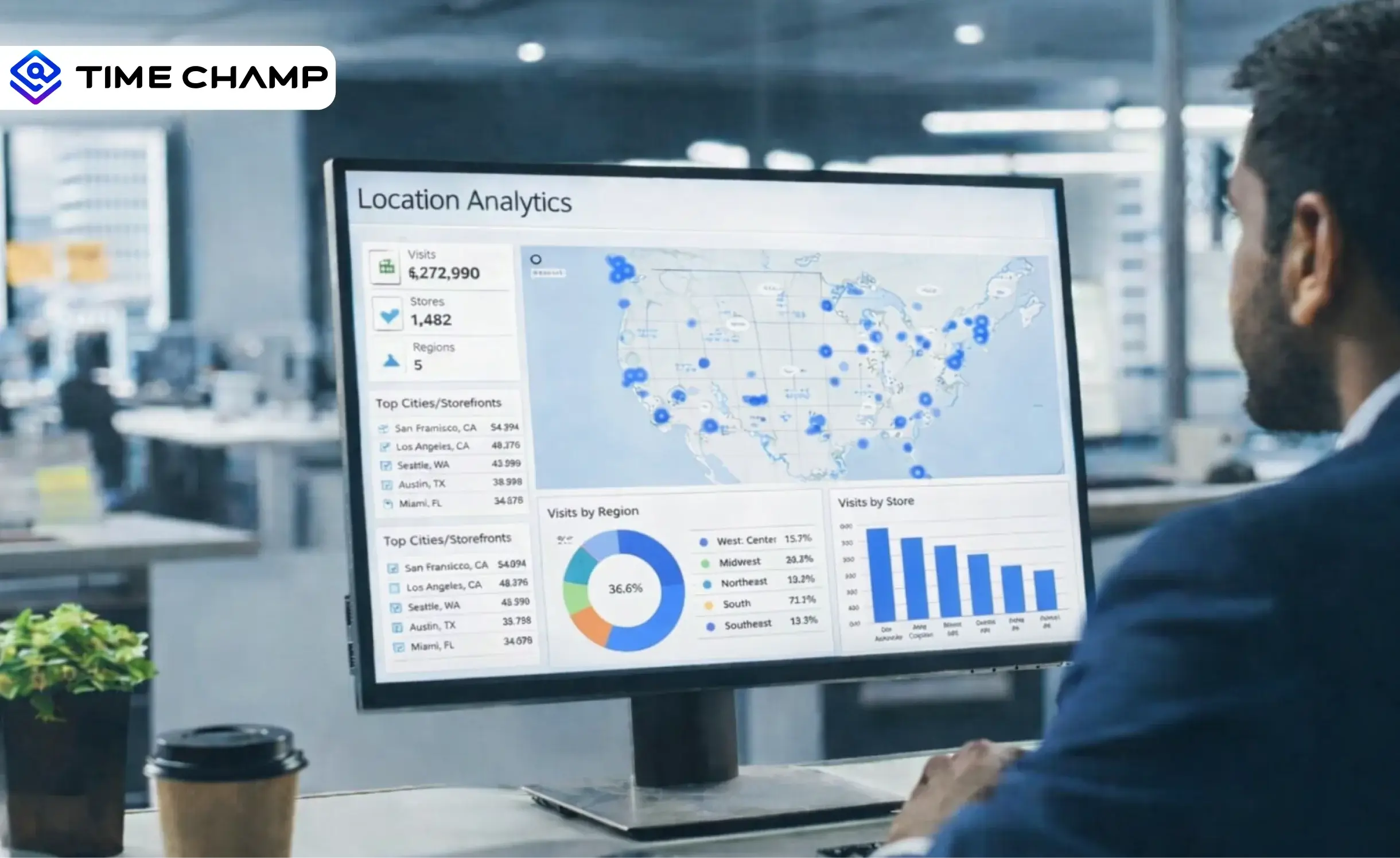
Learn what location analytics is, why it matters, common use cases, key benefits, implementation challenges & how it differs from location intelligence.
Anjali | Feb 11, 2026
Stay informed on employee GPS tracking laws and policies, including state regulations, device compliance rules, and how to create a legal tracking policy.
Thasleem Shaik | Oct 09, 2025
Create a compliant and effective GPS tracking policy. Download a free, customizable template and explore best practices for ethical operation and compliance.
Chethana | Jul 24, 2025
Find the best GPS location tracking apps for employees to track routes, manage time across sites, and keep work organized with real-time insights.
Thasleem Shaik | Apr 13, 2026


 4.7/5 avg.
Ready to Manage Your Workforce Smarter?
Join our family of 1500+ companies using smart insights to redefine workforces!

Free Trial
No Credit Card Required