Day Theming: A Complete Guide to Better Weekly Planning
Turn a busy week into a structured one with day theming. Compare it with time blocking, see the practical examples, and avoid common planning mistakes.
You may begin the week with a clear plan, but end up juggling meetings, urgent requests, and unfinished tasks. Constantly switching between different types of work makes it harder to stay focused, manage your work schedule, and make steady progress. A more structured approach, like day theming, can bring clarity and control to your week. Assigning a specific focus to each day of the week creates a simple structure that improves weekly planning, reduces distractions, and helps you work with greater consistency.
Here, you’ll understand what day theming is, comparison with time blocking, and how to create a weekly plan using practical examples. You'll also learn about the common mistakes to avoid and how to stay consistent with your routine.
What is Day Theming?
Day Theming is a time management method that assigns a specific type of work or responsibility to each day of the week. Without just switching between unrelated tasks throughout the day, you can dedicate each day to a particular focus, making it easier to prioritize work, reduce context switching, and complete important tasks more efficiently.
It became widely known through entrepreneurs and productivity experts such as Jack Dorsey, Tim Ferriss, and Michael Hyatt, who shared how they organized their weeks around dedicated themes. One of the earliest and most recognized examples comes from Jack Dorsey, who assigned a different business focus to each weekday while leading multiple companies. Over time, other business leaders and productivity coaches adopted and refined the approach, making it a popular strategy for improving focus, managing workloads, and planning work more intentionally.
Day Theming Vs Time Blocking
Day theming and time blocking are both effective time management methods, but they solve different problems. Day theming helps you organize your entire week by assigning a specific focus to each day. While time blocking helps you organize individual days by scheduling tasks into dedicated time slots.
Choosing the right method depends on how you prefer to plan and manage the workload.
| Aspect | Day Theming | Time Blocking |
|---|---|---|
| Planning Focus | Organizes your entire week by assigning a theme to each day. | Organizes a single day by assigning specific time slots to tasks. |
| Flexibility | Easy to adjust tasks within the day's theme without disrupting the week’s plan. | Requires rescheduling when tasks take longer or priorities change. |
| Work Style | Groups the similar work together to maintain focus and reduce context switching. | Breaks the day into structured time periods for planned activities. |
| Planning Level | Weekly planning | Daily planning |
| Example | Monday for planning, Tuesday for client work, Wednesday for meetings, Thursday for deep work, Friday for reviews. | 9–10 AM emails, 10–12 PM project work, 1–2 PM meetings, 2–4 PM reports. |
| Best For | Managing recurring responsibilities, departments, or projects. | Scheduling meetings, deadlines, and individual tasks. |
Why Does Day Theming Work So Well?
The reason day theming works so well is that it gives each workday a clear purpose. Focusing on one category of work at a time reduces unnecessary task switching, making it easier to stay organized, use time effectively, and complete meaningful work with less mental effort.
Key Benefits of Day Theming:
- Reduces Context Switching: Working on similar tasks throughout the day helps you maintain focus and spend less time adjusting between different types of work. Constantly switching between tasks can drain your energy and make it harder to stay productive.
- Makes Weekly Planning Easier: Assigning themes to each day creates a predictable schedule, making it simpler to prioritize responsibilities and plan work effectively.
- Supports Deeper Focus: Fewer interruptions between unrelated tasks allow you to spend longer periods on important work, leading to better-quality outcomes.
- Improves Workload Balance: Separating meetings, planning, administrative work, and project tasks across the week prevents any single day from becoming overloaded.
- Reduces Decision Fatigue: Knowing the focus of each day eliminates the need to constantly decide what to work on next, leaving more mental energy for completing important tasks.
- Creates a Sustainable Routine: A consistent weekly structure makes it easier to build productive habits, follow through on priorities, and adapt when unexpected work arises without disrupting the entire week.
Struggling to stick to your weekly plan?
Track work patterns and stay consistent with Time Champ.
Day Theming Examples for Different Roles
Every role has recurring responsibilities that can be grouped into dedicated days. Here are practical examples of how different professionals can organize their week using day theming.
Project Management
- Monday: Sprint planning and task allocation
- Tuesday: Project execution and team collaboration
- Wednesday: Client meetings and stakeholder updates
- Thursday: Risk management and issue resolution
- Friday: Progress reviews, reporting, and next week planning
Content Creation & Freelance
- Monday: Content planning and research
- Tuesday: Writing and content creation
- Wednesday: Editing, proofreading, and revisions
- Thursday: Client meetings, feedback, and content publishing
- Friday: Invoicing, portfolio updates, and planning upcoming projects
Software Development Team
- Monday: Sprint planning and backlog refinement
- Tuesday: Feature development
- Wednesday: Code reviews and team collaboration
- Thursday: Testing, debugging, and bug fixes
- Friday: Deployment, documentation, and sprint retrospective
Marketing Department
- Monday: Campaign planning and market research
- Tuesday: Content creation and creative development
- Wednesday: Social media, email, and campaign execution
- Thursday: Performance analysis and campaign optimization
- Friday: Reporting, brainstorming, and planning for the next week
How To Start Day Theming for Weekly Planning
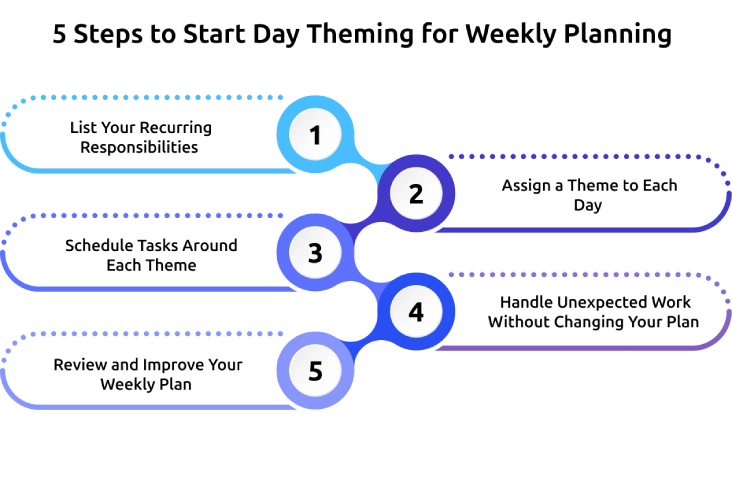
Getting started with day theming doesn’t require a complete overhaul of your schedule. Follow these simple steps to create a weekly plan that matches your responsibilities and helps you stay focused.
Step 1: List Your Recurring Responsibilities
Begin by identifying all the tasks and responsibilities you handle regularly. Write them down and group similar activities together, such as planning, meetings, client work, project execution, administration, or reporting. This helps you understand how your time is currently distributed and highlights areas that need better organization.
Step 2: Assign a Theme to Each Day
Assign a clear focus to each day of the week based on your priorities. Choose themes that reflect your main responsibilities, such as planning, execution, meetings, or review. Make sure each theme is broad enough to include related tasks but specific enough to guide your daily work.
Step 3: Schedule Tasks Around Each Theme
Place your tasks, meetings, and deadlines into your calendar based on the theme assigned to each day. Make sure you block dedicated time for high-priority work and protect those time slots from interruptions. Maintain some flexible space for smaller or routine tasks so that your schedule remains practical and manageable.
Step 4: Handle Unexpected Work Without Changing Your Plan
Follow a clear approach to handling new tasks or urgent requests when they arise. First, check if the task truly requires immediate attention. If it is not urgent, assign it to the day that matches its theme. If it is urgent, complete it promptly and then return to your planned work. This method helps you stay organized and prevents unnecessary changes to your schedule.
Step 5: Review and Improve Your Weekly Plan
Review how your schedule worked in practice. Identify which days felt productive and where adjustments are needed. Update your themes or task distribution based on your workload so that the weekly plan continues to support your goals effectively.
Common Day Theming Mistakes to Avoid
Even a well-planned day theming schedule can become ineffective if you make a few common mistakes. Avoiding these issues will help you stay consistent and get the most out of your weekly plan.
1. Assigning Too Many Themes to One Day
- Mistake: Trying to cover multiple unrelated responsibilities in a single day reduces focus and makes your schedule feel overwhelming. It also increases unnecessary task switching.
- How to Avoid It: Give each day one primary focus and keep related tasks together. If another task can wait, move it to the day that matches its theme.
2. Creating Themes That Are Too Specific
- Mistake: Narrow themes limit flexibility and make it difficult to fit unexpected work into your schedule. You may end up constantly changing your plan.
- How to Avoid It: Choose broader themes such as planning, meetings, project work, or reviews. This gives you enough flexibility while keeping the whole day organized.
3. Ignoring Urgent Priorities
- Mistake: Sticking to your schedule without considering urgent deadlines can delay important work. Not every task can wait for its assigned day.
- How to Avoid It: Handle genuine urgent tasks first, then return to your planned theme. Reschedule only when necessary, without changing your entire week.
4. Overloading One or Two Days
- Mistake: Filling a single day with too many high-priority tasks often leads to unfinished work and unnecessary stress. Productivity drops as the workload increases.
- How to Avoid It: Distribute responsibilities evenly across the week. Keep enough time between major tasks to manage workload comfortably.
5. Never Reviewing Your Weekly Plan
- Mistake: Following the same schedule every week without reviewing it can make your plan less effective as priorities change over time.
- How to Avoid It: Spend a few minutes at the end of each week reviewing what worked well. Adjust your themes based on the workload and upcoming priorities to keep the schedule practical.
How Time Champ Helps You Stay Consistent with Day Theming
Creating a weekly plan is easy, but sticking to it is where you may struggle. Meetings, interruptions, and changing priorities can quickly pull you away from the planned focus. Time Champ is a smart employee monitoring software with built-in workforce intelligence features that help you understand how time is spent, making it easier to follow the weekly themes and improve productivity.
Here are the key features of Time Champ that help your day theming routine stay on track:
- Verify Whether Your Daily Themes Are Working: View how your employees spend their time to see if each day follows its planned focus or gets filled with unrelated work.
- Identify Productivity Leaks: Spot frequent interruptions, unnecessary meetings, distracting applications, or websites that prevent your employees from staying focused on the day’s theme.
- Plan Weekly Themes with Real Work Insights: Use productivity trends, time tracking, and activity reports to create realistic weekly themes based on actual work patterns rather than assumptions.
- Provide Transparent Productivity Visibility: Give employees access to their own productivity dashboard so they can review work patterns, stay accountable, and improve their daily focus with complete transparency.
- Monitor Work Securely with Enterprise-Grade Protection: Protect your employee data with advanced security standards, role-based access controls, and compliance features, ensuring workforce insights remain secure and reliable.
Turn your weekly planning into measurable productivity.
Use Time Champ to gain complete visibility into work habits and help your team stay focused every day.
Conclusion
A productive week doesn't happen by chance. It starts with a clear plan that helps you focus on the right work at the right time. Day theming provides a simple way to organize your responsibilities, reduce unnecessary task switching, and maintain consistency throughout the week. Whether you’re managing projects, leading a team, or balancing multiple priorities, this approach can make your schedule more structured and manageable. Review your plan regularly, adjust it as your workload changes, and use the right tools to stay on track. Small improvements in weekly planning can lead to better productivity, stronger focus, and more meaningful results over time.

Anjali

Table of Content
 What is Day Theming?
- Day Theming Vs Time Blocking
- Why Does Day Theming Work So Well?
- Key Benefits of Day Theming:
- Day Theming Examples for Different Roles
- How To Start Day Theming for Weekly Planning
- Common Day Theming Mistakes to Avoid
- How Time Champ Helps You Stay Consistent with Day Theming
- Conclusion

Related Blogs

What is time blocking? Learn how to plan focus blocks, choose a method that fits your day, and audit whether your blocks actually held to get more done.
Shaik Shabana | Jun 08, 2026
See where your time goes, eliminate inefficiencies, and improve productivity with a time audit using practical steps, proven benefits, and tools.
Anjali | Jun 02, 2026
Learn what time management skills are, compare key skills, explore examples with stats, and see how they differ from time management techniques.
Thasleem Shaik | Apr 08, 2026
Learn how to build a time management plan that aligns roles, goals, and schedules. A practical, step-by-step guide to lead your team with clarity.
Thasleem Shaik | May 25, 2026
Learn what time mapping is, why it matters, and how it helps teams visualize workloads, optimize resources, and improve project planning and productivity.
Jahnavi Pulluri | Jun 09, 2026
Learn practical ways to speed up your workday, improve focus, reduce distractions, and manage time effectively without increasing work stress.
Guna Lakshmi | May 12, 2026


 4.7/5 avg.
Ready to Manage Your Workforce Smarter?
Join our family of 1500+ companies using smart insights to redefine workforces!

Free Trial
No Credit Card Required