What Is a Time Audit? Steps and Benefits Explained
See where your time goes, eliminate inefficiencies, and improve productivity with a time audit using practical steps, proven benefits, and tools.

Ever feel like your day is packed with work, yet important tasks still seem unfinished? Many professionals and teams struggle to understand where their time actually goes. Meetings, interruptions, administrative tasks, and unexpected requests can quietly consume hours without delivering meaningful results. A time audit helps uncover these hidden patterns, giving you a clear picture of how time is spent and where improvements can be made.
Whether you're trying to manage a team more effectively or improve business efficiency, understanding your employee time usage is the first step. Here, you'll understand what a time audit is and how to conduct it using a simple step-by-step process. You'll also learn its benefits, the differences between manual and automated time audits, and best practices for tracking and optimizing time more effectively.
What is a Time Audit?
A time audit is a structured process of analyzing how time is spent across tasks, projects, and daily activities to understand where productivity is gained or lost. It helps you and teams identify inefficiencies, prioritize high-value work, and make better decisions about how time is allocated.

Did You Know?
According to an Eagle Hill Consulting survey, 68% of U.S. employees regularly spend time on low-value and inefficient tasks at work. This highlights how easily productive hours can be lost without clear visibility into daily activities and workflows.
How to Conduct a Time Audit: A 6 Step Process
A time audit is most effective when you follow a structured process. These six steps will help you accurately track employee time, identify productivity gaps, and make effective improvements in team performance and efficiency.
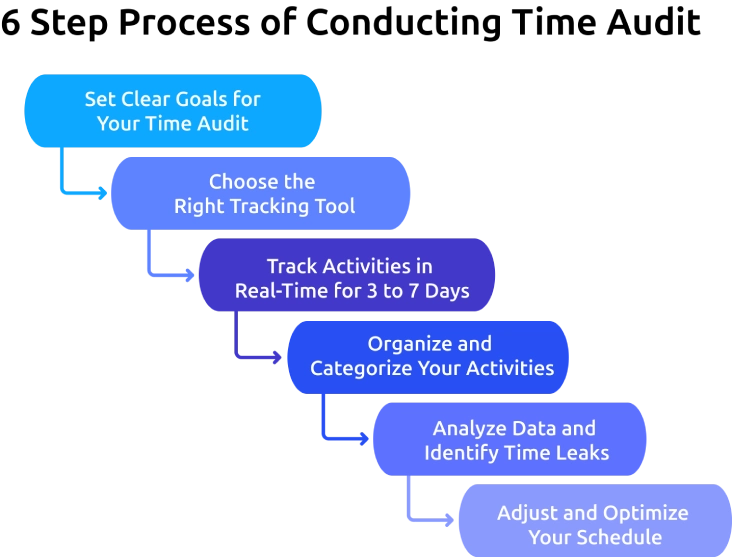
1. Set Clear Goals for Your Time Audit
Start by defining why you want to conduct a time audit. These goals can be to improve productivity, reduce distractions, understand how work hours are spent, or identify tasks that consume more time than expected.
Having a clear objective helps you focus on the information that matters most and makes it easier to evaluate the results later.
2. Choose the Right Tracking Tool
Select a method that makes time tracking easy and consistent. You can use a spreadsheet, time audit template, mobile app, or automated time tracking software, depending on your needs.
The best tool fits naturally into your workflow and allows you to record activities with minimal effort.
3. Track Activities in Real-Time for 3 to 7 Days
Record every activity as it happens without relying on memory at the end of the day. Include work tasks, meetings, emails, breaks, administrative work, and other routine activities.
Tracking for at least three to seven days provides a realistic view of how your time is distributed across different types of work.
4. Organize and Categorize Your Activities
Group similar activities into categories such as focused work, meetings, communication, administration, learning, and breaks.
Categorizing the activities makes patterns easier to identify and helps you understand which areas consume the most time.
5. Analyze Data and Identify Time Leaks
Review the records and look for activities that take longer than expected or contribute little value to your goals. Pay attention to frequent interruptions, unnecessary meetings, excessive multitasking, and repetitive tasks.
Even small-time leaks can add up quickly, reducing productivity and preventing your employees from focusing on high-priority work.
6. Adjust and Optimize Your Schedule
Use your findings to make practical improvements. Eliminate low-value activities where possible, set clearer priorities, reduce distractions, and allocate more time to important work.
Continue reviewing employee time usage periodically to ensure that the schedule remains aligned with the established goals and responsibilities.
Tired of manual tracking inconsistent data?
Time Champ automatically captures work hours and activities with accurate, real-time tracking.
What Are the Key Benefits of Conducting a Time Audit?
Understanding how your employees spend time is the first step toward improving it. Time audit helps you understand how daily activities align with the priorities set up, making it easier for employees to work smarter and achieve better results.
Regularly reviewing how time is spent can help you uncover hidden inefficiencies, improve focus, and create a more productive workflow. Here are some of the key benefits:
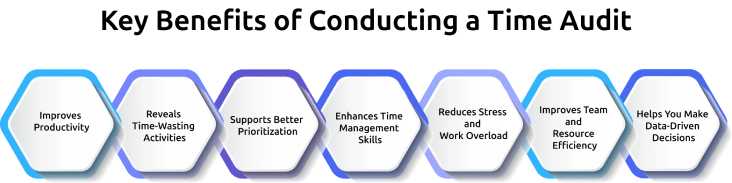
1. Improves Productivity
A time audit helps you identify activities that consume time without contributing meaningful value. Once these distractions are identified, you can redirect employee attention toward tasks that have a greater impact on the goals. This allows them to work more efficiently, complete important tasks faster, and achieve better results throughout the day.
2. Reveals Time-Wasting Activities
You may underestimate how much time is lost to interruptions, unnecessary meetings, multitasking, and administrative work. Reviewing your employees' daily activities helps uncover these hidden productivity drains that often go unnoticed. Once identified, you can take steps to reduce or eliminate them, creating more time for meaningful and productive work.
3. Supports Better Prioritization
Understanding where your time goes helps to distinguish between urgent tasks and important ones. This clarity helps employees focus on activities that contribute the most value without constantly reacting to less important demands. As a result, you can make better decisions about how to allocate the time for the tasks on each day.
4. Enhances Time Management Skills
Tracking and reviewing employee activities encourages better planning and scheduling. It helps you develop a better understanding of how long tasks actually take, making it easier to create realistic plans. Over time, this leads to stronger time management habits, improved focus, and greater control over your employee workload.
5. Reduces Stress and Work Overload
When you have visibility into how your employees spent their time, it becomes easier to balance responsibilities and avoid overcommitting. You can identify areas where employees get overloaded and make adjustments before stress builds up. This creates a more balanced workload, improves team efficiency, and supports a healthier, more productive work environment.
6. Improves Team and Resource Efficiency
A time audit provides valuable insights into how your team spends its work hours. These insights help you identify bottlenecks, uneven workloads, and processes that may slow productivity. With a clearer understanding of time allocation, teams can make informed adjustments, collaborate more effectively, and use available resources more efficiently.
7. Helps You Make Data-Driven Decisions
Using actual time usage data allows you to make informed decisions about workflows, staffing, project planning, and productivity improvements. You can base decisions on clear and measurable information without relying on assumptions. This leads to more accurate planning, better resource allocation, and improved outcomes across projects and operations.
Manual Vs Automated Time Audit: Key Differences?
A time audit can be performed either manually or with automated tracking tools. While both methods help you understand how time is spent, they differ in terms of accuracy, effort, and the depth of insights they provide.
The right approach depends on your goals, team size, and the level of detail you need. Here's a comparison of the key differences:
| Aspect | Manual Time Audit | Automated Time Audit |
|---|---|---|
| Data Collection | Requires manually recording activities and time spent. | Automatically tracks activities and work hours in the background. |
| Accuracy | Can result in missed entries and memory-based errors. | Provides more accurate and consistent time records. |
| Time and Effort | Time-consuming and requires regular updates. | Requires minimal effort after setup. |
| Real-Time Tracking | Limited, as activities are often logged after completion. | Captures activities in real time automatically. |
| Reporting and Analysis | Reports must be created and analyzed manually. | Generates reports and analytics automatically. |
| Scalability | Suitable for individuals or small teams. | Ideal for growing teams and organizations. |
| Risk of Human Error | High due to forgotten or inaccurate entries. | Low because tracking is automated. |
| Productivity Insights | Limited visibility into time usage patterns. | Provides deeper insights into productive and non-productive activities. |
| Best For | Personal use, short-term audits, and simple tracking needs. | Businesses, remote teams, and long-term productivity improvement. |
How Can Time Champ Improve Time Audit Accuracy?
Manually tracking activities during a time audit can often lead to missed entries, inaccurate records, and incomplete insights. Time Champ is an employee time tracking and monitoring software that helps you eliminate these challenges by automatically capturing work activity and providing accurate visibility into how time is spent across tasks, projects, and teams.
With automatic time tracking, Time Champ records work hours in real time, reducing the need for manual updates and eliminating recall errors. Its productivity reports, activity timelines, applications & website usage insights help you quickly identify time leaks, distractions, and productivity patterns. The platform automatically categorizes work activities, making it easier to understand where time is being spent without sorting data manually. For teams, Time Champ provides role-based access, workload visibility, and detailed analytics that support fair and transparent audits. You can continuously monitor trends, track improvements, and make data-driven decisions that improve productivity and time management accuracy without relying on a one-time review.
Struggling to identify the activities that drain your productivity?
Time Champ helps you identify time leaks with clear productivity insights.
Conclusion
Understanding how your team spends its time is one of the most effective ways to improve productivity, reduce inefficiencies, and optimize overall performance. A time audit helps you uncover hidden time drains, identify high-value activities, and make informed decisions about where to focus your effort. Regularly reviewing how employees spend their work hours helps improve planning, optimize resource allocation, and drive stronger team performance. Start by reviewing how employees spend their work hours, identify patterns and inefficiencies, and take action on the insights. Small improvements today can lead to stronger productivity and better team performance over time.

Anjali

Table of Content
 What is a Time Audit?
- How to Conduct a Time Audit: A 6 Step Process
- What Are the Key Benefits of Conducting a Time Audit?
- Manual Vs Automated Time Audit: Key Differences?
- How Can Time Champ Improve Time Audit Accuracy?
- Conclusion
Instant Signup
Thank you for your request!
We have received your signup request and our team will get back to you soon. In the meantime, you can book a demo to see Time Champ in action.
Book a DemoFree trial. No credit card required. Prefer a walkthrough? Book a demo.
Related Blogs

Learn how to build a time management plan that aligns roles, goals, and schedules. A practical, step-by-step guide to lead your team with clarity.
Thasleem Shaik | May 25, 2026
Want to boost productivity? Uncover 20 time tracking best practices that can transform your workflow and help you achieve more with less effort.
Guna Lakshmi | July 01, 2025
Discover essential time-tracking features that improve productivity, payroll accuracy, and workforce visibility, and learn how to use them effectively.
Guna Lakshmi | May 16, 2026
Learn how automated time tracking improves team productivity, reduces manual work, builds trust, and delivers smarter workforce insights for managers today.
Anjali | May 15, 2026
Setting the right time management goals can improve focus, organize priorities, and help you manage work with more clarity and consistency every day.
Thasleem Shaik | May 27, 2026
Learn the difference between productivity tracking and time tracking, how they work, and which approach helps improve team performance and visibility.
Guna Lakshmi | May 09, 2026


 4.7/5 avg.
Ready to Manage Your Workforce Smarter?
Join our family of 1500+ companies using smart insights to redefine workforces!

Free Trial
No Credit Card Required