What Is Cloud Data Loss Prevention? Features, Benefits & Uses
Understand how cloud DLP protects data, reduces security risks, compares with traditional DLP, and supports a secure cloud environment for businesses.

Your business runs on the cloud. Files move through Microsoft 365, Google Workspace, Slack, Dropbox, and many other apps every day. While these tools make work easier, they also create more opportunities for sensitive data to end up in the wrong place.
That is why cloud data loss prevention, or cloud DLP, has become an essential part of modern security. It helps you detect sensitive data, control how it moves across cloud applications, and stop data leaks before they turn into costly incidents.
In this blog, you'll learn what cloud DLP is, how it works, its key features, benefits, common use cases, and how it helps you protect your cloud environment before they become bigger problems.
What Is Cloud DLP?
Cloud DLP, or cloud data loss prevention, protects sensitive information stored, used, and shared across your cloud environment. It identifies data such as personal information, financial records, health data, credentials, and intellectual property, then applies security policies to prevent unauthorized access, sharing, or exposure.
Unlike traditional DLP, which mainly protects on-premises networks and endpoints, cloud DLP focuses on securing your cloud environment. It protects your SaaS applications, cloud storage, collaboration platforms, and cloud workloads. It gives you complete visibility into how sensitive data moves across cloud services, allowing you to stop accidental data leaks, risky file sharing, insider misuse, and policy violations before they create security risks.
How Does Cloud DLP Work?
Cloud DLP works by connecting to your cloud applications, identifying sensitive data, monitoring how it moves, and enforcing security policies to prevent unauthorized access or sharing. It continuously scans your cloud environment, detects potential risks, and takes action before sensitive information leaves your control.
The process runs continuously in the background to keep your cloud data secure. Here's how cloud DLP works step by step.
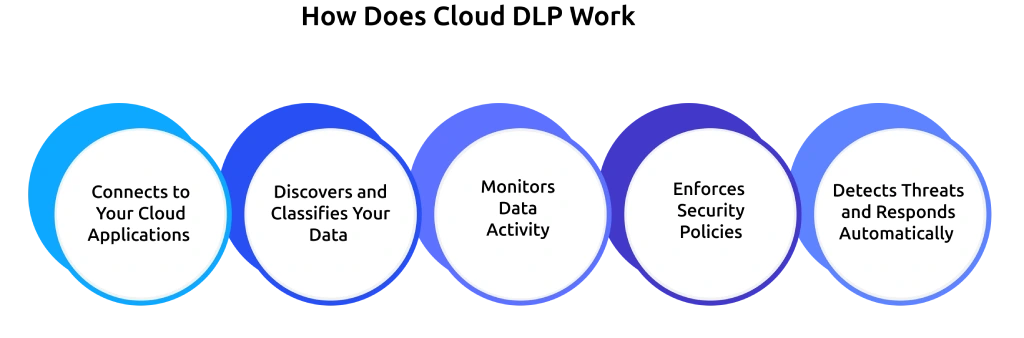
Step 1: Connects to Your Cloud Applications
- You link the tool to Microsoft 365, Google Workspace, Salesforce, Slack, Dropbox, and any other cloud services your teams use.
- It pulls data from every connected app into one dashboard, so you get a single view instead of checking each platform separately.
- No gateway or endpoint agent needed, since the connection runs cloud-to-cloud.
- You can add new SaaS apps to the connection list as your cloud footprint grows.
Step 2: Discovers and Classifies Your Data
- The tool scans files, messages, and records across every connected service.
- It combines pattern matching, machine learning, and Optical Character Recognition (OCR)to detect sensitive data, even when it appears in images or scanned documents.
- It classifies your data into sensitivity levels such as Public, Internal, Confidential, and Restricted.
- This creates a live inventory that shows exactly where sensitive data exists across your cloud environment.
For a deeper understanding of this step, check out our guide on data classification.
Step 3: Monitors Data Activity
- The tool gives you complete visibility into every file access, download, share, and transfer across your cloud applications.
- The tool records who accessed sensitive data, when they accessed it, and where the activity occurred.
- It detects unusual activity such as bulk downloads, off-hours logins, or excessive external sharing.
- It also identifies shadow IT. Many businesses believe they use only a few dozen cloud applications, but the actual number can reach into the thousands. This visibility helps you detect unapproved apps and reduce the risk of sensitive data exposure.
Step 4: Enforces Security Policies
Once the tool detects a risky action, you can set it to respond automatically:
- Block the action before it completes.
- Quarantine the file for your review.
- Encrypt sensitive content immediately.
- Revoke external sharing links.
- Warn users with a prompt before they continue.
Step 5: Detects Threats and Responds Automatically
- You get dashboards that show where your data exists and how it moves across every connected cloud service.
- The tool highlights your highest-risk users, applications, and data types.
- It generates audit-ready reports for GDPR, HIPAA, PCI-DSS, and SOC 2.
- It uses every alert to improve your security policies, reduce false positives, and make future threat detection more accurate.
Not sure where your sensitive data could be at risk?
Use Time Champ to spot potential risks before they become bigger problems.
Traditional DLP vs Cloud DLP: What’s the Difference?
Traditional DLP and cloud DLP protect sensitive data, but they focus on different environments. Traditional Data Loss Prevention secures data on on-premises networks and devices, while cloud DLP protects data across cloud applications, cloud storage, and SaaS platforms. Many businesses use both together to achieve complete data protection.
The table below highlights the key differences between traditional DLP and cloud DLP.
| Feature | Traditional DLP | Cloud DLP |
|---|---|---|
| Primary focus | Protects data on on-premises networks, servers, and endpoints. | Protects data across cloud applications, SaaS platforms, and cloud storage. |
| Deployment | Uses endpoint agents and network gateways. | Connects directly to cloud services through secure APIs. |
| Data visibility | Monitors data on local devices and internal networks. | Monitors data across cloud services, cloud storage, and collaboration platforms. |
| Data protection | Protects data stored and transferred within your internal environment. | Protects data stored, shared, and transferred across cloud environments. |
| Cloud application support | Provides limited visibility into cloud applications. | Covers Microsoft 365, Google Workspace, Salesforce, Slack, AWS, Azure, and many other cloud services. |
| Shadow IT detection | Cannot easily identify unauthorized cloud applications. | Detects unapproved cloud applications and reduces shadow IT risks. |
| Scalability | Requires additional infrastructure as your environment grows. | Scales easily as you add new cloud services and users. |
| Best suited for | Businesses with mostly on-premises infrastructure. | Businesses that rely on cloud services or follow a hybrid cloud approach. |

Did You Know
The global cloud data loss prevention market reached USD 2.71 billion and will grow to USD 11.54 billion by 2032, driven by a 22.5% CAGR during the forecast period.
What Are the Key Benefits of Cloud DLP?
Cloud DLP does more than prevent data leaks. It gives you greater visibility into your cloud data, strengthens security, supports compliance, and makes it easier to protect sensitive information across your cloud environment. Here are the key benefits of cloud DLP.
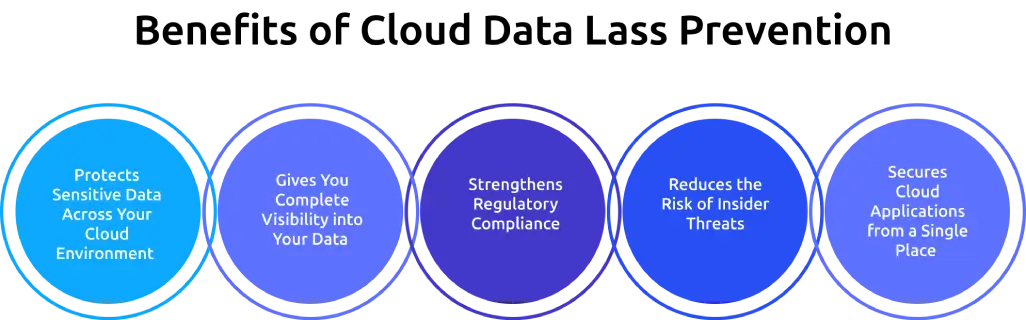
1. Protects Sensitive Data Across Your Cloud Environment
- Identifies sensitive information across cloud applications and storage.
- Prevents unauthorized access, sharing, or data transfers.
- Protects personal data, financial records, intellectual property, and other confidential information.
- Reduces the risk of accidental and intentional data leaks.
2. Gives You Complete Visibility into Your Data
- Shows where sensitive data exists across your connected cloud services.
- Tracks how data moves between users, applications, and cloud platforms.
- Identifies suspicious activity before it becomes a security issue.
- Makes it easier to understand how your data flows across the cloud.
3. Strengthens Regulatory Compliance
- Supports compliance with regulations such as GDPR, HIPAA, PCI-DSS, and SOC 2.
- Applies security policies consistently across your cloud environment.
- Generates audit-ready reports for compliance reviews.
- Maintains detailed records of data activity and policy violations.
4. Reduces the Risk of Insider Threats
- Detects risky actions such as unauthorized sharing, bulk downloads, and unusual access patterns.
- Alerts you when sensitive data moves in unexpected ways.
- Limits access to confidential information based on your security policies.
- Reduces the chances of data exposure caused by human error or misuse.
5. Secures Cloud Applications from a Single Place
- Protects multiple cloud applications through one centralized platform.
- Applies consistent security policies across different cloud services.
- Simplifies security management as your cloud environment grows.
- Reduces the need to manage separate security controls for each application.
What Are the Common Cloud DLP Use Cases?
Sensitive data can move across cloud applications in many ways, creating different security challenges. Below are some of the most common situations where cloud DLP helps protect your business data.
Use Case 1: Prevent Data Leaks in GenAI Tools
Your team may already use ChatGPT, Claude, Gemini, and similar AI tools, whether you've approved them or not. Around 34.8% of employee ChatGPT prompts now contain sensitive company data, up from 11% in the previous year. This means source code, client records, financial data, and HR information can easily end up in public AI models.
Cloud DLP detects this as soon as someone pastes sensitive information into an AI prompt. It can warn the user before they continue or block the action completely, allowing you to use GenAI tools without creating a new path for data leaks.
Use Case 2: Protect Misconfigured Cloud Storage
A single publicly exposed AWS S3 bucket, Azure Blob container, or Google Cloud Storage folder can expose millions of records in an instant. Public cloud storage exposures account for nearly 20% of all cloud data leaks, making them one of the most common ways sensitive data falls outside your control.
Cloud data loss prevention continuously scans your cloud storage, checks every bucket and container for sensitive data, and alerts you as soon as it detects public access. This allows you to fix configuration issues within minutes instead of finding them months later during an audit.
Use Case 3: Prevent Accidental Data Sharing
Accidental data sharing remains one of the most common causes of cloud data leaks. A confidential file shared with the wrong recipient or a document made publicly accessible can expose sensitive business information within seconds.
Cloud DLP monitors how files are shared across cloud applications and detects policy violations before data leaves your control. It can block unauthorized sharing, remove public access, or warn users before they complete a risky action.
Use Case 4: Monitor Third-Party and Contractor Access
Vendors, contractors, and external partners often need access to cloud applications, but they do not always require access to every file or folder. Unnecessary permissions can increase the risk of unauthorized data exposure.
Cloud DLP monitors how third parties access and share sensitive information across your cloud environment. It detects unusual activity, enforces access policies, and alerts you when external users attempt actions that violate your security rules.
Strengthen Your Cloud DLP Strategy with Time Champ
No security solution covers every stage of your data journey. While cloud DLP focuses on protecting data across cloud services, you also need visibility into the activities that happen before data reaches the cloud.
Time Champ fills that gap by showing how files, applications, websites, and devices interact with your business data. This extra visibility helps you identify unusual activity sooner, respond faster, and strengthen your overall cloud security strategy. Protect your business with greater confidence. Start your free 7-day Time Champ trial and stay informed about critical data activity before it becomes a security risk.
Ready to stay ahead of data risks?
Try Time Champ and gain better visibility into your business data.
Conclusion
Protecting sensitive data in the cloud requires more than basic security controls. Cloud DLP gives you the visibility and control needed to reduce data risks, support compliance, and secure your cloud environment. For even greater visibility into how data moves across employee devices, Time Champ works alongside your cloud security strategy to help you identify potential risks before they become bigger problems.

Thasleem Shaik

Table of Content
 What Is Cloud DLP?
- How Does Cloud DLP Work?
- Traditional DLP vs Cloud DLP: What’s the Difference?
- What Are the Key Benefits of Cloud DLP?
- What Are the Common Cloud DLP Use Cases?
- Strengthen Your Cloud DLP Strategy with Time Champ
- Conclusion

Related Blogs
Protect sensitive business data in hybrid work environments with strong security controls and practical strategies to prevent data breaches.
Guna Lakshmi | Jun 10, 2026
Learn how AI-powered workplace productivity monitoring affects employee data privacy, compliance, transparency, accountability, and trust in organizations.
Jahnavi Pulluri | May 11, 2026
Learn how to ensure data privacy in productivity tracking with key controls, vendor evaluation, and setup steps that reduce risk and protect employee data.
Guna Lakshmi | May 02, 2026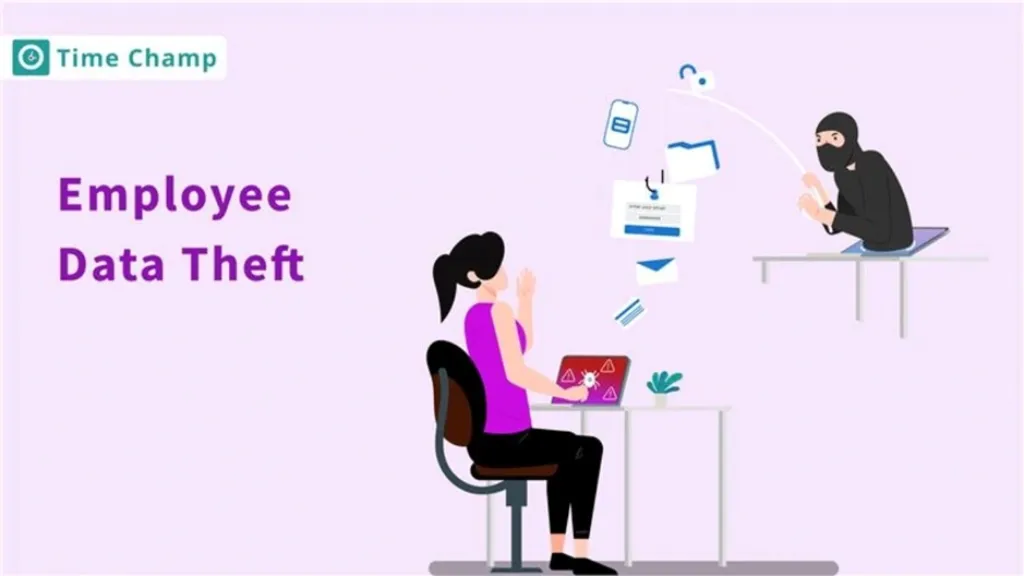
Explore why employee data theft happens and how smart, proactive steps can help protect your organization.
Jahnavi Pulluri | July 01, 2025
Learn the difference between data leak prevention vs. data loss prevention and explore effective strategies to protect sensitive business information.
Sai Keerthi Uppala | Jan 22, 2025
Discover the top 10 Data Loss Prevention tools to safeguard sensitive information and ensure workplace security with essential features and practical tips for selection.
Tarun Kumar Reddy | Jan 21, 2025


 4.7/5 avg.
Ready to Manage Your Workforce Smarter?
Join our family of 1500+ companies using smart insights to redefine workforces!

Free Trial
No Credit Card Required