Billable Utilization Rate: What It Is and How to Improve?
Learn what billable utilization rate means, how to calculate it, what a good rate looks like, and practical ways to improve it across your team.
Every hour your team spends on non-billable work can quietly eat into your revenue. It can mean more unused work hours, lower profits, and less revenue from the team. That’s why knowing your billable utilization rate matters. It helps you spot where valuable hours are being lost and take action before they affect your bottom line.
To help you improve profitability and maximize your team’s billable time, this guide covers how to calculate billable utilization, benchmark your rate, and identify practical ways to improve it.
What Is Billable Utilization Rate?
Billable utilization rate is the percentage of an employee’s available working hours spent on billable, client work. It helps you understand how effectively your team’s working time is being used to generate revenue. is the percentage of an employee’s available working hours spent on billable, client work. It helps you understand how effectively your team’s working time is being used to generate revenue.
A higher rate means more of your team’s working hours are spent on work that directly generates revenue. For example, a 70% billable utilization rate means an employee spends about 70% of their available working hours on work that directly generates revenue. Regularly measuring it helps you identify unused capacity and make better decisions about workloads and resource planning.
In fact, Sage reports that the average utilization rate is around 70%, with the average changing by only 1% to 2% from one year to the next.
Why Does Billable Utilization Rate Matter?
Your billable utilization rate can directly influence revenue, project profitability, resource planning, and overall business efficiency. Here are some key reasons why the billable utilization rate matters for your business:
- Protects Revenue: Helps you see how much of your team’s working time is actually generating revenue.
- Identifies Unused Time: Shows where employees have available hours that aren’t being spent on billable work.
- Improves Resource Planning: Helps you assign the right people to projects based on their available capacity.
- Supports Better Pricing: Gives you a clearer view of how much time projects actually require, helping you set more realistic rates.
- Improves Project Profitability: Helps you spot low utilization early before it starts affecting project margins.
- Helps Manage Workloads: Shows whether employees are underutilized or taking on too much billable work.
- Supports Business Growth: Higher and healthier utilization can help you generate more revenue without immediately increasing headcount.
Don’t let unused hours silently reduce your revenue.
Use Time Champ to track billable hours, identify utilization gaps, and make better use of your team’s time.
How Do You Calculate Billable Utilization Rate?
To calculate the billable utilization rate, divide the total billable hours by the total available working hours, then multiply the result by 100.
Formula: Billable Utilization Rate = (Billable Hours ÷ Available Working Hours) × 100
Example: Imagine you have 10 employees. Each employee has 160 available working hours in a month.
Available working hours: 10 × 160 = 1,600 hours
Hours spent on billable work: 1,200 hours
Now, calculate the rate:
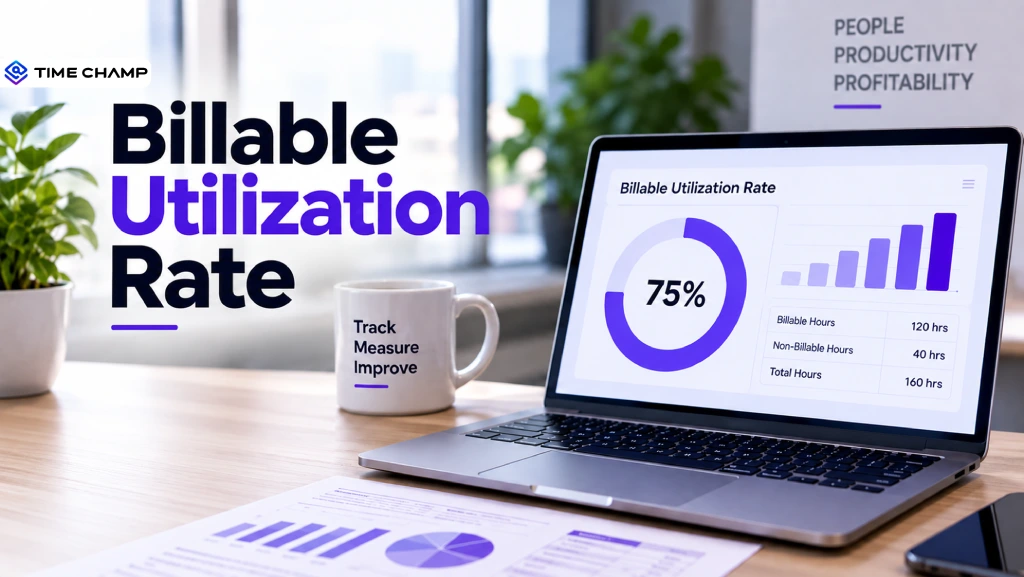
Billable Utilization Rate = (1,200 ÷ 1,600) × 100 = 75%
So, your billable utilization rate is 75%. This means your employees spent 75% of their available working hours on billable work, while the remaining 25% was spent on non-billable activities.
Billable Utilization vs. Realization Rate vs. Resource Utilization
These three metrics may sound similar, but they measure different aspects of business performance. Understanding the difference helps you see whether the challenge is with billable time, revenue, or resource capacity.
| Comparison | Billable Utilization | Realization Rate | Resource Utilization |
|---|---|---|---|
| What it measures | Percentage of available hours spent on billable work | Percentage of potential revenue actually earned | How effectively available resources are being used |
| Main focus | Billable working hours | Revenue generated or collected | People, time, and resource capacity |
| Formula | Billable hours ÷ available hours × 100 | Actual revenue ÷ potential revenue × 100 | Used capacity ÷ available capacity × 100 |
| Example | 120 billable hours ÷ 160 available hours × 100 = 75% | $9,000 actual revenue ÷ $10,000 potential revenue × 100 = 90% | 800 used hours ÷ 1,000 available hours × 100 = 80% |
| Best used for | Measuring employee and team billable time | Evaluating revenue performance | Planning and managing resource capacity |
Causes of Low Billable Utilization
Low billable utilization doesn’t always mean your team is underperforming. It can often point to issues with workload, project planning, or how employees spend their available hours. Common causes include:
- Not Enough Billable Work: Employees may have available hours but not enough client projects to keep them engaged.
- Too Much Non-Billable Work: Meetings, administrative tasks, training, and internal work can reduce the time available for billable projects.
- Poor Project Planning: Unclear project timelines or inefficient task allocation can leave employees waiting for work or switching between projects.
- Skills and Project Mismatch: Employees may have the right availability but lack the skills needed for current projects.
- Unbalanced Workloads: Some employees may be overloaded while others have too much free capacity.
- Poor Time Management: Frequent task switching, distractions, or inefficient workflows can reduce billable hours.
- Project Delays: Client approvals, missing information, or other dependencies can leave employees with fewer billable tasks to work on.
- Weak Resource Planning: Without clear visibility into upcoming project demand, it becomes harder to keep the right people assigned to billable work.
Noticing a low utilization rate in your team?
Use Time Champ to identify idle time, optimize workloads, and improve team utilization before it impacts your revenue.
How to Improve Billable Utilization Rate
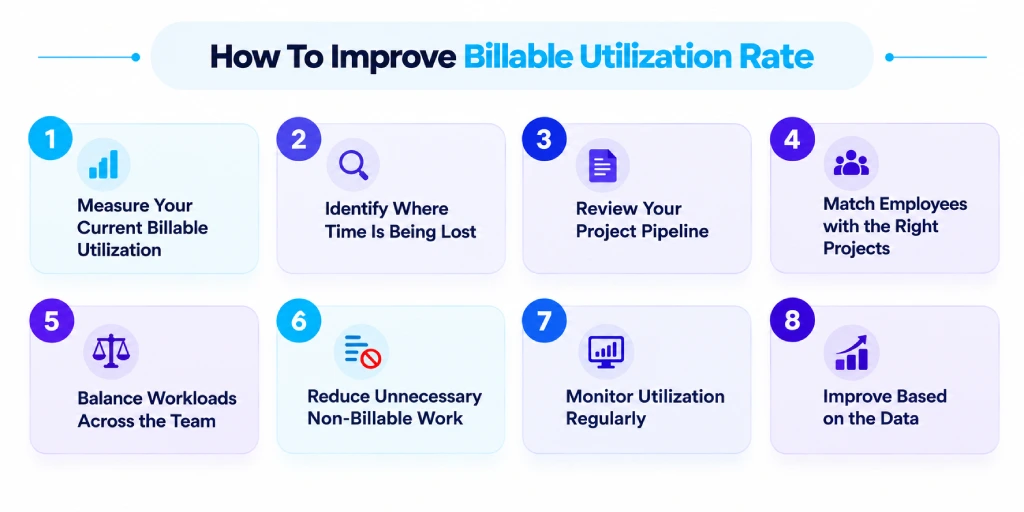
Improving billable utilization starts with understanding where your team’s working hours are going. Follow these steps to identify gaps and increase the time spent on billable work.
Start by calculating your current billable utilization rate. This gives you a baseline and helps you understand how much of your team’s available time is going toward billable work.
1. Measure Your Current Billable Utilization
Start by calculating your current billable utilization rate. This gives you a baseline and helps you understand how much of your team’s available time is going toward billable work.
2. Identify Where Time Is Being Lost
Look at how employees spend their working hours. Identify excessive meetings, administrative tasks, waiting time, project delays, and other activities that reduce billable hours.
3. Review Your Project Pipeline
Check whether you have enough upcoming billable work for your available workforce. A weak project pipeline can leave employees with unused capacity.
4. Match Employees with the Right Projects
Assign employees based on their skills, experience, and availability. The right project-to-employee match can reduce delays and help employees spend more time on productive billable work.
5. Balance Workloads Across the Team
Identify employees with too much work and those with unused capacity. Redistribute tasks where possible to keep workloads balanced.
6. Reduce Unnecessary Non-Billable Work
Cut down on unnecessary meetings, repetitive administrative tasks, and other activities that take valuable time away from billable projects.
7. Monitor Utilization Regularly
Review billable utilization regularly instead of checking it only at the end of a project. Regular reviews help you spot declining utilization early and make timely adjustments.
8. Improve Based on the Data
Use the insights from your utilization data to adjust project assignments, workloads, staffing, and processes. Continue measuring the rate to see whether your changes are actually improving utilization.
Track Billable Utilization Accurately with Time Champ
Manually calculating billable hours can take time, which can lead to inaccurate utilization rates, missed billable hours, and difficulty identifying where time is being lost. A automated time tracking software can make this process easier while giving you a more accurate view of your billable utilization rate. Time Champ is built exactly to give you that.
Time Champ is an employee monitoring and time tracking software that helps you record working hours, separate billable and non-billable time, and get a clear view of employee and project utilization.
Here’s how Time Champ can help you manage billable utilization:
- Automatic Time Tracking: Automatically records working hours so you don’t have to rely on manual timesheets.
- Project and Task Tracking: Shows how much time employees spend on specific projects and tasks, helping you identify billable work.
- Timesheets: Gives you a detailed view of employees’ working hours and makes it easier to categorize billable and non-billable time.
- Reports and Analytics: Helps you analyze working hours, productivity, and billable utilization to see how effectively your team’s time is being used for billable work.
- Productivity Analytics: Gives you insights into how employees spend their working time and helps identify time that could be better allocated to billable work.
- Real-Time Dashboards: Provides a quick view of workforce activity and project hours so you can spot utilization gaps earlier.
- Project Management: Helps you manage workloads and project assignments based on employee availability and recorded work hours.
With these insights, you can calculate billable utilization more accurately, identify unused capacity, and make better decisions about project assignments and workloads.
Ready to improve your billable utilization rate?
Use Time Champ to track billable hours, identify utilization gaps, and make better use of your team’s time.
Conclusion
Your billable utilization rate gives you a clear picture of how much of your team’s available time is actually contributing to revenue. A healthy rate helps you maximize billable hours, improve resource planning, and protect project profitability. Regularly review your utilization rate and identify where billable time is being lost to make better decisions about workloads and project assignments.
With the right workforce analytics software such as Time Champ, you can automate this process, get accurate utilization data, and take action before unused hours start affecting your revenue.

Guna Lakshmi

Table of Content
 What Is Billable Utilization Rate?
- Why Does Billable Utilization Rate Matter?
- How Do You Calculate Billable Utilization Rate?
- Billable Utilization vs. Realization Rate vs. Resource Utilization
- Causes of Low Billable Utilization
- How to Improve Billable Utilization Rate
- Track Billable Utilization Accurately with Time Champ
- Conclusion
Instant Signup
Thank you for your request!
We have received your signup request and our team will get back to you soon. In the meantime, you can book a demo to see Time Champ in action.
Book a DemoFree trial. No credit card required. Prefer a walkthrough? Book a demo.
Related Blogs

Understand how billable and non-billable hours impact profitability, efficiency, and time management in businesses and freelancing.
Sai Keerthi Uppala | Sep 13, 2024
Learn what workforce efficiency means in 2025, why it matters, key factors, how to measure, tips to improve, and what a good workforce efficiency rate is.
Guna Lakshmi | September 15, 2025
Boost team productivity with smart workload analysis. Discover effective strategies to balance tasks, optimize resources, and enhance performance.
Thasleem Shaik | Mar 13, 2025
Capacity Planning: Explore what it is, types, strategies, real-world examples, benefits, challenges, and how to implement it effectively in projects
Tarun Kumar | Apr 02, 2026
Find the best capacity planning software tools for IT, manufacturing, and more. Compare features, pricing, pros, and cons to choose the right tool for 2025.
Guna Lakshmi | Nov 07, 2025
Improve project profitability with Time Tracking ROI by reducing wasted hours, controlling labor costs, increasing productivity, and boosting returns.
Anjali | Jun 03, 2026


 4.7/5 avg.
Ready to Manage Your Workforce Smarter?
Join our family of 1500+ companies using smart insights to redefine workforces!

Free Trial
No Credit Card Required