Work from Home Call Center: Setup & Management Guide
Learn how a work from home call center operates, its benefits and challenges, 8 essential setup steps, and tips to manage remote call center teams easily.

A few years ago, a call center meant rows of desks, ringing phones, and a crowded office. Today, that same team could be spread across different cities, or even different countries, while customers never notice the difference. That's the power of a work from home call center.
But making remote customer support successful takes more than giving agents a laptop and an internet connection. In this guide, you'll learn how work from home call centers operate, how to set one up, and the best ways to manage a remote team that delivers excellent customer service.
What is a Work from Home Call Center?
A work from home call center is a customer support operation where agents handle customer calls, emails, chats, or messages from their homes instead of working in a traditional office. Rather than depending on a physical call center, businesses use cloud-based software to route calls, monitor performance, and keep teams connected.
From a customer's perspective, nothing changes; they still receive the same professional support. Behind the scenes, however, agents can be working from different cities, states, or even countries while staying connected through a shared platform.
How Does a Work from Home Call Center Work?
Behind every successful work from home call center is a cloud platform that connects agents, customers, and managers seamlessly.
Here's how the entire process works from the moment an agent logs in.
- Agents log in to the call center platform at the start of their shift.
- Calls are automatically assigned based on the agent's skills and availability.
- Customer details appear on the screen, allowing agents to provide faster and more personalized support.
- After each interaction, agents update the CRM, add notes, and prepare for the next call.
- Throughout the day, team leaders monitor live dashboards, review call quality, answer questions through chat or video meetings, and ensure service levels stay on track.
- At the end of the shift, agents log out, and if the business operates 24/7, the next team seamlessly takes over.
The success of a work from home call center is about keeping everything connected. Calls, schedules, customer information, and team communication all work together through a single cloud platform, allowing businesses to deliver consistent customer support no matter where their agents are located.
Challenges of Running a Call Center from Home
Running a work from home call center isn't always as easy as it looks. While remote teams offer plenty of benefits, they also bring challenges that require smart planning and proactive management.
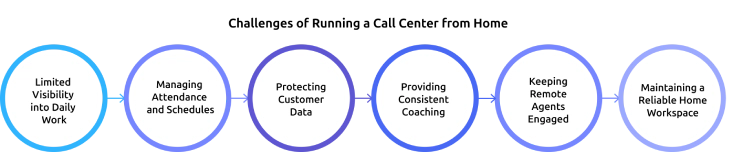
1. Limited Visibility into Daily Work
In a traditional call center, you can quickly see who's on a call, on a break, or need help. In a remote setup, you depend on dashboards and reports instead. Without real-time visibility, it's harder to identify performance issues or support agents when they need it most.
2. Managing Attendance and Schedules
Keeping remote agents on time and following their schedules can be challenging, especially when teams work across different locations and time zones. Even small delays or extended breaks can affect customer wait times and overall service quality.
3. Protecting Customer Data
Handling sensitive customer information from home increases security risks. Unsecured Wi-Fi, shared devices, or unauthorized access can lead to data breaches. That's why businesses need strong security policies, secure connections, and regular compliance checks.
4. Providing Consistent Coaching
In an office, you can give instant feedback after a customer interaction. Remote teams don't have that advantage, so coaching must be planned through regular one-on-one meetings, call reviews, and virtual training sessions to keep performance on track.
5. Keeping Remote Agents Engaged
Working from home can sometimes feel isolating. Without regular interaction, agents may feel disconnected from their team, leading to lower motivation and higher burnout. Frequent check-ins, team meetings, and recognition programs help keep employees engaged.
6. Maintaining a Reliable Home Workspace
Every agent's home workspace is different. Internet outages, background noise, power cuts, or outdated equipment can interrupt customer calls and reduce productivity. Setting minimum home office standards and providing the necessary equipment can help overcome these challenges.
How to Set Up a Work from Home Call Center in 8 Steps
Setting up work from home call center doesn't have to be complicated. Follow these eight practical steps to build a secure, efficient, and scalable remote support team.
Step 1: Decide Which Teams Will Work Remotely
Start with customer support channels that are easier to manage remotely, such as chat, email, or non-sensitive voice support. Once your remote processes are stable, gradually move more teams while maintaining service quality.
Step 2: Choose a Cloud Call Center Platform
Select a cloud-based platform that offers call routing, IVR, call recording, reporting, and CRM integration. Test it with a small group of agents before rolling it out across the entire team.
Step 3: Secure Customer Data
Protect customer information with secure connections, multi-factor authentication, encrypted devices, and role-based access. Strong security measures help prevent data breaches and ensure compliance.
Step 4: Set Home Office Standards
Define minimum requirements for every remote agent, including a stable internet connection, a quality headset, a quiet workspace, and backup connectivity. A reliable setup leads to better customer experiences.
Step 5: Plan Schedules Around Business Needs
Create shift schedules based on customer demand and time zones, not office hours. Proper workforce planning ensures enough agents are available during busy periods.
Step 6: Monitor Performance in Real Time
You need visibility into attendance, productivity, and customer interactions through workforce monitoring and reporting tools. Real-time insights help resolve issues quickly and improve team performance.
Step 7: Build a Strong Onboarding and Coaching Process
Support new agents with structured onboarding, regular one-on-one meetings, call reviews, and ongoing training. Continuous coaching helps improve performance and keeps remote employees engaged.
Step 8: Start Small and Scale Gradually
Launch your remote call center with a small team before expanding. Track key metrics like service quality, productivity, and customer satisfaction, then refine your process before scaling to more agents.
Build a More Productive Remote Call Center with Time Champ!
Track productivity, monitor performance, and manage remote agents with ease
How to Manage Agents Working from Home in a Call Center?
Setting up a remote call center is only half the job, the real challenge is managing your team every day. With the right approach, you can keep agents productive, motivated, and delivering excellent customer service.
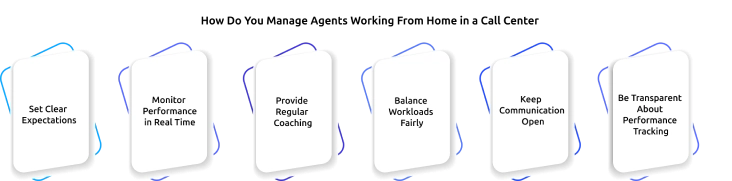
1. Set Clear Expectations
Define work hours, break times, response standards, and communication guidelines from day one. Clear expectations help agents stay aligned and reduce confusion.
2. Monitor Performance in Real Time
Use live dashboards to track attendance, availability, productivity, and customer interactions. Real-time visibility helps managers identify issues early and provide timely support.
3. Provide Regular Coaching
Schedule weekly one-on-one meetings, review customer calls, and give constructive feedback. Frequent coaching helps agents improve their skills and stay motivated.
4. Balance Workloads Fairly
Distribute calls and tasks evenly to avoid overloading some agents while others remain idle. A balanced workload improves both productivity and employee satisfaction.
5. Keep Communication Open
Encourage agents to reach out whenever they need help. Team chats, video meetings, and dedicated support channels make it easier to solve problems quickly.
6. Be Transparent About Performance Tracking
Explain what metrics are being tracked and how they're used. Giving agents access to their own performance reports builds trust and encourages continuous improvement.
How Time Champ Supports a Work from Home Call Center
Managing a work from home call center is easier when you have complete visibility into your remote team's work. Time Champ is an employee monitoring software that helps businesses monitor productivity, improve accountability, and support remote agents with real-time workforce insights, all from a single dashboard.
Track Attendance and Shift Hours
Monitor attendance, work hours, breaks, and shift schedules in real time, even for teams working across different time zones. This helps you ensure proper coverage and reduce scheduling issues.
Monitor Productivity in Real Time
Get a live view of agent activity, active and idle time, and daily work timelines. Instead of waiting for end-of-day reports, you can quickly identify productivity issues and provide timely support.
Understand How Agents Spend Their Time
Track application and website usage to see how agents use work hours. These insights help identify workflow inefficiencies, improve processes, and eliminate unnecessary distractions.
Strengthen Data Security
Protect sensitive customer information with features like USB restrictions, file transfer controls, and activity monitoring. These safeguards help remote teams meet security and compliance requirements.
Support Employee Well-Being
Time Champ highlights signs of overwork, skipped breaks, and changing work patterns, helping you address burnout risks early and create a healthier remote work environment.
Simplify Remote Team Management Using Time Champ!
Track agent productivity, attendance, application usage, and work hours from one dashboard
Conclusion
A work from home call center helps you provide good customer support while allowing employees to work from home. Clear communication, proper planning, and strong security help remote teams work efficiently. Regular training and performance monitoring improve service quality and employee productivity. With the right management, you can build a successful and reliable remote call center.

Jahnavi Pulluri

Table of Content
 What is a Work from Home Call Center?
- How Does a Work from Home Call Center Work?
- Challenges of Running a Call Center from Home
- How to Set Up a Work from Home Call Center in 8 Steps
- How to Manage Agents Working from Home in a Call Center?
- How Time Champ Supports a Work from Home Call Center
- Conclusion

Related Blogs
Discover if remote workers are truly less productive. Explore key insights, challenges, and benefits of remote work in boosting employee productivity.
Shabana Shaik | May 30, 2023
Struggling to improve your remote workplace? Uncover six powerful strategies to boost productivity, enhance collaboration, and keep your team engaged!
Tarun Kumar Reddy | Mar 14, 2025
Why remote work is becoming more popular in the last few years? Check out our 4 reasons companies are using remote work.
Shabana Shaik | Mar 14, 2025
Wondering why meetings are essential in remote work? Uncover 10 key reasons they improve communication, teamwork, and efficiency for your remote team!
Tarun Kumar Reddy | Mar 14, 2025
Avoid remote work mistakes that affect focus, communication, time, and boundaries. Get simple tips to stay productive and in control of your workday.
Thasleem Shaik | Mar 15, 2025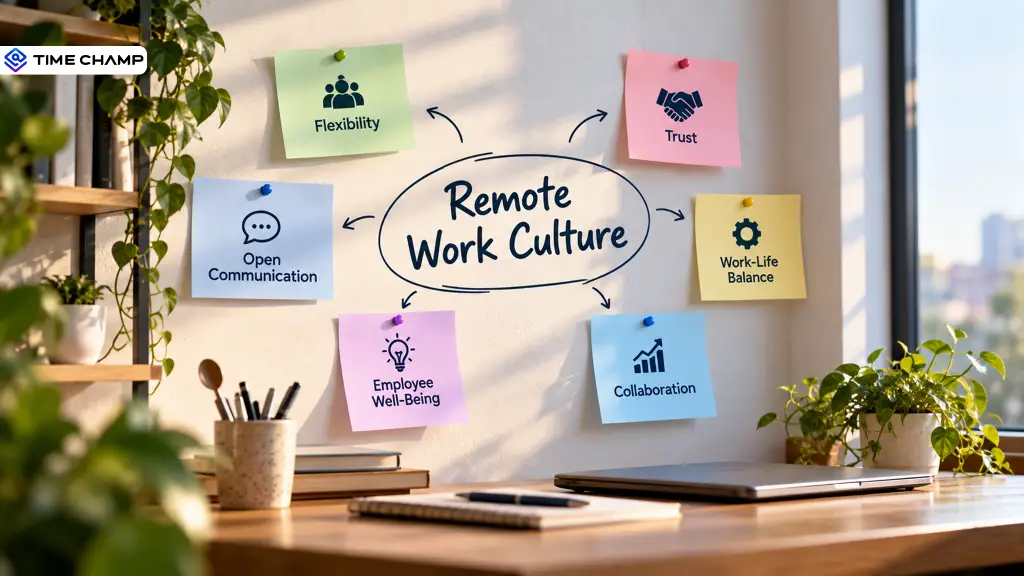
Build a strong remote work culture with practical strategies that improve communication, collaboration, accountability, and connection across your team.
Thasleem Shaik | Sep 29, 2026


 4.7/5 avg.
Ready to Manage Your Workforce Smarter?
Join our family of 1500+ companies using smart insights to redefine workforces!

Free Trial
No Credit Card Required