What Is User Behavior Analytics? Benefits & Use Cases
User behavior analytics detects insider threats and improves security. Explore UBA benefits, real-world use cases, and tools to protect your business.

Every company has data it cannot afford to lose, such as customer details, financial records, and product designs. This information keeps the business alive. And while most security conversations focus on outside hackers, the reality is that many risks actually come from within. Anyone weighing this decision usually starts with our enterprise employee monitoring guide for the full landscape.
That’s where user behavior analytics comes in.
In this blog, you’ll learn what user behavior analytics actually does, why it matters more now than ever, the benefits, and use cases that make it valuable.
What is User Behavior Analytics?
User behavior analytics, also known as UBA, is a simple way to understand how each person in a company usually works on their computer. It learns each person’s normal habits, login times, apps they touch, and data they access. When something unusual happens, it alerts you.
In basic terms, it analyzes patterns and notices changes that could point to a problem.
It does this by collecting data, learning from it over time, and recognizing patterns in how people work. This helps build a clear picture of each user’s regular behavior, so anything out of the ordinary stands out quickly.
Here’s how it works in practice. Say one of your team members logs in every morning at 9, works mainly in Google Docs and Slack, and rarely touches the finance folder. UBA quietly notes all of that as their baseline. Then one night, that same account starts downloading hundreds of files from the finance server at 2 A.M. The system catches the mismatch and sends an alert immediately, because this behavior does not match what it has learned about that user.
What Makes User Behavior Analytics Different from Traditional Security Tools?
Most security tools, like firewalls and antivirus software, follow fixed rules. They look for known threats, like specific viruses or suspicious IP addresses, and block them.
User and entity behavior analytics work differently. It doesn’t depend on a list of known threats. Instead, it learns what “normal” looks like for your team, how people usually work, what they access, and when they do it.
When something doesn’t match that normal behavior, it raises a flag.
This makes it especially useful for finding problems that traditional tools might miss, particularly when the risk comes from someone inside the company who already has permission to access systems.
How Does User Behavior Analytics Actually Detect Insider Threats?
At its core, the process is pretty simple, as it follows three steps: learn, score, and connect.
1. Learn: Build Normal Behavior
First, the system quietly observes how each person works. Over time, it builds a clear picture of what “normal” looks like for every user and keeps updating it as habits change.
2. Score: Spot Unusual Activity
Next, whenever something doesn’t match that normal behavior, the system takes notice. It gives the activity a risk score based on how unusual it is. If the score gets too high, it sends an alert with all the details.
3. Connect: See the Bigger Picture
One small, unusual action might not mean much on its own, but when multiple things happen together, it can signal a real problem.User behavior analytics connects these signals automatically and helps you see the full picture and catch threats that might otherwise go unnoticed.
Detect, act, and stop insider threats early with Time Champ!
UBA vs UEBA vs SIEM - A Simple Comparison
You’ll often hear these three terms in the security world, and they can sound confusing at first. If you’re not exactly sure what they mean, here’s a simple way to understand them:
| Aspect | UBA | UEBA | SIEM |
|---|---|---|---|
| What it analyzes | People | People + devices & apps | Network events & logs |
| How it detects threats | Learns user habits, flags anomalies | Learns user + entity habits, flags anomalies | Matches events against fixed rules |
| Best at | Insider threats, stolen credentials | Advanced attacks, lateral movement | Compliance reporting, log management |
| Uses machine learning? | Yes | Yes | Mostly no |
UBA focuses mainly on people, how employees use systems, and behave during their work.
UEBA goes a step further. It looks at not just people, but also devices and applications, giving a bigger picture.
SIEM is broader. It tracks everything happening across your systems and uses set rules to spot known issues.
Many companies use a mix of all three for better security. If you want to clearly understand what your employees are actually doing, UBA gives the most focused view.
Why Do Businesses Need User Behavior Analytics?
Insider threats are becoming more common, costly, and harder to notice.
A detailed study of the insider risk index across more than 1,400 organizations shows that insider threats now cost businesses an average of $17.4 million each year, marking a 7.4% rise compared to the previous year.
So why is this so difficult to catch?
The people causing the issue often already have access. For example, if an unhappy employee downloads customer data, it may look completely normal to a firewall, but they are allowed to access it anyway. If a hacker uses a stolen password, the system may still think it’s a real user logging in.
Traditional security tools are built to stop outsiders, not to question insiders. That’s the gap end-user behavior analytics helps fill.
With remote work now standard, this challenge has grown even bigger. You can’t simply walk by someone’s desk to see what they’re doing. Businesses need a smarter, clearer way to understand how work is happening, and that’s exactly what end-user behavior analytics provides.
Some modern workforce tools already have these features built in, and Time Champ is one of them. It offers UBA-style alerts and helps you spot unusual behavior early without adding extra complexity.
Start spotting unusual user behavior early with Time Champ and prevent risks before they escalate!
What are the Key Benefits of User Behavior Analytics?
So, what do you actually gain from user behavior analytics? The answer goes beyond security. It helps you understand and manage your business more effectively.
Here’s how:
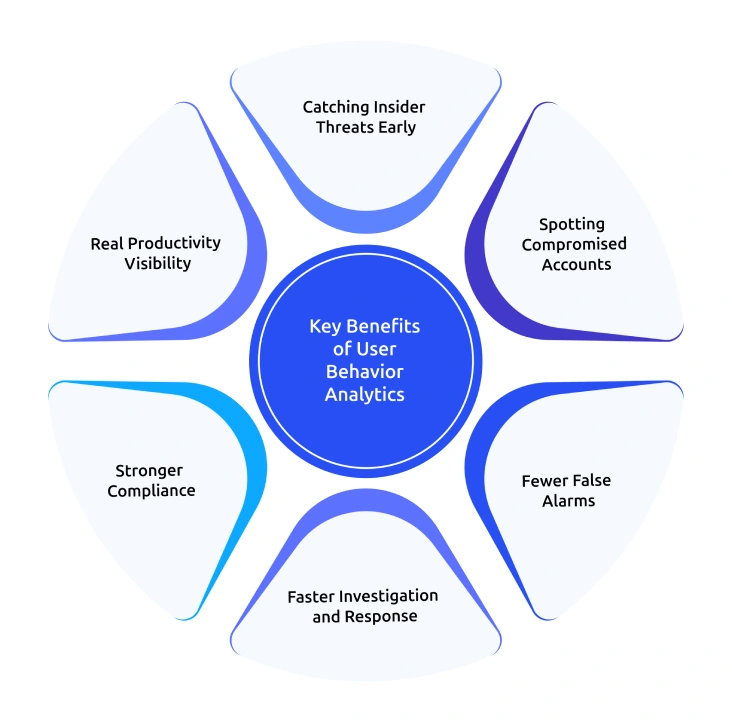
Catching Insider Threats Early
User and entity behavior analytics help you notice small warning signs before a real problem happens. UBA spots unusual file access, off-hours logins, and sudden large downloads before they turn into incidents. This means you don’t have to wait until damage is done to know something is wrong.
Spotting Compromised Accounts
If someone steals an employee’s login details, they rarely act the same way as the real person. They might log in from a different place, use systems differently, or access unusual data. Since UBA understands normal behavior, it can quickly find when something doesn’t match.
Fewer False Alarms
Traditional security tools often send too many alerts, many of which turn out to be harmless. This wastes time and effort. User and entity behavior analytics reduces this noise by adding context, like the user’s role, past activity, and team patterns, so alerts are more accurate.
Faster Investigation and Response
When a real issue is detected, UBA provides clear details on what changed, when it happened, and how risky it is. This helps your security teams act quickly without digging through too much data. As a result, problems can be investigated and handled faster.
For industries like healthcare, finance, or legal, keeping proper records is very important. UBA tracks who accessed what data and when, and whether it was normal behavior. This makes audits easier and less stressful for you.
Real Productivity Visibility
Beyond security, UBA also shows how your team actually works. It highlights app usage, idle time, and workflow patterns. This helps you understand where time is spent and improve processes, especially useful for remote or hybrid teams.
What Are the Top Use Cases of User Behavior Analytics?
So, where does user behavior analytics actually get used in real life?
It’s not just a theory, businesses use it every day to solve real problems, from stopping data leaks to understanding team behavior.
Here are some of the most common and practical ways it’s used:
1. Stopping Data Exfiltration
When someone moves large amounts of data outside the company, through USB drives, cloud uploads, or email, UBA detects the unusual pattern.
2. Keeping Tabs on Remote Teams
User behavior analytics gives you a clear view of how work is happening, like which apps are used, when people are active, and overall work patterns. This helps you stay informed without constantly checking in.
3. Meeting Compliance Requirements
In industries like finance or healthcare, companies need to prove that sensitive data is handled properly. UBA keeps track of who accessed what and whether it was normal behavior, making audits much easier.
4. Predicting Employee Attrition
Attrition prediction is a use case most people don’t expect from UBA. Changes in work habits can be early signs that someone might leave. UBA tools can pick up on these patterns, giving you a chance to step in and address concerns early.
How Does Employee Monitoring Software Strengthen Behavior Analytics?
User behavior analytics works best when it has good, reliable data. And it can be possible with employee monitoring software.
Think of it this way: monitoring tools collect what’s happening, and behavior analytics makes sense of it. Together, they give you a much clearer and more useful picture. Here’s how those tools support:
1. Activity Monitoring as a Data Source
Monitoring tools track app usage, websites visited, task progress, and idle time clearly. It even labels apps as productive or not and shows patterns through simple visuals like heatmaps. All of this helps build a strong understanding of each person’s normal work habits.
2. Screen Monitoring for Clear Proof
When something unusual is flagged, it helps to actually see what happened. It captures screenshots, allows live screen viewing, and records activity during suspicious moments. This makes it easier to understand the situation instead of depending only on data.
3. DLP for File and USB Tracking
It also keeps an eye on file activities such as what’s created, changed, or deleted, along with timestamps. It tracks USB usage, blocks unauthorized devices, and logs uploads and downloads. So, if unusual data movement is detected, there’s an extra layer to control and stop it.
4. Attrition Prediction Through Behavioral Signals
Beyond security, it also helps with team management. It looks at changes in work patterns, like reduced activity, unusual hours, or lower engagement, and turns them into a simple risk score. This gives you an early signal if someone might be disengaging, so you can step in and support them before it’s too late.
Common Myths About User Behavior Analytics
Let’s clear up a few common misunderstandings about user behavior analytics. A lot of people assume it’s something it’s not, so here’s the simple truth:
1. “It’s Just Surveillance.”
Not really, user behavior analytics is not about watching every single action. It doesn’t read emails or record conversations. Instead, it looks at overall patterns and notices when something feels unusual.
Some tools also focus on privacy, offering features like blurred screenshots, role-based access, and clear policies so employees know how data is used.
2. “Only Big Companies Need This.”
That’s a common myth!
Insider risks can affect any business, no matter the size. In fact, smaller companies can be even more exposed because they often have fewer security controls in place.
Just because of this, more small and mid-sized businesses are also starting to use behavior analytics tools.
3. “UBA Replaces my Existing Security Tools.”
It doesn’t replace anything. User behavior analytics works alongside tools like firewalls, antivirus software, and SIEM systems.
Think of it as an extra layer of protection, especially useful for finding risks that come from people who already have access.
How Do You Get Started with User Behavior Analytics?
Getting started with user behavior analytics doesn’t have to be complicated or expensive. You just need a clear plan and the right setup.
Here’s a simple, practical way to do it:

1. Set Clear Goals and Policies
First, pick one clear goal, detect insider threats, strengthen compliance, or gain visibility into work patterns. Once that’s clear, communicate it openly with your team so everyone understands why it’s being used.
2. Let the System Learn
After setup, give the system a few weeks to quietly learn how people normally work. It observes patterns without sending alerts during this stage. This helps build an accurate baseline.
3. Set the Right Thresholds
Next, define what counts as “unusual.” Start with simple settings so you don’t get too many alerts at once. Over time, you can adjust these based on what actually matters for your organization.
4. Train Your Team on Responsible Use
Make sure you and the security staff know how to use the data properly. The goal is to improve security and support employees, not to micromanage or misuse information.
5. Review and Improve Regularly
Finally, keep checking how the system is performing. Look at what alerts are useful, what can be improved, and whether detection is getting better over time. Regular updates help the system stay accurate as your team grows and changes.
How Time Champ Works as a User Behavior Analytics (UBA) Tool
Time Champ is a workforce intelligence platform, but many of its features work in a similar way to user behavior analytics.
It tracks how employees work and builds a clear picture of normal activity patterns. Based on this, it can raise alerts when something unusual happens, just like a UBA system would.
One of its key capabilities is customizable behavior alerts. You can set conditions based on activity patterns, and the system will notify you when those patterns change. This helps you find unusual behavior early instead of reacting after a problem occurs.
Time Champ also includes attrition risk detection. It analyzes work habits, productivity patterns, and login times, and assigns a risk score that flags employees who may be disengaging.
This is important because attrition signals often overlap with internal risk signals. When someone’s behavior changes, it could indicate either reduced engagement or a potential security concern. By identifying these patterns early, organizations can take action, whether that means offering support, improving workload balance, or preventing internal risks.
In this way, Time Champ acts as a lightweight UBA system focused on both security awareness and employee well-being, helping businesses stay proactive instead of reactive.
Ready to turn behavior data into early warning signals?
Time Champ’s customizable alerts help you catch insider risks before they escalate.
Conclusion
User behavior analytics helps you detect unusual activity early and reduce security risks before they turn into serious problems. It strengthens your protection against insider threats, compromised accounts, and data misuse while also giving you better visibility into how your team works. When you use it with other security tools, you build a complete and more effective defense. Overall, UBA helps you stay secure, aware, and proactive, catching risk signals early, cutting false alarms, and giving you a cleaner visibility into how work actually happens.

Jahnavi Pulluri


Table of Content
-
 What is User Behavior Analytics?
-
How Does User Behavior Analytics Actually Detect Insider Threats?
-
UBA vs UEBA vs SIEM - A Simple Comparison
-
Why Do Businesses Need User Behavior Analytics?
-
What are the Key Benefits of User Behavior Analytics?
-
What Are the Top Use Cases of User Behavior Analytics?
-
How Does Employee Monitoring Software Strengthen Behavior Analytics?
-
Common Myths About User Behavior Analytics
-
How Do You Get Started with User Behavior Analytics?
-
How Time Champ Works as a User Behavior Analytics (UBA) Tool
-
Conclusion
Related Blogs
Discover effective insider threat mitigation strategies to protect your organization from internal risks and minimize vulnerabilities.
Thasleem Shaik | Jan 22, 2025
Learn how to spot and handle suspicious activity to keep your organization secure. Discover essential tips and strategies for effective response.
Thasleem Shaik | Aug 09, 2024
Employee screen monitoring captures work activity in real time. Learn all monitoring types, how they boost productivity, and how to implement them ethically.
Jahnavi Pulluri | Apr 17, 2026
Explore 12 top endpoint security solutions to protect your organization and keep your data safe from cyber threats.
Jahnavi Pulluri | Jan 21, 2025
Learn what a malicious insider is, their threats and motives, and how to prevent them from causing harm to your organization.
Jahnavi Pulluri | Jan 22, 2025
Learn how to implement insider threat prevention strategies and protect your business from potential internal security breaches.
Thasleem Shaik | Jan 21, 2025


 4.7/5 avg.
Ready to Manage Your Workforce Smarter?
Join our family of 1500+ companies using smart insights to redefine workforces!

Free Trial
No Credit Card Required