7 Free Risk Management Templates (Excel, Word & PDF)
Get 7 free risk management templates, including a risk management plan and an ERM framework template!
Every project comes with risks, but the real challenge is identifying them before they turn into costly problems. Whether you're dealing with missed deadlines, budget overruns, or unexpected operational issues, having a clear risk management template helps you stay prepared and make better decisions. But creating one from scratch can take time.
That’s why we’ve put together 7 free risk management templates in Excel, Word, and PDF to help you identify, assess, prioritize, and manage risks effectively. Explore the templates, choose the one that fits your needs, and download it for free. You can change it, customize it, and make it work your way.
What Is a Risk Management Template?
A risk management template is a ready-to-use document or spreadsheet that helps you identify, assess, prioritize, and manage potential risks. It provides a structured way to record risks, evaluate their likelihood and impact, assign owners, and plan actions to reduce or respond to them.
It also saves you from starting with a blank sheet every time a new risk appears. With predefined fields and sections, you can quickly document risks, compare their severity, assign responsibility, and keep follow-up actions organized throughout the project.
7 Free Risk Management Templates
The seven risk management templates below cover the most common needs, from planning risk for a single project to tracking enterprise-wide and workforce risks. Each one lists the fields to include, so you can copy it into Excel, Word, or your project tool and start using it right away.
1. Risk Management Plan Template
A Risk Management Plan Template helps you define how your organization will identify, assess, prioritize, and respond to risks. It establishes a consistent approach that teams can follow when managing risks across a department, program, or business unit.
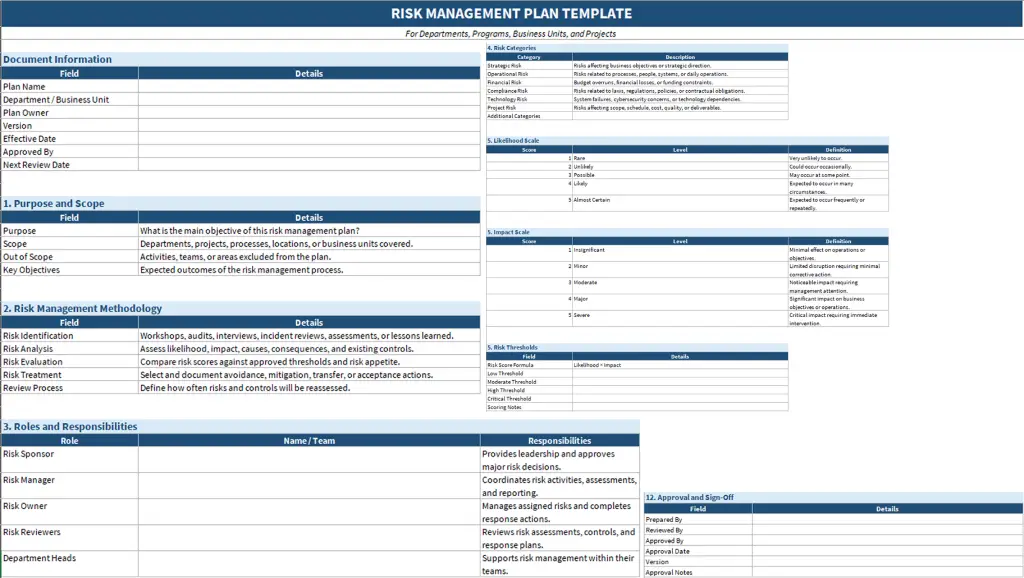
Best for: Departments, business units, operational teams, and organizations that need a consistent risk management process.
2. Project Risk Management Plan Template
A Project Risk Management Plan Template helps you manage uncertainties that could affect your project's scope, timeline, budget, resources, or deliverables. It gives your project team a structured process to prepare for potential problems throughout the project lifecycle.
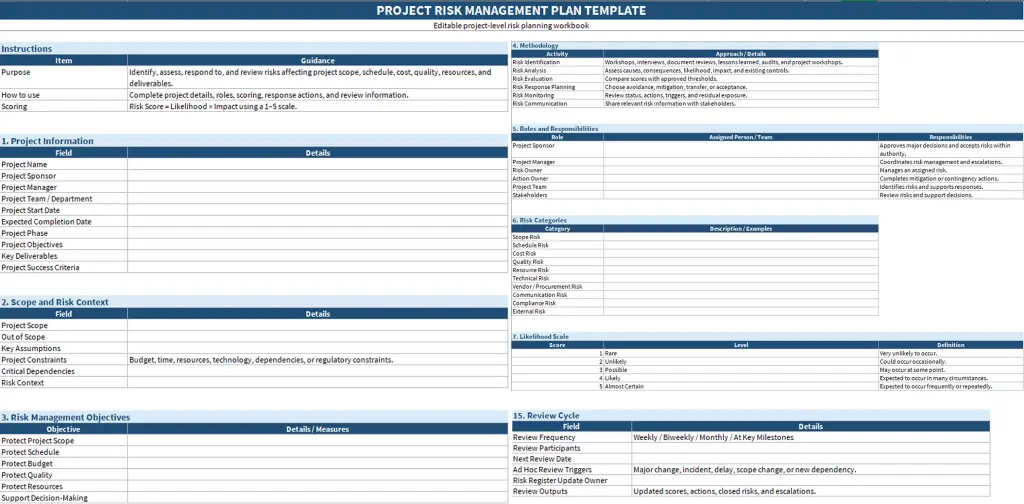
Best for: Project managers, PMOs, delivery teams, and organizations managing projects with defined deadlines and deliverables.
Want to manage project risks more effectively?
Use Time Champ to spot workload, project, and operational risks early and take action faster.
3. Risk Register Template (Risk Log for Project Management)
A Risk Register Template helps you maintain a centralized record of identified risks, their potential impact, assigned owners, and planned response actions. It allows your project team to update risk information and review changes throughout the project.
Sample scores use a 1-5 scale. Define your own scoring rules and thresholds according to your organization's process.
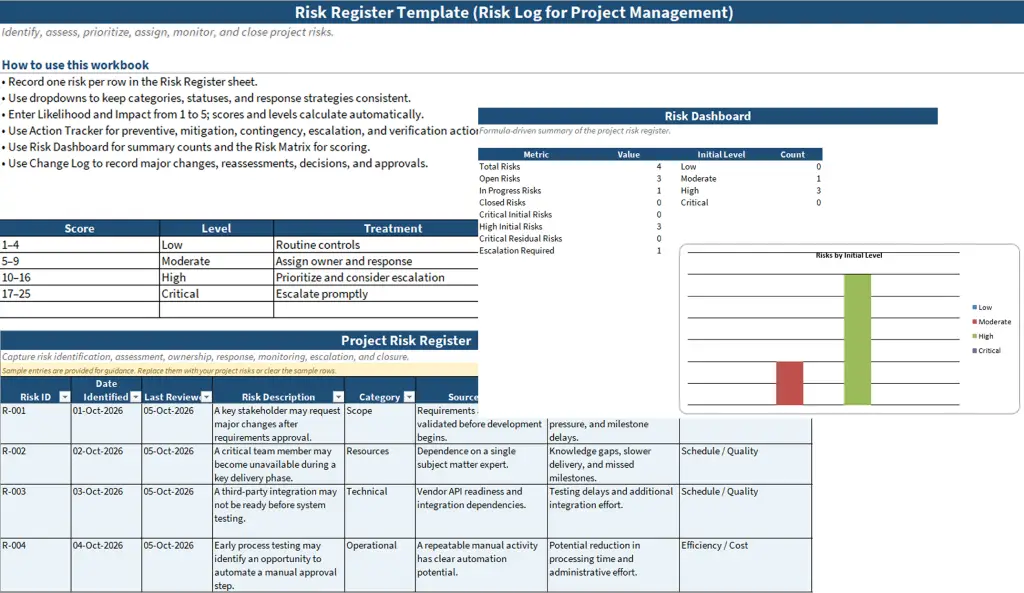
Best for: Project managers, risk owners, PMOs, and teams that need to maintain an ongoing record of project risks.
4. Risk Assessment Matrix Template
A Risk Assessment Matrix Template helps you evaluate risks by comparing their likelihood of occurring with the severity of their potential impact. It provides a visual way to prioritize risks and decide where additional controls or management attention may be needed.
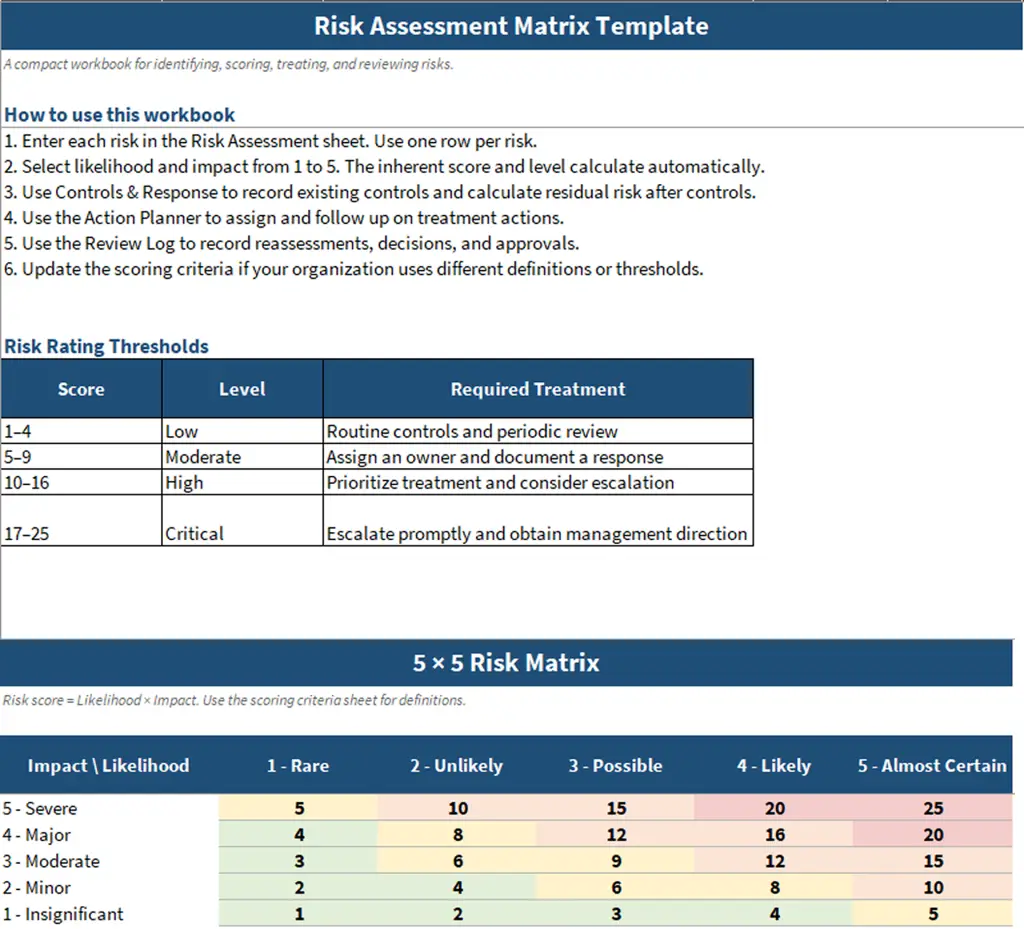
Best for: Project teams, safety and compliance departments, operations teams, and organizations that need a structured approach to evaluating risk exposure.
5. Composite Risk Management Template
A Composite Risk Management Template helps you assess multiple risk factors together before making operational or project-related decisions. It brings together hazard identification, risk assessment, control measures, and ongoing evaluation to support informed risk management.
The exact terminology and process can vary by organization. The following is a general-purpose composite risk management template.
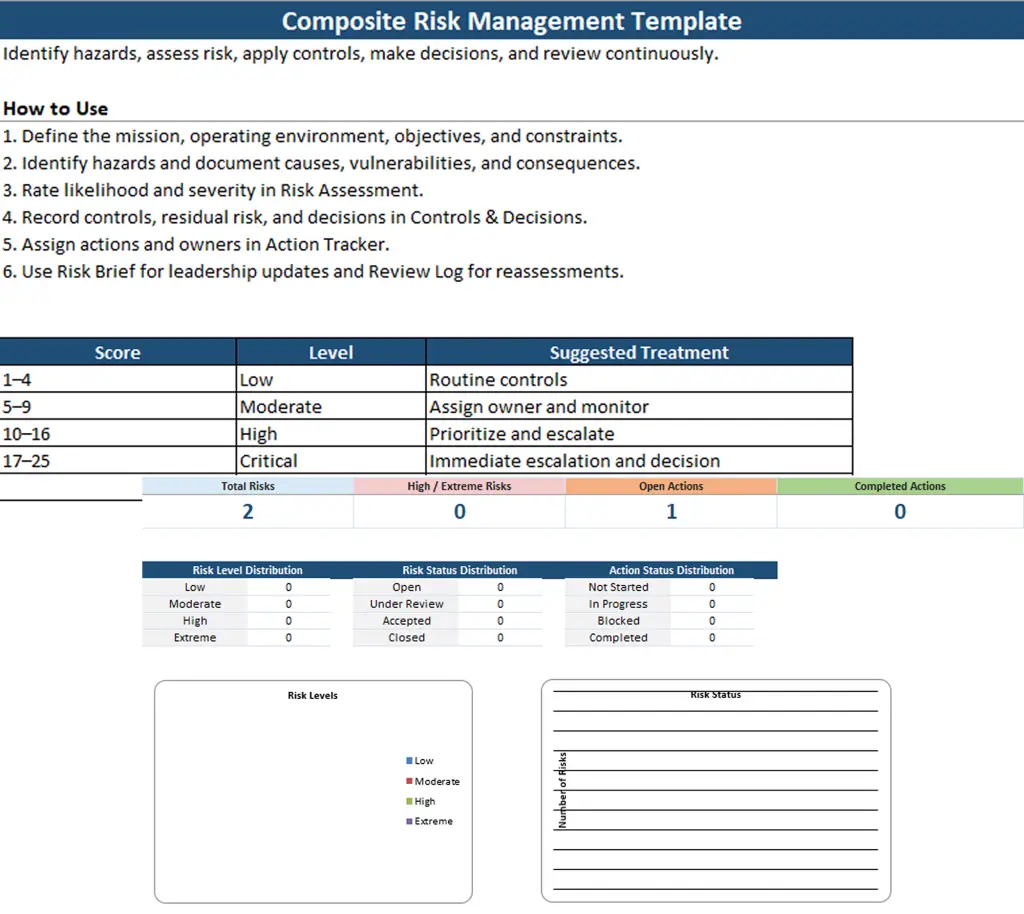
Best for: Operational teams, field activities, safety planning, and organizations that assess multiple hazards within a single activity.
6. Enterprise Risk Management Framework Template
An Enterprise Risk Management Framework Template helps you establish a coordinated approach to identifying and managing risks across the entire organization. It connects risk management with business objectives, leadership oversight, decision-making, and organizational performance.
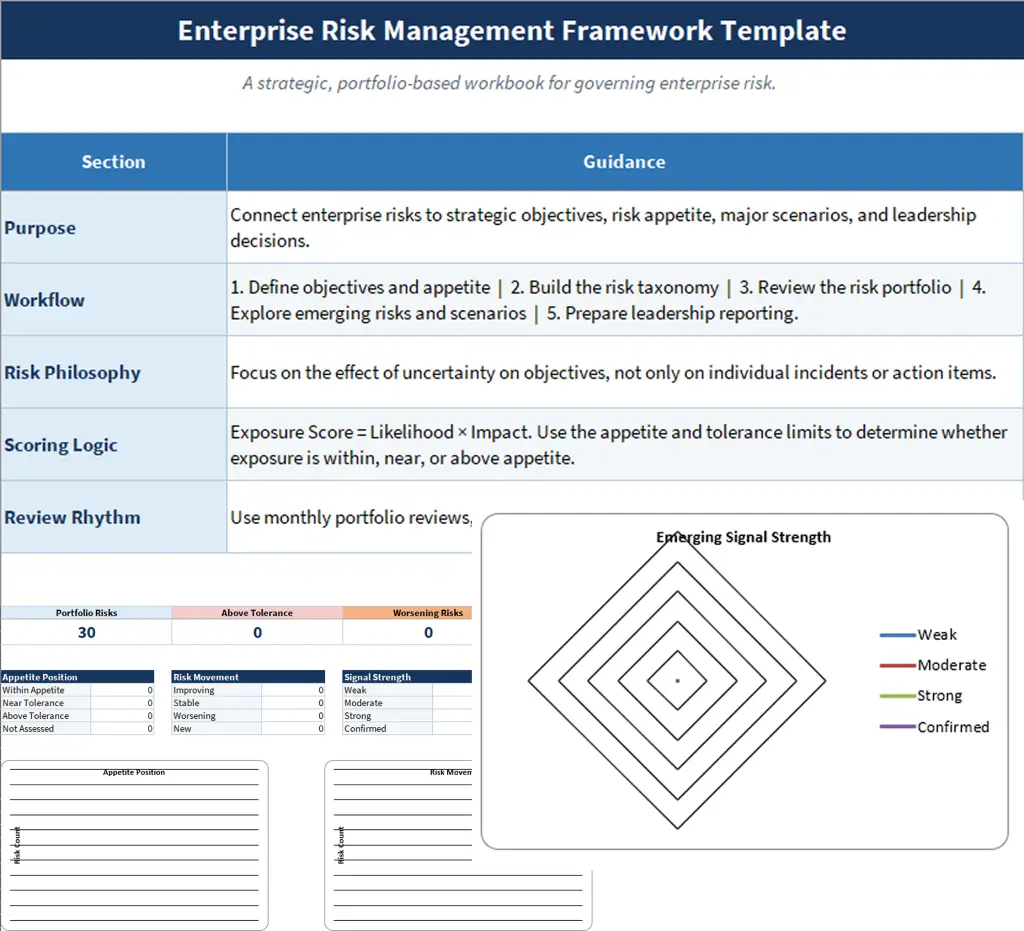
Best for: Enterprises, executive leadership, risk committees, finance teams, and organizations seeking an organization-wide risk management structure.

Did You Know?
The COSO ERM framework connects risk management with strategy-setting and organizational performance, helping organizations consider risk when making business decisions.
7. Workforce and Operational Risk Template
A Workforce and Operational Risk Template helps you identify and manage risks associated with employee capacity, workforce availability, business processes, and day-to-day operations. It supports teams in recognizing potential disruptions and planning appropriate response actions.
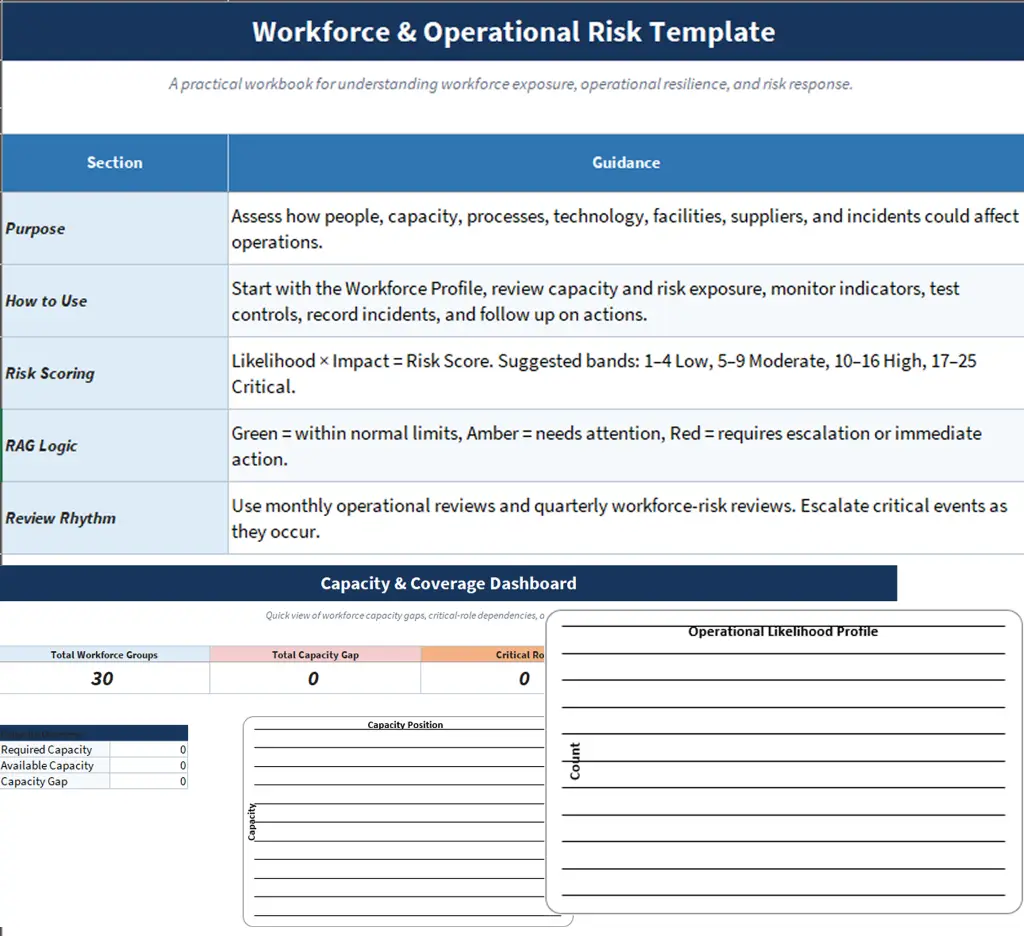
Best for: HR teams, workforce planning departments, operations managers, service organizations, and businesses managing workforce availability and operational continuity.
Are you relying on risk templates alone to spot issues?
Use Time Champ to identify workload issues and operational problems early, before they become bigger risks.
Which Risk Management Template Should You Use?
Choosing the right risk management template depends on your project, team, and the type of risks you need to manage. Use the template that best matches your risk assessment needs, workflow, and level of complexity.
| Template | Primary Purpose |
|---|---|
| Risk Management Plan | Establish an overall risk management approach |
| Project Risk Management Plan | Plan risk management for a specific project |
| Risk Register | Record and manage individual risks over time |
| Risk Assessment Matrix | Evaluate and prioritize risks based on the potential impact |
| Composite Risk Management | Assess multiple hazards and control measures within an activity |
| Enterprise Risk Management Framework | Coordinate risk management across the organization |
| Workforce and Operational Risk | Manage risks related to employees, capacity, and daily operations |
How to Use a Risk Management Template in 6 Steps
A risk management template helps you organize risks in one place and decide how to handle them. To use it effectively, set clear guidelines, identify risks with your team, assess their severity, assign responsibility, and review them regularly.
Step 1: Set the Rules Before Listing Risks
Before adding risks, decide how you will measure them. Define your risk categories, likelihood and impact scales, thresholds, and responsibilities. This gives everyone a consistent way to assess and compare risks.
Step 2: Identify Risks with Your Team
Bring together the people involved in the project, such as team leads, finance, IT, and other relevant stakeholders. Discuss possible risks, review past problems, and look at lessons learned. Your team can often identify risks that may be easy to overlook during planning.
Step 3: Score and Prioritize Risks
Use the risk matrix in your template to rate each risk based on its likelihood and potential impact. Calculate the risk score and prioritize the risks that could have the biggest effect on your project. Where possible, use information such as previous delays, incident records, or overtime data to support your assessment.
Step 4: Assign an Owner and Response
Assign one person to each risk so there is clear accountability. Then define how you plan to handle it, such as reducing, avoiding, transferring, or accepting the risk. Include specific actions and deadlines so the owner knows what needs to be done.
Step 5: Set a Measurable Risk Trigger
Identify a clear warning sign that tells you when a risk is becoming more serious. For example, a project budget reaching 80% of its limit or overtime increasing for several weeks can act as triggers. This helps you take action before the risk becomes a bigger problem.
Step 6: Review, Update, and Close Risks
Risk management doesn't end after you fill in the template. Review active risks regularly, update their status as things change, and close risks that are no longer relevant. Record what you learned so you can use those insights when planning future projects.
How Time Champ Keeps Your Risk Templates Up to Date
A risk management template is only useful when the information in it reflects what is happening in your workforce and operations. Time Champ brings real-time workforce data into your risk management process, helping you spot changes in workload, attendance, security, and project activity without relying only on manual updates.
| Risk in Your Template | Time Champ Data That Supports It |
|---|---|
| Budget and Schedule Overruns | Track project hours and costs, set alerts when limits are approaching, compare planned vs. actual work, and view project status. |
| Burnout and Workload Risks | Identify overutilization, review overtime, view work-life balance patterns, and receive alerts for potential burnout risks. |
| Attrition of Key Employees | Use attrition risk insights and activity pattern analysis to identify changes that may require attention. |
| Data Loss and Insider Risks | Provide data loss prevention features such as file activity monitoring, upload and download violation alerts, USB controls, and suspicious activity alerts to identify potential security risks. |
| Attendance and Coverage Gaps | View attendance in real time, receive late-login alerts, and identify missed check-ins or potential coverage gaps. |
| Audit and Compliance Risks | Generate compliance reports, export violation logs in XLSX, CSV, or PDF, and use recording exports as supporting evidence during audits. |
With these insights, you can update your risk templates using current workforce data, identify warning signs earlier, and take action before small issues become larger operational risks.
Ready to spot risks before they become bigger problems?
Explore how Time Champ gives you better visibility into project progress, helping you prevent issues before they escalate.
Risks are part of every project, but being prepared can help you handle them with confidence. With the right risk management template, you can spot potential issues early, prioritize what matters, and turn risks into clear action plans.
Explore the 7 free risk management templates above, choose the one that fits your needs, and start managing risks before they manage you.

Guna Lakshmi

Table of Content
 What Is a Risk Management Template?
- 7 Free Risk Management Templates
- Which Risk Management Template Should You Use?
- How to Use a Risk Management Template in 6 Steps
- How Time Champ Keeps Your Risk Templates Up to Date
Related Blogs
Explore 7 free project planning templates to plan, schedule, and manage projects effectively. Download in Excel, Word & PDF and boost your project success.
Chethana | Nov 11, 2025
Learn the biggest shadow IT risks, how they expose your business to security threats, and the best strategies to detect, manage, and prevent them.
Guna Lakshmi | Aug 27, 2026
Download free project scope templates in Excel, Word, and PDF to define requirements, avoid scope creep, and start projects with clarity easily.
Sai Keerthi Uppala | Apr 02, 2026
Protect your business from BYOD security risks like data breaches and phishing. Learn practical ways to secure employee devices and reduce security threats.
Guna Lakshmi | May 07, 2026
Explore 6 free project charter templates in Excel, Word, and PDF, including simple, agile, and six sigma formats for clear project starts.
Thasleem Shaik | Nov 07, 2025
Download 5 free Project Status Report Templates in Excel, Word, and PDF to track progress, spot risks early, and keep stakeholders aligned.
Tarun Kumar Reddy | Feb 11, 2026


 4.7/5 avg.
Ready to Manage Your Workforce Smarter?
Join our family of 1500+ companies using smart insights to redefine workforces!

Free Trial
No Credit Card Required