Free Consultant Time Tracking Templates (Excel, PDF & Word)
Download free consultant time tracking templates in Excel, PDF, and Word. Track billable hours, manage projects, boost productivity, and stay organized.

Keeping track of billable hours is part of running a consulting business. When time is recorded inconsistently, invoices can be inaccurate, and project records become harder to manage.
To make the process easier, we've created free consultant time tracking templates in Excel, PDF, and Word formats. These templates help you log hours, organize client work, and maintain accurate records without starting from scratch.
What is a Consultant Time Tracking Template?
A consultant time tracking template is a pre-designed document, usually in Excel, PDF, or Word format, used to record the time spent on client work, projects, and tasks. It helps consultants track billable and non-billable hours, calculate total time worked, and create accurate invoices for clients.
Think of it as the bridge between the work you do and the money you get paid for it. Without it, billable hours slip through the cracks. With it, every call, revision, and research task has a place, and your invoices stop turning into disputes.
4 Essential Consultant Time Tracking Templates (Free Downloads)
Most consultants do not need a complicated system. You just need the right template for how often you report. The four consultant time tracking templates below cover almost every situation, from hourly freelancers to consultants on long retainers. Pick the one that matches your invoicing needs.
| Template | Best for | What it captures |
|---|---|---|
| Daily | Hourly billing, multiple clients in one day | Task-by-task hours, start and end times, breaks, and billable split |
| Weekly | Short projects, weekly invoicing | Daily hours rolled up by project, weekly billable total |
| Biweekly | Retainers, twice-monthly billing | Two weeks of hours, period totals, overtime |
| Monthly | Fixed-fee or long engagements | High-level monthly summary with billable breakdown |
1. Daily Timesheet Template
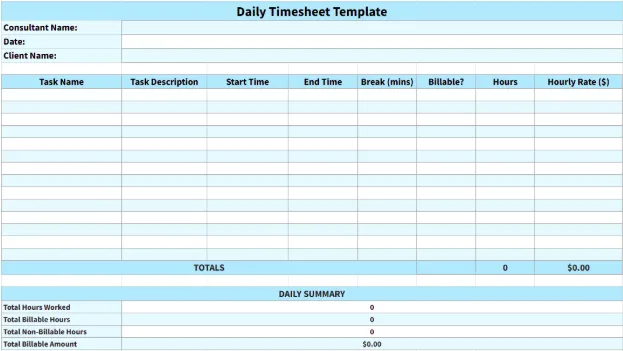
When every hour of work needs to be accounted for, the daily timesheet template is the right choice. It lets you log your workday hour by hour (or even in half-hour blocks), making it ideal for consultants who bill by the hour or work with multiple clients in a single day.
The template includes:
- Start and end time of each task
- Client or project name
- Short task description
- Breaks taken
- Billable vs non-billable hours
- Total hours worked
- Hourly rate
This level of tracking gives a clear view of how your day is spent and helps ensure no billable time is missed, especially when working across short tasks or multiple clients in a single day.
2. Weekly Timesheet Template
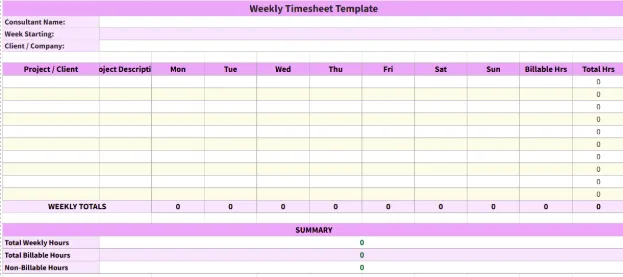
If you prefer a broader view of your work instead of tracking every hour, the weekly timesheet template is a practical middle ground. It summarizes your daily work by project, giving you structure without unnecessary detail. This makes it ideal for short projects and weekly invoicing cycles.
The template includes:
- Daily logged hours for each project
- Client or project names
- Short descriptions of completed work
- Billable hours per task
- Total weekly billable hours
This format works best for consultants managing short-term projects or those who invoice on a weekly basis. It gives a clear weekly overview without getting into every hour of the day. Consultants sometimes need to present a spreadsheet visually.
3. Bi-Weekly Timesheet Template
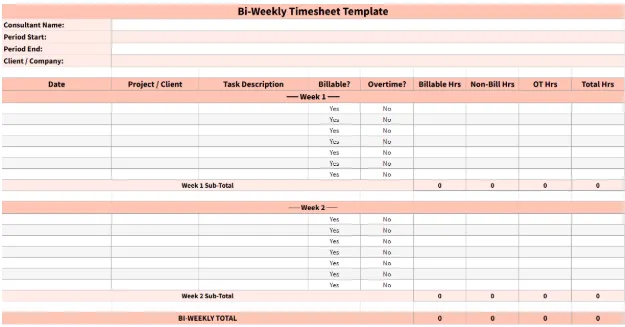
For retainer work or twice-monthly billing cycles, the biweekly timesheet template offers a balanced approach. It keeps your records accurate without the need for daily tracking and is well-suited for ongoing client work with steady output and regular reporting every two weeks.
The template includes:
- Daily work hours over two weeks
- Project details
- Billable vs non-billable hours
- Overtime (if applicable)
- Weekly and total hours for the period
This format simplifies reporting while ensuring no billable time is missed, making it ideal for consultants working on retainers or recurring engagements.
4. Monthly Timesheet Template
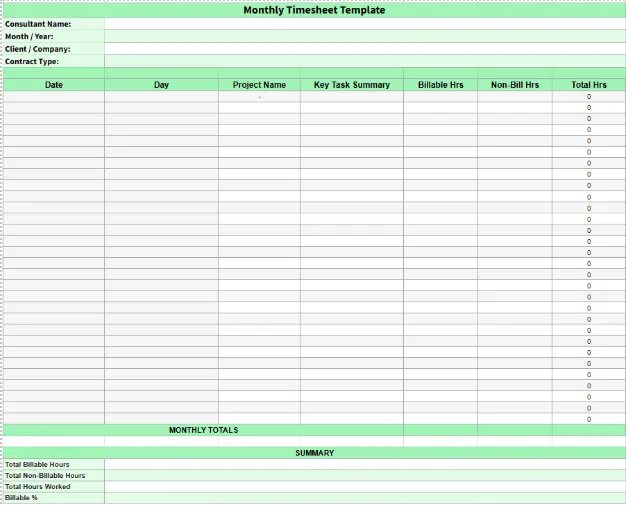
For fixed-fee contracts and long-term projects, the monthly timesheet template offers a simple, high-level way to track your work. It captures billable time without going into unnecessary detail, making it easier to review progress at the end of the month.
The template includes:
- Total daily hours
- Project name
- Billable vs non-billable hours
- Short descriptions of key tasks
- Total monthly hours
This format is ideal for consultants working on fixed-price contracts or monthly billing cycles. It provides a clear summary of work completed while keeping client reporting simple and transparent.
Which Consultant Time Tracking Template Fits Your Billing Model
The choice of the correct template depends on how you charge your clients, because your billing model determines how detailed your time tracking needs to be.
| Billing Model | What You Really Need to Prove | Best-Fit Template |
|---|---|---|
| Hourly | Every minute, defensible and accurate | Daily, with task-level detail |
| Retainer | The agreed hours were used properly | Biweekly or monthly summary |
| Fixed-fee / project | Work stayed within scope and budget | Monthly, with budget tracking |
| Day rate | Days worked and what each covered | Weekly, grouped by engagement day |
| Value-based | Outcomes delivered, hours as internal reference | Monthly (mainly for internal use) |
Notice the pattern first. If your fee depends on time, your tracking needs to be more detailed. Even when your pricing is based on results, hours still matter, but mostly to check whether the project is worth your time.
How to Fill Out a Consultant Timesheet Accurately
Filling in a timesheet is simple, but doing so accurately is a habit. The key is to log time as early as possible so you can record what actually happened, not what you remember a few days later. Here’s a routine that takes under five minutes a day.
- Open the template at the start of your day and add the date.
- Log each task as soon as you finish it, not at the end of the week.
- Write a one-line description a client can understand, not internal shorthand.
- Mark each entry as billable or non-billable while you’re logging it.
- Total it at the end of the day and quickly compare it with your calendar to catch anything missing.
Start tracking your time properly and never miss any hour you’ve worked!
Challenges of Using Manual Timesheet Templates
Templates are a great starting point, and for many solo consultants, they are enough. However, spreadsheets have their limits, and it helps to recognize them before you reach them. As your workload grows, these cracks start to show.
- Memory-based Entry: The longer you wait to log time, the more you rely on memory, and the more likely you are to round off hours, usually in the client’s favor.
- Lost Work: A misplaced file or system issue can wipe out days or weeks of records, leaving you with no backup of hours worked.
- Admin Creep: Manually building invoices from a spreadsheet slowly eats into the billable time you are trying to protect.
- No Early Warning: A spreadsheet won’t alert you when a fixed-fee project is going over budget until it has already happened.
- Hard to Scale: One client is manageable. Multiple clients with different rates quickly turn tracking and totals into a weekly headache.
When to Switch from Manual Templates to Time Tracking Software
There is nothing wrong with using a spreadsheet, but at some point it can quietly start holding you back. These are clear signs you’ve outgrown a template and could benefit from a tool that quickly pays for itself.
- You spend more than an hour a week assembling timesheets and invoices.
- You’ve lost billable hours you know you worked but can’t fully account for.
- You manage multiple clients or projects with different rates.
- You want utilization or budget insights without doing manual calculations.
- A client has questioned an invoice, and you didn’t have detailed records to back it up.
How Time Champ Helps Consultants with Time Tracking and Billing
Time Champ is a time tracking and employee monitoring software that helps consultants automatically track their work, capture billable hours accurately, and turn activity into clear billing and productivity insights without depending on manual spreadsheets.
Key features:
Automatic Time Tracking
Automatically tracks your work hours, ensuring every minute is recorded without manual input. It also tracks idle time and breaks for more accurate and transparent time reporting.
Billable and Non-Billable Classification
Categorize projects and tasks as billable or non-billable to clearly see where your paid and unpaid time is going, without needing extra calculations.
Multi-client and Project Tracking
Switch between clients and projects seamlessly while Time Champ organizes all your work in one place, so you always know how your time is distributed.
Real-time Project and Budget Monitoring
Set project budgets and track usage in real time, with alerts when you’re close to limits, so you can avoid overruns before they happen.
Timesheets and Invoice-Ready Reports
Automatically convert tracked hours into clean timesheets and reports in a few clicks, making billing faster and removing the need to manually rebuild your week.
Still on a spreadsheet and wondering what automatic tracking would catch?
Switch to Time Champ and bill accurately without losing billable hours.
Conclusion
Tracking time properly is what separates guesswork from consistent, reliable billing. With the right consultant time tracking template, you can stay organized, capture every billable hour, and make invoicing much smoother. As your workload grows, knowing when to move beyond spreadsheets becomes just as important. Whether you stick with templates or switch to a time tracking tool, the goal is the same: better visibility, better control, and better profitability.

Jahnavi Pulluri

Table of Content
 What is a Consultant Time Tracking Template?
- 4 Essential Consultant Time Tracking Templates (Free Downloads)
- Which Consultant Time Tracking Template Fits Your Billing Model
- How to Fill Out a Consultant Timesheet Accurately
- Challenges of Using Manual Timesheet Templates
- When to Switch from Manual Templates to Time Tracking Software
- How Time Champ Helps Consultants with Time Tracking and Billing
- Conclusion

Related Blogs
Get free attorney time tracking templates in Excel, PDF, and Word to streamline billing, improve accuracy, and manage billable hours efficiently.
Thasleem Shaik | March 12, 2025
Explore various productivity report templates to enhance your employee performance reviews and streamline evaluations.
Shabana Shaik | Jun 28, 2024
Always log accurate time with our easy and flexible timesheet templates. Download for free, customize to your needs, and use them according to your workflows.
Shabana Shaik | Mar 11, 2026
Download free time blocking templates in Excel, Word, and PDF. Plan your day, week, month, or year with structured time slots and clear task allocation.
Thasleem Shaik | Apr 02, 2026
Access free downloadable Project Estimate Templates in Excel, Word, and PDF to plan costs, track budgets, and create accurate project estimates easily.
Thasleem Shaik | November 03, 2025
Explore 12 free project schedule templates in Excel, Word, and PDF, including simple, construction, tracking, timeline, and multi-project options.
Thasleem Shaik | November 03, 2025


 4.7/5 avg.
Ready to Manage Your Workforce Smarter?
Join our family of 1500+ companies using smart insights to redefine workforces!

Free Trial
No Credit Card Required