Task Tracker for Remote Teams: Build a System That Works
Keep remote work on track with a task tracker that clarifies ownership, deadlines, priorities, and progress while keeping distributed teams better aligned.
When your team works remotely, staying on top of tasks can feel like keeping a dozen tabs open in your head. Who owns what? Which update changed the plan? What’s overdue? With updates spread across chats, emails, and tools, it can be hard to keep everyone on the same page. A single system can give your team a clearer view of what needs to get done. A task tracker helps you assign work, set priorities, track progress, and keep deadlines visible. It also helps your remote team stay coordinated when they work from different locations and schedules.
This blog discusses how to set up a reliable task management system for remote teams. It also covers how to handle different time zones, choose the right task tracker, and avoid common adoption mistakes.
Why Remote Teams Need a Better Way to Track Tasks
Remote teams do not have the same day-to-day visibility as teams working from one office. A quick question, task update, or handoff can easily get buried in a chat or wait several hours for a response. A clear task tracking system gives everyone a shared view of what needs to be done, who owns it, and where each task stands.
Here are some of the key reasons remote teams need a better way to track their tasks:
- Keeps Task Ownership Clear: Each task has a defined owner, so team members know who is responsible for moving the work forward.
- Makes Deadlines Easier to Follow: Visible due dates help teams keep important work on schedule and spot overdue tasks before they become bigger problems.
- Keeps Priorities Visible: Remote employees may work at different times and on different tasks. Clear priorities help everyone focus on the work that matters most.
- Reduces Scattered Updates: When task details live across emails, chats, and separate tools, important context can get lost. Keeping updates with the task gives everyone one place to check.
- Supports Asynchronous Work: Team members can check task status, add updates, and continue work without waiting for everyone to be online at the same time.
- Makes Time-zone Handoffs Easier: A clear task history gives the next person the context they need when work moves between different time zones.
- Gives Better Visibility: You can view progress, identify blocked or delayed work, and spot workload issues without repeatedly asking employees for status updates.
Losing track of tasks, deadlines, and ownership across remote teams?
Time Champ gives you clear task visibility and progress insights from one central workspace.
How to Set Up Remote Team Task Management In 7 Steps
A clear task management system gives your remote teams a consistent way to organize and complete work. Each task should have a clear purpose, owner, priority, and deadline so employees know what to do and when. It also gives the team a shared view of current work, upcoming tasks, and progress.
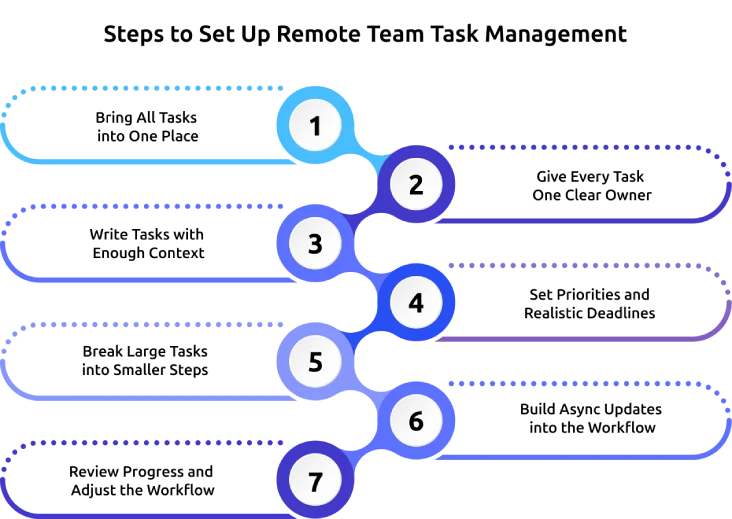
Follow these seven steps to build a task management system that works for your remote team.
1. Bring All Tasks into One Place
Start by moving active tasks into one shared workspace. Avoid keeping some tasks in emails, others in chat messages, and the rest in personal notes. A central task list gives everyone one place to check current work, updates, deadlines, and status. It also makes it easier to spot forgotten tasks or those without an owner.
2. Give Every Task One Clear Owner
Assign one person to take responsibility for each task. This person can involve other team members when needed, but one owner should remain responsible for moving the task forward. Clear ownership reduces confusion and makes it easier to identify who should provide the next update or resolve a blocker.
3. Write Tasks with Enough Context
Do not rely on short task names such as “Update report” or “Fix website.” Add the key details the assignee needs to get started. Include the expected outcome, relevant instructions, supporting files, and any important decisions. This gives your remote employees enough context to work independently without having to ask for every detail.
4. Set Priorities and Realistic Deadlines
Give each task a clear priority and due date. Make sure the deadline reflects the amount of work involved and any dependencies that could affect completion. Visible priorities help employees decide what needs attention first, while clear deadlines make it easier to plan work across different schedules.
5. Break Large Tasks into Smaller Steps
Turn complex assignments into smaller, manageable tasks or subtasks. This makes the work easier to plan and gives the team clearer progress points. For example, “Launch a new client website” could include content review, design approval, development, testing, and final checks. Smaller steps make it easier to identify what is complete and where work is blocked.
6. Build Async Updates into the Workflow
Give team members a simple way to update task status without requiring everyone to join a meeting. Encourage updates that show what has been completed, what is next, and whether anything is blocking progress. This approach keeps information available to the team and allows work to continue even when employees are not online at the same time.
7. Review Progress and Adjust the Workflow
Set a regular time to review active, completed, overdue, and blocked tasks. Look for recurring delays, unclear assignments, or workloads that need adjustment. Use these reviews to improve the workflow over time. A task management system should support the way your team works without creating extra administrative work.
How to Manage Tasks Across Different Time Zones
Different time zones can affect when team members receive updates, complete tasks, and hand work to the next person. A clear workflow helps everyone manage their responsibilities without waiting for the entire team to be online at the same time.
Set Clear Working Hours and Overlap Times
Document each team member’s working hours and time zone so everyone knows when colleagues are available. Set a shared overlap window for discussions, reviews, and tasks that need real-time input.
Make Async Work the Default
Keep routine updates, task discussions, and decisions in the task management system or another shared workspace. This lets your team members check information and continue their work when others are offline.
Write Clear Handoff Notes
Add the current status, completed work, next step, relevant files, and blockers before handing a task to someone in another time zone. The next person should have enough context to continue the work without waiting for a reply.
Specify the Time Zone for Every Deadline
Avoid deadlines such as “by Friday evening” when team members work in different regions. Include the relevant time zone with important deadlines so everyone knows exactly when the task is due.
Assign Clear Owners for Handoffs
Give each task a specific owner and identify who takes responsibility after a handoff. Clear ownership helps prevent tasks from sitting idle while team members wait for someone else to take the next step.
What to Look for in a Task Tracker for Remote Teams
A task tracker should help remote teams organize work, follow progress, and stay connected across different locations. Focus on features that make everyday task management clear and easy to follow.
- Flexible Task Views: Choose a tracker that offers different ways to organize work, such as lists, boards, calendars, or timelines. These views help you see tasks, deadlines, and upcoming work in a format that suits the workflow.
- Task Context and Dependencies: Each task should provide enough space for instructions, files, comments, and related tasks. This gives employees the context they need and shows how one task can affect another.
- Team Visibility and Progress Tracking: Look for features that show task status, pending work, completed tasks, and delayed items. This gives you and your team members a clear view of progress without repeated status requests.
- Time Tracking and Productivity Insights: Time tracking can show how much time employees spend on specific tasks or projects. Work insights can also help you review workloads, identify delays, and plan upcoming work more effectively.
- Useful Integrations: The tracker should connect with the tools your team already uses for communication, project work, file sharing, or reporting. Integrations help keep relevant task information connected and reduce unnecessary switching between platforms.
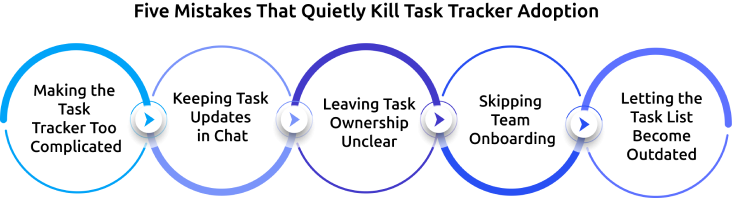
Five Mistakes That Quietly Kill Task Tracker Adoption
A task tracker works well when everyone uses it consistently. These common mistakes can make employees avoid the tracker, miss updates, or return to other ways of managing their work.
1. Making the Task Tracker Too Complicated
Too many fields, statuses, tags, and steps can make simple task updates feel difficult. Keep the workflow simple and include only the information your team needs to manage work effectively.
2. Keeping Task Updates in Chat
Important task details can get lost in chat messages and private conversations. Keep task updates, decisions, files, and comments with the relevant task so everyone can find the latest information.
3. Leaving Task Ownership Unclear
A task can remain unfinished when no one knows who is responsible for it. Assign one clear owner to each task so everyone knows who should take the next action.
4. Skipping Team Onboarding
Employees may continue using old habits when they do not know how the task tracker fits into their daily work. Explain how to create, assign, update, and complete tasks before making the tracker part of the team’s regular workflow.
5. Letting the Task List Become Outdated
Old tasks and incorrect statuses can make the tracker difficult to trust. Review the task list regularly, close completed tasks, update statuses, and remove work that is no longer relevant.

Did You Know?
Microsoft’s Work Trend Index found that employees are interrupted every two minutes during core work hours by meetings, emails, or chats. With so many messages competing for attention, keeping task updates in one place can reduce the risk of important details getting buried.
How Time Champ Supports Remote Team Task Tracking
Keeping track of tasks becomes harder when your team works across different locations, schedules, and projects. You may need to check task progress, follow up on delays, and review how much time different tasks are taking. Time Champ is a smart employee monitoring software with task management and time tracking together in one platform. It helps you assign work, monitor progress, track task time, and review workloads from a central workspace.
- Clear Ownership: Helps you assign tasks, define roles, set priorities, and add timelines so each team member knows what they are responsible for.
- Task Visibility: Organizes tasks by status and moves them through different stages as work progresses. This makes it easier to view pending, ongoing, completed, and verified tasks in one place.
- Progress Insights: Monitors task status, priorities, deadlines, and completion progress from a centralized view. This helps you identify delays and pending work more easily.
- Time Tracking: Records the time spent on individual tasks and projects with a one-click timer. You can also track billable and non-billable hours and use logged time to create timesheets.
- Performance Reports: Provides reports on the time spent across tasks and projects. This helps you identify bottlenecks, review workloads, and make better resource decisions.
- Budget Tracking: Sets project budgets based on hours or costs and sends alerts when projects approach their limits. This helps you monitor spending and keep project work within budget.
- Tool Integrations: Connects with platforms such as Asana, Jira, and Trello. This helps you track time within your existing workflows without constantly switching between different tools.
Struggling to keep remote tasks, time, and progress visible in one place?
Time Champ brings task tracking and time insights together to keep your team aligned.
Conclusion
Managing tasks across locations and time zones becomes easier with a clear system for assigning work, setting priorities, tracking progress, and managing deadlines. A task tracker gives your remote teams better visibility and keeps responsibilities clear. Set up a simple workflow, choose tools that fit your team, and review progress regularly. Start building a task tracking system that keeps your remote team organized and moving forward.

Anjali

Table of Content
 Why Remote Teams Need a Better Way to Track Tasks
- How to Set Up Remote Team Task Management In 7 Steps
- How to Manage Tasks Across Different Time Zones
- What to Look for in a Task Tracker for Remote Teams
- Five Mistakes That Quietly Kill Task Tracker Adoption
- How Time Champ Supports Remote Team Task Tracking
- Conclusion
Related Blogs

Choose the right task tracker with insights into its features, benefits, and how it helps your teams simplify task tracking and improve overall productivity.
Anjali | Aug 05, 2026
Use our effective task management strategies to stay organized, reduce stress, and boost team’s productivity by prioritizing tasks and managing time effectively.
Guna Lakshmi | Jul 01, 2025
Boost remote team productivity with practical management tips, proven best practices, key metrics, and tools that help your remote teams perform better.
Anjali | Jul 16, 2026
Learn how to track your time spent on tasks more accurately to improve billing and productivity with practical tracking methods and tools.
Guna Lakshmi | May 28, 2026
Discover how remote team communication and accountability improve with time tracking, helping teams build trust, visibility, and better work habits.
Anjali | May 19, 2026
Compare top collaboration tools for remote teams based on features, use cases, pricing, and strengths to choose the right platform for your workflow.
Thasleem Shaik | Feb 28, 2025


 4.7/5 avg.
Ready to Manage Your Workforce Smarter?
Join our family of 1500+ companies using smart insights to redefine workforces!

Free Trial
No Credit Card Required