Data Entry Outsourcing: How It Works and What to Expect
Data entry outsourcing gives you a practical way to handle repetitive data tasks. See the services, benefits, steps, and key factors to consider today.

A growing pile of forms, invoices, customer records, or product data can quietly take hours away from your core work. Data entry outsourcing gives you a way to move that repetitive workload to an external team while keeping your processes moving.
The real challenge comes after the decision to outsource. You still need to choose the right model, set clear expectations, protect your data, and make sure the work meets your standards.
This guide walks you through what to outsource, how the process works, what you can expect to pay, and how to choose the right approach.
What Is Data Entry Outsourcing?
Data entry outsourcing is the practice of assigning data input, conversion, updating, verification, and organization to a third-party specialist instead of handling those tasks entirely in-house. The provider works with your source files and follows agreed instructions, formats, deadlines, security measures, and quality checks to return accurate, usable records.
The arrangement may cover a one-time project, a seasonal workload, or ongoing support. Depending on the need, an external team can work on invoices, forms, customer details, product information, or database updates while your business keeps control of the rules, access, and expected results.
Types of Data Entry Services You Can Outsource
Data entry includes many different tasks, and each one may require a different approach. Before you outsource data entry, it is helpful to understand the main types of services available. This will help you choose the right service for the work in your backlog. Here are the major types of data entry services.
| Type of Data Entry Service | What You Can Outsource |
|---|---|
| Online data entry | Enter information into web forms, CRMs, e-commerce platforms, cloud databases, and other online systems. |
| Offline data entry | Transfer information from paper records, forms, surveys, and scanned files into spreadsheets or other digital formats. |
| Data conversion | Convert information from one format to another, such as PDF to Excel, image to text, or older files into a format your current system can use. |
| Document and image data entry | Capture information from invoices, receipts, forms, PDFs, scanned documents, and images and organize it into structured digital records. |
| Data cleansing | Remove duplicate records, correct inconsistencies, update outdated information, and standardize your existing data. |
| Data processing and tagging | Sort, categorize, label, organize, and prepare raw data for reporting, analysis, or other workflows. |
| Transcription | Turn audio or video content into written text when you need searchable or editable records. |
Most providers offer several of these services in one place. This means you usually do not need one specialist for typing and another for data cleaning. A single data entry service provider can often handle all the work your business needs.
Struggling to see how your outsourced team is really working?
Try Time Champ for clearer visibility into time, activity, and productivity.
What Are the Benefits of Data Entry Outsourcing?
When you outsource data entry, you can move routine work to a dedicated team and give your internal staff more time to focus on important tasks. Here are the benefits of outsourcing data entry:
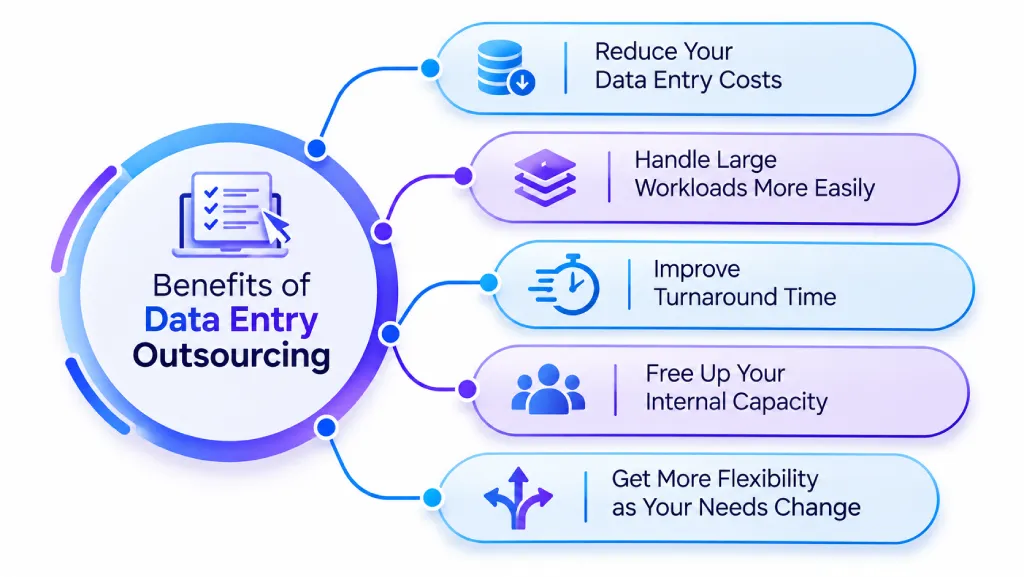
1. Reduce Your Data Entry Costs
Running data entry in-house can involve more than salaries. You may also need to account for hiring, training, equipment, software, workspace, and ongoing staffing costs.
With data entry outsourcing, you can choose a pricing model that matches your workload instead of maintaining a full-time setup for work that may fluctuate. You can scale your spending around the amount of work you actually need to process.
2. Handle Large Workloads More Easily
Your data volume may not stay the same throughout the year. A system migration, product launch, seasonal demand, or large batch of documents can suddenly create more work than your current capacity can handle.
Outsourced data entry services give you access to additional capacity when you need it. You can increase support during busy periods without building a larger permanent team around a temporary workload.
3. Improve Turnaround Time
Large data entry backlogs can hold up the work that depends on them. When you have a dedicated team handling the workload, you can move through large batches without making your existing workflow carry the entire load. You can also agree on turnaround expectations before the work begins. This gives you a clearer timeline for when you can expect each batch or project.
4. Free Up Your Internal Capacity
When your internal team spends hours entering records, updating spreadsheets, or digitizing documents, less time remains for work that directly moves your business forward. This gives your internal staff more time to focus on higher-value work such as analysis, planning, customer service, and process improvement.
5. Get More Flexibility as Your Needs Change
You may need extra support for one project and much less support once that project ends. Outsourcing gives you more flexibility to match your data workload instead of keeping the same level of capacity throughout the year.
This makes outsourcing data entry useful for both ongoing workloads and short-term projects such as migrations, digitization, catalog updates, or large database cleanup.
How to Outsource Data Entry: Step by Step
Outsourcing data entry does not have to be complicated, but rushing into it can create problems later. Before you hand over your data, you need to know exactly what you want to outsource, how you will measure the work, and which provider can meet your requirements.
Here are the steps you can follow to set up the process.
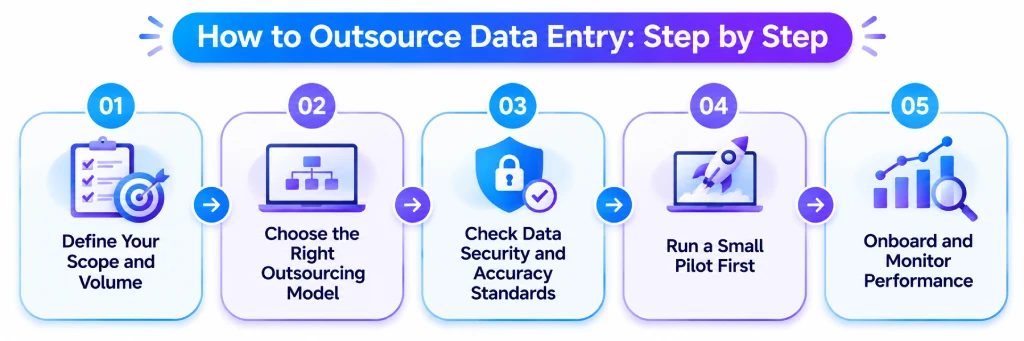
1. Define Your Scope and Volume
Before you contact any provider, clearly define the work you want to outsource. Estimate how many records you handle each week or month. Identify the type of work, such as invoice processing, CRM updates, survey forms, or something else.
Also decide whether you need help with a one-time project, such as data migration, or with an ongoing task that must be completed every week. The clearer your requirements are, the easier it will be to compare quotes, because unclear requests often lead to unclear answers from providers.
2. Choose the Right Outsourcing Model
Once you know your scope, decide how you want to outsource data entry. A freelancer is a good choice for a small, one-time project. A data entry outsourcing company or BPO is better if you need to manage a large volume of work with a clear process and quality checks. A dedicated remote team is a good option if you have ongoing data entry work.
Shortlist three or four data entry service providers. Check their experience and ask for references from clients you can contact. Looking for a trusted team to handle your business processes? Explore our list of the best BPO companies.
3. Check Data Security and Accuracy Standards
This is where many businesses make mistakes, and it can cost them later. Ask each provider about their security certifications, how they protect data through encryption, and which team members can access your files. If you handle customer records, financial information, or other sensitive data, sign a data processing agreement before sending any files. Also ask how the provider checks accuracy and whether they complete their own quality review before returning the work to you.
4. Run a Small Pilot First
Never hand over your full workload on the first day. Start with a small batch, such as one week’s worth of records. Check the provider’s speed, accuracy, and ability to follow your formatting rules. A two-week pilot can tell you more than any sales call.
5. Onboard and Monitor Performance
Once the pilot is successful, fully onboard the provider with clear instructions, sample files, and a contact person from both sides. After that, focus on monitoring the work instead of managing every entry.
Track turnaround times, error rates, and whether the provider is keeping up with your workload. A workforce visibility tool like Time Champ can help by showing productive time and activity trends across your outsourced or remote team. This allows you to identify slowdowns early, before they create a backlog.
Finding it hard to keep outsourced work on track?
Use Time Champ to see productivity patterns and make better decisions.
How to Choose a Data Entry Outsourcing Provider
Not every data entry outsourcing company works the same way. Choosing the wrong provider can cost you more in rework than you save on the service rate. Before you sign with any data entry service provider, check the following points.
- Relevant Experience: Ask how long the provider has handled work like yours, whether that's invoices, online forms, surveys, or transcription. A team that already knows your data type makes fewer errors and needs less training from your side.
- Security and Compliance: If your data includes customer or financial records, confirm the provider has encryption, restricted access, and compliance with frameworks like GDPR or HIPAA where they apply. Get a data processing agreement in writing before you share anything sensitive.
- Quality Control Process: A dependable data entry service runs every batch through a QA check before it reaches you. Ask how they catch errors, how often they sample the work, and what accuracy rate they commit to.
- Scalability: Your workload may not stay the same forever. Check whether the provider can add more staff during busy periods or one-time data migrations without reducing accuracy. This is especially important when working with offshore data entry teams that manage several clients at the same time.
- Transparent Pricing: Get a clear breakdown of the full cost, not just the starting rate. Some data entry outsourcing companies show a low price per record but add fees for corrections, urgent work, or formatting.
Conclusion
Data entry outsourcing can help you handle growing workloads, reduce repetitive work, and keep your internal team focused on higher-value tasks. The key is to choose the right outsourcing model, set clear quality and security standards, and work with a provider that fits your needs.
If you also want better visibility into how your outsourced or remote team is spending its work time, Time Champ can help you track productive time, activity, and workload trends. You can use these insights to spot slowdowns and keep work moving without replacing your quality checks.
Still relying on assumptions to manage outsourced work?
Use Time Champ to replace guesswork with real workforce insights.

Thasleem Shaik

Table of Content
 What Is Data Entry Outsourcing?
- Types of Data Entry Services You Can Outsource
- What Are the Benefits of Data Entry Outsourcing?
- How to Outsource Data Entry: Step by Step
- How to Choose a Data Entry Outsourcing Provider
- Conclusion
Instant Signup
Thank you for your request!
We have received your signup request and our team will get back to you soon. In the meantime, you can book a demo to see Time Champ in action.
Book a DemoFree trial. No credit card required. Prefer a walkthrough? Book a demo.
Related Blogs

Learn why billing breakdowns damage BPO trust, why clients value workforce intelligence billing, how it strengthens billing models & implementation steps.
Thasleem Shaik | Feb 11, 2026
Discover the 18 global best call center outsourcing companies to optimize customer support. Choose from leading names for exceptional service and efficiency.
Mounika Sai | Nov 16, 2023
Discover the essence of outsourcing, you will get to know its various types and the driving factors behind its high demand
Shabana Shaik | May 17, 2024
Strategic outsourcing involves delegating specific tasks to external experts for efficiency. Explore its types, advantages, and how it optimizes operations.
Mounika Sai | Nov 24, 2023
Business process outsourcing (BPO) vs Knowledge process outsourcing (KPO). Discover definitions of BPO and KPO, key functions, similarities, and use cases.
Guna Lakshmi | Apr 02, 2026
Learn how to kickstart your BPO business with this comprehensive step-by-step guide, covering everything from planning to execution. Get insights now!
Tarun Kumar Reddy | Nov 17, 2023


 4.7/5 avg.
Ready to Manage Your Workforce Smarter?
Join our family of 1500+ companies using smart insights to redefine workforces!

Free Trial
No Credit Card Required