What is Work Schedule? Types, Benefits & Challenges
Learn what a work schedule is, its types, benefits, challenges, legal factors, and how to create effective employee schedules with practical tips.

You've probably had one of those Mondays where half the team shows up late, someone didn't know they were on shift, and the whole morning just collapses before 10 AM. Sound familiar? That's not a people problem, that's a scheduling problem. A work schedule does more than tell your employees when to clock in. It's the invisible structure that holds your entire operation together.
Whether you manage a small team or an entire workforce, understanding work schedules is one of the most practical things you can do for your business. This guide walks you through everything: the types, the benefits, the legal stuff, and a step-by-step process to actually create schedules that stick.
What is a Work Schedule?
A work schedule is a structured plan that clearly defines when your employees need to work, which days they are scheduled, how many hours they are expected to complete, and what shift they are assigned to. When you start using work schedules, you can create a system where everyone knows their responsibilities in advance, which helps your daily operations run more smoothly and predictably.
Think about what happens without one, employees guess their hours, managers scramble to fill gaps and customers get inconsistent service. None of that is dramatic, it's just the slow grind of a business running without a system. A solid work schedule removes that uncertainty.
According to Gallup, the average full-time employee in the U.S. works 47 hours a week, not 40.
A well-planned employee work schedule also improves productivity and also makes payroll and attendance tracking easier because you already have a clear record of planned work hours, overtime, and time off.
What Are the Different Types of Work Schedules?
Not every business runs on a 9-to-5. Before you build a schedule, you need to know which type fits your operation. Here's a quick overview of the most common ones:
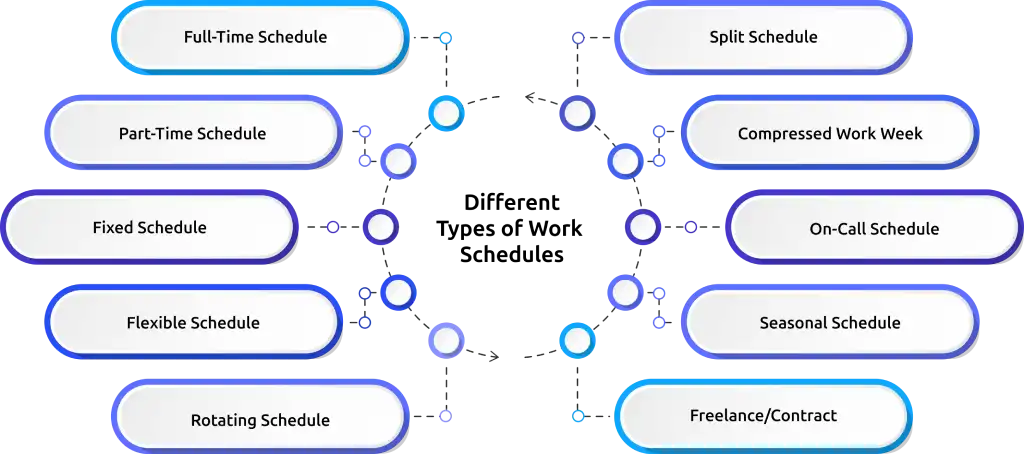
| Schedule Type | Typical Hours | Best For |
| Full-Time Schedule | 40 hrs/week | Offices, manufacturing, healthcare |
| Part-Time Schedule | Under 30 hrs/week | Retail, hospitality, students |
| Fixed Schedule | Same hours daily | Admin, corporate roles |
| Flexible Schedule | Variable, employee-chosen | Remote teams, knowledge workers |
| Rotating Schedule | Cycles through shifts | Hospitals, factories, security |
| Split Schedule | Two separate blocks/day | Restaurants, transit |
| Compressed Work Week | 4x10 or 9/80 model | Engineering, public sector |
| On-Call Schedule | Work as needed | Healthcare, IT support |
| Seasonal Schedule | Temporary, peak-period | Retail, agriculture, tourism |
| Freelance/Contract | Project-based | Creative, tech, consulting |
Full-Time Work Schedule
A full-time work schedule means you work 40 hours a week. That's 8 hours a day, 5 days a week, usually Monday to Friday. Most companies follow a 9 AM to 5 PM routine. This is the most common work schedule you'll see. Your employees know exactly when to come in and when to leave.
Example: Your HR manager comes in at 9 AM and leaves at 5 PM, Monday to Friday. Same time, every week.
Use Case: Best for offices, banks, IT companies, and corporate teams that need people working every weekday without breaks in coverage.
Part-Time Work Schedule
A part-time work schedule means your employee works less than 30 to 35 hours a week. The number of days and hours depends on what your business needs and when your employee is free. You pay less because they work fewer hours. You also get to hire people who can't commit to full-time, like students, parents, or retirees.
Example: A student works at your store on Tuesday, Thursday, and Saturday from 10 AM to 3 PM. That's 15 hours a week.
Use Case: Best for retail stores, cafés, and restaurants where the number of customers changes throughout the week and you don't always need a full team.
Fixed Work Schedule
A fixed work schedule means your employee works the same hours on the same days every single week. Nothing changes. They already know their schedule without having to check. This is the easiest schedule to manage. Your employees can plan their personal life around their work hours because nothing ever surprises them. You also deal with fewer last-minute shift swaps and schedule mix-ups.
Example: Your office admin works 8 AM to 4 PM, Monday to Friday, every week, no exceptions, no changes.
Use Case: Best for offices, government departments, and admin teams where the workload is steady and doesn't change much from week to week.
Flexible Work Schedule
A flexible work schedule means your employees choose when they start and finish work. They just need to complete their required hours and be available during the core hours you set, say, 10 AM to 3 PM. When people work at hours that suit them, they focus better and get more done.
Example: One employee starts at 7 AM and finishes at 3 PM. Another starts at 10 AM and finishes at 6 PM. Both work 8 hours. Both get their work done.
Use Case: Best for remote teams, designers, developers, and writers, roles where what you produce matters more than when you sit down to work.

Did you Know?
A study by Stanford University / Nicholas Bloom revealed that Employees with flexible schedules are 13% more productive than those without.
Rotating Work Schedule
A rotating work schedule means your employees take turns working different shifts. One week, they work mornings, the next week’s evenings, the week after that, nights, then the cycle repeats. Switching between day and night shifts messes with sleep. So if you use this schedule, make sure your employees get enough rest between shifts.
Example: Your factory worker does 6 AM-2 PM one week, 2 PM-10 PM the next, 10 PM-6 AM the week after, then starts again.
Use Case: Best for hospitals, factories, call centres, and security firms that need someone working every hour of every day.
Interesting Fact!
Research by WHO & ILO Overwork Health Risk revealed that working 55+ hours a week increases stroke risk by 35% and heart disease risk by 17%.
Split Work Schedule
A split work schedule means your employee works two separate shifts on the same day with a long break in between. They come in for the morning rush, take a few hours off, and come back for the evening rush. You only pay for the hours they actually work, so it saves money.
Example: Your waiter works from 7 AM to 11 AM for breakfast, takes a break, and comes back from 4 PM to 8 PM for dinner service.
Use Case: Best for restaurants, gyms, and public transport, businesses that get busy in the morning and evening but slow down in the afternoon.
Compressed Work Week Schedule
A compressed work week means your employees work the same total hours but in fewer days. Instead of 5 days, they work 4. Your employees get an extra day off without losing any pay. So, make sure the role actually suits longer shifts before you switch.
The two most popular versions are:
· 4x10: Work 10 hours a day, 4 days a week, and get 3 days off.
· 9/80: Work 9 hours a day for 9 days over two weeks and get every other Friday off.
Example: Your engineer works 10 hours Monday to Thursday and has every Friday completely free. They still work 40 hours but across 4 days.
Use Case: Best for engineering teams, project-based work, and public sector jobs where people need long, uninterrupted blocks of time to get things done properly.
On-Call Work Schedule
An on-call work schedule means your employee doesn't have fixed hours. But they must stay reachable and be ready to come in whenever you need them. This is stressful for employees because their personal time is never fully their own.
Some cities like San Francisco and Chicago now have laws that require you to pay on-call workers even when you don't actually call them in. If you operate in those areas, check whether those rules apply to you.
Example: Your IT technician gets a call at midnight because a server crashed. They're expected to be on it within 30 minutes.
Use Case: Best for hospitals, IT support teams, and emergency services, roles where problems don't wait for business hours.
Struggling to keep track of who's working and when?
Time Champ gives you a clear view of every shift and every employee, all in one place.
Seasonal Work Schedule
A seasonal work schedule means you hire extra staff during your busiest time of year and reduce the team once that period ends. It's temporary, your seasonal employees know upfront that the job has an end date. The mistake most businesses make is hiring too late. Start your seasonal hiring 2 to 3 months before your peak period. You'll get better people and save time doing it.
Example: Your warehouse hires 150 extra workers from October to January for the holiday rush, then scales back to normal staffing in February.
Use Case: Best for retail, agriculture, tourism, and event companies that get a big spike in business at the same time every year.
Freelance / Contract Work Schedule
A freelance or contract work schedule has no fixed hours at all. Freelancers work whenever they want, based on deadlines and project needs. You don't tell them when to work, you just tell them what you need and when you need it. If you work with contractors already, give them the freedom to work their way, just make sure your deadlines and delivery expectations are crystal clear from the start.
Example: Your freelance designer works 10 hours on Monday to meet a deadline, rests on Tuesday, and finishes the project late Wednesday night before sending it over.
Use Case: Best for creative agencies, tech startups, and consulting firms where the quality of the final output matters, not the hours someone spent on the clock.
Did you Know?
Only 21% of global employees are engaged at work, and low engagement costs the global economy $438 billion in lost productivity in 2024 alone. Proves why structured work schedules matter.
How to Create Employee Work Schedules?
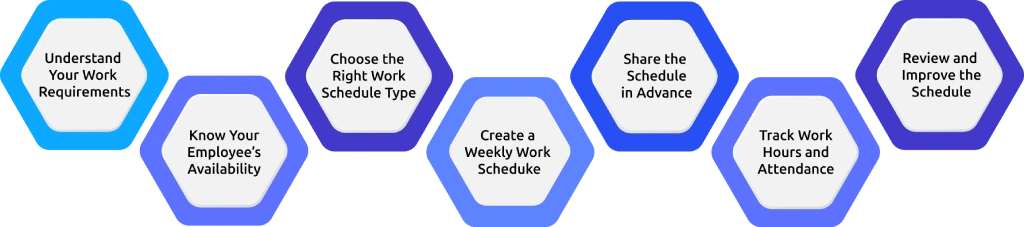
To create a proper work schedule you need proper process. If you skip steps, you end up with coverage gaps, confused employees, and a lot of last-minute errors. Here's exactly how to do it right.
Step 1: Understand Your Work Requirements
Start by identifying how many employees you need per shift and what work needs to be completed.
Step 2: Know Your Employees' Availability
Ask employees about:
- Available days
- Preferred shifts
- Time off requests
This reduces conflicts later.
Step 3: Choose the Right Work Schedule Type
Not every business needs the same schedule. Choose from fixed, shift, rotating, or flexible schedules based on your business. Choosing the wrong type from the start causes problems that don't go away, no matter how well you fill in the rest of the details. Get this decision right, and everything else becomes easier.
Step 4: Create a Weekly Work Schedule
Most companies create weekly work schedules so they can adjust based on workload, leave requests, or changes in demand. When you build it, start with your most important shifts first. Then spread your experienced employees across different shifts, don't stack all your best people in one slot. Also, don't schedule someone for a late-night close and then an early morning open the very next day. That kills energy fast, and you'll start seeing more mistakes and more sick days.
Step 5: Share the Schedule in Advance
Always share schedules at least one week in advance. This reduces absenteeism and confusion. When your team gets the schedule late, they've already made other plans. Sharing early gives people time to flag real conflicts before it's too late to fix them. It also shows your team that you value their time.
Step 6: Track Work Hours and Attendance
After creating the schedule, track whether employees are following it properly. A schedule that no one checks is just a document. What actually happens on the floor could be completely different, and that gap shows up in your payroll and your service quality. Use a time tracking tool so you always know who came in, who didn't, and who worked beyond their scheduled hours.
Step 7: Review and Improve the Schedule
At the end of each week, take a few minutes to look at how things went. Check for:
· Late logins
· Absenteeism
· Overtime
· Workload balance
These patterns show you exactly where your schedule is breaking down. Use what you find to fix the next one. The more you review and adjust, the fewer problems you deal with every week.
What Are the Benefits of a Work Schedule?

A proper work schedule helps both employers and employees. When you plan shifts well, your business runs more smoothly, your team stays happier, and you avoid a lot of unnecessary problems.
1. Improves Productivity
When employees clearly know their work hours and shift timings, they come prepared and focus better on their tasks. You don’t have to keep reminding people about shifts or working hours. This helps your team focus better and complete work on time, which improves overall productivity.
2. Reduces Absenteeism
When you share the schedule early, your employees know their working days and off days well in advance. So, they book appointments, handle personal errands, and sort out family commitments on their days off. This helps to directly reduce the number of unplanned leaves you deal with every week.
3. Better Workload Management
Without a schedule, some shifts end up with too much work, and others have too little. That's a loss of both time and money. A proper schedule makes it clear how many people each shift needs and what they need to handle.
4. Improves Employee Satisfaction
People have lives outside of work. When you give your employees their schedule in advance, they can plan around it. They spend time with family. They handle personal commitments. They get proper rest. When your team feels like they have control over their time, they're happier at work, and they stick around longer.
5. Helps in Payroll Accuracy
When you don't track schedules properly, calculating payroll gets messy. You end up overpaying, underpaying, or missing overtime. A clear schedule helps you track exactly:
· Work hours - how many hours each person worked
· Overtime - who went beyond their hours and by how much
· Time off - who took leave and when
· Shift hours - whether your employees worked the right shifts
Want these benefits to show up in your business too?
Time Champ tracks attendance, hours, and productivity so your schedules deliver real results.
What are the Challenges in Implementing a Work Schedule?
Even though work schedules are important, creating and managing them is not always easy. If you have ever created a schedule for a team, you already know that one small change can affect the entire plan. Here are some of the most common challenges you will face when implementing a work schedule.
Shift Conflicts
Shift conflicts are one of the most common scheduling problems. Employees may request shift changes, swap shifts with others, or ask for different working hours. If you don’t handle shift conflicts properly, you may end up with too many employees in one shift and not enough employees in another shift.
Last-Minute Absences
Last-minute leave or sudden absence can completely disrupt your work schedule. When one employee doesn’t show up, another employee has to handle extra work, which can lead to stress and overtime. This problem becomes more serious in shift-based industries like healthcare, customer support, manufacturing, and security, where every shift must be covered.
Overtime Management
Poor scheduling often leads to too much overtime. When you don’t distribute work properly, some employees may work extra hours while others work fewer hours. If overtime pay is not planned properly, it can affect both your budget and employee productivity.
Workload Imbalance
One of the biggest scheduling mistakes is workload imbalance. This happens when some employees handle too many tasks while others have very little work. When this continues for a long time, employees may feel frustrated and demotivated.
76% of employees say workplace stress affects their personal relationships and overall well-being.
Lack of Scheduling Tools
Many companies still use manual methods for scheduling. If you create schedules manually using Excel or paper, mistakes can easily happen. You may assign the wrong shift, schedule an employee on their day off, or forget to assign someone to an important shift.
Employee Availability Issues
Not all employees are available at the same time. Some prefer morning shifts, some prefer night shifts, and some may only be available on specific days. Managing different availability for different employees can be very challenging, especially if you have a large team.
What Legal Factors Should Be Considered in Work Scheduling?
When creating employee work schedules, you must also follow labor laws. Ignoring them, even by accident, can lead to fines, legal disputes, and unhappy employees. Here are the key legal factors to keep in mind.
Maximum Working Hours Per Week
Most labor laws set a limit on how many hours an employee can work per week. In many countries, this is 48 hours. Going beyond that without proper compensation is a violation. Before finalizing any schedule, check the working hour limits that apply in your region.
Overtime Rules
When employees work beyond their regular hours, they are entitled to overtime pay. In most places, overtime means paying 1.5 times the regular rate. If your schedule regularly pushes employees past their limits without extra pay, that's a legal problem waiting to happen.
Minimum Rest Time Between Shifts
Employees need adequate rest between shifts. Scheduling someone for a late-night close and then an early morning opens the very next day isn't just bad for their health, in many places, it's against the law. Most labor laws require a minimum gap of 8 to 11 hours between shifts.
Weekly Off Requirements
Every employee should get at least one full day off each week. In some places, two days are required. Make sure your schedule follows these rules. Consistently scheduling someone seven days a week without a day off puts you in direct violation of basic labor rights.
Break Time Rules
Employees working long shifts are legally entitled to breaks during their workday. The length and frequency of breaks depend on local laws and shift duration. A common rule is a 30-minute break for shifts longer than 6 hours. Build these into your schedule, don't leave them as an afterthought.
Leave Policies
Your schedule must account for legally protected leave, sick leave, annual leave, maternity or paternity leave, and any other entitlements under local law. Denying or ignoring these rights when building schedules leads to disputes and potential legal action.
Always check your local labor laws before finalizing work schedules. What applies in one country or state may be completely different somewhere else. When in doubt, consult an HR professional or legal advisor to make sure your schedules are fully compliant.
How to Choose the Best Work Schedule with Time Champ?
Picking the right work schedule is one thing. Managing it properly every single week without things falling apart is a different challenge. That's where Time Champ workforce intelligence makes a real difference. You don’t need to build schedules on spreadsheets and manually chase employees for updates. Time Champ brings everything into one place, shift planning, employee assignment, attendance tracking, and work hour monitoring, all from a single dashboard.
With Time Champ, you always know what's happening in real time. You can see who showed up, who's running late, who's on leave, and who's crossing into overtime, without waiting until the end of the week to find out something went wrong. Time Champ also gives you productivity reports, attendance, and shift performance insights so you understand exactly where your schedule is working and where it needs fixing. If a shift keeps having attendance problems or overtime keeps creeping up on certain days, you catch it early and fix it before it becomes a bigger issue.
The result is a schedule that reduces absenteeism, keeps costs under control, and makes sure every shift runs the way it should. And you finally have a system that works for you and scales along with you.
Worried about staying compliant while managing schedules?
Time Champ tracks hours, breaks, and overtime, so you're always audit-ready.
Conclusion
An effective work schedule directly affects how your business runs, how your team performs, and how much your operations actually cost you. When scheduling is done in a right way, employees show up prepared, shifts stay covered, payroll stays clean, and the team stays motivated. When it's done wrong, problems pile up quietly until they become impossible to ignore. The difference between the two is simply having the right process and the right tool in place.

Guna Lakshmi


Table of Content
-
 What is a Work Schedule?
-
What Are the Different Types of Work Schedules?
-
How to Create Employee Work Schedules?
-
What Are the Benefits of a Work Schedule?
-
What are the Challenges in Implementing a Work Schedule?
-
What Legal Factors Should Be Considered in Work Scheduling?
-
How to Choose the Best Work Schedule with Time Champ?
-
Conclusion
Related Blogs

Struggling with employee shift scheduling? Explore the best types, benefits, and strategies to streamline shifts, boost productivity, and keep your team happy!
Tarun Kumar Reddy | Mar 13, 2025
Learn to design an effective hybrid work schedule that balances flexibility and productivity, with best practices to fit your team’s needs.
Jahnavi Pulluri | Oct 26, 2024
Maximize team output with efficient workload management. Explore strategies to enhance collaboration, prioritize tasks, and boost overall productivity.
Mounika Sai | Jan 07, 2024
Discover ways to overcome communication challenges in remote work and boost collaboration. Find solutions for miscommunication, time zone issues, more!
Tarun Kumar Reddy | Oct 25, 2024
Discover what schedule adherence is, why it matters, how to calculate it, factors affecting it, common challenges, and proven ways to improve it effectively.
Thasleem Shaik | August 08, 2025
Find the 10 best employee scheduling software for 2025. Compare features, pricing, pros & cons to boost productivity and manage teams better.
Chethana Choudary | November 14, 2025


 4.7/5 avg.
Ready to Manage Your Workforce Smarter?
Join our family of 1100+ companies using smart insights to redefine workforces!

Free Trial
No Credit Card Required