Shift Differential Calculator
Accurately calculate extra pay for night, weekend, and holiday shifts. This Shift Differential Calculator helps you manage overtime, control payroll costs, and maintain fair, compliant compensation across schedules.
Shift Differential Calculator
Calculate regular pay, overtime, and shift differential compensation accurately
Add and configure additional shift differentials.
No differentials added.
What is Shift Differential Calculator?
A shift differential calculator is a payroll tool that calculates additional pay for employees who work outside standard hours like night shifts, weekends or public holidays. It uses approved differential rates for base pay according to the time of the shift and company policy to generate accurate compensation.
Organizations use a shift differential calculator to maintain consistent and compliant pay across varied schedules. It eliminates manual errors, supports clear payroll policies and provides HR and operations departments with assurance that compensation is accurate.
Accurate differential calculations help you plan your workforce better and manage costs more effectively. Implementing structured pay regulations using a trusted system, you enhance transparency, compliance, and trust in employees.
Why Should You Use Shift Differential Calculator?
Shift-based work needs to be managed accurately. When employees are working at night, weekends, or rotating schedules, you should compute the shift differential pay correctly to prevent payroll confusion, compliance risks, and unnecessary expenses. A formalized strategy provides you with control over pay decisions.
- Ensure Accurate and Error-Free Calculations: A shift differential calculator assists you in calculating shift differential pay based on approved rates and actual shift times. It eliminates human mistakes and reduces payroll disputes that may damage employee trust and internal productivity.
- Maintain Compliance with Pay Policies: After determining the shift differential rate in your organization, you must apply it consistently. A good calculator will make sure that you adhere to internal pay rules and regulatory standards without inconsistency or misinterpretation.
- Strengthen Control Over Workforce Costs: Shift allowances directly affect payroll costs. When you compute shift differential pay properly, you know its financial impact. This clarity will assist you in budget management, overtime trends, and improved staffing decisions.
- Promote Fair and Transparent Compensation: Employees want to know how you calculate their extra shift pay and how much you will pay them for working certain shifts. When the calculations are clear and consistent, everyone feels treated fairly and trusts the payroll system more.
- Support Better Workforce Planning: Companies that run different shifts need to make sure they have the right number of employees without spending too much money. A shift differential calculator helps you check who is working which shift, estimate how much it will cost, and manage work needs without overspending on payroll.
How to Use the Shift Differential Calculator?
Using the shift differential calculator is easy. Fill in each field, double check your details, and click calculate to see your results. The steps below show you exactly what to enter and where so you can use it correctly and efficiently.
Step 1: Choose Employee Settings and Pay Period
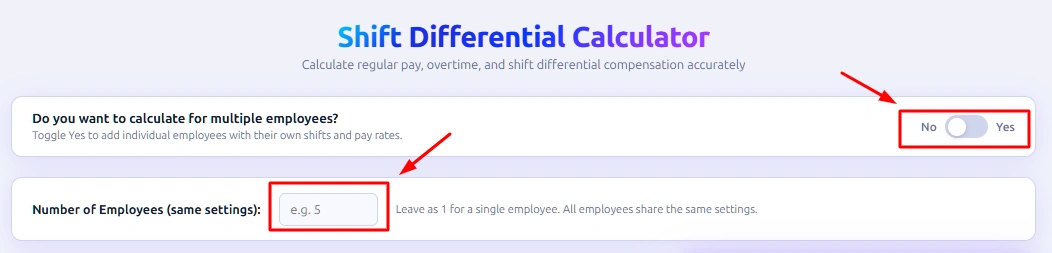
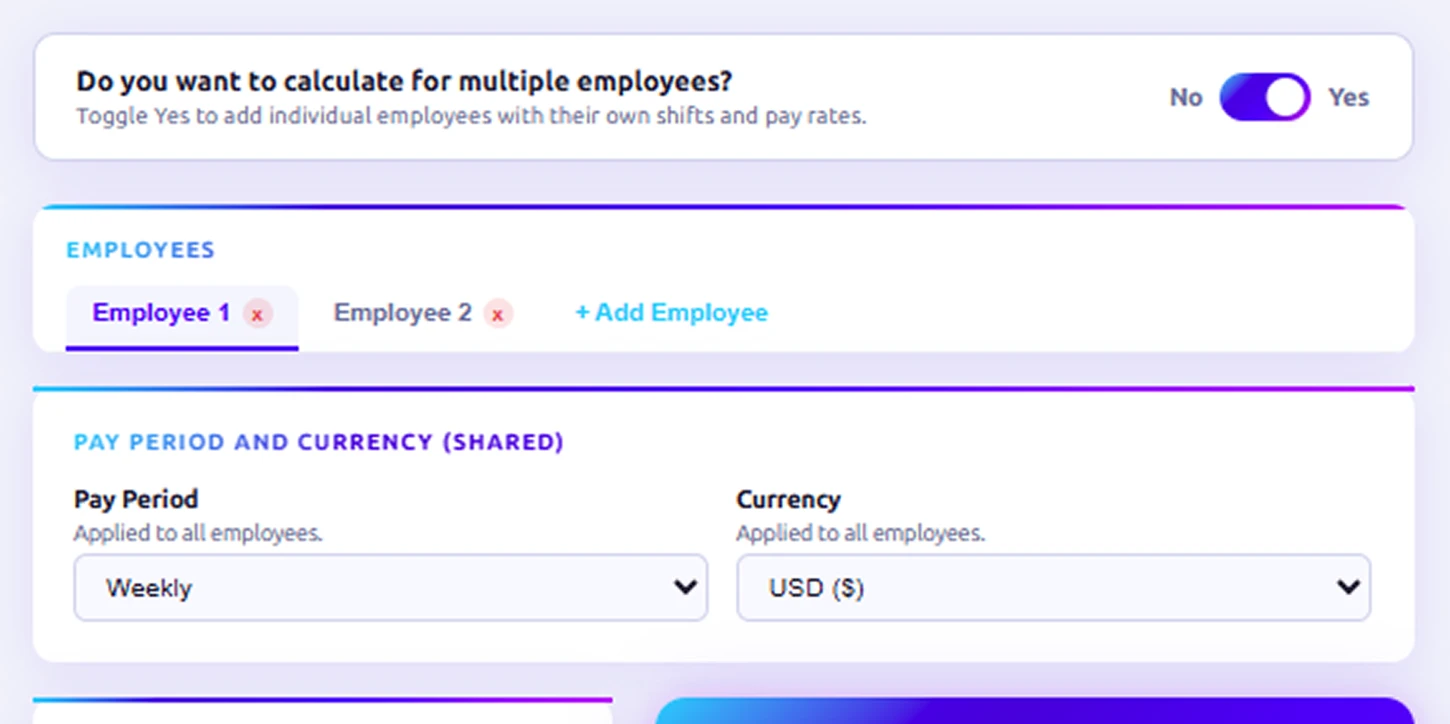
Select whether you're calculating for a single or multiple employees, enter the number of employees, then choose your pay period frequency and preferred currency.
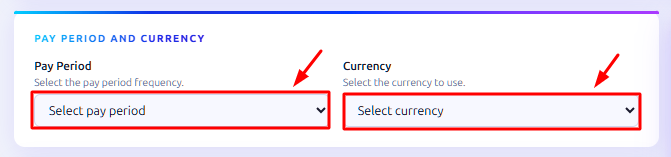
Step 2: Set Your Pay Period and Currency
Select your pay period frequency (weekly, bi-weekly, monthly, etc.) and choose your preferred currency to get started.
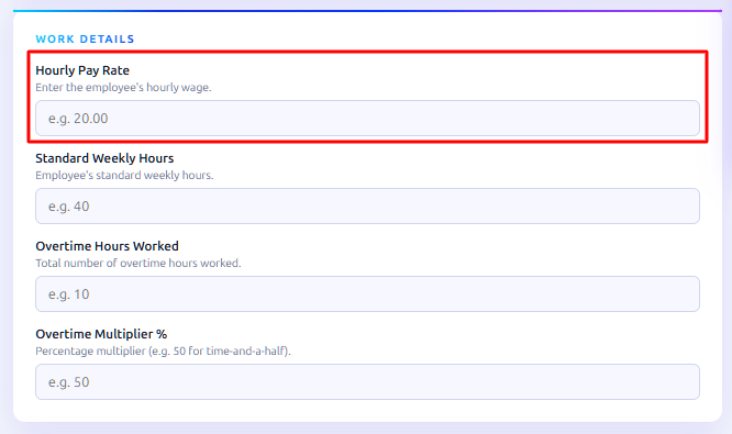
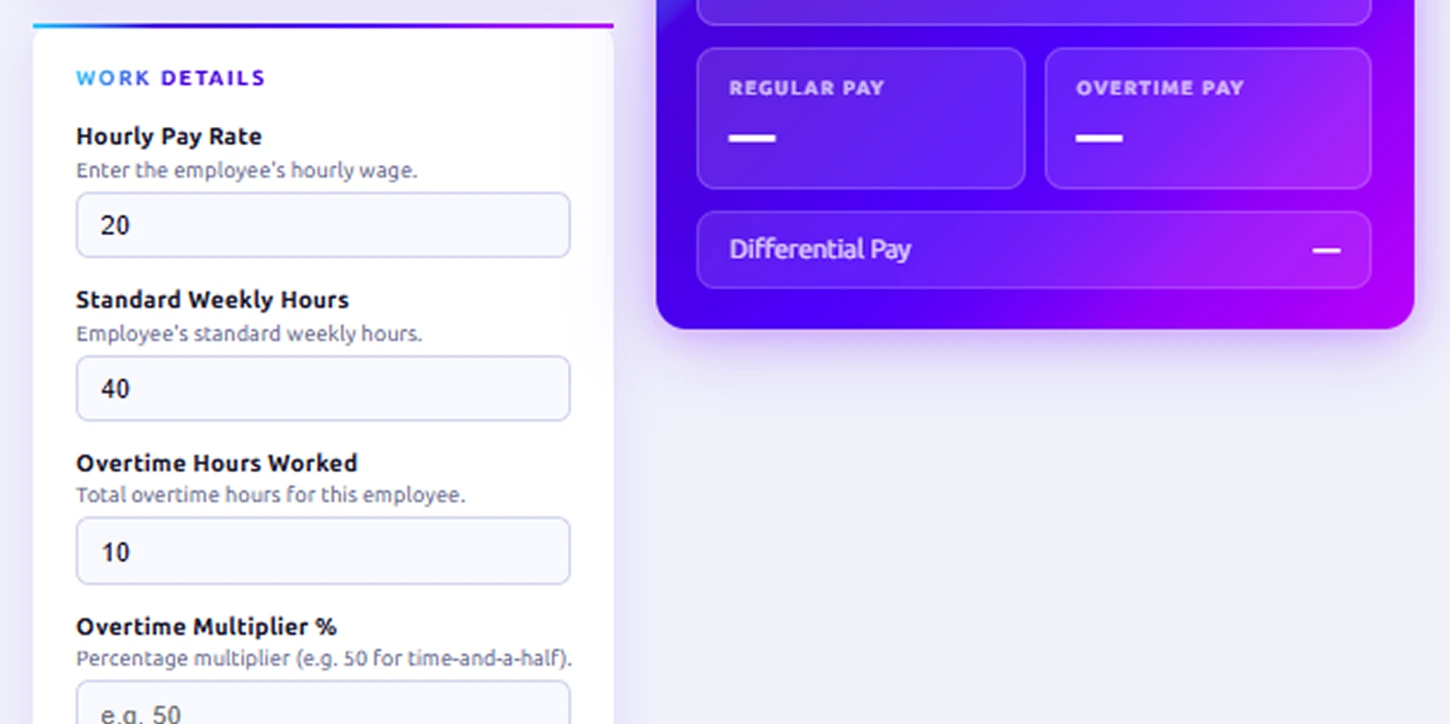
Step 3: Enter the Hourly Pay Rate
Start by entering the employee’s hourly pay rate. This is the base number used to calculate shift differential pay, overtime, and total earnings. Make sure you enter the correct rate, as every calculation depends on this figure.
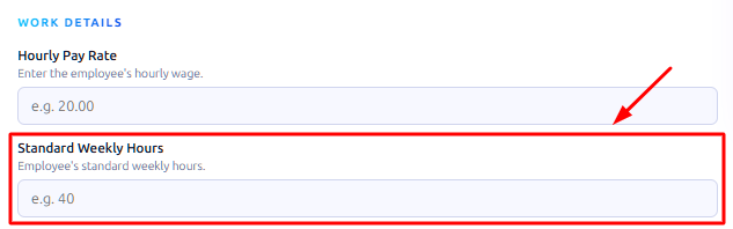
Step 4: Add Standard Weekly Hours
Next, type in the number of hours your employees usually work in a week. Most companies use 40 ho urs, but you can change it if your policy is different. The calculator will use this to figure out when overtime starts.
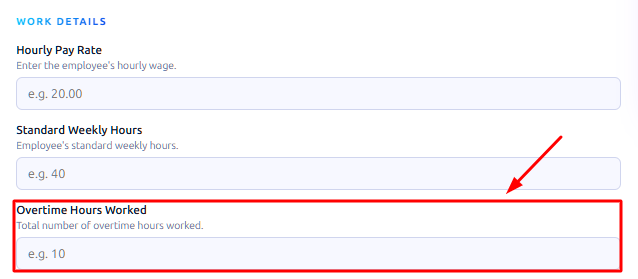
Step 5: Enter Overtime Hours Worked
If the employee has exceeded the standard working hours, enter the total overtime hours. This allows the shift differential calculator to separate regular pay from overtime pay accurately.
Step 6: Set the Overtime Multiplier
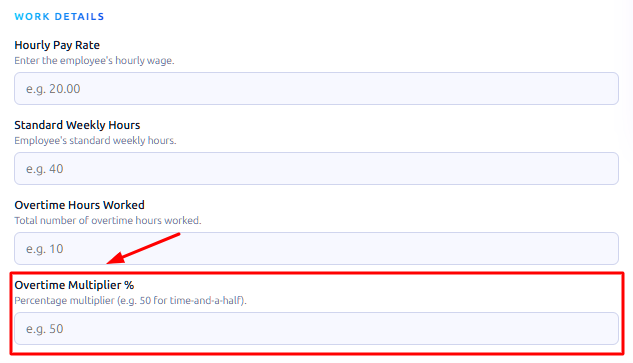
Enter the overtime rate according to your pay rules. For example, use 1.5× or 2× the regular hourly rate. This ensures you calculate overtime pay correctly and follow company and legal rules.
Step 7: Add Shift Differential Rates
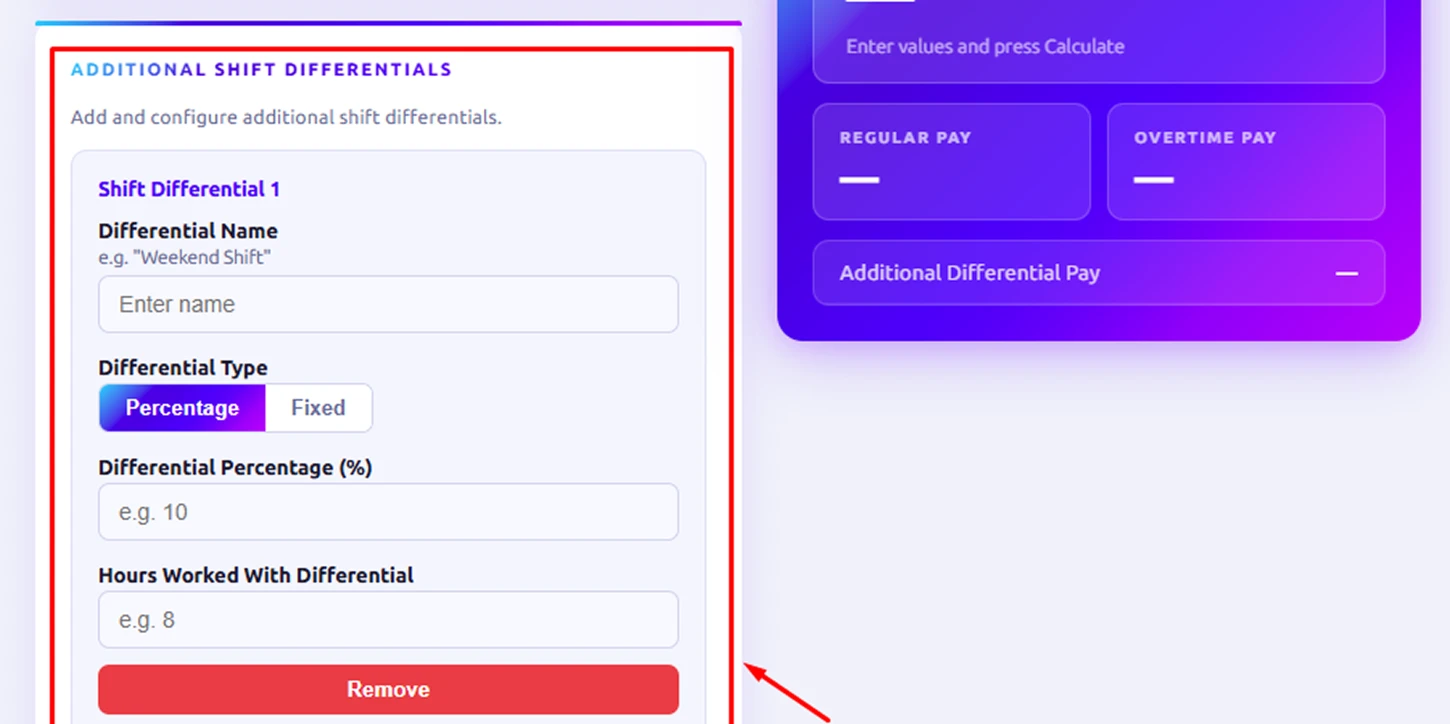
In the additional shift differentials section, enter the extra rate you offer on specific shifts. You can add different values for night differential pay, weekend differential pay, or any other approved shift differential rate. This step defines how much extra you pay employees for working outside standard hours.
Step 8: Review All Entered Details
Before you calculate, double-check all the fields. Make sure the hourly rate, overtime hours, multiplier, and shift differential values are correct. Accurate inputs give accurate results.
Step 9: Click Calculate to View Results
After checking the details, click the Calculate button. The calculator will immediately show regular pay, extra shift pay, overtime pay, and total pay.
How to Calculate the Shift Differential?
Calculating shift differential ensures employees are paid fairly for working outside regular hours. Follow these steps to determine regular pay, overtime, and extra shift pay accurately.
Step 1: Enter the Standard Hourly Rate
Enter the employee’s regular hourly rate in the calculator. This is the base for all calculations.
Example: If the employee earns $20/hour, enter 20.
Formula:
Regular Pay=Hourly Rate × Standard Hours
Step 2: Add Standard Weekly Hours
Enter the number of hours the employee usually works per week. Most companies use 40 hours. This helps the calculator determine when overtime begins.
Step 3: Enter Overtime Hours Worked
If the employee works more than standard weekly hours, type the total overtime hours. The calculator separates regular pay and overtime pay automatically.
Step 4: Set the Overtime Multiplier
Enter the extra overtime percentage in the Overtime Multiplier (%) field.
Why: Overtime is often 1.5× the regular rate, meaning the employee earns their normal rate plus 50% extra.
Formula:
Example with 50% overtime:
- Regular rate = $20/hour
- Overtime % = 50% → 0.5 in decimal
Overtime Rate=20 × (1+0.5) = 30
Note: You can enter other percentages depending on your company policy or labor laws:
- 75% → 1.75× rate
- 100% → 2× rate (double time, often for holidays)
Step 5: Select Pay Period and Currency
Choose your pay period (weekly, biweekly, etc.) and currency. This ensures the results match your payroll setup.
Step 6: Add Shift Differential Rates
Enter extra pay for specific shifts:
- $2 for evening shift (5 PM–10 PM)
- $3 for weekend shift (Saturday or Sunday)
Formula:
Additional Differential Pay = Sum of all applicable shift differentials
Step 7: Review All Details
Double-check all inputs: hourly rate, standard hours, overtime hours, overtime multiplier, and shift differentials. Accurate data ensures correct calculations.
Step 8: Click Calculate to View Results
The calculator will display:
- Regular Pay – payment for standard hours
- Additional Differential Pay – total of all shift differentials
- Overtime Pay – payment for overtime hours with multiplier
- Total Pay – sum of all the above
Example Calculation:
Employee Details:
- Hourly Rate = $20
- Standard Weekly Hours = 40
- Overtime Hours = 10
- Overtime Multiplier = 50% (1.5× rate)
- Shift Differentials = $2 for evening shift, $3 for weekend shift
Step 8a: Regular Pay
Formula:
Regular Pay = Hourly Rate × Standard Hours
Calculation: 20 × 40 = 800
Explanation: Employee worked 40 normal hours at $20/hour → $800.
Step 8b: Additional Differential Pay
Formula:
Additional Differential Pay = 2 + 3 = 5
Explanation: Employee earned $2 for evening shift + $3 for weekend → $5 extra.
Step 8c: Overtime Pay
Step 1 – Calculate Overtime Rate:
Overtime Rate = 20 × (1+0.5) = 30
Step 2 – Multiply by Overtime Hours:
Overtime Pay = 30 × 10 = 300
Explanation: 10 overtime hours × $30/hour → $300
Step 8d: Total Pay
Formula:
Total Pay = Regular Pay + Additional Differential Pay + Overtime Pay
Calculation: 800+5+300=1,105
Explanation: Total weekly pay = $1,105 (this is the weekly amount; for monthly pay, multiply by the number of weeks in a month).
What Are the Pros and Cons of Shift Differential Calculator?
A shift differential calculator makes it easy to calculate extra pay for night shifts, weekends, or holidays. It saves time and keeps pay fair, but it does have some limits. The table below shows the main benefits and possible drawbacks.
| Pros | Cons |
|---|---|
| Calculates shift differential pay accurately, eliminating human errors in manual computations. | Requires correct input. Mistakes in hourly rate, shift times, or differential percentages produce incorrect results. |
| Maintains fairness by applying consistent pay rules for night shifts, weekend shifts, and public holidays. | Cannot automatically handle very complex or irregular schedules; manual review may still be needed. |
| Automates calculations for overtime and additional shift pay, saving time and effort for payroll processing. | Some calculators may not integrate with existing payroll systems, requiring manual data transfer. |
| Provides transparent and traceable calculations, reducing payroll disputes and improving employee trust. | Built-in rules in software-based calculators need updates to reflect changes in regulations or company pay policies. |
| Produces clear and reliable pay results that help support payroll accuracy and staffing decisions. | Differential rates still need periodic review to ensure alignment with company policies and labor laws. |
| Supports compliance with internal pay policies and legal standards by applying rates consistently. | Overreliance on the calculator may lead to missed edge cases if unusual shifts or exceptions are not checked manually. |
What Your Shift Differential Data Could Be Telling You
Shift differential data reveals patterns in employee schedules, costs, and overtime. Analyzing this data helps you make informed decisions about workforce allocation, budgeting, and operational planning.

Identify High-Cost Shifts Quickly
Spot shifts with the highest extra pay and control payroll expenses.

Monitor Overtime Trends Regularly
Track which employees frequently work overtime to manage workloads better.

Assess Night and Weekend Staffing Needs
Determine if your night or weekend teams are sufficient and balanced.

Highlight Payroll Inefficiencies Promptly
Compare actual pay with calculated shift differentials to spot errors and prevent unnecessary payroll costs.

Improve Budget Planning Accuracy
Use data to forecast payroll costs and avoid unexpected expenses.

Enhance Workforce Scheduling Decisions
Adjust shifts and staffing levels based on reliable differential pay insights.
How Time Champ Outperforms Basic Shift Differential Calculators
Basic shift differential calculators, spreadsheets, and manual tools only handle simple number inputs. They require you to enter hours manually, apply formulas yourself, and double-check calculations every time. If schedules change, leave is applied, or overtime rules differ, you must adjust everything manually. This increases errors, delays payroll processing, and makes it hard to understand the real impact of shift pay on overall costs.
Time Champ goes beyond simple calculations by connecting shift scheduling, attendance, leave management, and payroll-supportive reports in one system. Instead of depending only on formulas, it provides structured shift data, overtime visibility, utilization insights, and workforce analytics to give a complete view of shift pay impact. This means more accurate calculations, better cost control, and clearer decision-making compared to basic shift differential calculators.
| Feature | Time Champ | Spreadsheets | Manual Calculators |
|---|---|---|---|
| Shift Scheduling | ✓ | ✕ | ✕ |
| Attendance & Work Schedules | ✓ | Basic | ✕ |
| Leave Management (affects payable hours) | ✓ | Manual | ✕ |
| Overtime Visibility via Reports | ✓ | Basic | ✕ |
| Workforce Analytics (Shift Cost Insights) | ✓ | Basic | ✕ |
| Utilization Reports (Shift Pay Impact) | ✓ | ✕ | ✕ |
| Workload Management | ✓ | ✕ | ✕ |
| Compliance-Based Attendance Rules | ✓ | ✕ | ✕ |
| Payroll-Supportive Reports | ✓ | ✕ | ✕ |
Simplify Shift Planning and Pay Decisions
Align Work Hours, Overtime, and Workforce Insights with Time Champ
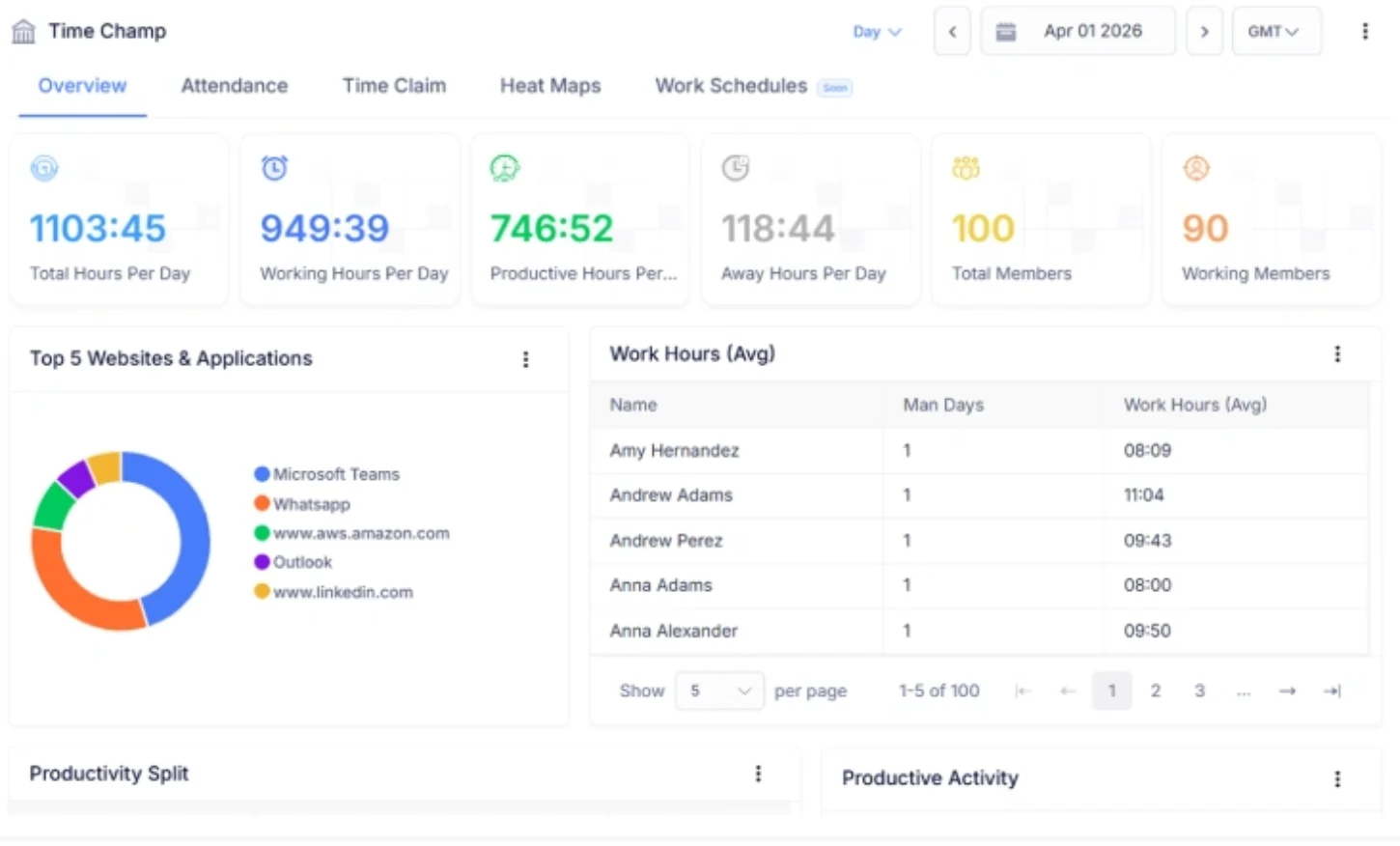
- Captures attendance, work schedules, and shift data to support accurate differential pay calculations.
- Delivers Time & Attendance and utilization reports to simplify overtime and payroll reviews.
- Provides workforce analytics and team comparisons to evaluate shift performance.
 Start 7-day free trial
A Workforce Intelligence Tool Built for Smarter Performance
See What Our Happy Customers Say

We needed a better way to understand how our teams were working without constantly checking in. Time Champ gave us that clarity. The dashboard is easy to use, the insights are quick, and we now clearly see how our teams spend their time. Productivity improved, and our managers make faster, smarter decisions with the data available.

Time Champ made managing our work much easier. We handled projects, managed attendance, and organized time without confusion. It was simple to use, and the support team was always helpful. It truly improved the way we worked.

What we loved about Time Champ was how simple and effective it was. It helped us clearly see where our time went and kept everyone focused. Productivity increased significantly, and projects moved faster. It was easy to use, and the insights were precise. The automated time feature removed guesswork and made task management much smoother.

We previously used a well-known project management tool, but it did not fully meet our needs. After switching to Time Champ, our operations improved noticeably. It gave us the flexibility to manage attendance, productivity, and tasks more efficiently. The system made our workflow smoother, and task management became much easier. The support team was always responsive and helpful. Once we started using Time Champ, we never felt the need to switch again.

Time Champ had been a trusted partner for us for over three years. It helped us organize our operations and generate accurate invoices. Scheduling became smoother, and productivity improved. Our clients were happier, and we truly valued the difference it made in our work.

Time Champ helped us understand how our time was spent and improved our team’s productivity. Billing became much less stressful, and daily work felt more organized. It was easy to use and reduced confusion. Features like attendance and screenshots played a key role in improving our team’s performance.
Connect with our product experts for a live demo and discuss your business requirements.
Explore Other Calculators

Project Cost Calculator
Calculate expenses with our project cost calculator, a tool for estimating budgets, tracking costs, and planning projects with accuracy and control.
Try Now →Absence Percentage Calculator
Calculate employee absence percentage easily with our absence percentage calculator - a fast, accurate tool for tracking attendance and workforce.
Try Now →Employee Turnover Rate Calculator
Calculate employee turnover rate with our Turnover Rate Calculator, a simple tool for measuring workforce stability and tracking HR performance.
Try Now →


 4.7/5 avg.
Ready to Manage Your Workforce Smarter?
Join our family of 1500+ companies using smart insights to redefine workforces!

Free Trial
No Credit Card Required