Employee Retention Rate Calculator
Identify data retention trends early and protect your team’s long-term stability. Use this employee retention rate calculator to instantly measure retention and make smarter HR decisions with confidence.
Employee Retention Rate Calculator
Overall Retention Rate
What is the Employee Retention Rate Calculator?
An employee retention rate calculator is an online tool that helps you measure the percentage of employees who continue working in your organization during a specific time frame. It uses a simple retention rate formula to quickly show how well your company retains its workforce over that period.
The main purpose of this calculator is to help you evaluate workforce stability and identify potential turnover risks early. You just have to enter the basic details, such as the number of employees at the beginning of the period and how many remained, and you can instantly assess the retention performance percentage.
Measuring retention is important because it directly impacts hiring costs, teams' productivity, and overall business performance. When you regularly calculate employee retention, you can identify turnover trends early, improve employee engagement strategies, and make better workforce planning decisions based on real workforce data.
Why Should You Use the Employee Retention Rate Calculator?
You might think you already know whether your employees are staying or leaving. But do you actually know your exact employee retention rate in numbers? Without measuring it properly, you’re only guessing. A smarter approach is to calculate it systematically. Use this employee retention rate calculator to instantly determine your retention percentage and get a clear, accurate answer in seconds. Here are some reasons why you need to use employee retention rate calculator:
Measures Workforce Stability:
When you calculate your employee retention rate, you can gain a clear understanding of how stable your workforce truly is. You can also identify whether your organization is retaining experienced talent or facing frequent turnover. With a stable workforce, you improve productivity, strengthen team morale, and ensure smoother daily operations.
Improves HR Strategy:
You can evaluate whether your HR policies, engagement programs, and workplace culture are effective or not by regularly measuring retention. It allows you to make workforce improvements, strengthen employee satisfaction, and build strategies that encourage long-term commitment.
Reduces Hiring Costs:
High turnover increases recruitment, onboarding, and training expenses. Tracking your retention rate helps you identify issues early and reduce unnecessary hiring costs. When employees stay longer, you can save money and retain valuable experience, skills, and a deep understanding of your company’s processes and clients.
Tracks Department Performance:
Retention rate calculations can reveal which departments are thriving in terms of employee satisfaction, leadership effectiveness, and team stability and which may need support. This enables you to address leadership gaps, workload imbalances, or engagement concerns before they impact overall performance.
Compares Time Periods:
When you measure your employee retention rate across different time periods, monthly, quarterly, or annually, you gain a clear view of trends and patterns. This allows you to see whether your recent policy changes, employee benefits, or leadership improvements are truly making a positive impact.
Strengthens Employer Brand:
A high employee retention rate shows that your workplace is supportive and trustworthy. When employees stay longer, it enhances your reputation and helps you attract top talent more easily. It also builds confidence among clients and stakeholders in your company’s stability.
Supports Long-Term Workforce Planning:
Retention insights help you forecast hiring needs, plan future expansion, and ensure workforce continuity. With accurate retention data, you can make smarter decisions about growth, succession planning, and organizational stability.
How to Use the Employee Retention Rate Calculator?
You can calculate your employee retention rate in just a few seconds using this simple tool. All you need is basic employee data for the selected time period (monthly, quarterly, or yearly). Follow the steps below to get accurate results.
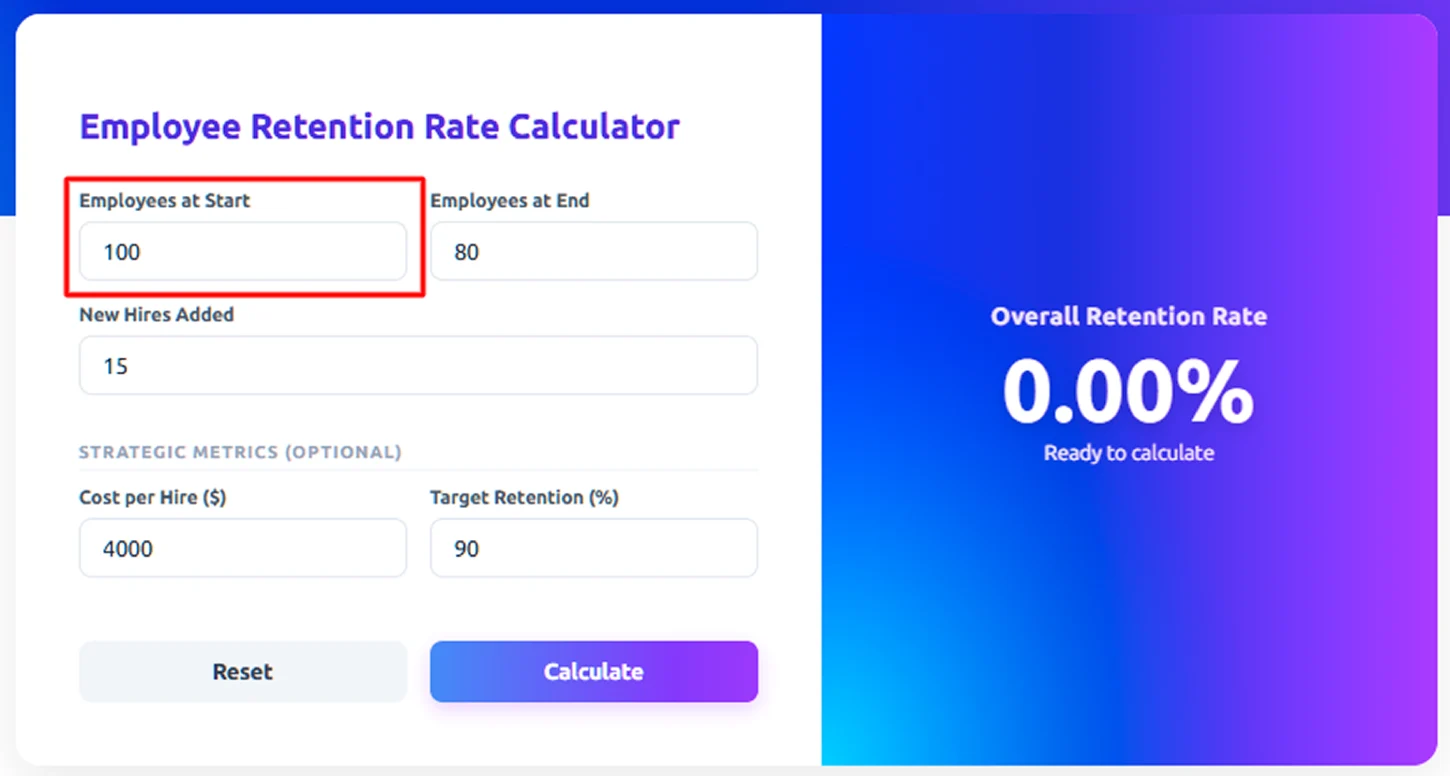
Step 1: Enter Total Employees at Start
In the first field, enter the total number of employees your organization had at the beginning of the organization. For example, if your company had 100 employees at the start of the year, enter 100.
This number represents your original workforce before any hiring or exits occurred.
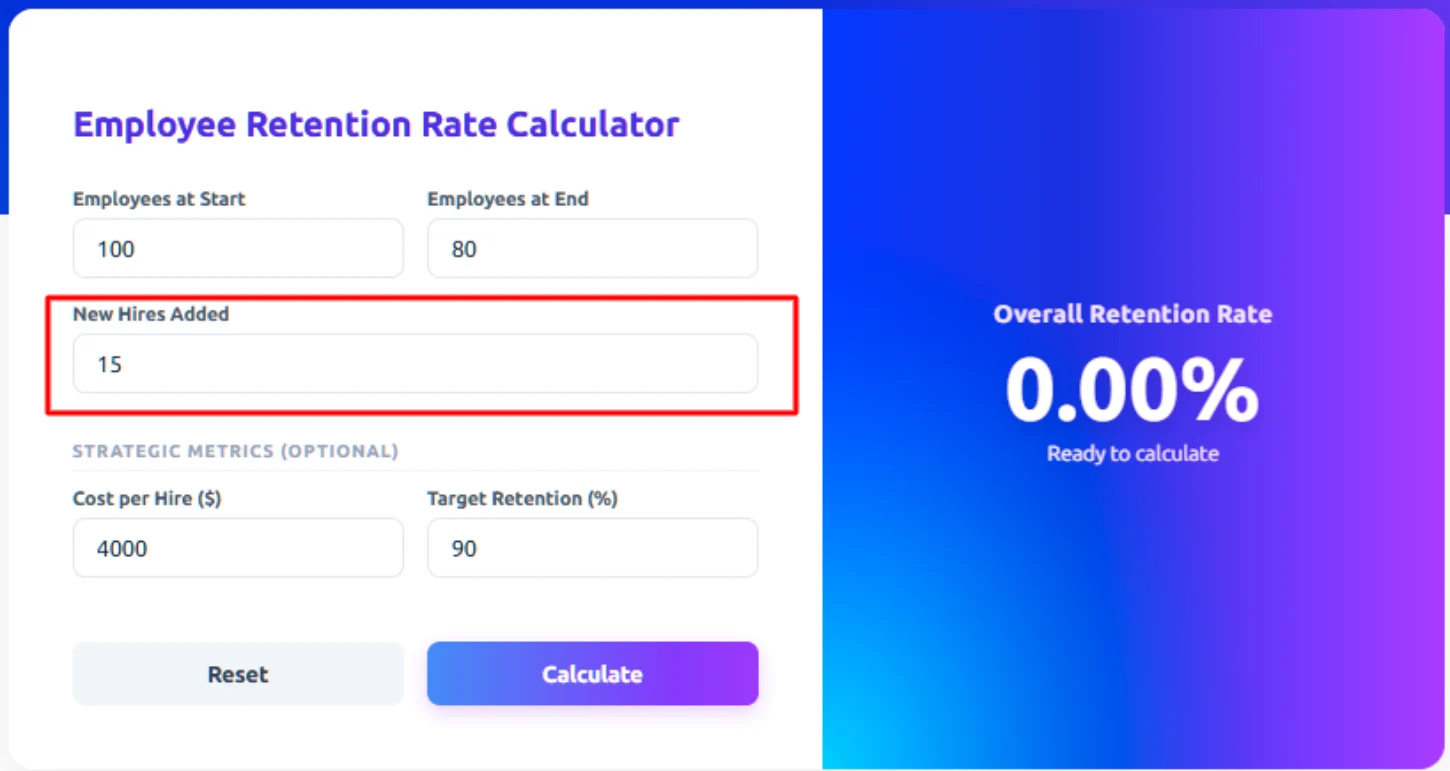
Step 2: Enter Total New Hires
Next, enter the number of employees you hired during that same period. For example, if you hired 15 new employees during the year, enter 15. Including new hires helps the calculator accurately determine how many of your original employees stayed versus how many changes happened in your workforce.
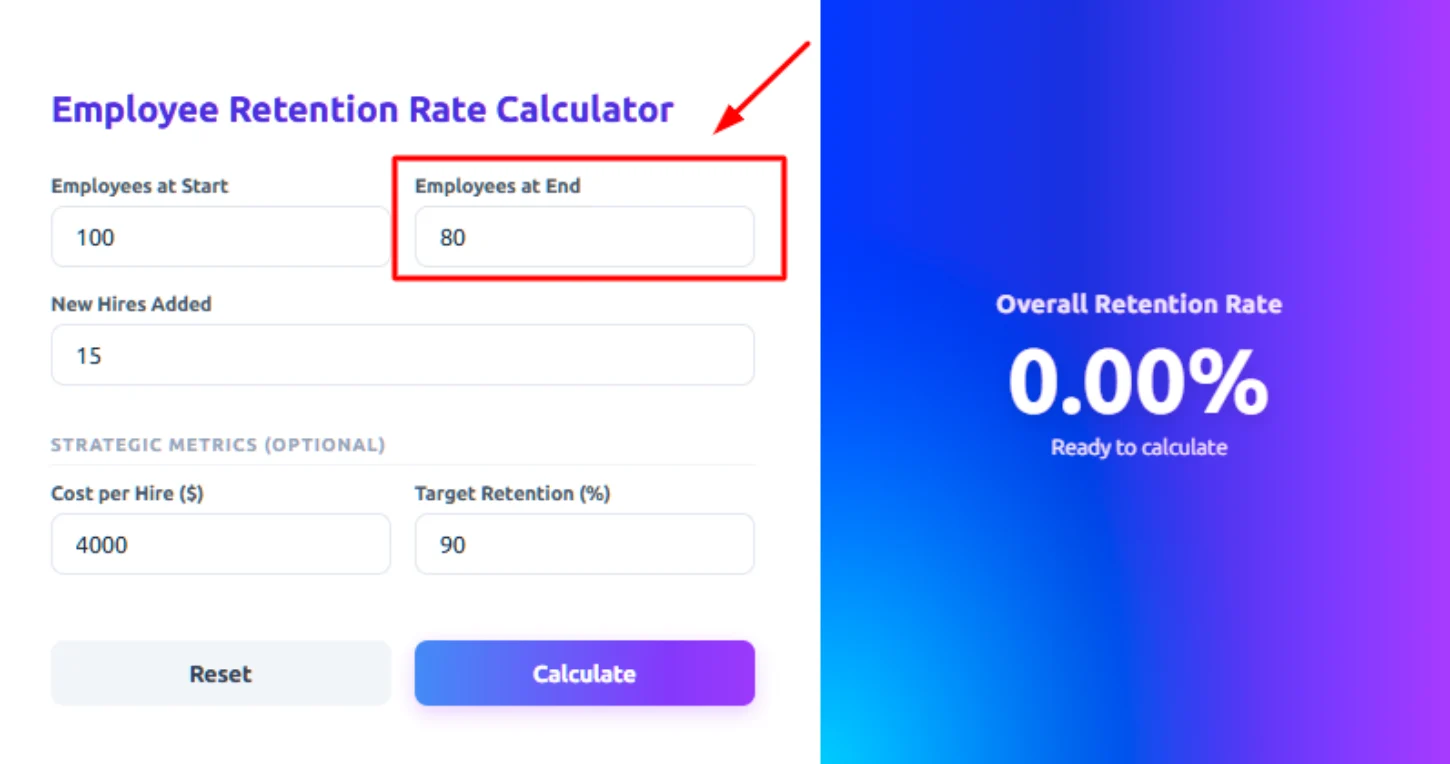
Step 3: Enter Total Employees at End
Now, enter the total number of employees working in your organization at the end of the period. For example, if you finished the year with 80 employees, enter 80.
This number includes employees who stayed from the beginning and new hires who are still working at the end.
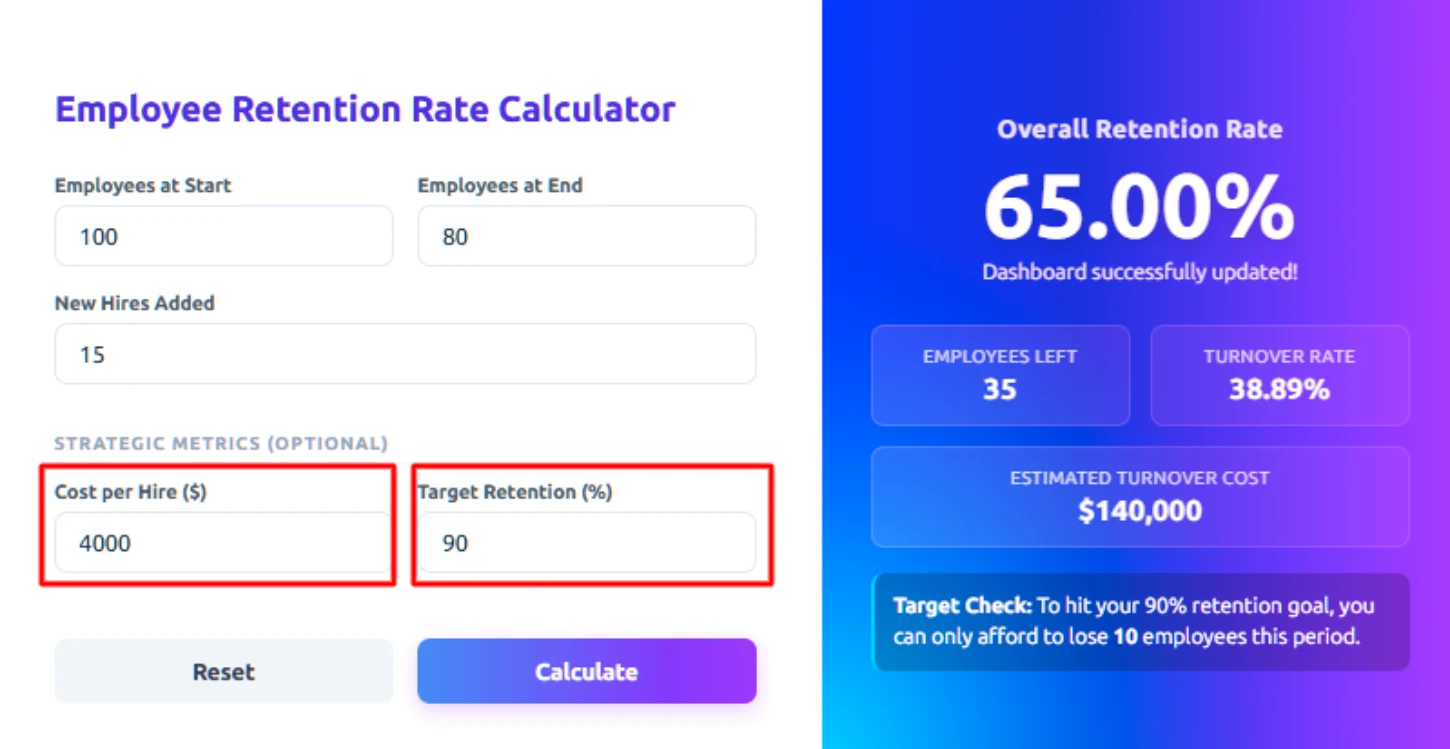
Step 4: Fill in Strategic Metrics (Optional) These two fields are optional but give you deeper insights:
- Cost per Hire ($): Enter how much it costs your company to hire one employee (e.g., $4,000)
- Target Retention (%): Enter your desired retention goal (e.g., 90%)
Step 4: Click “Calculate”
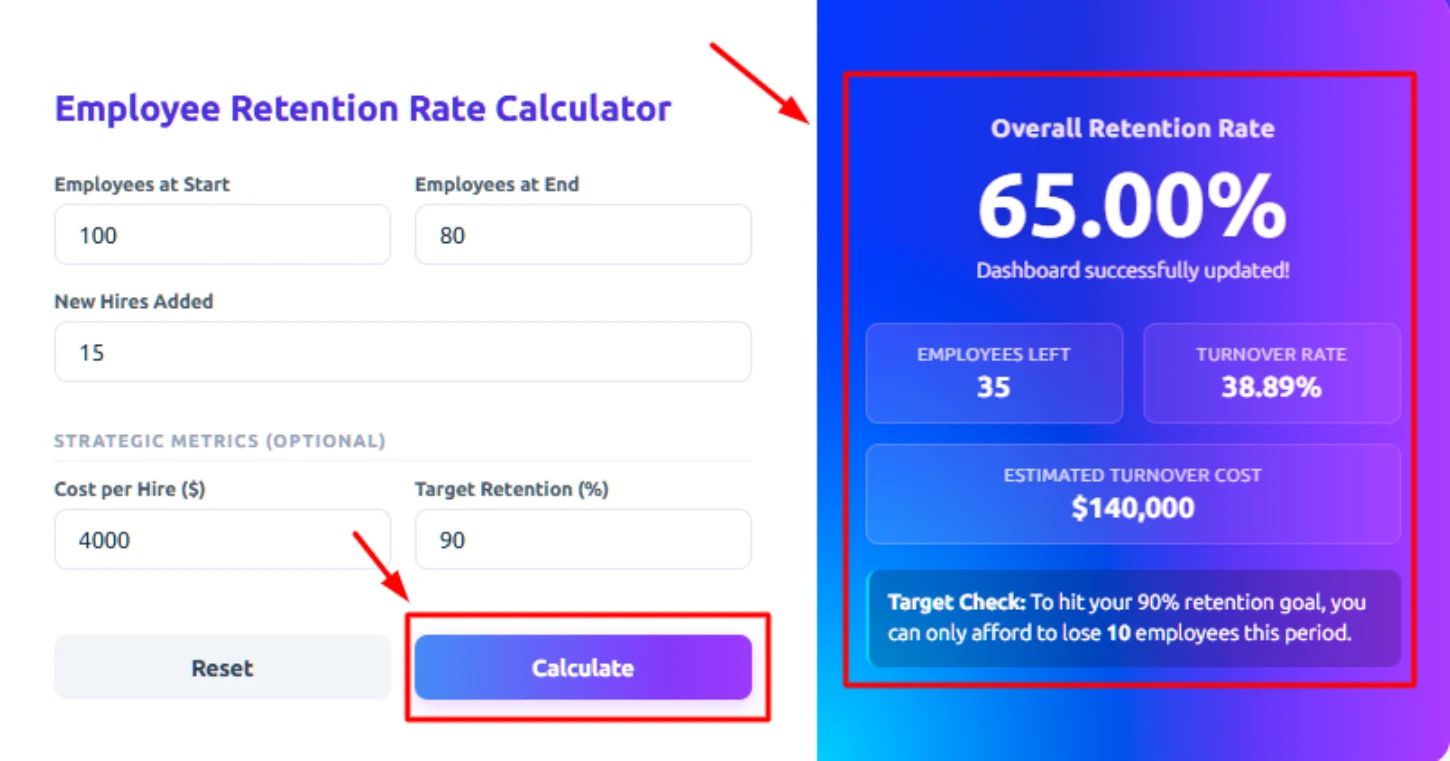
After filling in all three fields, click the Calculate button. Within seconds, the tool will display your Employee Retention Rate (%) on the right side of the screen.
The right panel will instantly show:
- Overall Retention Rate (65.00%): Out of every 100 employees you started with, 65 of them chose to stay.
- Employees Left (35): 35 people walked out the door during this period and are no longer with the company.
- Turnover Rate (38.89%): Nearly 4 out of every 10 employees left, which signals a high level of workforce instability.
- Estimated Turnover Cost ($140,000): Losing those employees cost your company $140,000 in hiring and replacing them alone.
- Target Check: It tells you the maximum number of employees you can afford to lose and still hit your retention goal. If you go over that number, your target is missed.
This percentage shows how effectively your organization retained employees during that time frame.
Step 6: Click “Reset” to Recalculate
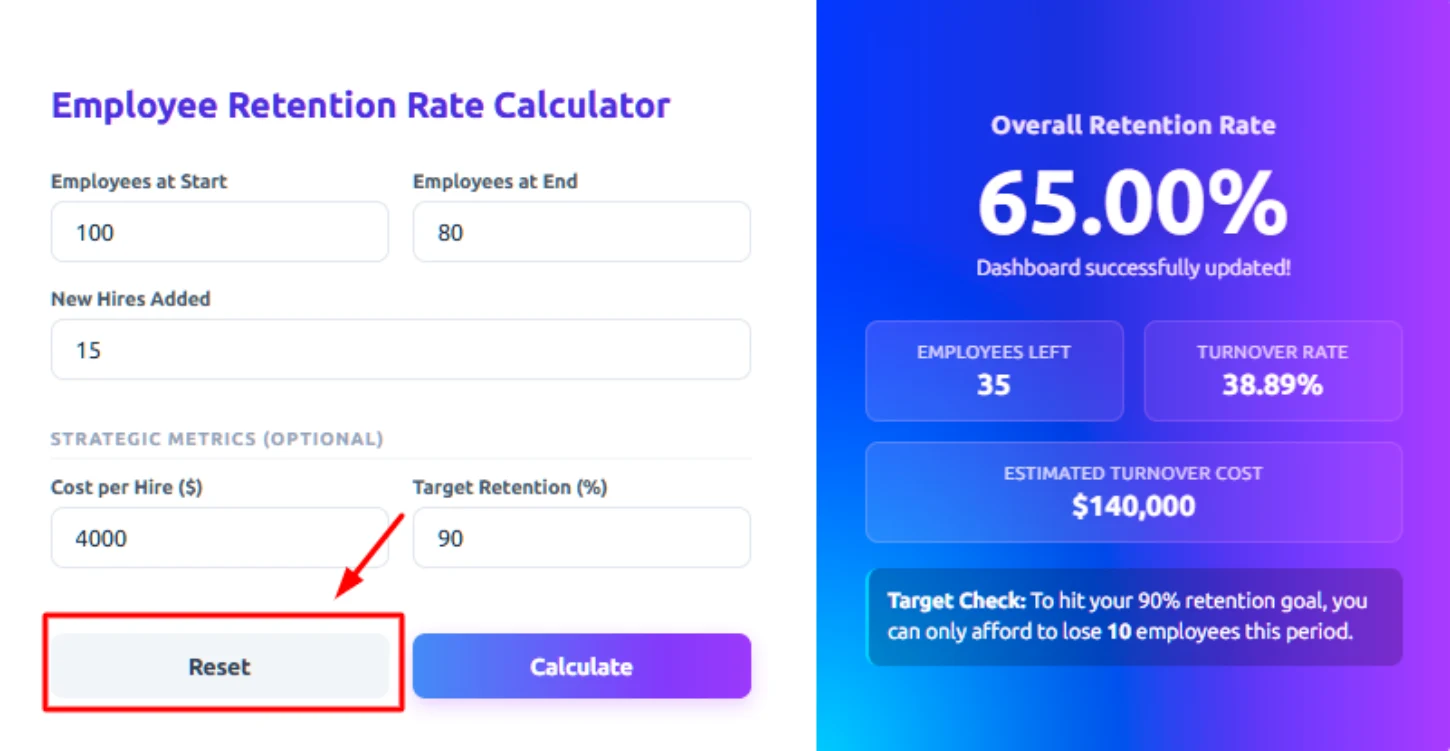
If you want to calculate retention for a different team, department, or time period, click Reset to clear the fields and enter new values.
How to Calculate the Employee Retention Rate?
If you want to understand how stable your workforce is, you need to know how to calculate employee retention rate correctly. The process is simple when you break it into steps.
Let’s walk through it clearly.
The employee retention rate calculator works by applying the standard employee retention rate formula to the data you enter. The employee retention rate calculator applies the standard employee retention rate formula using three key inputs:
- Total employees at the start of the period
- Total new hires during the period
- Total employees at the end of the period
The Formula:
Retention Rate = ((Employees at End of Period − New Hires) ÷ Employees at Start of Period) × 100
Retention Rate = ((190 − 20) ÷ 200) × 100
This formula ensures that only original employees are counted when measuring retention.
Step 1: Identify the Number of Employees at the Start
First, identify how many employees were working in your organization at the beginning of the selected period (monthly, quarterly, or yearly).
This represents your original workforce.
Example: Employees at Start = 120
Step 2: Count the New Hires During the Period
Next, calculate how many new employees joined your organization during that same period.
This helps separate newly hired employees from those who were already part of your workforce.
Example: New Hires = 20
Step 3: Include the Number of Employees at the End of the Period
Now, identify how many total employees are working in your organization at the end of the period.
This includes:
- Employees who stayed from the beginning
- New hires who are still employed
Example: Employees at End = 110
Step 3: Include the Number of Employees at the End of the Period
Now, identify how many total employees are working in your organization at the end of the period.
This includes:
- Employees who stayed from the beginning
- New hires who are still employed
Example: Employees at End = 110
The Formula:
Employees at End - New Hires = Retained employees
110 − 20 = 90
This means 90 of the original employees remained.
Step 5: Divide Retained Employees by Employees at Start
Now divide the number of retained original employees by the starting workforce.
The Formula:
Retained Employees ÷ Total Number of Employees at the Start = Retention Ratio in Decimal Form
90 ÷ 120 = 0.75
This gives you the retention ratio in decimal form.
Step 6: Convert the Decimal into a Percentage
Multiply the decimal value by 100 to convert it into a percentage.
The Formula:
Retention Ratio in Decimal Form × 100 = Employee Retention Rate
0.75 × 100 = 75%
Here, employee retention rate = 75%
This means 75% of the employees who were working at the beginning of the period remained employed at the end.
Still confused about the calculation? Don’t worry, here’s a simple and easy-to-follow format that helps you understand exactly how employee retention rate is calculated.
Example Calculation (Simple Step-by-Step Format):
For example, if you started the year with 100 employees, hired 15 new employees, and ended the year with 80 employees, the calculator works like this:
First, it removes new hires from the final count: 80 - 15 = 65
This means 65 of your original employees remained.
Then it divides this number by the starting workforce: 65 ÷ 100 = 0.65
Finally, it multiplies by 100 to convert it into a percentage: 0.65 × 100 = 65% Employee Retention Rate
Just in seconds, the tool performs the entire staff retention calculation automatically and displays your retention percentage clearly on the screen. This allows you to quickly measure workforce stability without applying the formula in spreadsheets, which helps you measure workforce stability and HR performance.
What Are the Pros and Cons of the Employee Retention Rate Calculator?
Before you rely on any employee retention tool, it’s important to understand both its advantages and its limitations. Yeah! It helps you measure workforce stability, but it does not provide deeper insights into employee engagement, satisfaction, or the reasons behind turnover. Here’s a clear breakdown of the pros and cons to help you clearly understand the employee retention rate calculator:
| Pros | Cons |
|---|---|
| Provides a quick and accurate employee retention rate calculation. | Results depend entirely on correct data entry. |
| Saves time compared to manual staff retention calculation in spreadsheets. | Does not explain the reasons behind employee turnover. |
| Helps HR teams measure workforce stability easily. | Cannot differentiate between resignations and terminations |
| Supports calculation for different time periods (monthly, quarterly, yearly). | Does not track historical trends unless data is recorded separately. |
| Useful for comparing department-level retention performance. | Does not show whether your retention rate is above or below the industry benchmark. |
| Encourages data-driven HR decisions and workforce planning. | Cannot replace complete workforce analytics software. |
What Your Turnover Rate Data Could Be Telling You
Your turnover rate shows how stable your workforce is and whether employees are choosing to stay or leave. When you combine turnover numbers with clear workforce data, you get a clear understanding of what is really happening inside your organization.

Highlights Retention Strengths and Weak Areas
Clearly understand where your workforce is strong and where focused improvement is needed.

Improves Hiring and Workforce Planning
Plan recruitment and workforce allocation with confidence before employee exits.

Supports Better Cost Control Decisions
Identify and reduce hidden turnover costs before they affect productivity and profitability.

Enhances Accountability and Transparency
Create a culture of clarity where performance expectations and responsibilities are visible to everyone.

Strengthens Long-term Retention Strategies
Use real workforce insights to build retention strategies that support employees for the long run.

Builds a More Stable and Productive Workforce
Develop consistent, engaged teams that perform better and stay longer with your organization.
Turn Retention Insights into Workforce Intelligence
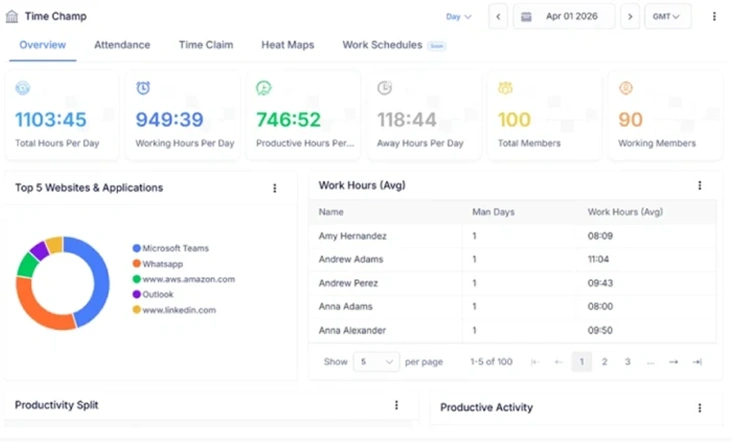
Calculating your employee retention rate is the first step toward building a stable and high-performing workforce. But understanding why employees stay or leave requires deeper workforce visibility. With the Time Champ you can go beyond basic retention metrics. Here you can gain insights into employee productivity, engagement patterns, attendance trends, and performance data, helping you improve retention rate before employees leave.
With Time Champ, you can build a stable, high-performing workforce backed by real-time workforce analytics. You can identify early warning signs of disengagement, reduce unexpected turnover, and make smarter HR decisions based on real data. This helps you strengthen team stability while improving overall business performance.
| Feature | Time Champ | Spreadsheets | Manual Calculators |
|---|---|---|---|
| Employee Retention Rate Calculation | ✔ | ✔ (with formulas) | ✔ |
| Employee Turnover Rate Calculation | ✔ | ✔ (manual formula setup) | ✔ |
| Automatic Percentage Calculation | ✔ | Requires formula setup | Manual entry required |
| Workforce Activity & Attendance Visibility | ✔ | Limited | ✖ |
| Productivity Insights | ✔ | Limited | ✖ |
| Multi-Team / Department Analysis | ✔ | Manual involvement requirement | Single calculation only |
| Trend Tracking Over Time | ✔ | Manual chart creation | ✖ |
| Error Reduction in Calculations | ✔ | ✖ | Low (manual errors likely) |
| Real-Time Workforce Monitoring | ✔ | ✖ | ✖ |
Strengthen Retention with Real Workforce Insights
Track retention trends and performance insights in real-time to help you make smarter decisions.
- Retention Rate Calculations in Seconds
- Real-Time Workforce Stability Insights
- Export-Ready Reports For HR Reviews
- Supports Growing Teams Across Locations
 Start 7-day free trial
A Workforce Intelligence Tool Built for Smarter Performance
See What Our Happy Customers Say
See how organizations improved performance through workforce intelligence

Time Champ has simplified the way we manage our work. We can now see project progress, monitor time, and handle attendance without any confusion. The platform is easy to use, and the support team is always ready to help. It has genuinely made a positive difference in our daily workflow.

Time Champ has significantly improved how we manage our workforce. With detailed insights, real-time monitoring, and detailed reports, we’ve been able to boost productivity, allocate resources more effectively, and support a healthier work-life balance for our team.

Time Champ helped us clearly see how our time was being spent, which helped us to boost our team’s productivity and simplified the entire billing process. The platform is simple to use and has reduced a lot of confusion for us. Features like attendance tracking and real-time activity tracking have greatly improved our team’s overall performance.

Managing our remote team has become much smoother. We now have better visibility into work patterns, productivity, and attendance. The custom reports also help us quickly spot areas that need improvement.

It was hard to understand how our teams were working without repeatedly checking in. Time Champ gave us clear visibility into daily activities and provided useful insights that helped us make better decisions.

Really great experience. Time Champ encourages feedback and genuinely acts on it based on our feedback. The support team helped us at every step. We’re very happy with the tool and the team behind it.
Start your 7-day free trial with Time Champ and turn workforce data into smarter decisions.
Explore Other Calculators

Project Cost Calculator
Calculate full-time equivalents easily with our FTE Calculator - a precise tool for measuring employee workload, staffing, and resource planning.
Try Now →Employee Retention Rate Calculator
Calculate employee retention easily with our Employee Retention Rate Calculator, an effective tool for measuring workforce stability and HR performance.
Try Now →Shift Differential Calculator
Calculate task or project completion rates instantly with our completion percentage calculator - an accurate tool to track progress and improve productivity.
Try Now →


 4.7/5 avg.
Ready to Manage Your Workforce Smarter?
Join our family of 1500+ companies using smart insights to redefine workforces!

Free Trial
No Credit Card Required