Difference Between Kanban Board and Scrum Board - (2026)
Kanban vs Scrum board explained. Understand their key differences, features, benefits, and when to use each method to manage projects effectively.
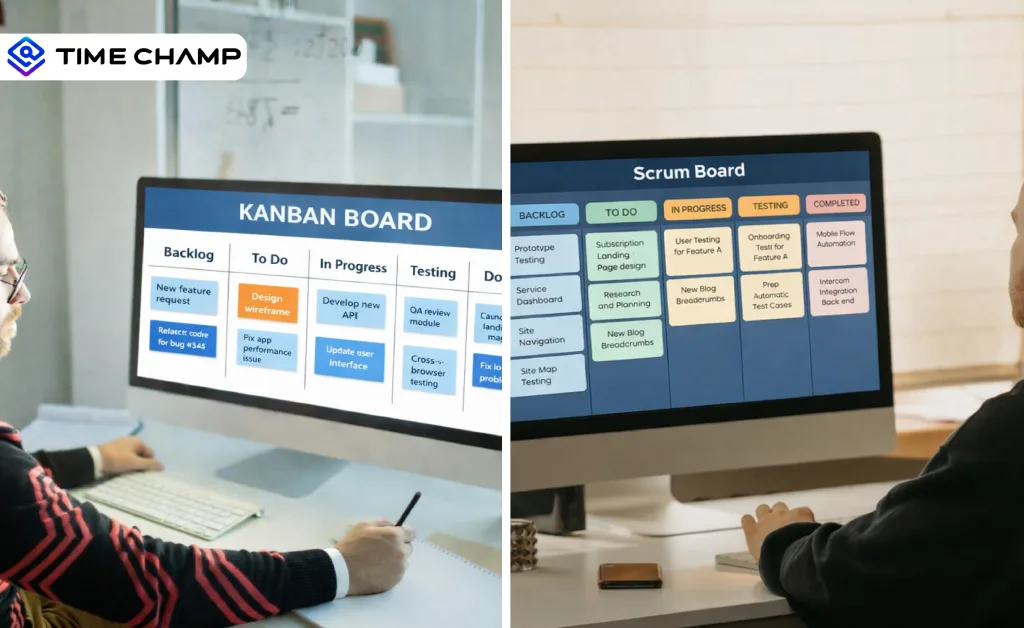
Choosing between a Kanban board and a Scrum board without understanding the difference often leads to misaligned workflows, missed deadlines, and teams working against a process that doesn't fit them. The right board equips your team with a clear structure for managing work, tracking progress, and ensuring consistent delivery. For the broader picture across this topic, our best project management software guide brings the moving parts together.
In this guide, you'll learn what Kanban and Scrum boards are, how the differences between Kanban and Scrum play out across structure, flexibility, roles, and use cases, and when to use each one. At the end, you’ll clearly understand which board fits your team’s workflow and how to apply it for better results.
What Is a Kanban Board?
A Kanban board is a visual workflow system that helps you manage tasks by moving them through clearly defined stages. Instead of planning work in fixed time cycles, you focus on continuous flow. You set limits on how many tasks can be in progress at once, so the workflow stays smooth and manageable.
- Scope: Ongoing task management and constant improvement of the working process.
- Focus: Visualizing work stages and maintaining a steady flow.
- Key Functions: Create task entries, map out work stages, set WIP limits, track cycle time, and spot bottlenecks in real time.
- Example: You manage a product support team where requests arrive daily. Using a Kanban board, you can move tickets from “To Do” to “In Progress” to “Done,” while keeping only a few tickets active to prevent overload and reduce response delays.
What Is a Scrum Board?
A Scrum board is a sprint-based task board that helps you plan, track, and complete work within a fixed time frame, usually called a sprint. You commit to a defined set of tasks at the start of the sprint and focus on finishing them before the cycle ends. This structure provides you with better control over commitments, timelines and team accountability.
- Scope: Short, time-boxed work cycles with clearly defined sprint goals.
- Focus: Sprint planning, commitment tracking, daily progress updates, and sprint completion.
- Key Functions: Create a sprint backlog, assign tasks for the sprint period, monitor daily progress, track remaining work, and review outcomes at the end of each sprint.
- Example: You lead a development team working in two-week sprints. At the start of the sprint, you select tasks from the product backlog, move them across the Scrum board as work progresses, and complete a sprint review to assess product delivery before planning the next cycle.
Struggling to keep Kanban and Scrum in sync?
Use Time Champ to bring structure, clarity, and real-time visibility to every workflow.
What Are the Key Differences Between Kanban Board and Scrum Board?
If you are making a comparison between a Kanban board and a Scrum board, the difference is that each of them structures work, commits to delivery, and tracks progress differently. Kanban supports continuous task flow, while Scrum runs on fixed sprint cycles with predefined goals. The table below breaks down these differences clearly, so you can see how each approach shapes planning, flexibility, and team execution.
| Basis of Comparison | Kanban Board | Scrum Board |
|---|---|---|
| Work Structure | Continuous workflow where tasks move through stages whenever new work appears. | Time-bound sprints with a defined set of tasks for each cycle. |
| Planning Style | Ongoing planning with tasks added based on capacity. | Sprint planning happens at the start of every sprint cycle. |
| Commitment Level | No fixed commitment to a batch of tasks. | It commits to finishing the selected tasks within the sprint timeline. |
| Work-in-Progress Limits | Uses strict WIP limits to manage workload and prevent bottlenecks. | The sprint backlog defines the workload, and WIP limits remain optional. |
| Flexibility During Cycle | You can reprioritize, add, or remove tasks at any time. | Most avoid changes once the sprint starts. |
| Performance Metrics | Focuses on cycle time, lead time, and flow efficiency. | Focuses on sprint velocity and completion rate. |
| Best Fit For | Operations, support teams, or environments with unpredictable demand. | Product development teams work toward clearly defined sprint goals. |
| Board Continuity | The board remains active continuously without a reset. | Can clear or refresh the board at the end of every sprint. |
What Are the Key Similarities Between Kanban Board and a Scrum Board?
Knowing what Kanban and Scrum boards have in common helps you see how both systems work. In fact, many teams combine practices from both frameworks. Studies show that about 27% of Agile teams use the Scrumban approach, which is the combination of Scrum and Kanban practices to manage work more effectively. This overlap exists because both boards aim to improve visibility, coordination, and steady progress across tasks. Here is a quick look at where they overlap.
| Similarity | Kanban Board | Scrum Board |
|---|---|---|
| Visual Workflow | Tasks move across columns, so your team sees progress in real time. | Tasks move across columns tied to sprint stages. |
| Transparency | Every team member sees what is in progress, what blocks the work, and what the team completes. | Full sprint backlog and task status are visible to the entire team. |
| Continuous Improvement | Teams review flow regularly to cut waste and improve the final output. | Sprint retrospectives drive process improvement after every cycle. |
| Team Collaboration | Everyone shares, tracks, and owns the work collectively. | Daily standups and sprint planning keep the whole team aligned. |
| Focus on Delivery | It measures success on completed work, not started work. | Measures success by sprint goals met and stories completed. |
| Limits Multitasking | WIP limits stop your team from juggling too many tasks at once. | Sprint scope blocks new work from entering once the cycle starts. |
Tired of switching between boards to understand task progress?
Use Time Champ to get a clear view of work, timelines, and team performance.
When Should You Use a Kanban Board and a Scrum Board?
Both Kanban and Scrum boards bring value in their own way. The real skill is picking the one that fits your team’s current workload. Let’s look at when each board makes the most sense.
When to Use a Kanban Board
- Continuous and Unpredictable Work: Kanban works best for teams that receive unpredictable tasks and change priorities often, such as support teams, marketing operations, or IT helpdesks. You manage flow as work arrives rather than planning it in fixed cycles.
- No Fixed Deadlines: If your team handles ongoing work without hard release dates or sprint commitments, Kanban gives you the flexibility to keep moving without the pressure of time-boxed delivery.
- Small or Cross-Functional Teams: Kanban can be effective where your team is lean and does not require any specific roles, such as a product owner or scrum master, to operate. Everyone pulls work based on capacity.
- Process Improvement Focus: When your main focus is reducing the delays and shortening the cycle time, the visual flow of Kanban makes it easier to identify the bottlenecks and to fix them faster.
When to Use a Scrum Board
- Structured Product Development: Scrum is applicable to teams that create a product in various cycles. If you can break your work into sprints with clear goals and deliverables, a Scrum board keeps everyone aligned and accountable.
- Fixed Timelines and Release Cycles: When your team commits to delivering specific features within a set period, Scrum's sprint structure gives you the discipline to plan, execute, and review on schedule.
- Defined Roles and Responsibilities: Scrum works best when your team has a product owner, scrum master, and developers working within a clear structure. Every position has its purpose that makes the sprint on track.
- Regular Feedback and Iteration: If stakeholder feedback plays a big role in shaping your product, Scrum's built-in review and retrospective cycles give you a structured way to learn and adjust after every sprint.
Can I Use a Kanban Board Template and a Scrum Board Template Together in a Project?
Yes, and more teams are already doing it. According to the Scrum Master Trends Report, 81% of Scrum masters use Scrum and Kanban together. Your development team can run structured sprints on a Scrum board, committing to specific features every two weeks, while your support or operations team can manage incoming requests on a Kanban board in parallel. The two boards enter into the same project without stepping on each other.
The key is knowing where each template does its job best. Scrum handles the planned, time-bound work your team commits to delivering. Kanban handles everything that does not fit neatly into a sprint, urgent fixes, unplanned requests, and ongoing tasks that cannot wait for the next planning cycle. When you use both together, you can stop forcing every type of work into one framework and let each board serve its purpose. This helps your project move faster, stay flexible, and puts less stress on your team.
Conclusion
Choosing between a Kanban board and a Scrum board depends on how your team plans and delivers work. When things keep changing in terms of priority, and you are dealing with continuous work, Kanban can assist you in managing flow and staying flexible. If you work toward defined goals within set timeframes, Scrum gives you structure and clear commitments. Once you realize how all the boards can help you with your working process, you can choose the method that will ensure your team remains concentrated, well-organized, and confident in execution.
Managing too many work boards and still missing updates?
Try Time Champ to gain real-time visibility into task progress and keep your team aligned.

Thasleem Shaik


Table of Content
-
 What Is a Kanban Board?
-
What Is a Scrum Board?
-
What Are the Key Differences Between Kanban Board and Scrum Board?
-
What Are the Key Similarities Between Kanban Board and a Scrum Board?
-
When Should You Use a Kanban Board and a Scrum Board?
-
Can I Use a Kanban Board Template and a Scrum Board Template Together in a Project?
-
Conclusion
Related Blogs
Explore Kanban board templates for projects, teams, HR, and IT. Free Excel, Word, and PDF downloads to visualize tasks and streamline workflows.
Thasleem Shaik | November 3, 2025
Discover what an agile workforce means, why it matters, and how to build, manage, and scale one in 2025. Explore key benefits, challenges & solutions.
Shabana Shaik | November 07, 2025
Workforce Management (WFM) vs Workforce Optimization (WFO). Learn the definitions, key functions, similarities, and best-fit use cases for businesses
Chethana Choudary | September 01, 2025
Download 5 free Project Status Report Templates in Excel, Word, and PDF to track progress, spot risks early, and keep stakeholders aligned.
Tarun Kumar Reddy | Feb 11, 2026
Explore 7 free project planning templates to plan, schedule, and manage projects effectively. Download in Excel, Word & PDF and boost your project success.
Chetana Choudary | November 11, 2025
Download 7 free project timeline templates in Excel, Word & PDF to plan, organize, and track projects efficiently, ensuring your team stays on schedule.
Guna Lakshmi | November 07, 2025


 4.7/5 avg.
Ready to Manage Your Workforce Smarter?
Join our family of 1500+ companies using smart insights to redefine workforces!

Free Trial
No Credit Card Required