IT Help Desk Outsourcing: Types, Services & Benefits
Learn what IT help desk outsourcing is, its types, services, benefits, challenges, common mistakes, and how to choose the right outsourcing partner easily.

Employees expect IT issues to be fixed quickly. Even if it's a simple forgotten password, a software error, or a network problem, delays can affect productivity and create frustration across the workplace.
To deliver faster, more reliable support, many businesses choose IT help desk outsourcing. This approach gives them access to skilled IT professionals without the cost of building a large in-house support team.
In this blog, I'll explain everything you need to know about IT help desk outsourcing, from its types and services to its benefits, challenges, and choosing the right outsourcing partner.
What Is IT Help Desk Outsourcing?
IT help desk outsourcing is the process of hiring a third-party service provider to manage some or all of your organization's IT support functions. Instead of depending only on an in-house IT team, businesses outsource everyday technical support to experienced professionals who can resolve employee IT issues quickly.
Types of IT Help Desk Outsourcing
Businesses have different IT support needs. Some organizations need full help desk management, while others may only need extra support during busy periods or outside regular business hours.
Understanding these outsourcing types can help you choose the option that best fits your budget, business size, and operational goals.
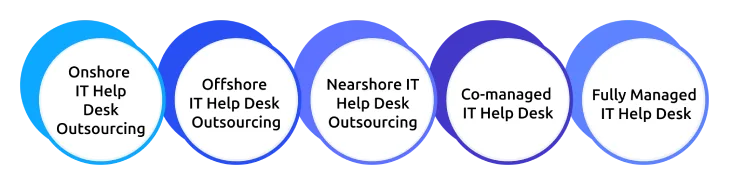
1. Onshore IT Help Desk Outsourcing
Onshore outsourcing means partnering with an IT help desk provider located in the same country as your business.
Because both teams operate in the same time zone and speak the same language, communication is usually easier and response times are more aligned with your business hours. This model is also beneficial for organizations that must comply with strict industry regulations or data privacy requirements.
Best For:
- Businesses handling sensitive data
- Government organizations
- Healthcare and financial institutions
- Companies that prefer local support
2. Offshore IT Help Desk Outsourcing
Offshore outsourcing means partnering with an IT help desk provider located in another country. Many businesses choose this model because it offers quality IT support at a lower cost while providing access to experienced IT professionals.
Many offshore providers also offer 24/7 support, making them an excellent option for businesses with global operations.
Best For:
- Businesses looking to reduce costs
- Companies requiring round-the-clock support
- Organizations with international operations
3. Nearshore IT Help Desk Outsourcing
Nearshore outsourcing means working with a provider located in a neighboring or nearby country. It offers a balance between affordability and effective collaboration.
Since nearby countries often share similar time zones and business practices, communication is generally smoother than with offshore outsourcing.
Best For:
- Businesses seeking cost savings without major time zone differences
- Organizations that value close collaboration
- Growing companies expanding internationally
4. Co-managed IT Help Desk
With a co-managed help desk, your internal IT team works alongside an external service provider. Routine support tasks, such as password resets and software troubleshooting, are handled by the outsourcing partner, while your internal team focuses on strategic IT projects or more complex technical issues.
This model allows businesses to strengthen their existing IT department without replacing it.
Best For:
- Businesses with an internal IT team
- Companies experiencing rapid growth
- Organizations with fluctuating support demands
5. Fully Managed IT Help Desk
A fully managed help desk indicates the outsourcing provider takes complete responsibility for IT support operations. From answering user requests to monitoring service performance and resolving technical issues, everything is managed externally.
This allows businesses to focus entirely on their core operations while ensuring employees receive consistent and reliable IT support.
Best For:
- Small and medium-sized businesses
- Organizations without an in-house IT team
- Companies looking to simplify IT operations
If you’re confused about which type suits your business, it actually depends on your business goals, budget, and support requirements.
Services Included in IT Help Desk Outsourcing
IT help desk outsourcing covers a wide range of services designed to resolve technical issues quickly and keep business operations running smoothly. While the exact services change by provider, most outsourcing partners offer end-to-end support for employees, software, hardware, and IT infrastructure.
1. End-User Support
Employees regularly face everyday IT problems, from forgotten passwords to software errors and login issues. An outsourced IT help desk acts as the first point of contact, resolving these issues quickly so employees can get back to work without unnecessary delays.
2. Software Installation and Troubleshooting
Installing new software or fixing application errors can take time, especially without dedicated IT support. Outsourced help desk teams handle software installation, updates, and troubleshooting to ensure business applications run smoothly, and employees can work without interruptions.
3. Hardware Support
Whether it's a slow laptop, a printer that won't connect, or a malfunctioning desktop, hardware issues can disrupt daily work. IT help desk providers help diagnose these problems remotely and arrange repairs or replacements when needed.
4. Network and Connectivity Support
A poor internet connection or VPN issue can bring work to a standstill. Outsourced IT teams quickly identify and resolve network problems, helping employees stay connected whether they're working from the office or remotely.
5. Remote Technical Support
Many IT issues can be solved without waiting for an on-site technician. Using secure remote access tools, help desk professionals can troubleshoot systems, install updates, and fix software issues in real time, reducing downtime and speeding up resolutions.
6. Ticket Management
Every IT request needs to be tracked to ensure nothing gets overlooked. Help desk providers use ticketing systems to record, prioritize, and monitor support requests, making it easier to resolve issues on time and maintain consistent service.
7. User Onboarding and Offboarding
When a new employee joins, they need access to devices, email, and business applications from day one. Similarly, when someone leaves, their accounts and permissions must be removed securely. Outsourced help desk teams manage both processes to keep your business productive and secure.
Keep Your IT Support Running Smoothly with Time Champ!
Track every task, monitor team performance, and improve support efficiency
Top Benefits of IT Help Desk Outsourcing
IT help desk outsourcing can help businesses deliver better IT support while making daily operations efficient. Let's look at some of the key benefits it offers.
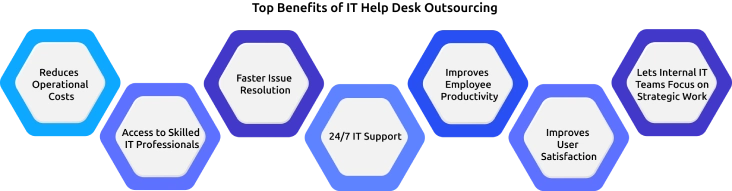
1. Reduces Operational Costs
Hiring IT professionals, providing training, purchasing support tools, and maintaining infrastructure can be expensive. Outsourcing removes many of these costs by giving businesses access to an experienced support team at a predictable monthly cost. This makes it easier to manage IT expenses without compromising on service quality.
2. Access to Skilled IT Professionals
Businesses gain access to experienced IT professionals without spending time and money on hiring and training. These experts can quickly resolve technical issues and provide reliable support across different technologies.
3. Faster Issue Resolution
Outsourced help desk teams use proven support processes and modern tools to identify and resolve IT issues quickly. Faster response and resolution times reduce downtime, allowing employees to get back to work with minimal disruption. This improves productivity across the organization.
4. 24/7 IT Support
Many IT help desk providers offer round-the-clock support, ensuring employees can get help whenever they need it. This is especially useful for businesses with remote teams, multiple locations, or customers in different time zones. Continuous support helps minimize disruptions and keeps operations running smoothly.
5. Improves Employee Productivity
When technical issues are resolved quickly, employees spend less time waiting for assistance and more time focusing on their work. Reliable IT support reduces frustration and helps teams stay productive throughout the day.
6. Improves User Satisfaction
Quick responses and reliable support create a better experience for employees. When users know their IT issues will be resolved efficiently, they can work with greater confidence and fewer interruptions, leading to higher overall satisfaction.
7. Lets Internal IT Teams Focus on Strategic Work
Routine support requests like password resets and software issues can take up a large portion of an internal IT team's time. Outsourcing these tasks allows your IT staff to focus on strategic projects such as system upgrades, cybersecurity, and digital transformation initiatives.
Challenges of IT Help Desk Outsourcing
While IT help desk outsourcing offers several benefits, it also comes with a few challenges. Being aware of these potential issues can help you set realistic expectations when choosing an outsourcing partner.
1. Communication Barriers
Working with an outsourced team in a different region can sometimes create communication challenges due to language differences, time zones, or varying work practices. These gaps may affect collaboration and delay issue resolution if not managed effectively.
2. Data Security and Compliance
Outsourced IT teams handle sensitive business data and access critical systems from their own or public wi-fi. Without proper security measures and compliance practices, you may face risks related to data privacy and regulatory requirements.
3. Less Direct Control
When IT support is managed by an external provider, you have less direct observation of daily operations. This can make it harder to monitor performance or respond quickly to changing business needs.
4. Knowledge Transfer
An outsourcing partner needs a clear understanding of your IT environment, processes, and business requirements. Inadequate documentation or knowledge sharing can result in slower resolutions and inconsistent support.
5. Maintaining Service Quality
Service quality can change if expectations are not clearly defined or performance is not monitored regularly. Slow response times or unresolved issues can impact employee productivity and satisfaction.
6. Vendor Dependency
Depending only on a single outsourcing provider can make it difficult to switch vendors or bring support back in-house. This dependency may become a challenge if business needs change or service quality declines.
How to Choose the Right IT Help Desk Outsourcing Partner
Choosing the right IT help desk outsourcing partner is just as important as deciding to outsource. Here are the key factors to consider before making a decision.
1. Assess Your Business Needs
Start by identifying your IT support requirements. Consider factors such as the number of users, support hours, ticket volume, and the type of technical issues your business faces. This will help you choose a provider that can meet your specific needs.
2. Evaluate Experience and Expertise
Look for a provider with experience in your industry and a proven track record of delivering IT help desk services. Their technical expertise and familiarity with your business environment can lead to faster and more effective issue resolution.
3. Review Service Level Agreements (SLAs)
SLAs define the level of service you can expect from the provider. Review important metrics such as response times, resolution times, availability, and escalation procedures to ensure they align with your business expectations.
4. Ensure Scalability
Your IT support needs may change as your business grows. Choose a provider that can easily scale its services to support additional users, locations, or changing business requirements without affecting service quality.
5. Evaluate Support Channels
Employees should be able to reach the help desk through channels that are convenient for them. Check whether the provider offers support via phone, email, live chat, self-service portals, or remote assistance.
6. Review Client Feedback
Client testimonials, case studies, and online reviews can provide valuable insights into the provider's reliability and service quality. They also help you understand how the provider performs in real-world business environments.
7. Understand Pricing and Contract Terms
Review the provider's pricing model and contract carefully. Make sure you understand what's included in the service, any additional charges, contract duration, and exit terms before making a commitment.
How Time Champ Supports IT Help Desk Outsourcing
Outsourcing your IT help desk is only part of the solution. To get the best results, you also need visibility into how your internal teams and outsourced providers are performing. This is where Time Champ can help. Time Champ is an employee monitoring software that helps you track productivity, monitor work patterns, and provide detailed insights.
1. Improve Team Productivity
Time Champ's productivity tracking feature helps you understand how outsourced IT teams spend their workday. It identifies productive and idle time; you can improve efficiency and ensure support teams stay focused on resolving issues.
2. Gain Complete Visibility into Team Performance
With real-time dashboards and performance reports, Time Champ gives you a clear view of employee activity, task progress, and overall team performance. This makes it easier to identify bottlenecks and improve service delivery.
3. Keep IT Tasks Organized
Using project and task management, you can assign support requests, track progress, and monitor deadlines from one place. This helps ensure IT issues are resolved on time without missing priorities.
4. Make Smarter Business Decisions
With detailed reports and analytics, you can measure productivity trends, evaluate team performance, and identify areas for improvement. These insights support better planning and continuous process improvement.
5. Manage Distributed Teams with Ease
For businesses with remote or global IT support teams, attendance and shift management help track work hours, monitor attendance, and ensure the right team members are available when support is needed.
Managing an Outsourced IT Help Desk?
Monitor productivity, track support performance, and keep your outsourced IT team accountable with Time Champ
Conclusion
IT help desk outsourcing is a practical way to improve IT support, reduce costs, and keep employees productive. The important part is choosing an outsourcing partner that understands your business needs and delivers reliable support. With the right approach, you can minimize downtime, improve operational efficiency, and create a better support experience for your employees.

Jahnavi Pulluri

Table of Content
 What Is IT Help Desk Outsourcing?
- Types of IT Help Desk Outsourcing
- Services Included in IT Help Desk Outsourcing
- Top Benefits of IT Help Desk Outsourcing
- Challenges of IT Help Desk Outsourcing
- How to Choose the Right IT Help Desk Outsourcing Partner
- How Time Champ Supports IT Help Desk Outsourcing
- Conclusion

Related Blogs
Compare the best online outsourcing websites for 2026, including real fees, hiring tips, platform features, and proven ways to manage freelancers easily.
Jahnavi Pulluri | Aug 13, 2026
Discover the essence of outsourcing, you will get to know its various types and the driving factors behind its high demand
Shabana Shaik | May 17, 2024
The future of outsourcing is changing with AI, nearshoring, and outcome-based models. Explore the latest trends, predictions, and what you should expect.
Thasleem Shaik | Jul 31, 2026
Learn how to kickstart your BPO business with this comprehensive step-by-step guide, covering everything from planning to execution. Get insights now!
Tarun Kumar Reddy | Nov 17, 2023
Business process outsourcing (BPO) vs Knowledge process outsourcing (KPO). Discover definitions of BPO and KPO, key functions, similarities, and use cases.
Guna Lakshmi | Apr 02, 2026
Compare the 10 best employee time tracking software in 2026. Review features, pricing, pros and cons, and find the right fit for your team today.
Sai Keerthi Uppala | Aug 17, 2026


 4.7/5 avg.
Ready to Manage Your Workforce Smarter?
Join our family of 1500+ companies using smart insights to redefine workforces!

Free Trial
No Credit Card Required