Task Tracker System: A Complete Guide for Teams
Discover how a task tracker system helps teams organize work, assign tasks, meet deadlines, and boost productivity with practical tips and best practices.
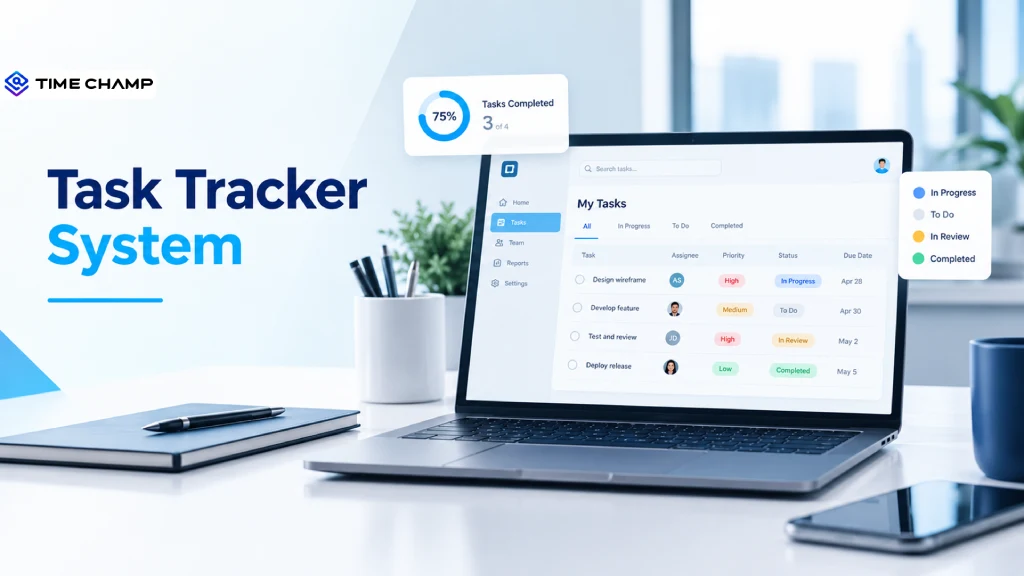
Managing multiple tasks, meeting deadlines, and keeping your team aligned can become challenging without the right system. A task tracker system helps you organize assignments, monitor progress, prioritize workloads, and ensure nothing falls through the cracks. Whether you manage a small team or a growing organization, the right task tracking system can improve collaboration, simplify workflows, and boost productivity.
In this guide, you'll discover how task tracker systems work, their key features, benefits, and how to choose the right solution for your team.
What Is a Task Tracker System?
A task tracker system is a software tool that helps you organize, assign, prioritize, and manage tasks throughout their lifecycle. It gives you a centralized view of what needs to be done, who is responsible for each task, and how much progress has been made.
With features such as task assignment, deadline management, status updates, and progress tracking, a task tracker system helps teams simplify workflows, improve collaboration, and complete projects efficiently.

Did You Know?
Asana's Anatomy of Work research finds that 60% of knowledge workers' time goes to status updates, searches, and follow-ups rather than the work itself.
Task Tracker vs Task Tracking System vs Project Management Software
Task trackers, task tracking systems, and project management software all help you organize work, but they serve different purposes.
A task tracker helps you create and update tasks. A task tracking system goes a step further by adding workflows, task ownership, deadlines, and reporting to help teams manage work efficiently. Project management software includes these task management features along with advanced tools such as project schedules, Gantt charts, dependencies, and resource planning.
| Feature | Task Tracker | Task Tracking System | Project Management Software |
|---|---|---|---|
| Scope | Individual tasks or small-team to-do lists | Team-wide tasks, workflows, ownership, and reporting | Multiple projects, schedules, resources, and budgets |
| Core Question | What do I need to do? | Who is doing what, what is the progress, and how much time did it take? | Will the project finish on time and within budget? |
| Typical Users | Individuals and very small teams | Team leads, operations managers, and HR teams | Project managers and PMOs |
| Data Captured | Tasks and status | Tasks, owners, status, deadlines, priorities, time, and activity history | All task tracking data, plus milestones, dependencies, and resource plans |
Which One Does Your Team Need?
- Task Tracker: Choose a basic task tracker when you need to manage personal to-do lists or simple team assignments.
- Task Tracking System: Consider a task tracking system when your team needs structured workflows, clear ownership, progress updates, and reports.
- Project Management Software: Choose project management software when you manage complex projects that require schedules, dependencies, budgets, and resource planning.
Did You Know?
According to Project.co. 88% of people create daily task lists to manage their work. Task tracking systems help teams organize tasks, set priorities, and monitor progress in one place.
How Does a Task Tracking System Work?
A task tracking system helps you manage work through five stages: capture, assign, execute, review, and report. It ensures every task has a clear owner, deadline, and progress status, helping your team stay organized and avoid missed deadlines.
For example, an e-commerce team handling returns can use a task tracking system to manage every step, from pickup and quality checks to refunds and restocking.
Here's how the five stages work.
1. Capture
The first step is to record every task as soon as it is identified. Tasks may come from customer requests, meetings, emails, or recurring work.
Each task should include a clear goal and the expected outcome. For example, a return can be divided into five connected tasks, from pickup to final resolution. This helps ensure that every step is recorded and completed.
2. Assign
Once a task is created, assign it to the right person based on their skills, workload, and availability.
Set a clear owner, priority, and deadline for each task. You can also add dependencies to show which tasks must be completed first. For example, the quality check cannot begin until the returned item reaches the warehouse.
Clear task assignments help your team understand their responsibilities and avoid unnecessary delays.
3. Execute
The assigned employee works on the task and updates its progress in the system. Status updates help the team understand whether a task is pending, in progress, or completed.
A task tracking system can also record the time spent on each task through timers or automatic time tracking. This gives you a better understanding of how much time different activities require instead of relying only on manual timesheets.
4. Review
Before marking a task as complete, review the work to ensure it meets the required standards.
For example, the returns team can verify that the refund matches the quality check results. This helps identify errors and ensures that damaged items are handled correctly.
A review process adds an extra layer of accuracy and reduces the risk of closing tasks before they are actually finished.
5. Report
The final stage is to turn task data into useful reports. These reports help managers understand team performance, identify delays, and plan workloads more effectively.
Common metrics include:
- Task completion rates
- Time spent on different tasks
- Planned vs. actual effort
- Overdue tasks
- Workload per employee
For example, if reports show that quality checks are taking longer than expected, you can identify the cause and adjust workloads or processes.
Want to improve your team's task management?
Use Time Champ to gain better visibility into employee work and build a more productive workforce.
Types of Task Tracking Systems
Task tracking systems come in different forms, from simple spreadsheets to advanced platforms that connect tasks with time, employee activity, and costs. The right choice depends on your team size, workflow, reporting needs, and the level of visibility you need.
Here are six common types of task tracking systems and what each one offers.
| Type | Best Suited To | Strength | Limitation |
|---|---|---|---|
| Spreadsheet Tracker | Small teams with simple and consistent tasks | Free, familiar, and easy to customize | Requires manual updates, has limited time tracking, and can create version issues |
| Kanban Board Tool | Teams managing tasks through stages such as To Do, In Progress, and Done | Visual workflow, easy adoption, and simple progress management | May not capture detailed effort, time, or activity history |
| Project Management Software | Teams handling multiple projects with deadlines and dependencies | Advanced planning, timelines, resource management, and project visibility | Time and activity tracking may require additional tools or integrations |
| Workflow and Ticketing System | IT support, customer service, and operations teams | Structured requests, automated routing, and service-level agreements (SLAs) | Primarily designed for incoming requests rather than creative or long-term project work |
| Compliance Task Tracking System | Regulated industries, audit teams, and compliance departments | Recurring tasks, verification stages, and audit trails | Can be less flexible for everyday team workflows |
| Employee Task Tracking System with Workforce Intelligence | Teams that need visibility into tasks, time, activity, and workload | Connects task data with work hours, productivity insights, and workload analysis | May offer more features than needed for teams that only require basic task status updates |
How to Choose a Task Tracker System
Choosing the right task tracker system starts with understanding your team's workflow, reporting needs, and daily challenges. Look for features that help you assign tasks, manage deadlines, track progress, and understand how work gets done.
Use the checklist below to compare different task tracking systems and find one that fits your team's needs.
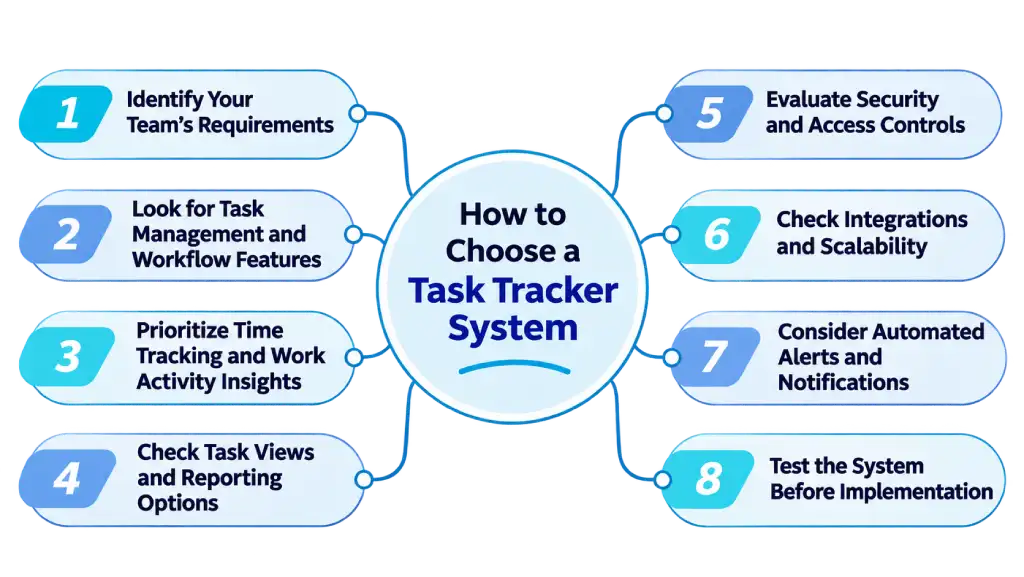
1. Identify Your Team's Requirements
Start by understanding your team's size, workflow, and daily challenges. Consider the number of tasks you manage, the level of collaboration required, and whether you need basic task management or advanced workforce insights.
2. Look for Task Management and Workflow Features
Choose a system that allows you to assign task owners, set priorities, add deadlines, and customize task statuses. Features such as review stages, task dependencies, and flexible workflows help your team manage work from start to finish.
3. Prioritize Time Tracking and Work Activity Insights
Select a platform that records time spent on individual tasks and provides relevant work activity insights. Built-in timers or automatic time tracking can help you understand effort, identify delays, and improve workload planning.
4. Check Task Views and Reporting Options
Look for multiple task views, such as lists, boards, and timelines, to help employees and managers organize work. Reporting features should provide insights into task completion, workload, planned vs. actual time, and project budgets.
5. Evaluate Security and Access Controls
Choose a system with role-based permissions to control access to employee and team data. If your organization handles sensitive or regulated information, prioritize audit trails, timestamped activity records, and secure data exports.
6. Check Integrations and Scalability
Ensure the task tracker works with your existing CRM, HR, payroll, and other business tools. Select a platform that can support your current team and scale as your business grows.
7. Consider Automated Alerts and Notifications
Look for alerts that highlight overdue tasks, blocked work, and excessive workloads. Timely notifications help you identify potential problems and take action before they affect deadlines.
8. Test the System Before Implementation
Run a trial with a small team to evaluate usability, employee adoption, reporting, and overall performance. Gather feedback and confirm that the system meets your team's needs before rolling it out across the organization.
Need a task tracker that fits your team's workflow?
Use Time Champ to simplify task management with time tracking and workload insights.
How to Implement a Task Tracking System Without Losing the Team
Introducing a task tracking system can improve workflow visibility and accountability, but a sudden change in how employees manage their work can create confusion and resistance. A successful implementation focuses on clear communication, simple processes, and employee involvement. Follow these steps to introduce the system smoothly without disrupting your team's productivity.
1. Explain the Purpose Clearly
Start by explaining why you're introducing the task tracking system and how it will help employees in their daily work. Highlight benefits such as clearer task assignments, reduced manual reporting, better workload planning, and fewer missed deadlines. Make sure your team understands that the goal is to improve workflows rather than create unnecessary pressure.
2. Involve Employees in the Selection Process
Include employees and team leads when evaluating different task tracking systems. Gather their feedback about existing challenges, preferred workflows, and features they need. Involving your team early helps you choose a practical solution and encourages employees to take ownership of the change.
3. Start with a Small Pilot Team
Instead of introducing the system across the entire organization at once, begin with a small team or department. Use the pilot to test task workflows, identify usability issues, and collect feedback. Make improvements based on what you learn before expanding the implementation.
4. Provide Simple Training and Support
Offer clear guidance on creating tasks, assigning responsibilities, updating statuses, and using reports. Keep training practical and provide ongoing support during the transition. This helps employees build confidence and reduces the learning curve.
5. Introduce the System Gradually
Start with essential features such as task assignments, deadlines, and progress updates. Avoid introducing too many workflows or reporting requirements at once. Gradually add advanced features as employees become comfortable with the system.
6. Set Clear Expectations and Respect Privacy
Establish consistent guidelines for task updates, reporting, and system usage. Explain what data is collected, how it is used, and who can access it, particularly when the platform includes employee time or activity insights. Transparent policies help build trust and reduce concerns about workplace privacy.
7. Review Feedback and Improve Workflows
Regularly collect feedback from employees and managers after implementation. Review adoption, workflow challenges, and reporting needs to identify areas for improvement. Use this feedback to refine processes and ensure the system continues to support your team's work.
The Key to Successful Implementation: Introduce the task tracking system as a tool that helps employees work more efficiently, not as an additional burden. Clear communication, gradual adoption, and continuous support can help your team adjust while maintaining productivity.
How Time Champ Works as an Employee Task Tracking System
Managing employee tasks involves more than assigning work and checking completion status. You also need visibility into time spent, workload, productivity, and project progress. Time Champ helps you connect task management with workforce intelligence, giving you a clearer view of how your team works and where improvements are needed.
With automatic time tracking, productivity analytics, project management, and detailed reporting, Time Champ helps you manage employee work while improving accountability and operational efficiency.
Key Time Champ Features for Employee Task Tracking:
- Automatic Time Tracking: See how much time your employees spend on tasks and projects to identify delays and improve workload planning.
- Project Management: Assign responsibilities, set deadlines, and follow project progress to keep your team aligned.
- Productivity Analytics: Identify work patterns and workflow bottlenecks to help your employees work more efficiently.
- Reports and Analytics: Review work hours, project activity, and productivity data to make informed task management decisions.
- Weekly Timesheets: Review employee hours across tasks and projects to understand effort and improve planning.
- Application and Website Usage Insights: Understand how your employees use applications and websites during work to identify workflow patterns.
Ready to improve task visibility and team productivity?
Use Time Champ to manage employee tasks with time tracking, productivity insights, and detailed reports.
Conclusion
A task tracker system helps you organize work, assign responsibilities, manage deadlines, and improve team productivity. It gives you better visibility into task progress, employee workloads, and workflow challenges. Time Champ connects task management with time tracking and productivity analytics to help you improve task allocation, identify delays, and make informed decisions about team performance.

Guna Lakshmi

Table of Content
 What Is a Task Tracker System?
- Task Tracker vs Task Tracking System vs Project Management Software
- Which One Does Your Team Need?
- How Does a Task Tracking System Work?
- Types of Task Tracking Systems
- How to Choose a Task Tracker System
- How to Implement a Task Tracking System Without Losing the Team
- How Time Champ Works as an Employee Task Tracking System
- Conclusion
Related Blogs

Struggling with addressing employee attendance issues? Learn the causes and solutions to improve attendance, increase productivity and create engaged workforce.
Guna Lakshmi | Jul 02, 2025
Curious about task management? Discover what it is, why it matters, along with its key benefits and proven best practices to stay organized and get more done.
Tarun Kumar Reddy | Jul 24, 2025
Task mining provides visibility into how tasks are completed. See its benefits, challenges, use cases, working processes, and value for better workflows.
Thasleem Shaik | Sep 21, 2026
Use our effective task management strategies to stay organized, reduce stress, and boost team’s productivity by prioritizing tasks and managing time effectively.
Guna Lakshmi | Jul 01, 2025Curious about task management? Discover what it is, why it matters, along with its key benefits and proven best practices to stay organized and get more done.
Chethana | Jul 24, 2025
Find the best task timer apps for 2026. Compare features, pricing, pros & cons to boost productivity, track time accurately, and manage tasks efficiently.
Guna Lakshmi | Apr 02, 2026


 4.7/5 avg.
Ready to Manage Your Workforce Smarter?
Join our family of 1500+ companies using smart insights to redefine workforces!

Free Trial
No Credit Card Required