Applying for a job can feel confusing, especially when employers ask for a CV, leaving you unsure about what it is or what it should include.
A CV is not just a document attached to the job application, it represents your professional journey and often plays a key role in helping employers decide whether to move the application forward.
In this blog, you’ll understand what a CV is, what to include, how it differs from a resume, and the best way to format it. You’ll also know the practical tips for creating a strong CV and common mistakes to avoid before submitting it.
What is a CV?
A Curriculum Vitae (CV) is a detailed professional document that presents your education, work experience, skills, certifications, achievements, and other qualifications. It gives employers a complete view of your academic and professional background, helping them assess your suitability for a job, academic program, research position, or other career opportunities.
What to Include in a CV
A well-structured CV gives employers a complete picture of your qualifications and professional background. Including the right information in a clear and organized format makes it easier for hiring managers to assess your suitability for a role.
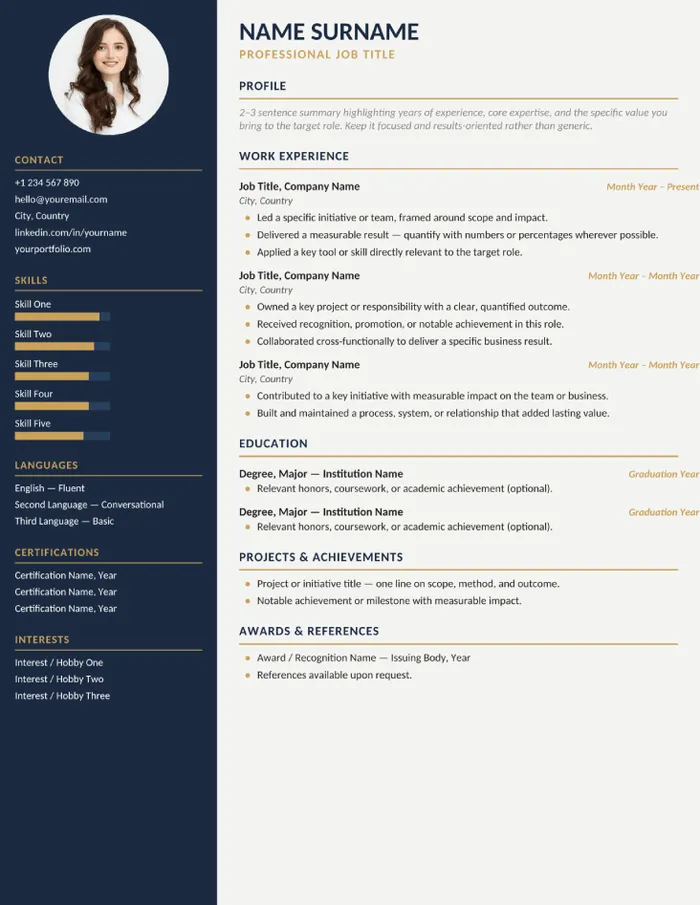
- Contact Information: Include your full name, phone number, professional email address, and location so employers can contact you easily.
- Education: List your academic qualifications in reverse chronological order, including the institution, degree, graduation year, and any notable academic achievements if relevant.
- Professional Summary (Optional): Add a brief introduction highlighting your experience, key strengths, career goals, and the value you bring to the role.
- Skills: Include technical skills, job-specific competencies, and relevant soft skills that match the position you are applying for.
- Work Experience: Mention your previous roles, employers, employment dates, and key responsibilities or accomplishments that demonstrate your expertise.
- Certifications and Licenses: Add professional certifications, licenses, or training programs that strengthen your qualifications.
You can also include these sections, depending on your experience and the job you're applying for:
- Projects or Research (If Applicable): Showcase significant projects, research work, publications, or case studies that demonstrate your practical knowledge and expertise.
- Awards and Achievements: Highlight scholarships, professional awards, recognitions, or notable accomplishments that demonstrate your contributions and credibility.
- Volunteer Experience or Extracurricular Activities (Optional): Include volunteer work, leadership positions, or community involvement that reflects valuable skills and initiative.
- References (Optional): Provide references only if requested by the employer, or mention that they are available upon request.
Including these sections helps you create a clear, organized, and professional CV like the example below.
CV vs Resume: What’s the Difference?
Although both a CV and a resume are used when applying for jobs, they are not the same. They differ in length, purpose, content, and the situations in which employers expect you to use them.
| Aspect | CV | Resume |
|---|---|---|
| Purpose | Provides a detailed overview of your academic and professional background. | Highlights your most relevant qualifications for a specific job. |
| Length | Usually two or more pages, depending on experience. | Typically one to two pages. |
| Content | Includes education, work experience, skills, certifications, research, publications, awards, and other achievements. | Focuses on relevant work experience, skills, education, and accomplishments related to the role. |
| Customization | Updated as your qualifications grow and changes less frequently. | Tailored for each job application to match the role's requirements. |
| Common Use | Preferred for academic, research, medical, and international job applications. | Commonly used for corporate, private sector, and most professional jobs. |
| Focus | Presents your complete career and academic history. | Emphasizes the qualifications most relevant to the position. |
How to Format a CV
A well-formatted CV makes it easier for employers to find the information they need. A clean layout, consistent formatting, and a logical structure help present your qualifications professionally.
1. Choose a Professional Layout
Use a clean, single-column layout with clear section headings. Keep enough white space so the document is easy to read both on screen and in print.
2. Select a Readable Font
Choose a professional font such as Arial, Calibri, or Times New Roman in 10-12 pt size. Use the same font style and size throughout your CV for consistency.
3. Organize Information in a Logical Order
Begin with your contact details, followed by a professional summary, education, work experience, skills, and any additional relevant sections. Present your most recent qualifications and experience first.
4. Use Bullet Points for Better Readability
Write responsibilities and achievements as concise bullet points. This helps recruiters quickly scan your qualifications without having to read long blocks of text.
5. Maintain Consistent Formatting
Keep headings, dates, spacing, margins, and bullet styles uniform throughout the document. Consistency gives your CV a polished and professional appearance.
6. Review Before Submitting
Check your CV for spelling, grammar, formatting, and factual errors. A final review helps ensure your document is accurate and professional.
Tips for Creating a Strong CV
A strong CV highlights your qualifications clearly and helps employers quickly identify why you’re a suitable candidate. These best practices can improve the quality and impact of your CV.
- Tailor Your CV for Every Role
Customize your skills, experience, and summary to match the job description and emphasize the qualifications most relevant to the position.
- Write a Clear Professional Summary
Start with a brief summary that shows your experience, key strengths, and career focus to capture the employer’s attention.
- Highlight Achievements, Not Just Responsibilities
Describe measurable accomplishments whenever possible to demonstrate the impact of your work rather than simply listing daily tasks.
- Use Keywords from the Job Description
Include relevant industry terms and skills that align with the job posting to improve compatibility with Applicant Tracking Systems (ATS).
- Keep Your Content Clear and Concise
Use simple language, short paragraphs, and bullet points to make your CV easy to scan.
- Prioritize Relevant Information
Place your strongest qualifications, experience, and achievements near the beginning of the document so employers notice them quickly.
- Include Recent and Accurate Information
Keep your employment history, certifications, and contact details updated before every application.
- Proofread Carefully
Review your CV multiple times or ask someone else to check it for grammar, spelling, and formatting errors before submitting it.
Common CV Mistakes to Avoid
Even a well-qualified candidate can miss opportunities because of avoidable CV mistakes. Identifying and fixing these common errors can help your application make a stronger first impression.
- Using the Same CV for Every Application: Sending the same CV for every job may not highlight the qualifications employers are looking for. Tailor your CV to match the specific role and job description.
- Including Irrelevant Information: Adding unrelated skills, experience, or personal details can distract recruiters. Focus only on information that strengthens your application.
- Writing Long Paragraphs: Large blocks of text make your CV difficult to scan. Keep descriptions concise and use bullet points to improve readability.
- Listing Responsibilities Without Achievements: Simply describing your daily duties doesn’t demonstrate your impact. Highlight measurable achievements that showcase your contributions.
- Using Inconsistent Formatting: Different fonts, spacing, or heading styles can make your CV look unprofessional. Maintain a consistent layout throughout the document.
- Ignoring Spelling and Grammar Errors: Mistakes in spelling or grammar can leave a negative impression. Proofread your CV carefully before submitting it.
- Using Complex Designs: Excessive graphics, tables, or decorative elements can reduce readability and affect ATS compatibility. Choose a clean and professional format.
- Providing Outdated or Incorrect Information: Incorrect contact details or outdated employment information can create unnecessary issues. Review and update your CV before each application.
Ready to build a stronger professional profile?
Keep your work, projects, and accomplishments organized with Time Champ.

Decisions Backed by Data
Trends and team-level analytics that show what matters.
Explore Workforce Analytics →